
Come Visualizzare la Telecamera del Citofono sul Telefono: Guida Completa per Proprietari di Casa e Aziende
27 Novembre 2025
Condividi questo articolo

1. Cos'è un Citofono Video e Come Funziona?
A videocamera per campanello è un dispositivo di sicurezza intelligente che sostituisce o integra il tuo tradizionale campanello. Include una telecamera ad alta definizione, microfono, altoparlante e spesso sensori di movimento, consentendo ai proprietari di casa o di attività commerciali di vedere, sentire e parlare con i visitatori alla porta — tutto tramite il proprio smartphone.
Componenti principali di un videocitofono:
| Componente | Funzione |
|---|---|
| Fotocamera | Cattura video live o registrati dell'ingresso |
| Microfono | Rileva audio dall'esterno |
| Altoparlante | Consente la comunicazione bidirezionale con i visitatori |
| Sensore di movimento | Rileva i movimenti e attiva gli avvisi o le registrazioni |
| Modulo Wi-Fi | Collega la telecamera del campanello alla rete domestica o aziendale |
| App mobile | Abilita visualizzazione, avvisi e interazioni direttamente su uno smartphone |
Come funziona:
- Il visitatore preme il campanello
Il sistema invia una notifica push al tuo telefono tramite un'app. - Rilevamento del movimento
Anche se il pulsante non viene premuto, i sensori di movimento attivano una visualizzazione live o una registrazione. - Flusso video live
Puoi guardare un feed video in tempo reale del visitatore usando il tuo telefono. - Audio bidirezionale
Parla con il visitatore a distanza tramite il tuo telefono. - Archiviazione in cloud o locale
I video sono spesso salvati per una visualizzazione successiva, sia localmente (scheda SD) che nel cloud.
Applicazioni:
- Abitazioni residenziali: Migliorare la sicurezza e la comodità
- Appartamenti: Fornire accesso remoto senza necessità di presenza fisica
- Aziende: Monitorare consegne, clienti e dipendenti tramite accesso remoto
2. Funzionalità della videocamera per campanello intelligente da ricercare nel 2025
Man mano che la tecnologia evolve, i moderni videocitofoni offrono funzionalità avanzate che vanno ben oltre il semplice video e audio. Che si tratti di proprietari di casa o acquirenti B2B come proprietari immobiliari, gestori di proprietà o integratori di sicurezza, conoscere quali funzionalità contano è fondamentale per scegliere il prodotto giusto.
Funzionalità indispensabili:
| Caratteristica | Vantaggio |
|---|---|
| HD/Risoluzione video 4K | Qualità immagine più chiara, migliore riconoscimento facciale |
| Visione notturna | I LED a infrarossi consentono la visibilità in completa oscurità |
| Rilevamento del movimento AI | Riduce gli avvisi falsi distinguendo tra persone, auto e animali |
| Cloud e archiviazione locale | Opzioni flessibili per la registrazione e l'archiviazione video |
| Opzioni a batteria o cablate | Adatte a diversi requisiti di installazione |
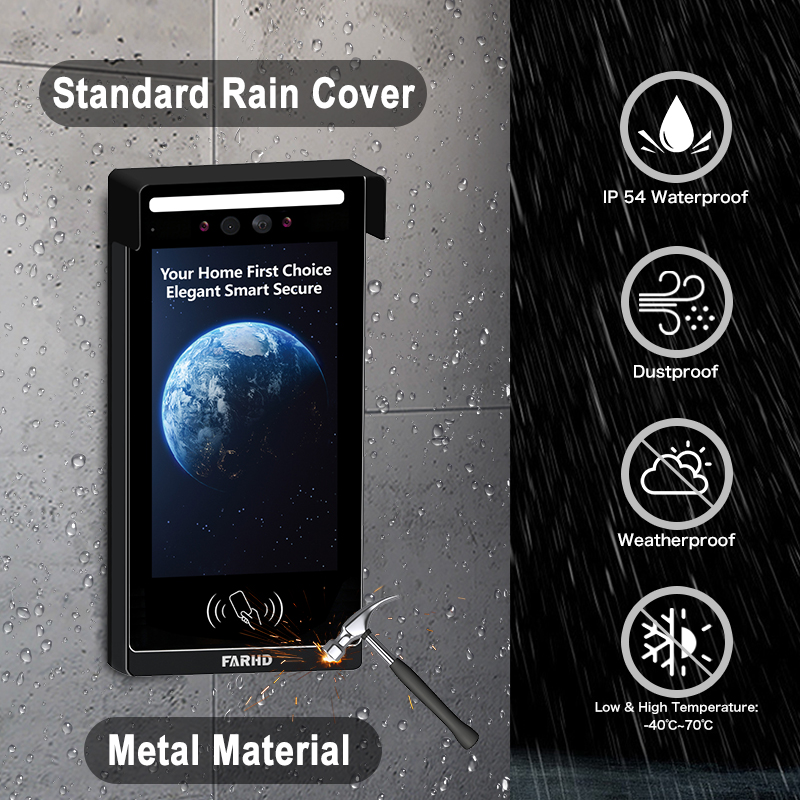
| Resistenza agli agenti atmosferici | Essenziali per installazioni esterne |
| Integrazione della casa intelligente | Funziona con Alexa, Google Home, Apple HomeKit |
| Accesso multiutente | Ideale per aziende o famiglie con più utenti |
| Flussi video crittografati | Garantisce privacy e previene visualizzazioni non autorizzate |
Considerazioni B2B:
- Personalizzazione in bulk: Per complessi residenziali o edifici commerciali
- Servizi OEM/ODM: Le aziende possono richiedere etichettatura privata o personalizzazione delle funzionalità
- Gestione dell'accesso remoto: Particolarmente utile per i gestori di proprietà in affitto
💡 Se stai sourcing videocitofoni per la rivendita o installazioni commerciali, considera di lavorare con un fornitore affidabile OEM/ODM come FARHD per soluzioni su misura.
3. Come utilizzare un videocitofono con Alexa o Google Home
Integrare il tuo videocitofono con Amazon Alexa o Google Home aggiunge controllo vocale e automazione domestica intelligente al tuo sistema di sicurezza. Questo è particolarmente utile per integratori di case intelligenti e rivenditori B2B chi cerca di offrire ecosistemi completamente connessi.
Checklist di compatibilità:
| Compatibilità dispositivo | Alexa | Google Home |
|---|---|---|
| Campanello video Ring | ✅ | ✅ |
| Campanello video Eufy | ✅ | ✅ |
| Citofono Arlo | ✅ | ✅ |
| Proprietari di casa, focalizzati sulla privacy | ✅ (modelli selezionati) | ✅ (modelli selezionati) |
Come connettersi con Alexa:
- Installa l'app del produttore (ad es., Ring, Arlo, FARHD Smart)
- Abilita la skill Video Doorbell nell'app Alexa
- Accedi al tuo account del citofono
- Scopri i dispositivi – Alexa troverà il tuo citofono
- Usa i comandi vocali:
- "Alexa, mostrami la porta d'ingresso"
- “Alexa, parla con il citofono”
Come connettersi con Google Home:
- Apri l'app Google Home
- Aggiungi dispositivo > Funziona con Google
- Cerca il marchio del citofono e accedi
- Assegna la telecamera a una stanza
- Usa i comandi vocali:
- “Ehi Google, mostra la porta d'ingresso”
- “Ehi Google, parla con il citofono d'ingresso”
Vantaggi per le imprese:
- Controllo a mani libere nelle aree di reception o hall
- Verifica visiva prima di concedere l'accesso al personale delle consegne
- Integrazione con altri dispositivi smart: Luci, serrature e allarmi
🔗 Scopri di più sui prodotti videocitofono smart da Pagina Prodotti di FARHD che offrono compatibilità con Alexa e Google Home.

4. Come visualizzare la telecamera del citofono sul telefono: Guida passo-passo
Visualizzare la tua telecamera del citofono su uno smartphone è la funzionalità principale di qualsiasi citofono smart. Ecco una guida completa sia per gli utenti residenziali che per gli installatori B2B che configurano sistemi per i clienti.
Configurazione passo-passo sul telefono:
Passo 1: scaricare l'app
Ogni videocitofono viene fornito con la propria app. Esempi:
- Ring → App Ring
- Arlo → Arlo Secure
- Eufy → Eufy Security
- FARHD → App FARHD Smart
📝 Per modelli white-label o OEM, l'app potrebbe essere marchiata con il nome dell'azienda.
Passo 2: Crea un account
- Usa la tua email, numero di telefono o login sui social media
- Imposta una password sicura
Passo 3: Connettiti al Wi-Fi
- Assicurati che il tuo telefono sia su una 2.wi-Fi 4GHz rete (la maggior parte dei citofoni non supporta il 5GHz)
- Segui le istruzioni in-app per connettere il citofono al Wi-Fi
Passo 4: Abbina il dispositivo
- Scansiona un codice QR sul citofono o inserisci manualmente il numero di serie
- Attendi che il citofono si sincronizzi con l'app
Passo 5: Accedi alla visualizzazione live
- Apri l'app
- Tocca sul tuo dispositivo → Visualizza flusso live
- Parla con i visitatori usando l'audio bidirezionale
Funzionalità che puoi controllare sul tuo telefono:
- 📹 Streaming live
- 🔄 Riproduzione video
- 📲 Notifiche Push
- 📁 Download video
- 📡 Personalizzazione zone di movimento
- 👥 Condivisione accesso utente
Casi d'uso comuni:
| Caso d'uso | Vantaggio |
|---|---|
| Proprietari di case | Vedi chi è alla porta da qualsiasi luogo |
| Proprietari | Monitora interazioni con gli inquilini o manutenzione della proprietà |
| Proprietari di attività | Gestisci a distanza l'ingresso dei clienti e le consegne |
| Integratori di sicurezza (B2B) | Offri ai clienti un controllo centralizzato dai loro telefoni cellulari |
🔗 Vuoi integrare l'accesso dal telefono mobile nella tua offerta di sicurezza? Contatta Supporto FARHD per opzioni di personalizzazione OEM/ODM e white-labeling del software.
5. I videocitofoni funzionano senza Wi-Fi o internet?
Sebbene la maggior parte dei moderni videocitofoni necessiti di Wi-Fi per funzionare pienamente, alcuni modelli supportano funzionalità offline limitate — una caratteristica chiave per implementazioni commerciali o rurali dove l'internet potrebbe essere instabile.
Scenari con e senza Wi-Fi:
| Caratteristica | Con Wi-Fi abilitato | Senza Wi-Fi |
|---|---|---|
| Visualizzazione video live | ✅ | ❌ |
| Audio bidirezionale remoto | ✅ | ❌ |
| Archiviazione in cloud | ✅ | ❌ |
| Registrazione su scheda SD locale | ✅ | ✅ (su modelli selezionati) |
| Avvisi sensore di movimento | ✅ (notifiche push) | ✅ (solo LED/sirena) |
| Notifiche dell'app | ✅ | ❌ |
Opzioni per uso offline:
- Modelli con Archiviazione Locale: Salva video su scheda SD senza internet
- Citofoni 4G LTE: Usa reti cellulari invece del Wi-Fi
- Sistemi ibridi: Combina registrazione offline con backup cloud quando connesso
📦 Per acquirenti in bulk e distributori, FARHD offre sistemi videocitofono con capacità offline ideali per località remote. Questi modelli supportano la registrazione su SD e la sincronizzazione cloud ritardata.
6. I migliori videocitofoni per le proprietà in affitto e i proprietari di casa
Le proprietà in affitto presentano sfide uniche: alto turnover degli inquilini, ingressi condivisi e la necessità di gestione remota della proprietà. Citofoni video smart risolvono questi problemi offrendo visualizzazione remota, controllo accessi e accesso multi-utente.
Funzionalità indispensabili per uso in affitto:
- Accesso multi-utente
- Archiviazione cloud con login multi-dispositivo
- Integrazione blocco/sblocco remoto
- Avvisi di manomissione
- Riconfigurazione facile per nuovi inquilini
Soluzioni FARHD ideali per proprietà in affitto:
| Linea di prodotti | Set di funzionalità |
|---|---|
| Serie Villa a 4 fili | Ideale per case in affitto individuali o duplex |
| Citofono IP per appartamenti | Progettato per edifici multi-unità con controllo accessi centralizzato |
| Soluzioni personalizzate OEM | Sistemi citofono marchiati per gestori di proprietà o sviluppatori immobiliari |
🔗 Esplora il sito di FARHD’s Serie Villa a 4 fili — perfetti per proprietari che cercano soluzioni affidabili e scalabili.
Opportunità B2B:
- Rivendi videocitofoni white-label ai gestori di proprietà
- Offri contratti di installazione e manutenzione
- Usa i servizi OEM di FARHD per costruire un marchio intorno alla sicurezza delle proprietà in affitto
7. Videocitofoni per uso aziendale: Monitoraggio e controllo remoto
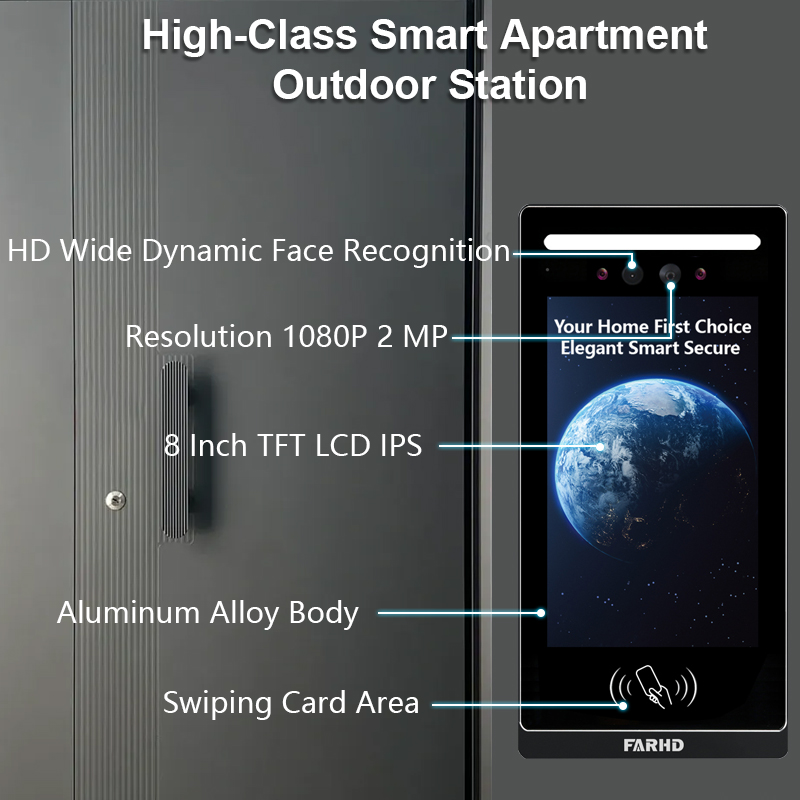
Spazi commerciali come uffici, negozi al dettaglio e magazzini richiedono sicurezza e visibilità potenziate. I videocitofoni con capacità di visualizzazione mobile consentono ai proprietari di attività di monitorare gli ingressi a distanza, gestire consegne e verificare visitatori.
Funzionalità orientate al business:
- Monitoraggio multi-citofono da un'unica app
- Accessi programmati e log dei visitatori
- Integrazione serratura smart
- Riconoscimento facciale basato sull'IA
- Comunicazione crittografata per la privacy
Raccomandato da FARHD:
- Sistemi citofono personalizzabili
- Videocitofoni smart OEM
- Soluzioni complete hardware + software
FARHD sviluppa sistemi citofono di livello aziendale su misura per ambienti ad alto traffico. Con oltre il 60% di quota di mercato in Cina e profonda esperienza OEM, FARHD è un partner affidabile per implementazioni aziendali.
🔗 Scopri di più su Profilo aziendale di FARHD e la loro presenza globale nel mercato dei videocitofoni.
8. Fornitore B2B di videocitofoni e opzioni di personalizzazione
Se sei un grossista, distributore, integratore di sistemi, o marchio startup, collaborare con un fornitore affidabile fornitore di videocitofoni è essenziale per il tuo successo nel mercato smart home e sicurezza.
Perché scegliere FARHD?
| Caratteristica | Vantaggio FARHD |
|---|---|
| Integrazione verticale | Controllo dalla produzione LCD al prodotto finale |
| Capacità OEM/ODM | Personalizza hardware, software, interfaccia app e imballaggio |
| Certificazioni globali | ISO 9001, CE, FCC, ROHS, SGS |
| Capacità di produzione | 13 linee in fabbrica da 5.500㎡, attrezzature SMT YAMAHA |
| Raggiungimento di mercato | Principale fornitore in Cina, Italia, Turchia e Corea |
| Competenza in R&S | Team dedicato per innovazioni AI, IoT e connettività |
📞 Stai cercando di lanciare il tuo marchio di videocitofono? Contatto FARHD per discutere prezzi in bulk, etichettatura privata e soluzioni specifiche per il mercato.
9. FAQ: Visualizzazione videocitofoni su dispositivi mobili
D1: Posso visualizzare la mia telecamera del citofono su più di un telefono?
Sì, la maggior parte delle app consente a più utenti o dispositivi di accedere allo stesso feed del citofono.
D2: Ho bisogno di un abbonamento per visualizzare il mio citofono sul telefono?
No. La visualizzazione live è tipicamente gratuita. Tuttavia, l'archiviazione cloud e le funzionalità avanzate potrebbero richiedere un abbonamento.
D3: Quale velocità internet mi serve per un flusso video fluido?
Si raccomanda una velocità minima di upload di 2 Mbps per lo streaming HD.
D4: Posso ricevere avvisi quando non sono a casa?
Sì, le notifiche push vengono inviate al tuo telefono indipendentemente dalla posizione, purché tu sia connesso a internet.
D5: Posso visualizzare il video del mio citofono dall'estero?
Assolutamente. Purché il tuo citofono sia connesso a internet e il tuo telefono abbia accesso, puoi visualizzarlo da qualsiasi luogo.
Con il sistema giusto in atto, visualizzare la telecamera del citofono sul telefono non è solo possibile — è sicuro, comodo e affidabile. Che tu sia un proprietario di casa, un landlord o un acquirente aziendale, scegliere una soluzione affidabile come FARHD garantisce soddisfazione e supporto a lungo termine.
Potreste anche essere interessati
-
FARHD: Your 28-Year Source Factory for Video Door Phone Intercoms
When you choose a video door phone intercom supplier, you are not just buying a product—you are choosing the factory behind it. FARHD has been a source manufacturer since 1998, with over 28 years of experience in video intercom and access control. From villa kits to apartment intercoms, we deliver reliable, customizable, and Tuya-compatible solutions…
-
FARHD Source Factory: Your Trusted Partner for Video Intercom and Access Control Solutions
When you choose a manufacturing partner for video intercom and access control systems, you are not just buying products—you are investing in quality, reliability, and long-term support. FARHD has been a source factory since 1998, and today we serve clients in over 100 countries worldwide. With strict quality inspection, in-house production, independent R&D, and full…
-
2-Wire Video Door Phone Connection with Electric Rim Lock: Unlock by Card, Indoor Monitor, and App
A complete guide to wiring an electric rim lock to a FARHD 2-wire video door phone system—and configuring three convenient unlock methods: RFID card, indoor monitor, and mobile app. Whether you are upgrading an existing building or specifying a new system, this guide covers the essentials for reliable, secure access control. Electric rim locks are…
-

Video Intercom Manufacturer & Source Factory Since 1998 | OEM ODM SKD Building Intercom
Video Intercom Manufacturer & Vertical Source Factory in China FARHD is a professional video intercom manufacturer with over 28 years of specialized experience in building security intercom systems. Established in 1998, we are a genuine building intercom factory focused on independent R&D, in-house production, and customized manufacturing for global B2B clients, including distributors, importers, engineering contractors, real estate…



