
Come Visualizzare la Telecamera del Citofono sul Telefono: Guida Completa per Proprietari di Casa e Aziende
27 Novembre 2025
Condividi questo articolo

1. Cos'è un Citofono Video e Come Funziona?
A videocamera per campanello è un dispositivo di sicurezza intelligente che sostituisce o integra il tuo tradizionale campanello. Include una telecamera ad alta definizione, microfono, altoparlante e spesso sensori di movimento, consentendo ai proprietari di casa o di attività commerciali di vedere, sentire e parlare con i visitatori alla porta — tutto tramite il proprio smartphone.
Componenti principali di un videocitofono:
| Componente | Funzione |
|---|---|
| Fotocamera | Cattura video live o registrati dell'ingresso |
| Microfono | Rileva audio dall'esterno |
| Altoparlante | Consente la comunicazione bidirezionale con i visitatori |
| Sensore di movimento | Rileva i movimenti e attiva gli avvisi o le registrazioni |
| Modulo Wi-Fi | Collega la telecamera del campanello alla rete domestica o aziendale |
| App mobile | Abilita visualizzazione, avvisi e interazioni direttamente su uno smartphone |
Come funziona:
- Il visitatore preme il campanello
Il sistema invia una notifica push al tuo telefono tramite un'app. - Rilevamento del movimento
Anche se il pulsante non viene premuto, i sensori di movimento attivano una visualizzazione live o una registrazione. - Flusso video live
Puoi guardare un feed video in tempo reale del visitatore usando il tuo telefono. - Audio bidirezionale
Parla con il visitatore a distanza tramite il tuo telefono. - Archiviazione in cloud o locale
I video sono spesso salvati per una visualizzazione successiva, sia localmente (scheda SD) che nel cloud.
Applicazioni:
- Abitazioni residenziali: Migliorare la sicurezza e la comodità
- Appartamenti: Fornire accesso remoto senza necessità di presenza fisica
- Aziende: Monitorare consegne, clienti e dipendenti tramite accesso remoto
2. Funzionalità della videocamera per campanello intelligente da ricercare nel 2025
Man mano che la tecnologia evolve, i moderni videocitofoni offrono funzionalità avanzate che vanno ben oltre il semplice video e audio. Che si tratti di proprietari di casa o acquirenti B2B come proprietari immobiliari, gestori di proprietà o integratori di sicurezza, conoscere quali funzionalità contano è fondamentale per scegliere il prodotto giusto.
Funzionalità indispensabili:
| Caratteristica | Vantaggio |
|---|---|
| HD/Risoluzione video 4K | Qualità immagine più chiara, migliore riconoscimento facciale |
| Visione notturna | I LED a infrarossi consentono la visibilità in completa oscurità |
| Rilevamento del movimento AI | Riduce gli avvisi falsi distinguendo tra persone, auto e animali |
| Cloud e archiviazione locale | Opzioni flessibili per la registrazione e l'archiviazione video |
| Opzioni a batteria o cablate | Adatte a diversi requisiti di installazione |
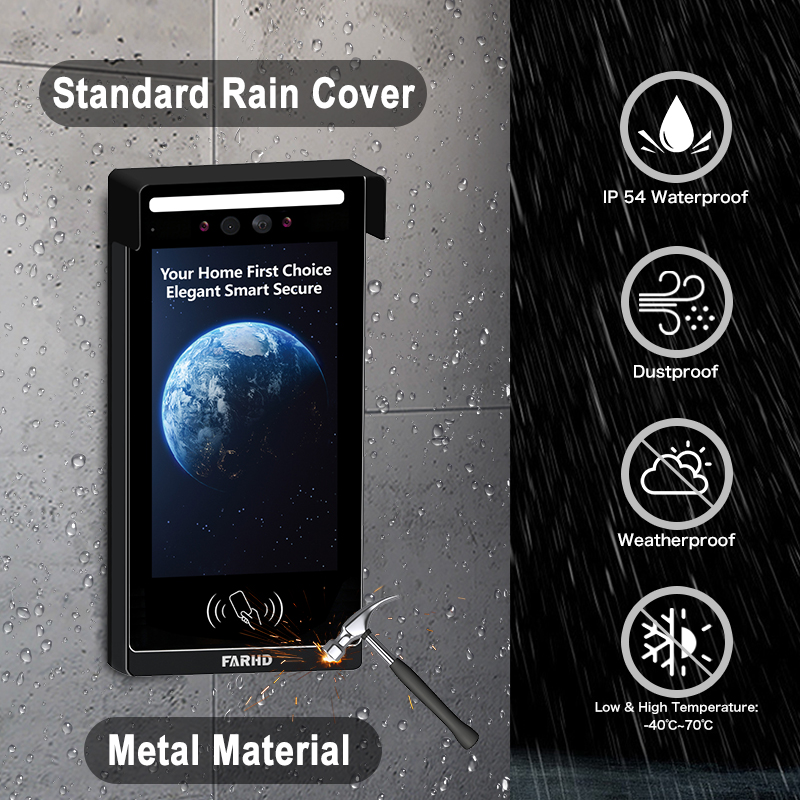
| Resistenza agli agenti atmosferici | Essenziali per installazioni esterne |
| Integrazione della casa intelligente | Funziona con Alexa, Google Home, Apple HomeKit |
| Accesso multiutente | Ideale per aziende o famiglie con più utenti |
| Flussi video crittografati | Garantisce privacy e previene visualizzazioni non autorizzate |
Considerazioni B2B:
- Personalizzazione in bulk: Per complessi residenziali o edifici commerciali
- Servizi OEM/ODM: Le aziende possono richiedere etichettatura privata o personalizzazione delle funzionalità
- Gestione dell'accesso remoto: Particolarmente utile per i gestori di proprietà in affitto
💡 Se stai sourcing videocitofoni per la rivendita o installazioni commerciali, considera di lavorare con un fornitore affidabile OEM/ODM come FARHD per soluzioni su misura.
3. Come utilizzare un videocitofono con Alexa o Google Home
Integrare il tuo videocitofono con Amazon Alexa o Google Home aggiunge controllo vocale e automazione domestica intelligente al tuo sistema di sicurezza. Questo è particolarmente utile per integratori di case intelligenti e rivenditori B2B chi cerca di offrire ecosistemi completamente connessi.
Checklist di compatibilità:
| Compatibilità dispositivo | Alexa | Google Home |
|---|---|---|
| Campanello video Ring | ✅ | ✅ |
| Campanello video Eufy | ✅ | ✅ |
| Citofono Arlo | ✅ | ✅ |
| Proprietari di casa, focalizzati sulla privacy | ✅ (modelli selezionati) | ✅ (modelli selezionati) |
Come connettersi con Alexa:
- Installa l'app del produttore (ad es., Ring, Arlo, FARHD Smart)
- Abilita la skill Video Doorbell nell'app Alexa
- Accedi al tuo account del citofono
- Scopri i dispositivi – Alexa troverà il tuo citofono
- Usa i comandi vocali:
- "Alexa, mostrami la porta d'ingresso"
- “Alexa, parla con il citofono”
Come connettersi con Google Home:
- Apri l'app Google Home
- Aggiungi dispositivo > Funziona con Google
- Cerca il marchio del citofono e accedi
- Assegna la telecamera a una stanza
- Usa i comandi vocali:
- “Ehi Google, mostra la porta d'ingresso”
- “Ehi Google, parla con il citofono d'ingresso”
Vantaggi per le imprese:
- Controllo a mani libere nelle aree di reception o hall
- Verifica visiva prima di concedere l'accesso al personale delle consegne
- Integrazione con altri dispositivi smart: Luci, serrature e allarmi
🔗 Scopri di più sui prodotti videocitofono smart da Pagina Prodotti di FARHD che offrono compatibilità con Alexa e Google Home.

4. Come visualizzare la telecamera del citofono sul telefono: Guida passo-passo
Visualizzare la tua telecamera del citofono su uno smartphone è la funzionalità principale di qualsiasi citofono smart. Ecco una guida completa sia per gli utenti residenziali che per gli installatori B2B che configurano sistemi per i clienti.
Configurazione passo-passo sul telefono:
Passo 1: scaricare l'app
Ogni videocitofono viene fornito con la propria app. Esempi:
- Ring → App Ring
- Arlo → Arlo Secure
- Eufy → Eufy Security
- FARHD → App FARHD Smart
📝 Per modelli white-label o OEM, l'app potrebbe essere marchiata con il nome dell'azienda.
Passo 2: Crea un account
- Usa la tua email, numero di telefono o login sui social media
- Imposta una password sicura
Passo 3: Connettiti al Wi-Fi
- Assicurati che il tuo telefono sia su una 2.wi-Fi 4GHz rete (la maggior parte dei citofoni non supporta il 5GHz)
- Segui le istruzioni in-app per connettere il citofono al Wi-Fi
Passo 4: Abbina il dispositivo
- Scansiona un codice QR sul citofono o inserisci manualmente il numero di serie
- Attendi che il citofono si sincronizzi con l'app
Passo 5: Accedi alla visualizzazione live
- Apri l'app
- Tocca sul tuo dispositivo → Visualizza flusso live
- Parla con i visitatori usando l'audio bidirezionale
Funzionalità che puoi controllare sul tuo telefono:
- 📹 Streaming live
- 🔄 Riproduzione video
- 📲 Notifiche Push
- 📁 Download video
- 📡 Personalizzazione zone di movimento
- 👥 Condivisione accesso utente
Casi d'uso comuni:
| Caso d'uso | Vantaggio |
|---|---|
| Proprietari di case | Vedi chi è alla porta da qualsiasi luogo |
| Proprietari | Monitora interazioni con gli inquilini o manutenzione della proprietà |
| Proprietari di attività | Gestisci a distanza l'ingresso dei clienti e le consegne |
| Integratori di sicurezza (B2B) | Offri ai clienti un controllo centralizzato dai loro telefoni cellulari |
🔗 Vuoi integrare l'accesso dal telefono mobile nella tua offerta di sicurezza? Contatta Supporto FARHD per opzioni di personalizzazione OEM/ODM e white-labeling del software.
5. I videocitofoni funzionano senza Wi-Fi o internet?
Sebbene la maggior parte dei moderni videocitofoni necessiti di Wi-Fi per funzionare pienamente, alcuni modelli supportano funzionalità offline limitate — una caratteristica chiave per implementazioni commerciali o rurali dove l'internet potrebbe essere instabile.
Scenari con e senza Wi-Fi:
| Caratteristica | Con Wi-Fi abilitato | Senza Wi-Fi |
|---|---|---|
| Visualizzazione video live | ✅ | ❌ |
| Audio bidirezionale remoto | ✅ | ❌ |
| Archiviazione in cloud | ✅ | ❌ |
| Registrazione su scheda SD locale | ✅ | ✅ (su modelli selezionati) |
| Avvisi sensore di movimento | ✅ (notifiche push) | ✅ (solo LED/sirena) |
| Notifiche dell'app | ✅ | ❌ |
Opzioni per uso offline:
- Modelli con Archiviazione Locale: Salva video su scheda SD senza internet
- Citofoni 4G LTE: Usa reti cellulari invece del Wi-Fi
- Sistemi ibridi: Combina registrazione offline con backup cloud quando connesso
📦 Per acquirenti in bulk e distributori, FARHD offre sistemi videocitofono con capacità offline ideali per località remote. Questi modelli supportano la registrazione su SD e la sincronizzazione cloud ritardata.
6. I migliori videocitofoni per le proprietà in affitto e i proprietari di casa
Le proprietà in affitto presentano sfide uniche: alto turnover degli inquilini, ingressi condivisi e la necessità di gestione remota della proprietà. Citofoni video smart risolvono questi problemi offrendo visualizzazione remota, controllo accessi e accesso multi-utente.
Funzionalità indispensabili per uso in affitto:
- Accesso multi-utente
- Archiviazione cloud con login multi-dispositivo
- Integrazione blocco/sblocco remoto
- Avvisi di manomissione
- Riconfigurazione facile per nuovi inquilini
Soluzioni FARHD ideali per proprietà in affitto:
| Linea di prodotti | Set di funzionalità |
|---|---|
| Serie Villa a 4 fili | Ideale per case in affitto individuali o duplex |
| Citofono IP per appartamenti | Progettato per edifici multi-unità con controllo accessi centralizzato |
| Soluzioni personalizzate OEM | Sistemi citofono marchiati per gestori di proprietà o sviluppatori immobiliari |
🔗 Esplora il sito di FARHD’s Serie Villa a 4 fili — perfetti per proprietari che cercano soluzioni affidabili e scalabili.
Opportunità B2B:
- Rivendi videocitofoni white-label ai gestori di proprietà
- Offri contratti di installazione e manutenzione
- Usa i servizi OEM di FARHD per costruire un marchio intorno alla sicurezza delle proprietà in affitto
7. Videocitofoni per uso aziendale: Monitoraggio e controllo remoto
Spazi commerciali come uffici, negozi al dettaglio e magazzini richiedono sicurezza e visibilità potenziate. I videocitofoni con capacità di visualizzazione mobile consentono ai proprietari di attività di monitorare gli ingressi a distanza, gestire consegne e verificare visitatori.
Funzionalità orientate al business:
- Monitoraggio multi-citofono da un'unica app
- Accessi programmati e log dei visitatori
- Integrazione serratura smart
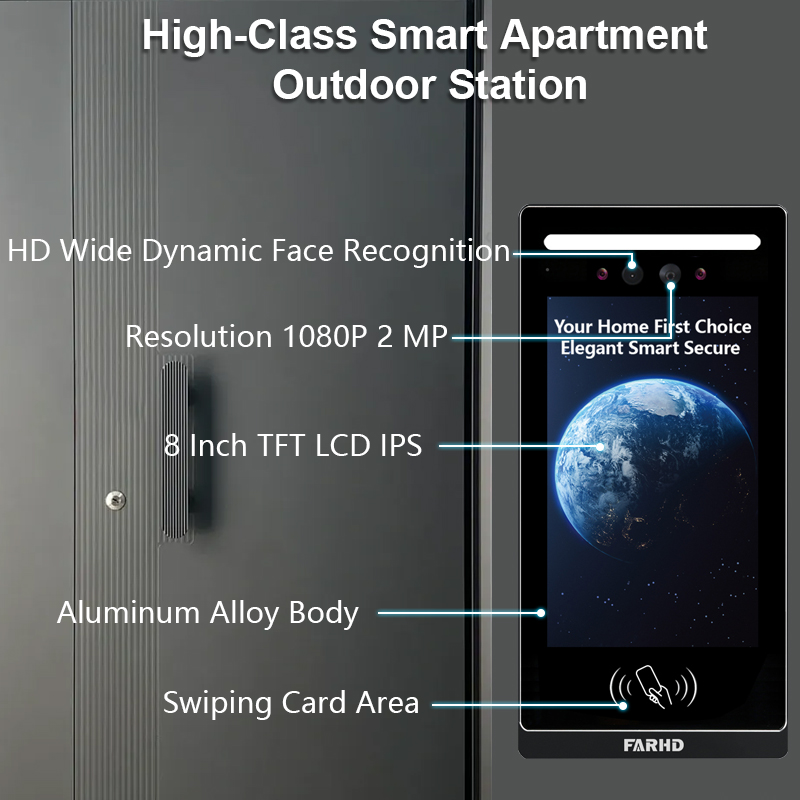
- Riconoscimento facciale basato sull'IA
- Comunicazione crittografata per la privacy
Raccomandato da FARHD:
- Sistemi citofono personalizzabili
- Videocitofoni smart OEM
- Soluzioni complete hardware + software
FARHD sviluppa sistemi citofono di livello aziendale su misura per ambienti ad alto traffico. Con oltre il 60% di quota di mercato in Cina e profonda esperienza OEM, FARHD è un partner affidabile per implementazioni aziendali.
🔗 Scopri di più su Profilo aziendale di FARHD e la loro presenza globale nel mercato dei videocitofoni.
8. Fornitore B2B di videocitofoni e opzioni di personalizzazione
Se sei un grossista, distributore, integratore di sistemi, o marchio startup, collaborare con un fornitore affidabile fornitore di videocitofoni è essenziale per il tuo successo nel mercato smart home e sicurezza.
Perché scegliere FARHD?
| Caratteristica | Vantaggio FARHD |
|---|---|
| Integrazione verticale | Controllo dalla produzione LCD al prodotto finale |
| Capacità OEM/ODM | Personalizza hardware, software, interfaccia app e imballaggio |
| Certificazioni globali | ISO 9001, CE, FCC, ROHS, SGS |
| Capacità di produzione | 13 linee in fabbrica da 5.500㎡, attrezzature SMT YAMAHA |
| Raggiungimento di mercato | Principale fornitore in Cina, Italia, Turchia e Corea |
| Competenza in R&S | Team dedicato per innovazioni AI, IoT e connettività |
📞 Stai cercando di lanciare il tuo marchio di videocitofono? Contatto FARHD per discutere prezzi in bulk, etichettatura privata e soluzioni specifiche per il mercato.
9. FAQ: Visualizzazione videocitofoni su dispositivi mobili
D1: Posso visualizzare la mia telecamera del citofono su più di un telefono?
Sì, la maggior parte delle app consente a più utenti o dispositivi di accedere allo stesso feed del citofono.
D2: Ho bisogno di un abbonamento per visualizzare il mio citofono sul telefono?
No. La visualizzazione live è tipicamente gratuita. Tuttavia, l'archiviazione cloud e le funzionalità avanzate potrebbero richiedere un abbonamento.
D3: Quale velocità internet mi serve per un flusso video fluido?
Si raccomanda una velocità minima di upload di 2 Mbps per lo streaming HD.
D4: Posso ricevere avvisi quando non sono a casa?
Sì, le notifiche push vengono inviate al tuo telefono indipendentemente dalla posizione, purché tu sia connesso a internet.
D5: Posso visualizzare il video del mio citofono dall'estero?
Assolutamente. Purché il tuo citofono sia connesso a internet e il tuo telefono abbia accesso, puoi visualizzarlo da qualsiasi luogo.
Con il sistema giusto in atto, visualizzare la telecamera del citofono sul telefono non è solo possibile — è sicuro, comodo e affidabile. Che tu sia un proprietario di casa, un landlord o un acquirente aziendale, scegliere una soluzione affidabile come FARHD garantisce soddisfazione e supporto a lungo termine.
Potreste anche essere interessati
-

FARHD to Showcase All-Climate Technology at 2026 China Security Expo, Empowering Smart Communities in Northern China
From November 3 to 6, 2026, FARHD, a global leader in smart security and communication solutions, will unveil its full range of products deeply optimized for the harsh winter conditions of northern China at the 18th China International Social Public Security Products Expo (Security China). Under the theme “Digital Intelligence World, Total Security,” the expo…
-

FARHD to Showcase All-Climate Hard-Tech Solutions at Securika Moscow 2026
From April 22 to 24, 2026, FARHD, a global leader in smart security and communication solutions, will unveil its full range of products engineered for extreme climates at Securika Moscow 2026, held at Crocus Expo in Moscow, Russia. At booth A-9101, FARHD will present its smart intercom, access control, and smart home solutions—all deeply optimized…
-

FARHD Honored with Multiple Prestigious Awards in China’s Building Intercom Industry, 28 Years of Deep Engagement in the Chinese Market Solidifying Its Position as a Leading Brand
Recently, in the annual selection event jointly organized by the China Security and Protection Industry Association and multiple authoritative media outlets, FARHD, by virtue of its profound industry experience, outstanding technological innovation capabilities, and extensive market recognition, was awarded the prestigious “Most Influential Brand in China’s Building Intercom Industry” . These accolades not only affirm FARHD’s 28…
-

FARHD Honored with Multiple Prestigious Awards in China’s Building Intercom Industry, 28 Years of Deep Engagement in the Chinese Market Solidifying Its Position as a Leading Brand
Recently, in the annual selection event jointly organized by the China Security and Protection Industry Association and multiple authoritative media outlets, FARHD, by virtue of its profound industry experience, outstanding technological innovation capabilities, and extensive market recognition, was awarded the prestigious “National Top 10 Quality Brands in the Security Industry” . These accolades not only affirm FARHD’s…



