
Hoe Bekijk Je de Deurbelcamera op Je Telefoon: Een Complete Gids voor Huiseigenaren en Bedrijven
27 november 2025
Deel dit artikel

1. Wat is een Videodeurbel en Hoe Werkt Het?
A videodeurbel is een slim beveiligingsapparaat dat je traditionele deurbel vervangt of aanvult. Het bevat een ingebouwde high-definition camera, microfoon, speaker en vaak bewegingsensoren, waardoor huiseigenaren of ondernemers bezoekers aan de deur kunnen zien, horen en spreken — allemaal via hun smartphone.
Belangrijkste onderdelen van een videodeurbel:
| Component | Functie |
|---|---|
| Camera | Legt live of opgenomen video vast van de ingang |
| Microfoon | Neemt audio op van buiten |
| Luidspreker | Maakt tweerichtingscommunicatie met bezoekers mogelijk |
| Bewegingssensor | Detecteert beweging en activeert waarschuwingen of opnames |
| Wi-Fi-module | Verbindt de deurbelcamera met je thuis- of bedrijfsnetwerk |
| Mobiele app | Maakt bekijken, waarschuwingen en interactie direct op een smartphone mogelijk |
Hoe het werkt:
- Bezoeker drukt op de deurbel
Het systeem stuurt een push-melding naar je telefoon via een app. - Beweging Wordt Gedetecteerd
Zelfs als de knop niet wordt ingedrukt, activeren bewegingsensoren een live weergave of opname. - Live Videostream
Je kunt een real-time videofeed van de bezoeker bekijken met je telefoon. - Audio in twee richtingen
Spreek op afstand met de bezoeker via je telefoon. - Cloud- of lokale opslag
Video's worden vaak opgeslagen voor later bekijken, lokaal (SD-kaart) of in de cloud.
Toepassingen:
- Woningen: Verbeter beveiliging en gemak
- Appartementen: Bied externe toegang zonder fysiek aanwezig te hoeven zijn
- Bedrijven: Monitor leveringen, klanten en medewerkers via externe toegang
2. Slimme videodeurbelfuncties om op te letten in 2025
Naarmate de technologie evolueert, bieden moderne videodeurbellen geavanceerde functies die ver gaan buiten alleen video en audio. Of het nu voor huiseigenaren of B2B-kopers zoals verhuurders, vastgoedbeheerders of beveiligingsintegrators is, het weten welke functies ertoe doen is cruciaal bij het kiezen van het juiste product.
Onmisbare functies:
| Functie | Voordeel |
|---|---|
| HD/4K Videoresolutie | Duidelijkere beeldkwaliteit, betere gezichtsherkenning |
| Nachtzicht | Infrarood-LED's maken zichtbaarheid mogelijk in complete duisternis |
| AI-bewegingsdetectie | Vermindert valse waarschuwingen door onderscheid te maken tussen mensen, auto's en dieren |
| Cloud- & lokale opslag | Flexibele opties voor opname en opslag van video |
| Opties voor batterij of bedraad | Geschikt voor verschillende installatievereisten |
| Weerbestendigheid | Essentieel voor buitentoepassingen |
| Smart Home-integratie | Werkt met Alexa, Google Home, Apple HomeKit |
| Toegang voor meerdere gebruikers | Ideaal voor bedrijven of families met meerdere gebruikers |
| Versleutelde videostreams | Zorgt voor privacy en voorkomt ongeautoriseerde weergave |
B2B-overwegingen:
- Bulk Aanpassing: Voor vastgoedontwikkelingen of commerciële gebouwen
- OEM/ODM-diensten: Bedrijven kunnen private labeling of functieaanpassing aanvragen
- Beheer van externe toegang: Vooral nuttig voor verhuurmakelaars
💡 Als je videodeurbellen inkoopt voor wederverkoop of commerciële installaties, overweeg dan samen te werken met een vertrouwde OEM/ODM-leverancier zoals FARHD voor op maat gemaakte oplossingen.
3. Hoe u een videodeurbel met Alexa of Google Home kunt gebruiken
Het integreren van je videodeurbel met Amazon Alexa of Google Home voegt spraakbesturing en slimme woningautomatisering toe aan je beveiligingssysteem. Dit is bijzonder nuttig voor slimme huisintegrators en B2B-verkopers die volledig verbonden ecosystemen willen aanbieden.
Compatibiliteitschecklist:
| Apparaatcompatibiliteit | Alexa | Google Home |
|---|---|---|
| Ring Video Deurbel | ✅ | ✅ |
| Eufy Video Deurbel | ✅ | ✅ |
| Arlo Deurbel | ✅ | ✅ |
| FARHD OEM-modellen | ✅ (geselecteerde modellen) | ✅ (geselecteerde modellen) |
Hoe Verbind Je met Alexa:
- Installeer de Fabrikantapp (bijv. Ring, Arlo, FARHD Smart)
- Activeer de Videodeurbel Skill in de Alexa-app
- Log in op Je Deurbelaccount
- Apparaten ontdekken – Alexa vindt je deurbel
- Gebruik spraakopdrachten:
- "Alexa, laat me de voordeur zien"
- “Alexa, praat met de deurbel”
Hoe Verbind Je met Google Home:
- Open de Google Home-app
- Voeg Apparaat Toe > Werkt met Google
- Zoek naar Deurbelmerk en Log In
- Wijs Camera Toe aan een Kamer
- Gebruik spraakopdrachten:
- “Hey Google, toon de voordeur”
- “Hey Google, praat met de voordeurbel”
Voordelen voor bedrijven:
- Handsfree bediening in ontvangstruimtes of lobby's
- Visuele verificatie voordat toegang wordt verleend aan bezorgpersoneel
- Integratie met Andere Slimme Apparaten: Lichten, sloten en alarmen
🔗 Lees meer over slimme videodeurbelproducten van FARHD’s Productpagina die compatibiliteit met Alexa en Google Home bieden.

4. Hoe Bekijk Je de Deurbelcamera op Je Telefoon: Stapsgewijze Gids
Het bekijken van je deurbelcamera op een smartphone is de kernfunctie van elke slimme deurbel. Hier is een complete handleiding voor zowel particuliere gebruikers als B2B-installateurs die systemen opzetten voor klanten.
Stapsgewijze Installatie op Telefoon:
Stap 1: Download de app
Elke videodeurbel komt met zijn eigen app. Voorbeelden:
- Ring → Ring App
- Arlo → Arlo Secure
- Eufy → Eufy Security
- FARHD → FARHD Smart App
📝 Voor white-label- of OEM-modellen kan de app onder de bedrijfsnaam gebrand zijn.
Stap 2: Maak een Account Aan
- Gebruik je e-mail, telefoonnummer of sociale media-inlog
- Stel een veilig wachtwoord in
Stap 3: Verbind met Wi-Fi
- Zorg dat je telefoon is verbonden met een 2.4GHz Wi-Fi netwerk (de meeste deurbellen ondersteunen geen 5GHz)
- Volg de instructies in de app om de deurbel met Wi-Fi te verbinden
Stap 4: Koppel het Apparaat
- Scan een QR-code op de deurbel of voer het serienummer handmatig in
- Wacht tot de deurbel synchroniseert met de app
Stap 5: Toegang tot Live Weergave
- Open de app
- Tik op je apparaat → Bekijk Live Stream
- Spreek met bezoekers met behulp van tweerichtingsaudio
Functies Die Je op Je Telefoon Kunt Bedienen:
- 📹 Live Streaming
- 🔄 Videoweergave
- 📲 Pushmeldingen
- 📁 Video Downloads
- 📡 Bewegingszone Aanpassing
- 👥 Gebruikersdeling Toegang
Veelvoorkomende gebruiksscenario's:
| Gebruiksscenario | Voordeel |
|---|---|
| Huiseigenaren | Zie wie er aan de deur is vanaf elke locatie |
| Verhuurders | Monitor interacties met huurders of vastgoedonderhoud |
| Bedrijfsownaren | Beheer op afstand klantentoegang en leveringen |
| Beveiligingsintegrators (B2B) | Bied klanten gecentraliseerde controle vanaf hun mobiele telefoon |
🔗 Wil je mobiele telefoon-toegang integreren in je beveiligingsaanbod? Neem contact op met FARHD Ondersteuning voor OEM/ODM-aanpassing en software white-labelopties.
5. Werken Videodeurbellen Zonder Wi-Fi of Internet?
Hoewel de meeste moderne videodeurbellen Wi-Fi nodig hebben om volledig te functioneren, ondersteunen sommige modellen beperkte offline functionaliteit — een sleutelfunctie voor commerciële of landelijke implementaties waar het internet instabiel kan zijn.
Scenario's met en zonder Wi-Fi:
| Functie | Met Wi-Fi ingeschakeld | Zonder Wi-Fi |
|---|---|---|
| Live videoweergave | ✅ | ❌ |
| Remote tweerichtingsaudio | ✅ | ❌ |
| Cloudopslag | ✅ | ❌ |
| Lokale SD-kaartopname | ✅ | ✅ (op geselecteerde modellen) |
| Bewegingsensorwaarschuwingen | ✅ (pushmeldingen) | ✅ (alleen LED/sirene) |
| App meldingen | ✅ | ❌ |
Opties voor offline gebruik:
- Modellen met lokale opslag: Video opslaan op SD-kaart zonder internet
- 4G LTE-deurbellen: Cellulair netwerk gebruiken in plaats van Wi-Fi
- Hybride systemen: Offline opnemen combineren met cloudback-up bij verbinding
📦 Voor groothandelaars en distributeurs, FARHD biedt offline videodeurbelsystemen ideaal voor afgelegen locaties. Deze modellen ondersteunen SD-kauropname en vertraagde cloud-synchronisatie.
6. Beste video-deurbellen voor huurwoningen en verhuurders
Verhuurpanden brengen unieke uitdagingen met zich mee: hoge tenantomzet, gedeelde ingangen en de noodzaak voor remote property management. Slimme videodeurbellen lossen deze problemen op door remote weergave, toegangscontrole en multi-gebruikersaccess te bieden.
Onmisbare functies voor verhuurgebruik:
- Meerdere gebruikers met toegang
- Cloudopslag met multi-apparaatinlog
- Integratie op afstand vergrendelen/ontgrendelen
- Waarschuwingen voor knoeien
- Eenvoudige herconfiguratie voor nieuwe huurders
Ideale FARHD-oplossingen voor verhuurpanden:
| Productlijn | Functieset |
|---|---|
| 4-draads villaserie | Ideaal voor individuele huurwoningen of duplexen |
| IP-appartementintercom | Ontworpen voor meergezinswoningen met gecentraliseerde toegangscontrole |
| OEM-aangepaste oplossingen | Gebrande deurbelsystemen voor property managers of vastgoedontwikkelaars |
ontdek FARHD’s 4-draads villaserie — perfect voor verhuurders die op zoek zijn naar betrouwbare, schaalbare oplossingen.
B2B-kansen:
- Witte-label videodeurbellen doorverkopen aan property managers
- Installatie- en onderhoudscontracten aanbieden
- Gebruik FARHD’s OEM-diensten om een merk op te bouwen rond beveiliging voor verhuurpanden
7. Videodeurbellen voor zakelijk gebruik: Remote monitoring en controle
Commerciële ruimtes zoals kantoren, winkels en magazijnen vereisen geavanceerde beveiliging en zichtbaarheid. Videodeurbellen met mobiele weergavemogelijkheden stellen ondernemers in staat om ingangen remote te monitoren, leveringen af te handelen en bezoekers te verifiëren.
Zakelijk georiënteerde kenmerken:
- Multi-deurbelmonitoring vanuit één app
- Geplande toegang en bezoekerslogboeken
- Integratie met slimme sloten
- U kunt door alle video-deurbel- en intercomoplossingen bladeren op hun
- Versleutelde communicatie voor privacy
Aanbevolen door FARHD:
- Aanpasbare intercomsystemen
- OEM slimme videodeurbellen
- Volledige hardware + software-oplossingen
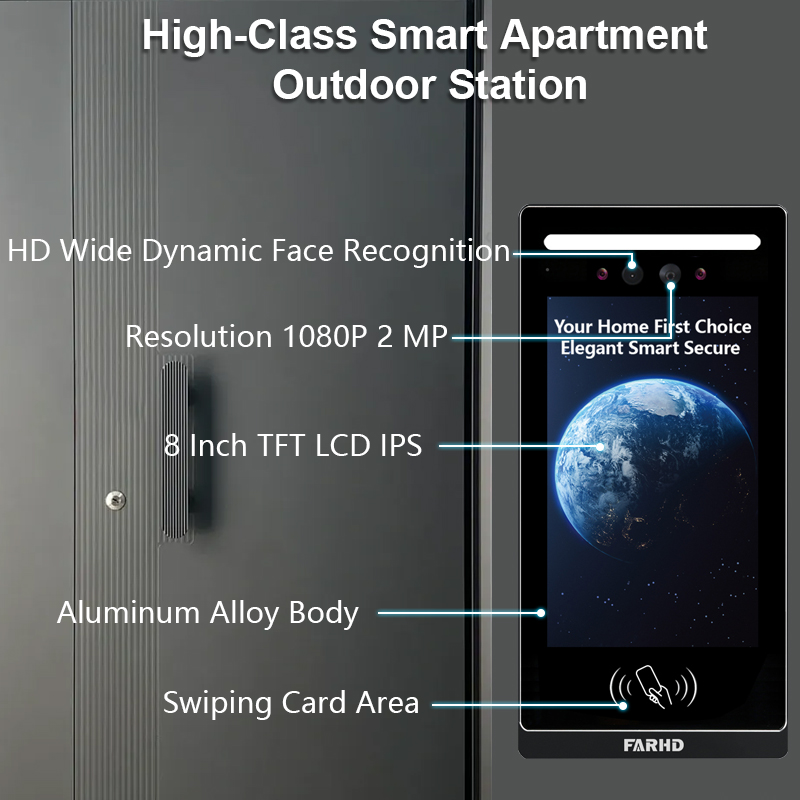
FARHD ontwikkelt zakelijke deurbelsystemen op maat voor omgevingen met veel verkeer. Met meer dan 60% marktaandeel in China en diepgaande OEM-ervaring is FARHD een betrouwbare partner voor enterprise-implementaties.
🔗 Lees meer over FARHD’s bedrijfsprofiel en hun wereldwijde aanwezigheid op de videointercommarkt.
8. Videodeurbel B2B-leverancier en aanpassingsopties
Als je een groothandel, distributeur bent, systeemintegrator, of start-up merk, partnering met een betrouwbare videodeurbelleverancier is essentieel voor uw succes op de smart home- en beveiligingsmarkt.
Waarom kiezen voor FARHD?
| Functie | FARHD Voordeel |
|---|---|
| Verticale integratie | Controle van LCD-productie tot eindproduct |
| OEM/ODM-mogelijkheden | Hardware, software, app-interface en verpakking aanpassen |
| Wereldwijde Certificeringen | ISO 9001, CE, FCC, ROHS, SGS |
| Productiecapaciteit | 13 productielijnen in 5.500㎡ fabriek, YAMAHA SMT-apparatuur |
| Marktbereik | Topleverancier in China, Italië, Turkije en Korea |
| R&D Expertise | Toegewijde teams voor AI, IoT en connectiviteitsinnovaties |
📞 Wilt u uw eigen videodeurbelmerk lanceren? Contact FARHD om bulkprijzen, private labeling en marktgerichte oplossingen te bespreken.
9. FAQ: Videodeurbellen bekijken op mobiele apparaten
V1: Kan ik mijn deurbelcamera op meer dan één telefoon bekijken?
Ja, de meeste apps staan meerdere gebruikers of apparaten toe om dezelfde deurbelstroom te benaderen.
V2: Heb ik een abonnement nodig om mijn deurbel op mijn telefoon te bekijken?
Nee. Live weergave is doorgaans gratis. Cloudopslag en geavanceerde functies kunnen echter een abonnement vereisen.
V3: Welke internetsnelheid heb ik nodig voor soepele videostreaming?
Een minimum van 2 Mbps uploadsnelheid wordt aanbevolen voor HD-streaming.
V4: Kan ik meldingen ontvangen als ik niet thuis ben?
Ja, pushmeldingen worden naar uw telefoon gestuurd ongeacht de locatie, zolang u verbonden bent met internet.
V5: Kan ik mijn deurbelvideo vanuit het buitenland bekijken?
Absoluut. Zolang uw deurbel verbonden is met internet en uw telefoon toegang heeft, kunt u het overal bekijken.
Met het juiste systeem op zijn plaats, uw deurbelcamera op een telefoon bekijken is niet alleen mogelijk — het is veilig, handig en betrouwbaar. Of u nu een huiseigenaar, verhuurder of zakelijke koper bent, het kiezen van een vertrouwde oplossing zoals FARHD garandeert langdurige tevredenheid en ondersteuning.
Mogelijk bent u ook geïnteresseerd in
-
FARHD: Your 28-Year Source Factory for Video Door Phone Intercoms
When you choose a video door phone intercom supplier, you are not just buying a product—you are choosing the factory behind it. FARHD has been a source manufacturer since 1998, with over 28 years of experience in video intercom and access control. From villa kits to apartment intercoms, we deliver reliable, customizable, and Tuya-compatible solutions…
-
FARHD Source Factory: Your Trusted Partner for Video Intercom and Access Control Solutions
When you choose a manufacturing partner for video intercom and access control systems, you are not just buying products—you are investing in quality, reliability, and long-term support. FARHD has been a source factory since 1998, and today we serve clients in over 100 countries worldwide. With strict quality inspection, in-house production, independent R&D, and full…
-
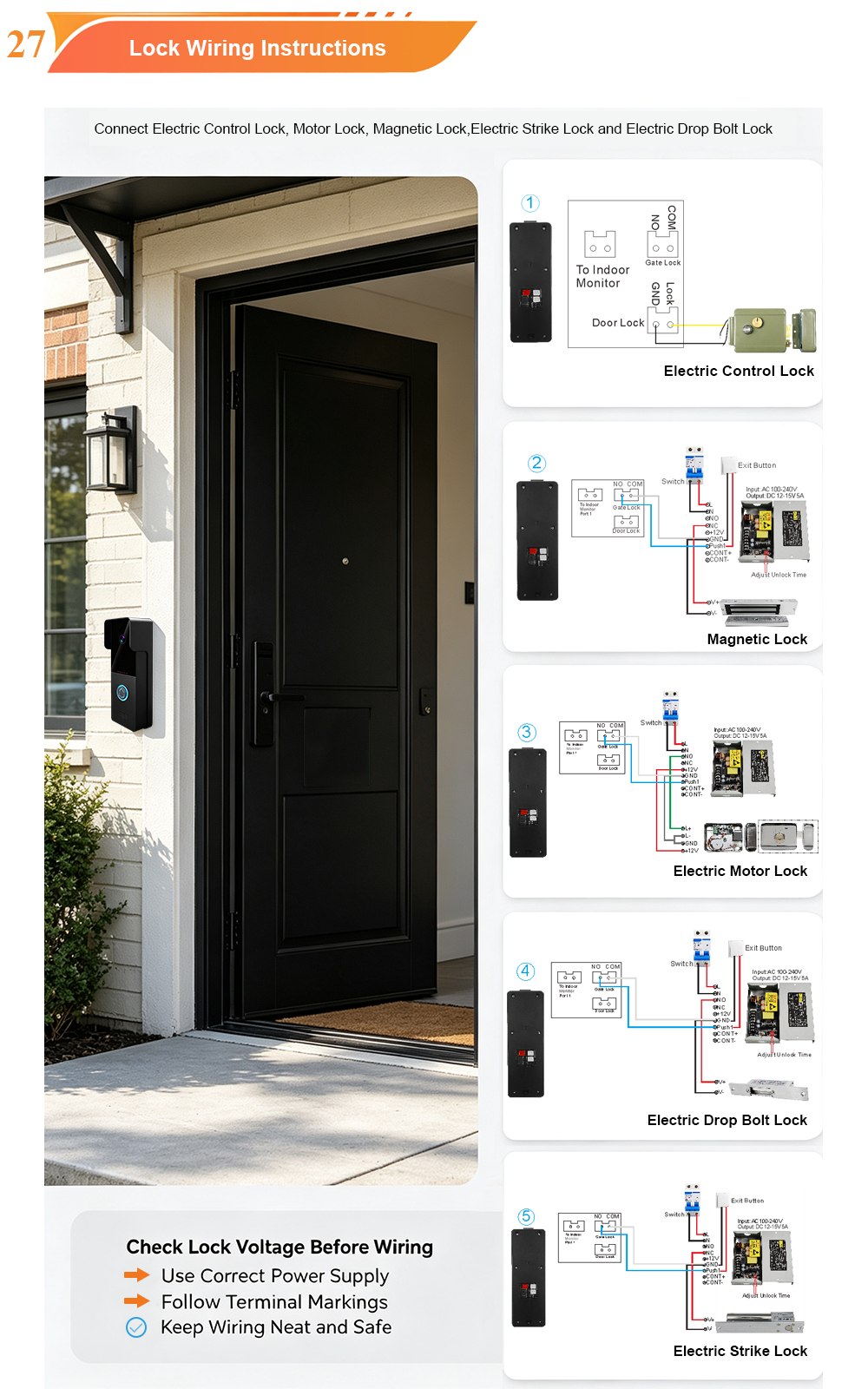
2-Wire Video Door Phone Connection with Electric Rim Lock: Unlock by Card, Indoor Monitor, and App
A complete guide to wiring an electric rim lock to a FARHD 2-wire video door phone system—and configuring three convenient unlock methods: RFID card, indoor monitor, and mobile app. Whether you are upgrading an existing building or specifying a new system, this guide covers the essentials for reliable, secure access control. Electric rim locks are…
-

Video Intercom Manufacturer & Source Factory Since 1998 | OEM ODM SKD Building Intercom
Video Intercom Manufacturer & Vertical Source Factory in China FARHD is a professional video intercom manufacturer with over 28 years of specialized experience in building security intercom systems. Established in 1998, we are a genuine building intercom factory focused on independent R&D, in-house production, and customized manufacturing for global B2B clients, including distributors, importers, engineering contractors, real estate…



