
Como Visualizar a Câmera da Campainha no Celular: Um Guia Completo para Proprietários e Empresas
Novembro 27, 2025
Partilhar este artigo

1. O que é uma Campainha de Vídeo e Como Ela Funciona?
A campainha de vídeo é um dispositivo de segurança inteligente que substitui ou complementa sua campainha tradicional. Ela inclui uma câmera de alta definição, microfone, alto-falante e frequentemente sensores de movimento, permitindo que proprietários de residências ou empresas vejam, ouçam e conversem com visitantes em sua porta — tudo por meio de seu smartphone.
Componentes principais de uma campainha com vídeo:
| Componente | Função |
|---|---|
| Câmera | Captura vídeo ao vivo ou gravado da entrada |
| Captura vídeo ao vivo dos visitantes, geralmente em resolução HD ou Full HD. | Capta áudio do exterior |
| Capta áudio do lado do visitante. | Permite comunicação bidirecional com visitantes |
| Sensor de movimento | Detecta movimentos e acciona alertas ou gravações |
| Módulo Wi-Fi | Conecta a campainha com câmera à rede doméstica ou empresarial |
| Aplicativo móvel | Permite visualização, alertas e interação diretamente em um smartphone |
Alimentado por bateria recarregável ou conectado à fonte de alimentação do edifício
- O visitante carrega na campainha
O sistema envia uma notificação push para o seu telefone via aplicativo. - Movimento Detectado
Mesmo se o botão não for pressionado, os sensores de movimento ativam uma visualização ao vivo ou gravação. - Transmissão de Vídeo ao Vivo
Você pode assistir a uma transmissão de vídeo em tempo real do visitante usando o seu telefone. - Áudio bidirecional
Fale com o visitante remotamente por meio do seu telefone. - Armazenamento local ou na nuvem
Os vídeos são frequentemente salvos para visualização posterior, seja localmente (cartão SD) ou na nuvem.
Aplicações:
- Residências: Aumentar a segurança e a conveniência
- Apartamentos: Fornecer acesso remoto sem necessidade de presença física
- Empresas: Monitorar entregas, clientes e funcionários por meio de acesso remoto
2. Recursos de campainha de vídeo inteligente para procurar em 2025
À medida que a tecnologia evolui, as campainhas com vídeo modernas oferecem recursos avançados que vão muito além de apenas vídeo e áudio. Seja para proprietários de casas ou compradores B2B como proprietários de imóveis, gerentes de propriedades ou integradores de segurança, saber quais recursos importam é fundamental para escolher o produto certo.
, é fundamental avaliar recursos específicos que se alinhem às necessidades de segurança e às expectativas técnicas.
| Caraterística | Benefício |
|---|---|
| HD/Resolução de Vídeo 4K | Qualidade de imagem mais nítida, melhor reconhecimento facial |
| Visão noturna | LEDs infravermelhos permitem visibilidade na escuridão total |
| Transmissão ao vivo | Reduz alertas falsos ao distinguir entre pessoas, carros e animais |
| Nuvem e Armazenamento Local | Opções flexíveis para gravação e armazenamento de vídeo |
| Opções com bateria ou com fio | Adequado para diferentes requisitos de instalação |
| Resistência às intempéries | Essencial para instalações externas |
| Integração de casas inteligentes | Compatível com Alexa, Google Home e Apple HomeKit |
| Acesso de vários usuários | Ideal para empresas ou famílias com vários usuários |
| Fluxos de vídeo encriptados | Garante privacidade e impede visualizações não autorizadas |
Considerações B2B:
- Personalização em Massa: Para empreendimentos imobiliários ou edifícios comerciais
- Serviços OEM/ODM: Empresas podem solicitar rotulagem privada ou personalização de recursos
- Gestão do acesso remoto: Especialmente útil para gerentes de propriedades de aluguel
💡 Se você está adquirindo interfones de vídeo para revenda ou instalações comerciais, considere trabalhar com um fornecedor OEM/ODM confiável como FARHD para soluções sob medida.
3. Como usar uma campainha de vídeo com Alexa ou Google Home
Integrar seu interfone de vídeo com Amazon Alexa ou Google Home adiciona controle por voz e automação residencial inteligente ao seu sistema de segurança. Isso é particularmente útil para integradores de casas inteligentes e Revendedores B2B quem busca oferecer ecossistemas totalmente conectados.
Lista de Verificação de Compatibilidade:
| Compatibilidade de Dispositivos | Alexa | Google Home |
|---|---|---|
| Ring Video Doorbell | ✅ | ✅ |
| Campainha com vídeo Eufy | ✅ | ✅ |
| Interfone Arlo | ✅ | ✅ |
| Modelos OEM FARHD | ✅ (modelos selecionados) | ✅ (modelos selecionados) |
Como Conectar com Alexa:
- Instalar o Aplicativo do Fabricante (ex.: Ring, Arlo, FARHD Smart)
- Ativar a Habilidade do Interfone de Vídeo no aplicativo Alexa
- Fazer Login na Conta do Interfone
- Descubra dispositivos – A Alexa localizará seu interfone
- Use comandos de voz:
- "Alexa, mostre-me a porta da frente"
- “Alexa, fale com o interfone”
Como Conectar com Google Home:
- Abra o aplicativo Google Home
- Adicionar Dispositivo > Funciona com Google
- Pesquisar pela Marca do Interfone e Fazer Login
- Atribuir a Câmera a uma Sala
- Use comandos de voz:
- “Ei Google, mostre a porta da frente”
- “Ei Google, fale com o interfone da frente”
Benefícios para Empresas:
- Controle mãos-livres em áreas de recepção ou saguões
- Verificação visual antes de conceder acesso à equipe de entregas
- Integração com Outros Dispositivos Inteligentes: Luzes, fechaduras e alarmes
🔗 Saiba mais sobre produtos de interfones de vídeo inteligentes da Página de Produtos da FARHD que oferecem compatibilidade com Alexa e Google Home.

4. Como Visualizar a Câmera do Interfone no Celular: Guia Passo a Passo
Visualizar sua câmera de interfone em um smartphone é o recurso principal de qualquer interfone inteligente. Aqui está um guia completo para usuários residenciais e instaladores B2B configurando sistemas para clientes.
Configuração Passo a Passo no Celular:
Passo 1: Descarregar a aplicação
Cada vídeo porteiro vem com seu próprio aplicativo. Exemplos:
- Ring → App Ring
- Arlo → Arlo Secure
- Eufy → Eufy Security
- FARHD → App Smart FARHD
📝 Para modelos de marca branca ou OEM, o aplicativo pode ser personalizado com o nome da empresa.
Passo 2: Crie uma Conta
- Use seu e-mail, número de telefone ou login em redes sociais
- Configure uma senha segura
Passo 3: Conectar ao Wi-Fi
- Certifique-se de que seu celular esteja em uma 2.wi-Fi de 4 GHz rede (a maioria dos porteiros não suporta 5GHz)
- Siga as instruções no aplicativo para conectar o porteiro ao Wi-Fi
Passo 4: Emparelhe o Dispositivo
- Escaneie um código QR no porteiro ou insira manualmente o número de série
- Aguarde o porteiro sincronizar com o aplicativo
Passo 5: Acesse a Visualização ao Vivo
- Abra o aplicativo
- Toque no seu dispositivo → Visualize o Stream ao Vivo
- Fale com visitantes usando áudio bidirecional
Recursos que Você Pode Controlar no Seu Celular:
- 📹 📊 Comparação de recursos: assinatura vs. Sem assinatura
- 🔄 Reprodução de Vídeo
- 📲 Notificações Push
- 📁 Downloads de Vídeo
- 📡 Personalização de Zonas de Movimento
- 👥 Compartilhamento de Acesso com Usuários
Casos de uso comuns:
| Caso de utilização | Benefício |
|---|---|
| Proprietários de casas | Veja quem está à porta de qualquer lugar |
| Pequenas empresas | Monitore interações com inquilinos ou manutenção de propriedades |
| Proprietários de Negócios | Gerencie remotamente a entrada de clientes e entregas |
| Integradores de Segurança (B2B) | Ofereça aos clientes controlo centralizado a partir dos seus telemóveis |
🔗 Pretende integrar acesso por telemóvel na sua oferta de segurança? Contacte Suporte FARHD para opções de personalização OEM/ODM e rotulagem branca de software.
5. As Campainhas com Vídeo Funcionam Sem Wi-Fi ou Internet?
Embora a maioria das campainhas com vídeo modernas precise Wi-Fi de ligação para funcionar plenamente, alguns modelos suportam funcionalidades offline limitadas — uma funcionalidade chave para implementações comerciais ou rurais onde a internet pode ser instável.
Cenários Com e Sem Wi-Fi:
| Caraterística | Com Wi-Fi Ativado | Sem Wi-Fi |
|---|---|---|
| Visualização de Vídeo em Direto | ✅ | ❌ |
| Áudio Bidirecional Remoto | ✅ | ❌ |
| Armazenamento em nuvem | ✅ | ❌ |
| Gravação local em cartão SD | ✅ | ✅ (em modelos selecionados) |
| Alertas de Sensor de Movimento | ✅ (notificações push) | ✅ (apenas LED/buzzer) |
| Notificações de aplicações | ✅ | ❌ |
Opções para Uso Offline:
- Modelos com Armazenamento Local: Guarde vídeo no cartão SD sem internet
- Campainhas 4G LTE: Use redes celulares em vez de Wi-Fi
- Sistemas híbridos: Combine gravação offline com cópia de segurança na nuvem quando ligado
📦 Para compradores em grande escala e distribuidores, FARHD oferece sistemas de campainhas com vídeo capazes de funcionar offline ideais para locais remotos. Estes modelos suportam gravação em cartão SD e sincronização na nuvem diferida.
6. As melhores campainhas de vídeo para propriedades de aluguer e senhorios
As propriedades de arrendamento apresentam desafios únicos: alta rotatividade de inquilinos, entradas partilhadas e a necessidade de gestão remota de propriedades. Campainhas de vídeo inteligentes resolvem estes problemas ao oferecer visualização remota, controlo de acesso e acesso multiutilizador.
Funcionalidades Essenciais para Uso em Arrendamentos:
- Acesso para múltiplos usuários
- Armazenamento na nuvem com login multi-dispositivo
- Integração de bloqueio/desbloqueio remoto
- Alertas de adulteração
- Reconversão fácil para novos inquilinos
Soluções Ideais FARHD para Propriedades de Arrendamento:
| Linha de produtos | Conjunto de Funcionalidades |
|---|---|
| Série Villa com 4 fios | Ideal para casas de arrendamento individuais ou duplexes |
| Intercomunicador IP para Apartamentos | Projetado para edifícios multi-unidade com controlo de acesso centralizado |
| Soluções Personalizadas OEM | Sistemas de campainhas de marca para gestores de propriedades ou promotores imobiliários |
explorar o FARHD’s Série Villa com 4 fios — perfeito para senhorios que procuram soluções fiáveis e escaláveis.
Oportunidades B2B:
- Revenda campainhas com vídeo de rotulagem branca a gestores de propriedades
- Ofereça contratos de instalação e manutenção
- Use os serviços OEM da FARHD para construir uma marca em torno da segurança de propriedades de arrendamento
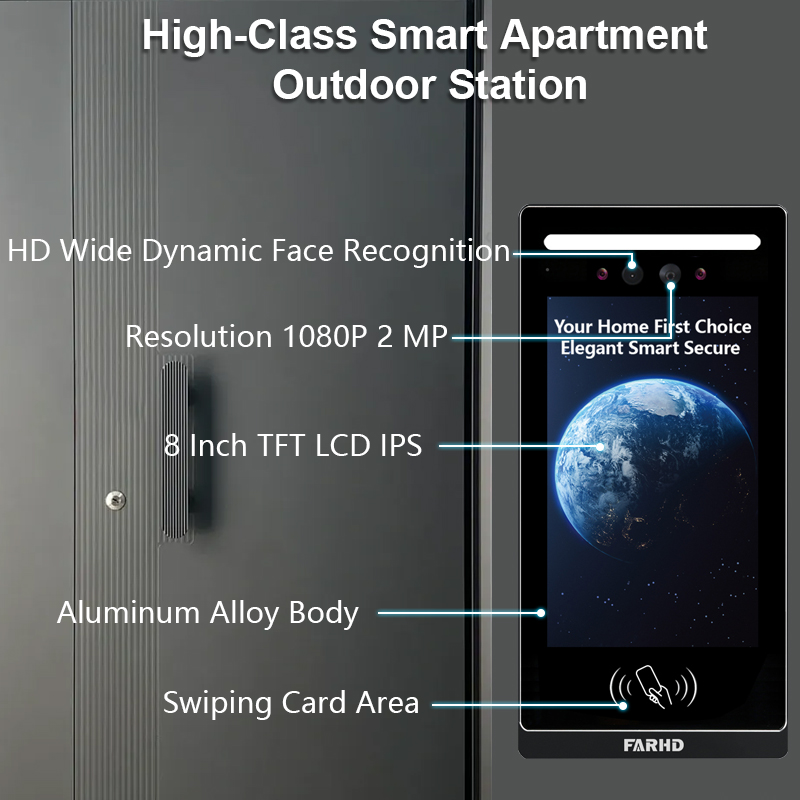
7. Campainhas com Vídeo para Uso Empresarial: Monitorização e Controlo Remotos
Espaços comerciais como escritórios, lojas de retalho e armazéns requerem segurança e visibilidade acrescidas. Campainhas com vídeo com capacidade de visualização móvel permitem que os proprietários de negócios monitorem entradas remotamente, gerenciem entregas e verifiquem visitantes.
Recursos Orientados para Negócios:
- Monitorização multi-campainha a partir de uma única app
- Acesso programado e registos de visitantes
- Integração com fechadura inteligente
- P7: Qual é a política de garantia e suporte pós-venda?
- Comunicação encriptada para privacidade
Recomendado pela FARHD:
- Sistemas de Intercomunicadores Personalizáveis
- Campainhas com vídeo inteligentes OEM
- Soluções completas de hardware + software
A FARHD desenvolve sistemas de campainhas de nível empresarial adaptados a ambientes de alto tráfego. Com mais de 60% de quota de mercado na China e vasta experiência em OEM, a FARHD é um parceiro fiável para implementações empresariais.
🔗 Saiba mais sobre Perfil da empresa FARHD e a sua presença global no mercado de intercomunicadores de vídeo.
8. Fornecedor B2B de Campainhas com Vídeo e Opções de Personalização
Se é um atacadista, distribuidor, integrador de sistemas, ou marca inicial, ao fazer parceria com um fornecedor fiável fornecedor de campainha de vídeo é essencial para o seu sucesso no mercado de casas inteligentes e segurança.
Porquê escolher a FARHD?
| Caraterística | Vantagem FARHD |
|---|---|
| Integração vertical | Controlo desde a fabricação de LCD até ao produto final |
| Recursos de OEM/ODM | Personalize hardware, software, interface da app e embalagem |
| Certificações Globais | ISO 9001, CE, FCC, ROHS, SGS |
| Capacidade de produção | 13 linhas numa fábrica de 5.500㎡, equipamento SMT YAMAHA |
| Alcance de Mercado | Principal fornecedor na China, Itália, Turquia e Coreia |
| Expertise em P&D | Equipa dedicada a inovações em IA, IoT e conectividade |
📞 Procura lançar a sua própria marca de campainhas com vídeo? Contactar a FARHD para discutir preços em grande escala, rotulagem privada e soluções específicas para o mercado.
9. FAQ: Visualização de Campainhas com Vídeo em Dispositivos Móveis
P1: Posso visualizar a câmara da minha campainha em mais do que um telemóvel?
Sim, a maioria das apps permite que múltiplos utilizadores ou dispositivos acedam ao mesmo fluxo de vídeo da campainha.
P2: Preciso de uma subscrição para visualizar a minha campainha no telemóvel?
Não. A visualização em direto é tipicamente gratuita. No entanto, o armazenamento na nuvem e funcionalidades avançadas podem requerer uma subscrição.
P3: Que velocidade de internet preciso para transmissão de vídeo suave?
Recomenda-se uma velocidade mínima de upload de 2 Mbps para transmissão HD.
P4: Posso receber alertas quando não estou em casa?
Sim, as notificações push são enviadas para o seu telemóvel independentemente da localização, desde que esteja ligado à internet.
P5: Posso visualizar o vídeo da minha campainha do estrangeiro?
Absolutamente. Desde que a sua campainha esteja ligada à internet e o seu telemóvel tenha acesso, pode visualizá-la de qualquer lugar.
Com o sistema certo no lugar, a visualização da câmara da campainha no telemóvel não é apenas possível — é segura, conveniente e fiável. Seja proprietário de casa, senhorio ou comprador empresarial, escolher uma solução de confiança como a FARHD garante satisfação e suporte a longo prazo.
Também pode interessar-lhe
-
FARHD: Your 28-Year Source Factory for Video Door Phone Intercoms
When you choose a video door phone intercom supplier, you are not just buying a product—you are choosing the factory behind it. FARHD has been a source manufacturer since 1998, with over 28 years of experience in video intercom and access control. From villa kits to apartment intercoms, we deliver reliable, customizable, and Tuya-compatible solutions…
-
FARHD Source Factory: Your Trusted Partner for Video Intercom and Access Control Solutions
When you choose a manufacturing partner for video intercom and access control systems, you are not just buying products—you are investing in quality, reliability, and long-term support. FARHD has been a source factory since 1998, and today we serve clients in over 100 countries worldwide. With strict quality inspection, in-house production, independent R&D, and full…
-
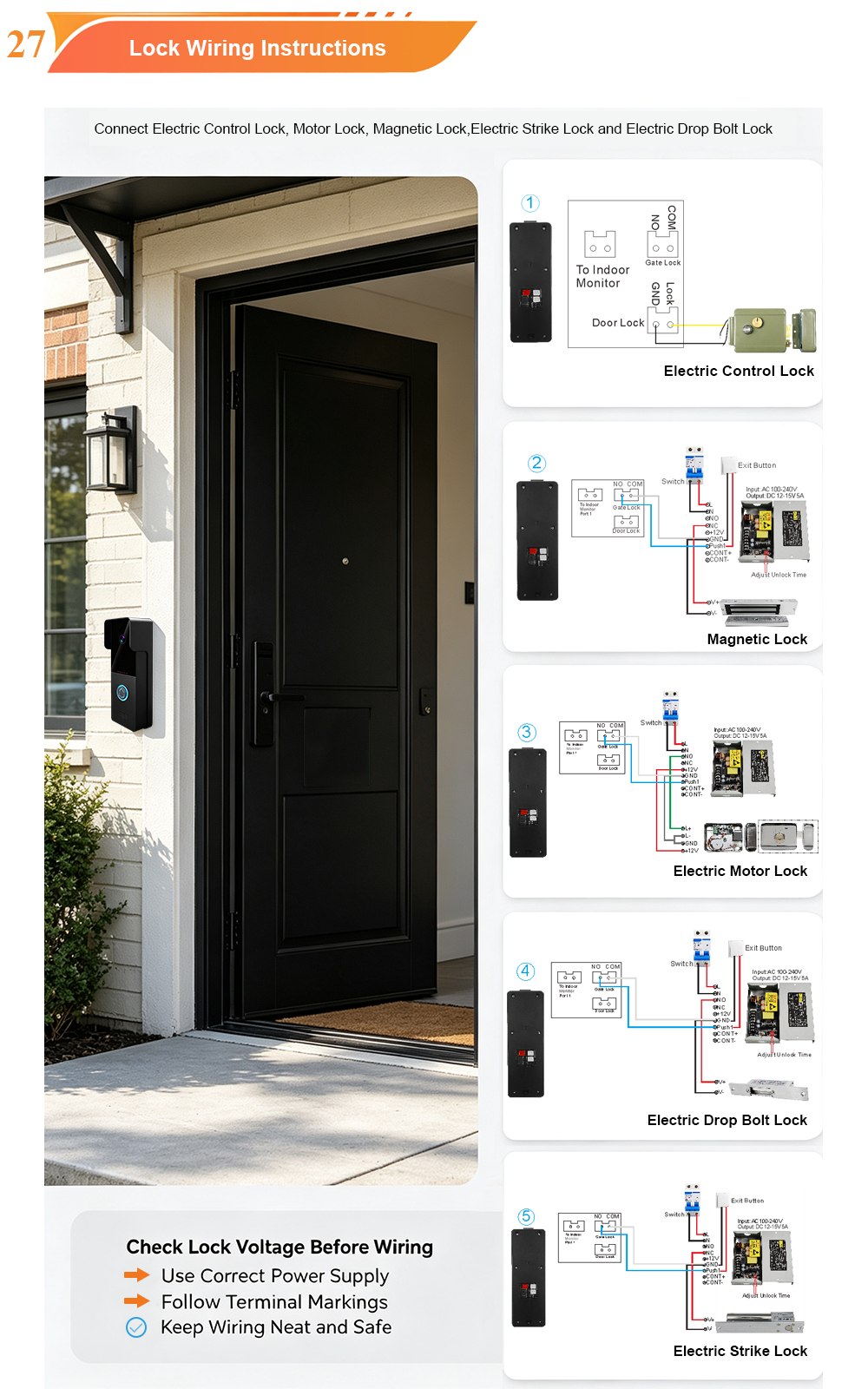
2-Wire Video Door Phone Connection with Electric Rim Lock: Unlock by Card, Indoor Monitor, and App
A complete guide to wiring an electric rim lock to a FARHD 2-wire video door phone system—and configuring three convenient unlock methods: RFID card, indoor monitor, and mobile app. Whether you are upgrading an existing building or specifying a new system, this guide covers the essentials for reliable, secure access control. Electric rim locks are…
-

Video Intercom Manufacturer & Source Factory Since 1998 | OEM ODM SKD Building Intercom
Video Intercom Manufacturer & Vertical Source Factory in China FARHD is a professional video intercom manufacturer with over 28 years of specialized experience in building security intercom systems. Established in 1998, we are a genuine building intercom factory focused on independent R&D, in-house production, and customized manufacturing for global B2B clients, including distributors, importers, engineering contractors, real estate…



