
كيفية عرض كاميرا جرس الباب على الهاتف: دليل كامل لأصحاب المنازل والأعمال
نوفمبر 27, 2025
شارك هذه المقالة

1. ما هو جرس الفيديو وكيف يعمل؟
أ كاميرا جرس الباب هو جهاز أمان ذكي يحل محل جرس الباب التقليدي أو يكمله. يتضمن كاميرا مدمجة عالية الدقة، وميكروفون، وسماعة، وغالبًا مستشعرات حركة، مما يتيح لأصحاب المنازل أو أصحاب الأعمال رؤية والاستماع والتحدث مع الزوار عند الباب — كل ذلك عبر الهواتف الذكية.
المكونات الرئيسية لجرس الباب بالفيديو:
| مكون | وظيفة |
|---|---|
| كاميرا | يلتقط فيديو حي أو مسجل لمدخل الدخول |
| ميكروفون | يلتقط الصوت من الخارج |
| مكبر الصوت | يتيح التواصل ذو الاتجاهين مع الزوار |
| مستشعر الحركة | تكتشف الحركة وتشغل التنبيهات أو التسجيلات |
| وحدة Wi-Fi | يربط كاميرا الجرس بشبكة المنزل أو العمل |
| تطبيق الهاتف المحمول | يتيح المشاهدة والإشعارات والتفاعل مباشرة على الهاتف الذكي |
كيف تعمل:
- يضغط الزائر على جرس الباب
يرسل النظام إشعار دفع إلى هاتفك عبر التطبيق. - تم اكتشاف حركة
حتى لو لم يتم الضغط على الزر، فإن مستشعرات الحركة تفعل عرضًا حيًا أو تسجيلًا. - تدفق فيديو حي
يمكنك مشاهدة تغذية فيديو في الوقت الفعلي للزائر باستخدام هاتفك. - صوت ثنائي الاتجاه
تحدث إلى الزائر عن بعد عبر هاتفك. - التخزين السحابي أو المحلي
غالبًا ما يتم حفظ الفيديوهات للمشاهدة لاحقًا، إما محليًا (بطاقة SD) أو في السحابة.
التطبيقات:
- المنازل السكنية: تعزيز الأمان والراحة
- شقق: توفير الوصول عن بعد دون الحاجة إلى التواجد الجسدي
- الشركات: مراقبة التسليمات والعملاء والموظفين عبر الوصول عن بعد
2. ميزات جرس الباب الذكي بالفيديو التي يجب البحث عنها في عام 2025
مع تطور التكنولوجيا، تقدم أجراس الفيديو الحديثة ميزات متقدمة تتجاوز مجرد الفيديو والصوت. سواء لـ أصحاب المنازل أو مشتري B2B مثل ملاك العقارات أو مديري الممتلكات أو متخصصي التكامل الأمني، فإن معرفة الميزات المهمة هي المفتاح لاختيار المنتج المناسب.
الميزات التي يجب توفرها:
| ميزة | الفائدة |
|---|---|
| عالي الدقة/دقة فيديو 4K | جودة صورة أوضح، وتعرف أفضل على الوجوه |
| الرؤية الليلية | يتيح مصابيح LED تحت الحمراء الرؤية في الظلام التام |
| كشف الحركة بالذكاء الاصطناعي | يقلل من الإشعارات الكاذبة من خلال التمييز بين الأشخاص والسيارات والحيوانات |
| التخزين السحابي والمحلي | خيارات مرنة لتسجيل وتخزين الفيديو |
| خيارات البطارية أو السلكية | مناسبة لمتطلبات التثبيت المختلفة |
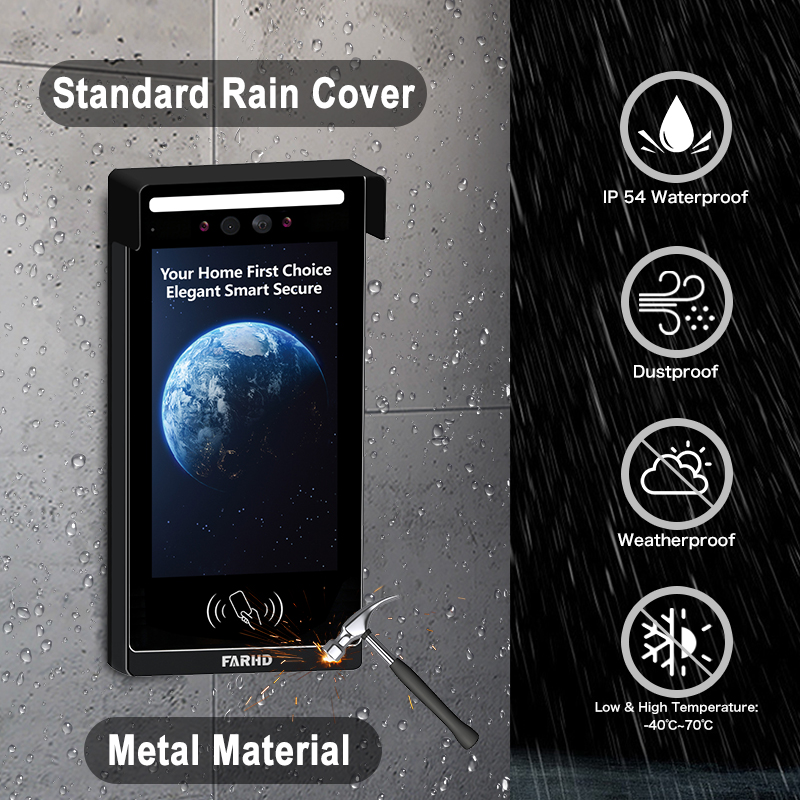
| مقاومة الطقس | أساسية للتثبيتات الخارجية |
| تكامل المنزل الذكي | يعمل مع أليكسا وجوجل هوم وأبل هوم كيت |
| وصول مستخدمين متعددين | مثالي للأعمال أو العائلات التي لديها عدة مستخدمين |
| تدفقات الفيديو المشفرة | يضمن الخصوصية ويمنع المشاهدة غير المصرح بها |
اعتبارات B2B:
- تخصيص بالجملة: لتطوير العقارات أو المباني التجارية
- خدمات OEM/ODM: يمكن للأعمال طلب وضع علامة تجارية خاصة أو تخصيص الميزات
- إدارة الوصول عن بعد: مفيد بشكل خاص لمديري العقارات المؤجرة
💡 إذا كنت تبحث عن أجراس فيديو لإعادة البيع أو التثبيتات التجارية، فكر في العمل مع مورد OEM/ODM موثوق مثل FARHD للحلول المصممة خصيصًا.
3. كيفية استخدام جرس الباب بالفيديو مع Alexa أو Google Home
دمج جرس الفيديو الخاص بك مع أمازون أليكسا أو Tuya يضيف التحكم الصوتي وأتمتة المنزل الذكي إلى نظام الأمان الخاص بك. هذا مفيد بشكل خاص لـ مدمجي المنازل الذكية و موزعي B2B الذين يسعون لتقديم أنظمة متصلة بالكامل.
قائمة التحقق من التوافق:
| توافق الجهاز | أليكسا | Tuya |
|---|---|---|
| Ring Video Doorbell | ✅ | ✅ |
| جرس الباب بالفيديو Eufy | ✅ | ✅ |
| جرس أرلو | ✅ | ✅ |
| نماذج FARHD OEM | ✅ (نماذج مختارة) | ✅ (نماذج مختارة) |
كيفية الاتصال بأليكسا:
- تثبيت تطبيق الشركة المصنعة (مثل رينج، أرلو، FARHD Smart)
- تمكين مهارة جرس الفيديو في تطبيق أليكسا
- تسجيل الدخول إلى حساب جرس الباب الخاص بك
- اكتشف الأجهزة – ستجد أليكسا جرسك
- استخدم الأوامر الصوتية:
- "يا أليكسا، أرني الباب الأمامي"
- “أليكسا، تحدثي إلى جرس الباب”
كيفية الاتصال بجوجل هوم:
- افتح تطبيق جوجل هوم
- إضافة جهاز > يعمل مع جوجل
- البحث عن علامة جرس الباب وتسجيل الدخول
- تعيين الكاميرا إلى غرفة
- استخدم الأوامر الصوتية:
- “يا جوجل، أظهري باب المدخل الأمامي”
- “يا جوجل، تحدثي إلى جرس الباب الأمامي”
الفوائد للأعمال:
- التحكم بدون استخدام اليدين في مناطق الاستقبال أو الردهات
- التحقق المرئي قبل منح الوصول لموظفي التسليم
- التكامل مع أجهزة ذكية أخرى: الأضواء والأقفال والإنذارات
🔗 تعرف على المزيد حول منتجات أجراس الفيديو الذكية من صفحة منتجات FARHD التي تقدم توافقًا مع أليكسا وجوجل هوم.

4. كيفية مشاهدة كاميرا جرس الباب على الهاتف: دليل خطوة بخطوة
مشاهدة كاميرا جرس الباب على الهاتف الذكي هي الميزة الأساسية لأي جرس ذكي. إليك دليلًا كاملاً لكل من مستخدمي المنازل ومثبتي B2B الذين يقومون بإعداد أنظمة للعملاء.
الإعداد خطوة بخطوة على الهاتف:
الخطوة 1: قم بتنزيل التطبيق
يأتي كل جرس فيديو مع تطبيقه الخاص. أمثلة:
- رينج → تطبيق رينج
- أرلو → أرلو سيكيور
- يوفي → يوفي سيكيوريتي
- FARHD → تطبيق FARHD Smart
📝 بالنسبة للنماذج المسماة باللون الأبيض أو OEM، قد يكون التطبيق مسمى باسم العمل.
الخطوة 2: إنشاء حساب
- استخدم بريدك الإلكتروني أو رقم هاتفك أو تسجيل الدخول عبر وسائل التواصل الاجتماعي
- قم بإعداد كلمة مرور آمنة
الخطوة 3: الاتصال بـ Wi-Fi
- تأكد من أن هاتفك متصل بشبكة شبكة Wi-Fi بتردد 2.4 جيجاهرتز (معظم أجراس الباب لا تدعم 5GHz)
- اتبع التعليمات داخل التطبيق لربط جرس الباب بالواي فاي
الخطوة 4: ربط الجهاز
- مسح رمز QR على جرس الباب أو إدخال الرقم التسلسلي يدويًا
- انتظر حتى يتزامن جرس الباب مع التطبيق
الخطوة 5: الوصول إلى العرض الحي
- افتح التطبيق
- اضغط على جهازك → عرض التدفق الحي
- تحدث إلى الزوار باستخدام الصوت ذو الاتجاهين
الميزات التي يمكنك التحكم فيها على هاتفك:
- 📹 البث المباشر
- 🔄 تشغيل الفيديو
- 📲 إشعارات الدفع
- 📁 تنزيلات الفيديو
- 📡 تخصيص مناطق الحركة
- 👥 مشاركة الوصول للمستخدمين
حالات الاستخدام الشائعة:
| حالة الاستخدام | الفائدة |
|---|---|
| أصحاب المنازل | انظر من هو عند الباب من أي مكان |
| الملاك | راقب تفاعلات المستأجرين أو صيانة الممتلكات |
| أصحاب الأعمال | إدارة دخول العملاء والتسليمات عن بعد |
| متخصصو التكامل الأمني (B2B) | قدم للعملاء تحكمًا مركزيًا من هواتفهم المحمولة |
🔗 هل تريد دمج الوصول عبر الهاتف المحمول في عرض الأمان الخاص بك؟ اتصل بـ دعم FARHD لخيارات التخصيص OEM/ODM ووضع علامة بيضاء للبرمجيات.
5. هل تعمل أجراس الفيديو بدون واي فاي أو إنترنت؟
بينما تحتاج معظم أجراس الفيديو الحديثة إلى شبكة Wi-Fi لتعمل بالكامل، فإن بعض النماذج تدعم وظائف غير متصلة محدودة — ميزة رئيسية لـ التوزيعات التجارية أو الريفية حيث قد يكون الإنترنت غير مستقر.
سيناريوهات مع ودون واي فاي:
| ميزة | مع تمكين الواي فاي | بدون واي فاي |
|---|---|---|
| مشاهدة الفيديو الحي | ✅ | ❌ |
| الصوت ذو الاتجاهين عن بعد | ✅ | ❌ |
| تخزين سحابي | ✅ | ❌ |
| تسجيل بطاقة SD المحلية | ✅ | ✅ (في نماذج مختارة) |
| إشعارات مستشعر الحركة | ✅ (إشعارات دفع) | ✅ (LED/بuzzer فقط) |
| إشعارات التطبيق | ✅ | ❌ |
خيارات للاستخدام غير المتصل:
- نماذج التخزين المحلي: حفظ الفيديو على بطاقة SD بدون إنترنت
- أجراس 4G LTE: استخدام الشبكات الخلوية بدلاً من الواي فاي
- الأنظمة الهجينة: دمج التسجيل غير المتصل مع النسخ الاحتياطي السحابي عند الاتصال
📦 بالنسبة للمشترين بالجملة والموزعين، FARHD تقدم أنظمة أجراس الفيديو القادرة على العمل غير المتصل مثالية للمواقع النائية. هذه النماذج تدعم تسجيل بطاقة SD ومزامنة سحابية متأخرة.
6. أفضل أجراس أبواب الفيديو للعقارات المؤجرة وأصحاب العقارات
تطرح العقارات المؤجرة تحديات فريدة: دوران عالي للمستأجرين، ومداخل مشتركة، والحاجة إلى إدارة الممتلكات عن بعد. أجراس الباب الذكية بالفيديو تحل هذه المشكلات من خلال تقديم المشاهدة عن بعد والتحكم في الوصول والوصول لعدة مستخدمين.
الميزات الضرورية للاستخدام في التأجير:
- وصول متعدد المستخدمين
- تخزين سحابي مع تسجيل دخول لعدة أجهزة
- تكامل القفل / الفتح عن بعد
- تنبيهات العبث
- إعادة تهيئة سهلة للمستأجرين الجدد
حلول FARHD المثالية للعقارات المؤجرة:
| خط المنتج | مجموعة الميزات |
|---|---|
| سلسلة فيلا ذات 4 أسلاك | مثالية للمنازل المؤجرة الفردية أو الثنائية |
| هاتف شقق IP | مصمم للمباني متعددة الوحدات مع تحكم مركزي في الوصول |
| حلول OEM مخصصة | أنظمة أجراس مسماة لمديري الممتلكات أو مطوري العقارات |
🔗 استكشف سلسلة فيلا ذات 4 أسلاك — مثالية لملاك العقارات الذين يبحثون عن حلول موثوقة وقابلة للتوسع.
فرص B2B:
- إعادة بيع أجراس الفيديو المسماة باللون الأبيض لمديري الممتلكات
- تقديم عقود التثبيت والصيانة
- استخدام خدمات OEM الخاصة بـ FARHD لبناء علامة تجارية حول أمان العقارات المؤجرة
7. أجراس الفيديو للاستخدام التجاري: المراقبة والتحكم عن بعد
تتطلب المساحات التجارية مثل المكاتب ومتاجر التجزئة والمستودعات أمانًا ومرئية محسنة. أجراس الفيديو مع قدرة مشاهدة محمولة تتيح لأصحاب الأعمال مراقبة المداخل عن بعد ومعالجة التسليمات وتأكيد الزوار.
الميزات التوجه نحو الأعمال:
- مراقبة متعددة الأجراس من تطبيق واحد
- الوصول المجدول وسجلات الزوار
- اتصال متعدد الأجهزة
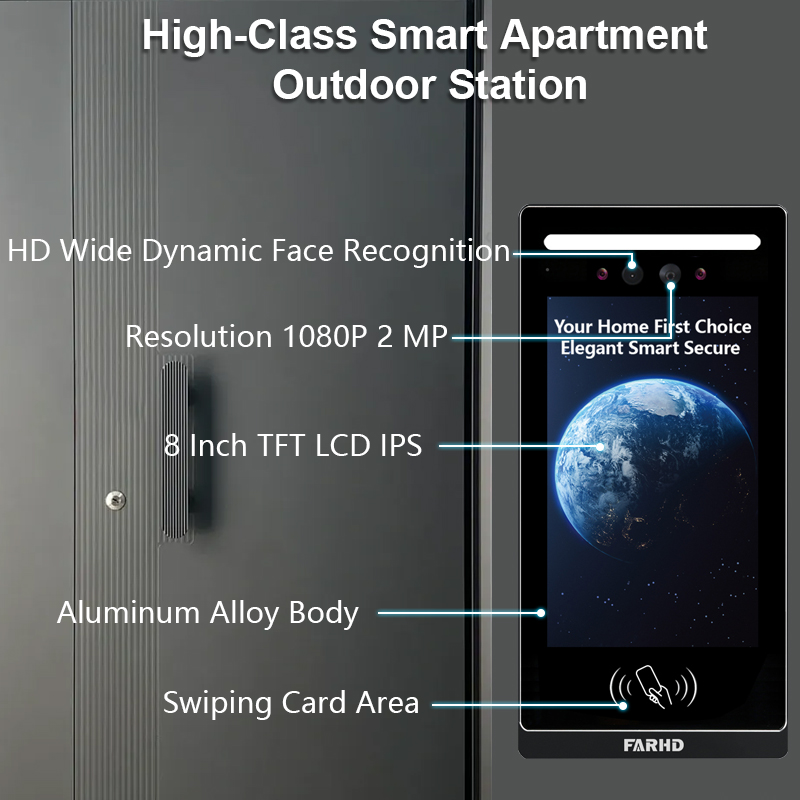
- التعرف على الوجه المدعوم بالذكاء الاصطناعي
- تواصل مشفر للخصوصية
موصى به من قبل FARHD:
- أنظمة إنتركوم قابلة للتخصيص
- أجراس فيديو ذكية OEM
- حلول أجهزة + برمجيات كاملة
تطور FARHD أنظمة أجراس تجارية مصممة للبيئات ذات الحركة العالية. مع أكثر من 60% حصة سوق في الصين وخبرة عميقة في OEM، FARHD شريك موثوق للنشر المؤسسي.
🔗 تعرف على المزيد حول ملف تعريف شركة FARHD ووجودها العالمي في سوق الإنتركوم الفيديو.
8. مورد B2B لأجراس الفيديو وخيارات التخصيص
إذا كنت تاجر جملة, موزعًا, متكامل للنظام، أو علامة تجارية ناشئة، فإن الشراكة مع مورد جرس الباب بالفيديو موثوق هي أساس نجاحك في سوق المنزل الذكي والأمان.
لماذا تختار FARHD؟
| ميزة | ميزة FARHD |
|---|---|
| التكامل الرأسي | التحكم من تصنيع LCD إلى المنتج النهائي |
| قدرات تصنيع المعدات الأصلية/تصميم المعدات الأصلية | تخصيص الأجهزة والبرمجيات وواجهة التطبيق والتغليف |
| الشهادات العالمية | ISO 9001، CE، FCC، ROHS، SGS |
| القدرة الإنتاجية | 13 خط إنتاج في مصنع 5,500㎡ |
| 13 خط إنتاج في مصنع 5,500㎡، معدات YAMAHA SMT | الوصول إلى السوق |
| خبرة البحث والتطوير | المورد الأع |
📞 هل تبحث عن إطلاق علامتك التجارية الخاصة بجرس الباب الفيديو؟ اتصل بـ FARHD لمناقشة أسعار الشراء بالجملة، والتسمية الخاصة، والحلول الخاصة بالسوق.
9. الأسئلة الشائعة: مشاهدة أجراس الباب الفيديو على الأجهزة المحمولة
س1: هل يمكنني مشاهدة كاميرا جرس الباب على أكثر من هاتف واحد؟
نعم، تسمح معظم التطبيقات لمستخدمين أو أجهزة متعددة بالوصول إلى تغذية جرس الباب نفسها.
س2: هل أحتاج إلى اشتراك لمشاهدة جرس الباب على هاتفي؟
لا. المشاهدة المباشرة عادةً مجانية. ومع ذلك، قد يتطلب تخزين السحابة والميزات المتقدمة اشتراكًا.
س3: ما هي سرعة الإنترنت التي أحتاجها للبث السلس للفيديو؟
يُوصى بسرعة تحميل لا تقل عن 2 ميغابت في الثانية للبث عالي الدقة.
س4: هل يمكنني تلقي تنبيهات عندما لا أكون في المنزل؟
نعم، يتم إرسال إشعارات الدفع إلى هاتفك بغض النظر عن موقعك، طالما أنك متصل بالإنترنت.
س5: هل يمكنني مشاهدة فيديو جرس الباب من الخارج؟
بالتأكيد. طالما أن جرس الباب متصل بالإنترنت ويتوفر لدى هاتفك الوصول، يمكنك مشاهدته من أي مكان.
مع النظام المناسب في مكانه، مشاهدة كاميرا جرس الباب على الهاتف ليست مجرد ممكنة — بل آمنة ومريحة وموثوقة. سواء كنت مالك منزل أو مالك عقار أو مشتري أعمال، فإن اختيار حل موثوق مثل FARHD يضمن الرضا طويل الأمد والدعم.
قد يثير اهتمامك أيضًا
-

FARHD to Showcase All-Climate Technology at 2026 China Security Expo, Empowering Smart Communities in Northern China
From November 3 to 6, 2026, FARHD, a global leader in smart security and communication solutions, will unveil its full range of products deeply optimized for the harsh winter conditions of northern China at the 18th China International Social Public Security Products Expo (Security China). Under the theme “Digital Intelligence World, Total Security,” the expo…
-

FARHD to Showcase All-Climate Hard-Tech Solutions at Securika Moscow 2026
From April 22 to 24, 2026, FARHD, a global leader in smart security and communication solutions, will unveil its full range of products engineered for extreme climates at Securika Moscow 2026, held at Crocus Expo in Moscow, Russia. At booth A-9101, FARHD will present its smart intercom, access control, and smart home solutions—all deeply optimized…
-

FARHD Honored with Multiple Prestigious Awards in China’s Building Intercom Industry, 28 Years of Deep Engagement in the Chinese Market Solidifying Its Position as a Leading Brand
Recently, in the annual selection event jointly organized by the China Security and Protection Industry Association and multiple authoritative media outlets, FARHD, by virtue of its profound industry experience, outstanding technological innovation capabilities, and extensive market recognition, was awarded the prestigious “Most Influential Brand in China’s Building Intercom Industry” . These accolades not only affirm FARHD’s 28…
-

FARHD Honored with Multiple Prestigious Awards in China’s Building Intercom Industry, 28 Years of Deep Engagement in the Chinese Market Solidifying Its Position as a Leading Brand
Recently, in the annual selection event jointly organized by the China Security and Protection Industry Association and multiple authoritative media outlets, FARHD, by virtue of its profound industry experience, outstanding technological innovation capabilities, and extensive market recognition, was awarded the prestigious “National Top 10 Quality Brands in the Security Industry” . These accolades not only affirm FARHD’s…



