
So rufen Sie die Türklingel-Kamera auf dem Smartphone ab: Vollständige Anleitung für Hausbesitzer und Unternehmen
27. November 2025
Diesen Artikel teilen

1. Was ist eine Video-Türklingel und wie funktioniert sie?
A Video-Türklingel ist ein smarte Sicherheitsgerät, das Ihre herkömmliche Türklingel ersetzt oder ergänzt. Es umfasst eine integrierte hochauflösende Kamera, ein Mikrofon, einen Lautsprecher und oft Bewegungssensoren, sodass Hausbesitzer oder Unternehmer Besucher an der Tür sehen, hören und ansprechen können – alles über ihr Smartphone.
Die wichtigsten Komponenten einer Videotürklingel:
| Komponente | Funktion |
|---|---|
| Kamera | Erfasst Live- oder aufgezeichnete Videos des Eingangsbereichs |
| Mikrofon | Nimmt Audio von außen auf |
| Lautsprecher | Ermöglicht Zwei-Wege-Kommunikation mit Besuchern |
| Bewegungsmelder | Erkennt Bewegungen und löst Warnungen oder Aufzeichnungen aus |
| Wi-Fi-Modul | Verbinde die Türklingel-Kamera mit Ihrem Heim- oder Geschäftsnetzwerk |
| Mobile App | Ermöglicht direkte Ansicht, Alarme und Interaktion auf dem Smartphone |
Wie es funktioniert:
- Besucher drückt die Türklingel
Das System sendet eine Push-Benachrichtigung auf Ihr Telefon über eine App. - Bewegung erkannt
Selbst ohne Klingeln lösen Bewegungssensoren eine Live-Ansicht oder Aufzeichnung aus. - Live-Video-Stream
Sie können den Echtzeit-Video-Feed des Besuchers auf Ihrem Telefon ansehen. - Zwei-Wege-Audio
Sprechen Sie remote mit dem Besucher über Ihr Telefon. - Cloud- oder lokaler Speicher
Videos werden oft lokal (SD-Karte) oder in der Cloud für spätere Ansicht gespeichert.
Anwendungen:
- Wohnhäuser: Erhöht Sicherheit und Komfort
- Wohnungen: Ermöglicht Fernzugriff ohne physische Anwesenheit
- Unternehmen: Überwachen von Lieferungen, Kunden und Mitarbeitern per Fernzugriff
2. Intelligente Video-Türklingel-Funktionen, auf die Sie 2025 achten sollten
Mit fortschreitender Technologie bieten moderne Video-Türklingeln erweiterte Funktionen weit über Video und Audio hinaus. Ob für Privatnutzer als auch oder B2B-Käufer Unternehmen wie Vermieter, Hausverwalter oder Sicherheitssystem-Integratoren – das Wissen um relevante Funktionen ist entscheidend für die richtige Produktauswahl.
Unverzichtbare Funktionen:
| Merkmal | Nutzen Sie |
|---|---|
| Lokal/4K-Videoauflösung | Klarere Bildqualität, bessere Gesichtserkennung |
| Nachtsicht | Infrarot-LEDs für Sichtbarkeit bei Vollfinsternis |
| AI-Bewegungserkennung | Reduziert Fehlalarme durch Unterscheidung von Personen, Fahrzeugen und Tieren |
| Cloud- & lokaler Speicher | Flexible Optionen für Aufzeichnung und Speicherung von Videos |
| Batterie- oder kabelgebundene Optionen | Geeignet für unterschiedliche Installationsanforderungen |
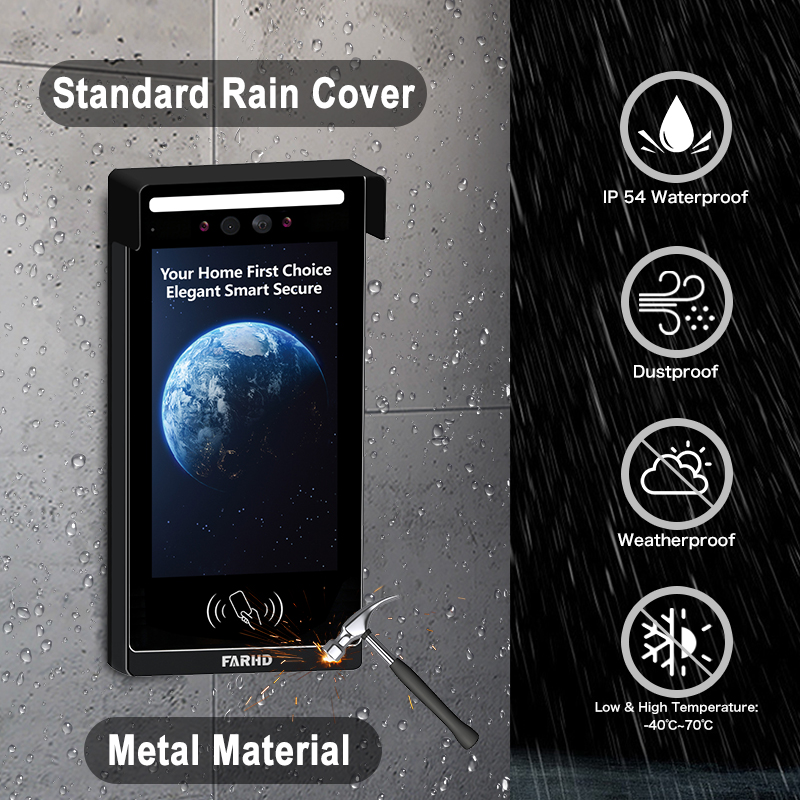
| Wetterbeständigkeit | Essentiell für Außeneinsätze |
| Smart Home-Integration | Kompatibel mit Alexa, Google Home, Apple HomeKit |
| Mehrfachzugriff für Benutzer | Ideal für Unternehmen oder Familien mit mehreren Nutzern |
| Verschlüsselte Videostreams | Gewährleistet Datenschutz und verhindert unbefugten Zugriff |
B2B-Aspekte:
- Großabnahmen-Anpassung: Für Immobilienentwicklungen oder Gewerbegebäude
- 6. Vergleich der Top-Video-Türsprechanlagenmarken: Ring vs. Eufy vs. SKYNEX: Unternehmen können Private-Labeling oder Funktionsanpassungen anfordern
- Verwaltung des Fernzugriffs: Besonders nützlich für Verwalter von Mietimmobilien
💡 Wenn Sie Videotürklingeln für den Weiterverkauf oder gewerbliche Installationen beschaffen, sollten Sie in Erwägung ziehen, mit einem vertrauenswürdigen OEM/ODM-Lieferanten zusammenzuarbeiten wie FARHD für maßgeschneiderte Lösungen.
3. So verwenden Sie eine Video-Türklingel mit Alexa oder Google Home
Die Integration Ihrer Videotürklingel mit Amazon Alexa oder Google Home fügt Sprachsteuerung und Smart-Home-Automatisierung zu Ihrem Sicherheitssystem hinzu. Dies ist besonders nützlich für Bauherren und 4. Beste Tuya-kompatible Video-Türklingeln für den Heim- und Wohnungsgebrauch Unternehmen, die vollständig vernetzte Ökosysteme anbieten möchten.
Kompatibilitäts-Checkliste:
| Gerätekompatibilität | Alexa | Google Home |
|---|---|---|
| Ring Video-Türklingel | ✅ | ✅ |
| Eufy Video-Türklingel | ✅ | ✅ |
| Arlo Türklingel | ✅ | ✅ |
| FARHD OEM-Modelle | ✅ (ausgewählte Modelle) | ✅ (ausgewählte Modelle) |
So verbinden Sie sich mit Alexa:
- Installieren Sie die App des Herstellers (z. B. Ring, Arlo, FARHD Smart)
- Aktivieren Sie die Videotürklingel-Skill in der Alexa-App
- Melden Sie sich in Ihrem Türklingel-Konto an
- Geräte entdecken – Alexa findet Ihre Türklingel
- Verwenden Sie Sprachbefehle:
- "Alexa, zeig mir die Eingangstür"
- „Alexa, sprich mit der Türklingel“
So verbinden Sie sich mit Google Home:
- Öffnen Sie die Google Home App
- Gerät hinzufügen > Funktioniert mit Google
- Nach Türklingel-Marke suchen und anmelden
- Kamera einem Raum zuweisen
- Verwenden Sie Sprachbefehle:
- „Hey Google, zeige die Haustür“
- „Hey Google, sprich mit der vorderen Türklingel“
Vorteile für Unternehmen:
- Freihändige Steuerung in Empfangsbereichen oder Lobbys
- Visuelle Verifizierung bevor Zugang für Lieferpersonal gewährt wird
- Integration mit anderen Smart-Geräten: Lichter, Schlösser und Alarme
🔗 Erfahren Sie mehr über smarte Videotürklingel-Produkte von FARHD’s Produktseite die Kompatibilität mit Alexa und Google Home bieten.

4. So rufen Sie die Türklingel-Kamera auf dem Telefon ab: Schritt-für-Schritt-Anleitung
Das Anzeigen Ihrer Türklingel-Kamera auf einem Smartphone ist die Kernfunktion jeder smarten Türklingel. Hier ist eine vollständige Anleitung für private Nutzer und B2B-Installateure, die Systeme für Kunden einrichten.
Schritt-für-Schritt-Einrichtung auf dem Telefon:
Schritt 1: Laden Sie die App herunter
Jede Videotürklingel kommt mit einer eigenen App. Beispiele:
- Ring → Ring-App
- Arlo → Arlo Secure
- Eufy → Eufy Security
- FARHD → FARHD Smart App
📝 Bei White-Label- oder OEM-Modellen kann die App unter dem Firmennamen gebrandet sein.
Schritt 2: Konto erstellen
- Mit E-Mail, Telefonnummer oder Social-Media-Login
- Ein sicheres Passwort festlegen
Stellen Sie sicher, dass Ihr Telefon mit einem
- Stellen Sie sicher, dass Ihr Telefon mit einem 2,4 GHz Wi-Fi Netzwerk verbunden ist (die meisten Türklingeln unterstützen kein 5 GHz)
- Folgen Sie den In-App-Anweisungen, um die Türklingel mit dem WLAN zu verbinden
Schritt 4: Gerät koppeln
- Scannen Sie einen QR-Code auf der Türklingel oder geben Sie die Seriennummer manuell ein
- Warten Sie, bis die Türklingel mit der App synchronisiert ist
Schritt 5: Live-Ansicht aufrufen
- Öffnen Sie die App
- Tippen Sie auf Ihr Gerät → Live-Stream anzeigen
- Sprechen Sie mit Besuchern über Zwei-Wege-Audio
Funktionen, die Sie vom Telefon aus steuern können:
- 📹 Live-Streaming
- 🔄 Video-Wiedergabe
- 📲 Push-Benachrichtigungen
- 📁 Videodownloads
- 📡 Anpassung von Bewegungs-Zonen
- 👥 Freigabe von Benutzerzugriff
Häufige Anwendungsfälle:
| Anwendungsfall | Nutzen Sie |
|---|---|
| Hauseigentümer | Sehen Sie von überall, wer vor der Tür steht |
| Vermieter | Überwachen Sie Mieterinteraktionen oder Instandhaltungsarbeiten an der Immobilie |
| Unternehmer | Kundenentry und Lieferungen aus der Ferne verwalten |
| Sicherheitsintegratoren (B2B) | Klienten zentrale Steuerung über ihre Mobiltelefone bieten |
🔗 Möchten Sie Mobiltelefonzugriff in Ihr Sicherheitssortiment integrieren? Kontaktieren Sie FARHD Support für OEM/ODM-Anpassungen und Software-White-Label-Optionen.
5. Funktioniert eine Videotürklingel ohne WLAN oder Internet?
Während die meisten modernen Videotürklingeln Wi-Fi für volle Funktionalität benötigen, bieten einige Modelle begrenzte Offline-Funktionen – eine Schlüsselmerkmal für gewerbliche oder ländliche Einsätze mit instabiler Internetverbindung.
Szenarien mit und ohne WLAN:
| Merkmal | Mit WLAN aktiviert | Ohne WLAN |
|---|---|---|
| Live-Videoanzeige | ✅ | ✅ Vollständiges OEM/ODM |
| Fern-Zwei-Wege-Audio | ✅ | ✅ Vollständiges OEM/ODM |
| Cloud-Speicher | ✅ | ✅ Vollständiges OEM/ODM |
| Lokale SD-Kartenaufzeichnung | ✅ | ✅ (bei ausgewählten Modellen) |
| Bewegungssensor-Alarme | ✅ (Push-Benachrichtigungen) | ✅ (nur LED/Summer) |
| App-Benachrichtigungen | ✅ | ✅ Vollständiges OEM/ODM |
Optionen für Offline-Nutzung:
- Modelle mit lokaler Speicherung: Video auf SD-Karte ohne Internet speichern
- 4G-LTE-Türklingeln: Mobilfunknetze statt WLAN nutzen
- Hybridsysteme: Offline-Aufzeichnung mit Cloud-Backup bei Verbindung kombinieren
📦 Für Großabnehmer und Distributoren FARHD Auf jeden Fall. Wenn Sie ein Distributor oder Wiederverkäufer sind, offline-fähige Videotürklingel-Systeme ideal für abgelegene Standorte. Diese Modelle unterstützen SD-Karten-Aufzeichnung und verzögerten Cloud-Sync.
6. Beste Video-Türklingeln für Mietobjekte und Vermieter
Mietimmobilien stellen einzigartige Herausforderungen dar: hoher Mieterwechsel, gemeinsame Eingänge und Bedarf an Fernverwaltung. Smarte Video-Türklingeln lösen diese Probleme durch Fernansicht, Zugangskontrolle und Mehrbenutzerzugriff.
Unverzichtbare Funktionen für Mietnutzung:
- Mehrbenutzerzugriff
- Cloud-Speicher mit Mehrgeräte-Login
- Integration zum Fernver- und -entriegeln
- Manipulationswarnungen
- Einfache Umkonfiguration für neue Mieter
Ideale FARHD-Lösungen für Mietimmobilien:
| Produktlinie | Funktionsumfang |
|---|---|
| im Jahr 2025, basierend auf Funktionen, Skalierbarkeit, Zuverlässigkeit und Eignung für den B2B- oder B2C-Einsatz. Diese Systeme sind ideal für Distributoren, Großhändler, Systemintegratoren und Immobilienverwalter. | Ideal für einzelne Mietwohnungen oder Doppelhaushälften |
| IP-Wohnungs-Intercom | Entwickelt für Mehrfamilienhäuser mit zentraler Zugangskontrolle |
| OEM-Custom-Lösungen | Gebrandete Türklingel-Systeme für Immobilienverwalter oder Bauträger |
🔗 Entdecken Sie FARHD im Jahr 2025, basierend auf Funktionen, Skalierbarkeit, Zuverlässigkeit und Eignung für den B2B- oder B2C-Einsatz. Diese Systeme sind ideal für Distributoren, Großhändler, Systemintegratoren und Immobilienverwalter. – perfekt für Vermieter, die zuverlässige, skalierbare Lösungen suchen.
B2B-Möglichkeiten:
- White-Label-Videotürklingeln an Immobilienverwalter weiterverkaufen
- Installations- und Wartungsverträge anbieten
- FARHDs OEM-Dienste nutzen, um eine Marke rund um Mietimmobilien-Sicherheit aufzubauen
7. Videotürklingeln für den Gewerbeeinsatz: Fernüberwachung und -steuerung
Gewerberäume wie Büros, Einzelhandelsgeschäfte und Lagerhäuser erfordern eine erhöhte Sicherheit und bessere Sichtbarkeit. Videotürklingeln mit mobiler Ansichtsmöglichkeit ermöglichen es Unternehmern, Eingänge aus der Ferne zu überwachen, Lieferungen zu organisieren und Besucher zu überprüfen.
Geschäftliche Funktionen:
- Überwachung mehrerer Türklingeln über eine App
- Geplante Zugänge und Besucherprotokolle
- Integration mit Smart-Schloss
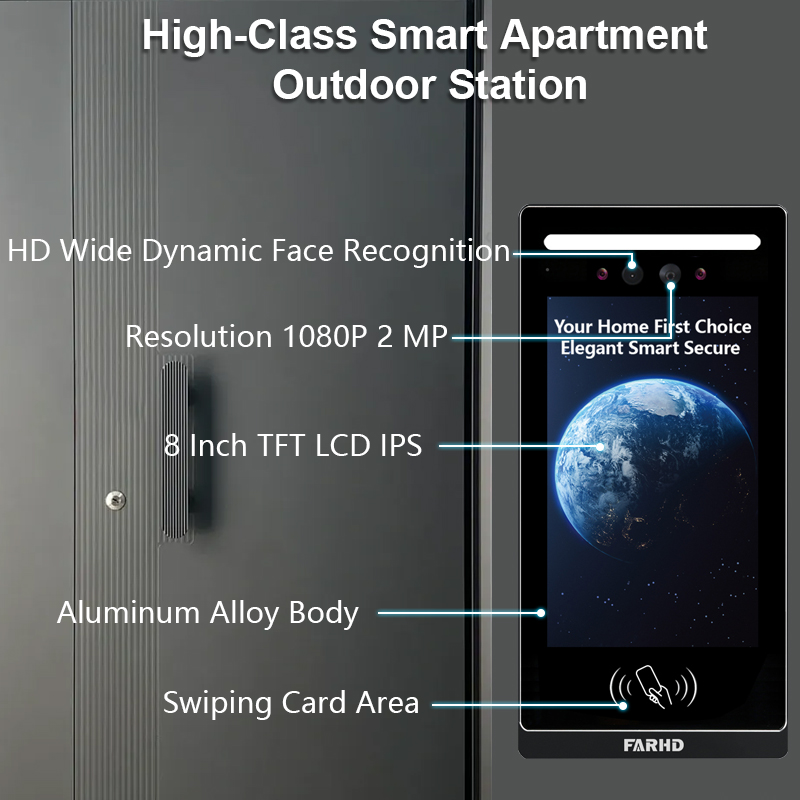
- KI-gestützte Gesichtserkennung
- Verschlüsselte Kommunikation zum Schutz der Privatsphäre
Empfohlen von FARHD:
- Anpassbare Gegensprechanlagen
- OEM-Smarte Videotürklingeln
- Komplettlösungen aus Hardware + Software
FARHD entwickelt geschäftstaugliche Türklingelsysteme maßgeschneidert für stark frequentierte Umgebungen. Mit über 60 % Marktanteil in China und fundierter OEM-Erfahrung ist FARHD ein verlässlicher Partner für Unternehmenseinsätze.
🔗 Erfahren Sie mehr über Unternehmensprofil von FARHD und ihrer globalen Präsenz im Videogegensprechmarkt.
8. Videotürklingel B2B-Lieferant und Anpassungsoptionen
: Gewährleistet Qualität, Anpassung und kurze Vorlaufzeiten. Großhändler, Händler, Systemintegrator, oder Startup-Marke, die Zusammenarbeit mit einem zuverlässigen F5: Kann ich Video-Türklingeln in großen Mengen für ein Seniorenheim bestellen? Partner ist essenziell für Ihren Erfolg im Smart-Home- und Sicherheitsmarkt.
Warum FARHD wählen?
| Merkmal | FARHD-Vorteil |
|---|---|
| Vertikale Integration | Kontrolle von der LCD-Fertigung bis zum Endprodukt |
| OEM/ODM-Fähigkeiten | Anpassung von Hardware, Software, App-Oberfläche und Verpackung |
| Globale Zertifizierungen | ISO 9001, CE, FCC, ROHS, SGS |
| Produktionskapazität | 13 Produktionslinien in 5.500 m² Fabrik, YAMAHA SMT-Ausrüstung |
| Marktabdeckung | Führender Lieferant in China, Italien, der Türkei und Korea |
| F&E-Expertise | Engagiertes Team für KI-, IoT- und Konnektivitätsinnovationen |
📞 Möchten Sie Ihre eigene Videotürklingel-Marke launchen? FARHD kontaktieren Kontaktieren Sie uns, um über Mengenrabatte, Private Labeling und marktspezifische Lösungen zu sprechen.
9. FAQ: Videotürklingeln auf Mobilgeräten ansehen
F1: Kann ich meine Türklingel-Kamera auf mehreren Smartphones ansehen?
Ja, die meisten Apps erlauben mehreren Nutzern oder Geräten den Zugriff auf denselben Videostream.
F2: Brauche ich ein Abonnement, um meine Türklingel auf dem Handy anzusehen?
Nein. Die Live-Ansicht ist in der Regel kostenlos. Cloud-Speicher und erweiterte Funktionen erfordern jedoch möglicherweise ein Abonnement.
F3: Welche Internetgeschwindigkeit brauche ich für flüssiges Videostreaming?
Mindestens 2 Mbps Upload-Geschwindigkeit werden für HD-Streaming empfohlen.
F4: Kann ich Benachrichtigungen erhalten, wenn ich nicht zu Hause bin?
Ja, Push-Benachrichtigungen werden unabhängig vom Standort an Ihr Smartphone gesendet, solange eine Internetverbindung besteht.
F5: Kann ich das Video meiner Türklingel aus dem Ausland ansehen?
Absolut. Solange Ihre Türklingel mit dem Internet verbunden ist und Ihr Smartphone Zugriff hat, können Sie es von überall aus ansehen.
Mit dem richtigen System vor Ort lässt sich die Türklingel-Kamera über ein Smartphone nicht nur ansehen – es ist sicher, bequem und zuverlässig. Egal, ob Sie Hausbesitzer, Vermieter oder Geschäftskunde sind: Eine vertrauenswürdige Lösung wie FARHD gewährleistet langfristige Zufriedenheit und Unterstützung.
Das könnte Sie auch interessieren
-

FARHD to Showcase All-Climate Technology at 2026 China Security Expo, Empowering Smart Communities in Northern China
From November 3 to 6, 2026, FARHD, a global leader in smart security and communication solutions, will unveil its full range of products deeply optimized for the harsh winter conditions of northern China at the 18th China International Social Public Security Products Expo (Security China). Under the theme “Digital Intelligence World, Total Security,” the expo…
-

FARHD to Showcase All-Climate Hard-Tech Solutions at Securika Moscow 2026
From April 22 to 24, 2026, FARHD, a global leader in smart security and communication solutions, will unveil its full range of products engineered for extreme climates at Securika Moscow 2026, held at Crocus Expo in Moscow, Russia. At booth A-9101, FARHD will present its smart intercom, access control, and smart home solutions—all deeply optimized…
-

FARHD Honored with Multiple Prestigious Awards in China’s Building Intercom Industry, 28 Years of Deep Engagement in the Chinese Market Solidifying Its Position as a Leading Brand
Recently, in the annual selection event jointly organized by the China Security and Protection Industry Association and multiple authoritative media outlets, FARHD, by virtue of its profound industry experience, outstanding technological innovation capabilities, and extensive market recognition, was awarded the prestigious “Most Influential Brand in China’s Building Intercom Industry” . These accolades not only affirm FARHD’s 28…
-

FARHD Honored with Multiple Prestigious Awards in China’s Building Intercom Industry, 28 Years of Deep Engagement in the Chinese Market Solidifying Its Position as a Leading Brand
Recently, in the annual selection event jointly organized by the China Security and Protection Industry Association and multiple authoritative media outlets, FARHD, by virtue of its profound industry experience, outstanding technological innovation capabilities, and extensive market recognition, was awarded the prestigious “National Top 10 Quality Brands in the Security Industry” . These accolades not only affirm FARHD’s…



