
Wie nutze ich eine Tuya Video-Türklingel für Smart-Home-Sicherheit und B2B-Integration
12. November 2025
Diesen Artikel teilen

1. Was ist eine Tuya-Video-Türklingel und wie funktioniert sie?
Einführung in Tuya-Video-Türklingeln
A Tuya-Video-Türklingel ist ein Smart-Home-Sicherheitsgerät, das mit der IoT-Plattform von Tuya integriert ist. Tuya bietet eine universelle Lösung für smarte Geräte, die Herstellern ermöglicht, ihre Produkte mit der Cloud, Apps und KI-gestützten Diensten zu verbinden. Tuya-kompatible Türklingeln ermöglichen Nutzern:
- Echtzeitüberwachung der Aktivität vor der Haustür
- Kommunizieren über Zweirichtungsaudio
- Empfangen von Benachrichtigungen durch Bewegungserkennung
- Aufzeichnungen in der Cloud oder auf lokalen SD-Karten speichern
- Integration in Smart-Home-Ökosysteme wie Alexa, Google Homeund IFTTT
So funktionieren Tuya-Video-Türklingeln
| Komponente | Funktionalität |
|---|---|
| Lokal Kamera | Erfassen von Live-Video und Aufnahmen |
| Bewegungsmelder | Erkennen von Bewegungen und Senden von Benachrichtigungen |
| Mikrofon & Verstärker; Lautsprecher | Ermöglicht Zwei-Wege-Kommunikation |
| WiFi-Modul | Verbinden der Türklingel mit der Tuya-Smart-App und der Cloud |
| Stromversorgung | Akkubetriebene oder festverdrahtete Optionen verfügbar |
| Speicheroptionen | Cloud über Tuya oder lokaler Speicher über microSD |
Hauptvorteile:
- Nahtlose Integration in das Tuya-Smart-Ökosystem
- Fernzugriff und Echtzeit-Benachrichtigungen
- Preiswert und skalierbar für B2B-Anwendungen mit mehreren Immobilien
Wer nutzt Tuya-Video-Türklingeln?
- Hauseigentümer auf der Suche nach smarter Sicherheit
- Immobilienverwalter für Mehrfamilienhäuser
- B2B-Käufer wie Distributoren, Großhändlerund OEM-Marken auf der Suche nach White-Label-Lösungen
Tuya-Türklingeln sind nicht nur für Verbraucher gedacht. Ihre Kompatibilität mit einer breiten Palette von OEM/ODM-Hersteller macht sie zur idealen Wahl für Großhandelskäufer und Anbieter von Sicherheitslösungen.
2. So richten Sie eine Tuya-Video-Türklingel ein: Schritt-für-Schritt-Installationsanleitung
Vorinstallations-Checkliste
Vor der Installation einer Tuya-Video-Türklingel sollten Sie Folgendes sicherstellen:
- Stabile WLAN-Verbindung (2,4 GHz) – Tuya-Geräte unterstützen kein 5 GHz
- Tuya Smart App heruntergeladen auf Ihrem Smartphone
- Stromquelle (Akkuladung oder Verkabelung vorbereitet)
- Montagewerkzeuge (Schrauben, Dübel, Schraubendreher)
Installationsschritte
Schritt 1: Akkuladen oder Strom anschließen
- Bei Akkubetrieb die Batterie vollständig über USB-Kabel laden
- Bei festverdrahtetem Betrieb das Gerät an die vorhandene Türklingelverkabelung anschließen (12–24 V AC)
Schritt 2: Türklingel montieren
- Wählen Sie eine Position in Augenhöhe nahe der Tür (~1,2–1,5 m)
- Montagehalterung mit Schrauben befestigen
- Video-Türklingel auf die Halterung einrasten
Schritt 3: Mit WLAN verbinden
- Öffnen Sie die Alle Interaktionen können auch aus der Ferne über die
- App und tippen Sie auf „Gerät hinzufügen“ → „Videoüberwachung“ → „Smart-Türklingel“
- Folgen Sie den Anweisungen in der App und scannen Sie den auf dem Smartphone angezeigten QR-Code mit der Kamera der Türklingel
Schritt 4: Abschließende Einrichtung
- Überprüfen Sie, ob Audio- und Videofeed funktionieren
- Bewegungserkennungsempfindlichkeit einstellen
- Push-Benachrichtigungseinstellungen konfigurieren
Tipps zur Installation
| Tipp | Beschreibung |
|---|---|
| Winkel-Montage verwenden | Erweitert das Sichtfeld für Eckinstallationen |
| Sicherer WLAN-Empfang | Router innerhalb von 10–15 m zur Türklingel platzieren |
| Verschlüsselung aktivieren | Tuya-Verschlüsselungsdienste in der Cloud für sichere Daten nutzen |
| Gerät benennen | Besonders nützlich für Immobilien mit mehreren Einheiten |
3. So verbinden Sie eine Tuya-Video-Türklingel mit der Tuya-Smart-App
Das Verbinden Ihrer Tuya-Video-Türklingel mit der Alle Interaktionen können auch aus der Ferne über die App entfaltet ihr volles Potenzial, einschließlich Fernzugriff, Cloud-Speicher und Smart-Home-Integration.
App-Download und Kontoeinrichtung
- Laden Sie die Tuya Smart oder Kluges Leben App aus dem App Store oder Google Play herunter.
- Erstellen Sie ein Konto und melden Sie sich an.
- Aktivieren Sie Standortdienste und Bluetooth auf Ihrem Gerät für einfacheres Pairing.
Türklingel koppeln
- Öffnen Sie die App und tippen Sie auf „+“, um ein neues Gerät hinzuzufügen.
- Wählen Sie Videoüberwachung → Smart-Türklingel (WLAN).
- Stellen Sie sicher, dass die Türklingel im Kopplungsmodus ist (meist blinkend blau).
- Geben Sie Ihre 2,4-GHz-WLAN-Zugangsdaten ein.
- Scannen Sie den in der App angezeigten QR-Code mit der Türklingel-Kamera.
- Warten Sie auf die Verbindung (dauert 30–60 Sekunden).
Geräteeinstellungen anpassen
Nach der Verbindung können Sie einstellen:
- Erkennungszonen und -empfindlichkeit für Bewegungen
- Benachrichtigungspläne (z. B. nur nachts alarmieren)
- Einstellungen für Zweirichtungsaudio
- Aufnahmepräferenzen für Video (Cloud oder SD-Karte)
Cloud-Speicher-Integration
Tuya bietet optionale Cloud-Pläne:
| Speicherplan | Funktionen | Ideal für |
|---|---|---|
| Basis | 7-Tage-Ereignisverlauf, Bewegungsaufnahmen | Einfamilienhäuser und kleine Wohnungen |
| Standard | 14-Tage-Verlauf, kontinuierliche Videoaufnahmen | Große Häuser, kleine Büros |
| Premium | 30-Tage-Verlauf, Unterstützung mehrerer Kameras | Mehrfamilienhäuser, B2B |
Hinweis: Lokaler SD-Kartenspeicher wird ebenfalls für Offline-Backups unterstützt.
Vorteile für B2B-Einkäufer
- Mehrere Geräte von einem Konto aus verwalten
- Unterschiedliche Benutzer und Berechtigungen zuweisen
- Aktivieren Multi-Immobilien-Dashboard-Ansichten
- Option zur White-Label- Anpassung der App mit Ihrem Firmenbranding über OEM-Partnerschaften
Für Unternehmen, die Tuya-kompatible Video-Türklingeln beziehen möchten, FARHD bietet Full-Stack-Design, OEM/ODM und App-Integrationsdienste für smarte Türklingelsysteme.
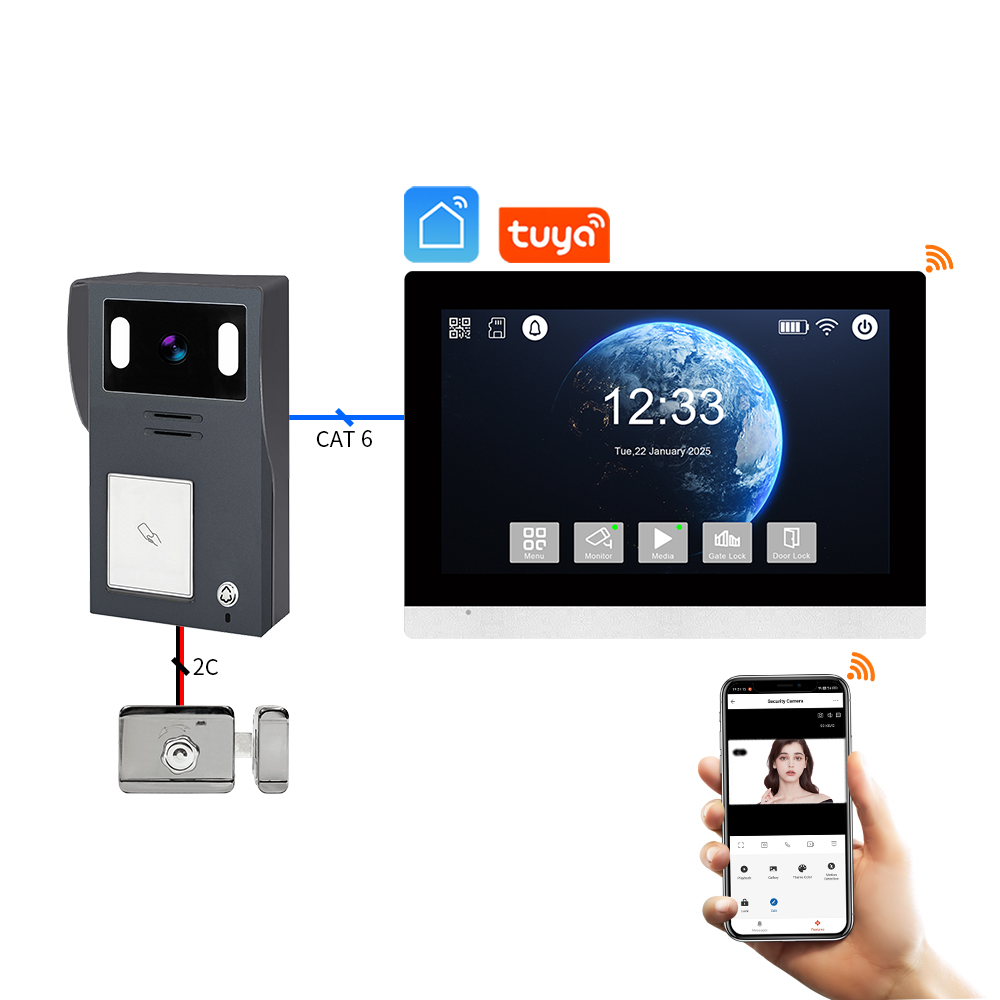
4. So nutzen Sie eine Tuya-Video-Türklingel mit Alexa oder Google Home
Die Integration Ihrer Tuya-Video-Türklingel mit Alexa oder Google Home ermöglicht Sprachbefehle, smarte Routinen und Live-Video-Streaming auf kompatiblen Geräten. Dies ist besonders nützlich für Hausbesitzer und B2B-Käufer bei der Verwaltung mehrerer smarter Immobilien oder der Bereitstellung von Mehrwertdiensten für Mieter und Kunden.
Integration mit Amazon Alexa
Kompatible Geräte:
- Bündelungsoptionen mit intelligenten Lautsprechern oder Panels.
- Echo Spot
- Fire TV
Einrichtungsschritte:
- Öffnen Sie die Alexa-App.
- Gehen Sie zu Skills & Games → Suchen Sie nach „Tuya Smart“ oder „Smart Life“.
- Aktivieren Sie die Skill und verknüpfen Sie Ihr Tuya-Konto.
- Entdecken Sie Geräte; Ihre Türklingel sollte automatisch erscheinen.
- Weisen Sie sie einer Gruppe oder einem Raum zu (z. B. „Haustür“).
Sprachbefehle:
- auf Amazon Alexa oder verknüpfen Sie die Tuya Smart App auf Google Home.
- „Alexa, ist jemand an der Tür?“
- „Alexa, antworte der Türklingel.“
Integration mit Google Home
Kompatible Geräte:
- Vorkonfigurationsdienste für einfachere Installationen.
- Chromecast-fähige Fernseher
- Android-Smartphones mit Assistant
Einrichtungsschritte:
- Öffnen Sie die Google-Home-App.
- Tippen Sie auf „+“ → „Gerät einrichten“ → „Funktioniert mit Google“.
- Suchen Sie nach und verknüpfen Sie Ihr Tuya Smart oder Kluges Leben Konto.
- Weisen Sie die Türklingel einem Raum zu.
Sprachbefehle:
- „Hey Google, zeige mir die Haustür.“
- „Hey Google, wer ist an der Tür?“
- „Hey Google, schalte Bewegungsalarme ein.“
Vorteile für B2B-Anwendungen
| Merkmal | Anwendungsfall für Unternehmen |
|---|---|
| Sprachgesteuerte Zutrittskontrolle | Smarter Zugang für Lieferungen, Gäste und Handwerker |
| Echtzeit-Überwachung auf Displays | Gemeinschaftsbereiche in Mehrfamilienhäusern oder Büro-Lobbys |
| Automatisierte Routinen | Auslösen von Lichtern oder Alarmen bei Bewegungserkennung |
| Markenfähige Erfahrung | OEM-Anbieter können Tuya-APIs in White-Label-Plattformen integrieren |
FARHD bietet smarte Video-Türklingel-Lösungen, die Tuya-Sprachintegrationen unterstützen und für White-Label-B2B-Anwendungen angepasst werden können. Schauen Sie in ihr Produktportfolio für kompatible Modelle mit Alexa- und Google-Home-Unterstützung.
5. Smarte Funktionen von Tuya-kompatiblen Video-Türklingeln im Jahr 2025
Die Weiterentwicklung der Tuya-IoT-Plattform hat next-gen smarte Funktionen in Video-Türklingeln ermöglicht, die sie nicht nur sicherer, sondern auch intelligenter und anpassungsfähiger machen. Hier sind die wichtigsten Funktionen, auf die Sie bei 2025 Tuya-kompatiblen Türklingelnachten sollten, insbesondere für Unternehmen und Distributoren bei Großabnahmen.
Wichtige smarte Funktionen
1. KI-gestützte Bewegungserkennung
- Erkennen von Menschen im Gegensatz zu Tieren oder Fahrzeugen
- Reduziert Fehlalarme durch fortschrittliche Algorithmen
- Anpassbare Erkennungszonen und Empfindlichkeitsstufen
2. Gesichtserkennung (fortschrittliche Modelle)
- Erkennen wiederkehrender Besucher (Familie, Personal)
- Personalisierte Benachrichtigungen senden
- Integration mit Zugangskontrollsystemen
3. Cloud- und Edge-Speicheroptionen
- Lokale SD (bis 128 GB) und verschlüsselter Cloud-Speicher
- Edge-AI-Verarbeitung für schnellere Reaktionszeiten
- Keine Internetabhängigkeit für Basisfunktionen
4. Akku- und Energieeffizienz
- Energiesparmodi mit Wake-up
- Kompatibilität mit Solarpaneelen für nachhaltige Stromversorgung
- Verbesserte Akkulaufzeit (bis zu 6 Monate pro Ladung)
5. Multi-Benutzer- und Multi-Geräte-Zugriff
- Zugriff mit Familie oder Personal teilen
- Rollengestützte Zugriffssteuerung für Hausverwalter
- Cloud-Dashboard für Flottenmanagement
Feature-Vergleichstabelle
| Merkmal | 2023 Standardmodelle | 2025 Tuya-verbesserte Modelle |
|---|---|---|
| Bewegungserkennung | Basis-PIR | KI-Mensch/Fahrzeug-Unterscheidung |
| Speicheroptionen | SD-Karte oder Cloud | Edge + Cloud-Hybrid |
| Sprachassistenten-Unterstützung | Teilweise | Volle Alexa/Google-Integration |
| Stromquelle | Festverdrahtet/Akku (kurze Laufzeit) | Solar + Langzeitakku |
| Smart-Benachrichtigungen | Mögliche Verzögerungen | Echtzeit, smarte Alarme |
Vorteile für B2B-Käufer
- Aufgewertete SKUs für Premium-Produktlinien
- Erhöhtes ARPU (durchschnittlicher Umsatz pro Nutzer) durch Cloud-Abonnements
- Niedrigere Supportkosten durch KI-basierte Genauigkeit
- Ideal für Smart-City-Projekte, geschlossene Wohnanlagen und multi-Tenant-Gebäude
Wenn Sie planen, innovative Tuya-kompatible Video-Türklingeln zu beziehen oder zu vertreiben, ist FARHD ein bewährter OEM/ODM-Partner mit vollständigen internen F&E- und Anpassungsfähigkeiten. Erfahren Sie mehr über ihre End-to-End-Lösungsdienste hier.
6. Fehlerbehebung bei häufigen Problemen mit Tuya-Video-Türklingeln
Selbst die besten Smart-Türklingeln können Probleme bereiten. Das Verständnis, wie man gängige Störungen behebt, gewährleistet ein nahtloses Nutzererlebnis und hilft, 4. Beste Tuya-kompatible Video-Türklingeln für den Heim- und Wohnungsgebrauch After-Sales-Support-Kosten zu senken.
Problem 1: Gerät koppelt nicht
Mögliche Ursachen:
- WiFi nicht auf 2,4 GHz
- Türklingel nicht im Kopplungsmodus
- Schwache Signalstärke
Lösungen:
- Stellen Sie sicher, dass der Router ausschließlich 2,4 GHz verwendet
- Setzen Sie die Türklingel zurück (meist durch langes Drücken der Reset-Taste für 5–10 Sekunden)
- Bringen Sie die Türklingel während der Einrichtung näher an den Router
Problem 2: Keine Bewegungsmeldungen
Mögliche Ursachen:
- Bewegungserkennung deaktiviert
- Niedrige Empfindlichkeitseinstellungen
- Firmware veraltet
Lösungen:
- Bewegungserkennung in der Tuya-App aktivieren
- Empfindlichkeit auf „hoch“ stellen und testen
- Nach Firmware-Updates suchen und installieren
Problem 3: Live-Video lädt nicht
Mögliche Ursachen:
- Unzureichende Bandbreite
- Serverproblem oder App-Fehler
- Gerät offline
Lösungen:
- Unbenutzte Geräte vom WiFi trennen
- App und Türklingel neu starten
- Gerätestatus in der App überprüfen
Problem 4: Alexa oder Google erkennt Gerät nicht
Mögliche Ursachen:
- Skill nicht korrekt verknüpft
- Mehrere Konten verursachen Konflikte
- Gerät nicht korrekt geteilt
Lösungen:
- Tuya-Konto mit Alexa/Google neu verknüpfen
- Sicherstellen, dass die Türklingel dem richtigen Raum zugewiesen ist
- Gerätezugriff mit dem richtigen Benutzerkonto teilen
B2B-Tipp: Eine Fehlerbehebungsübersicht erstellen
Um die Kundenzufriedenheit zu steigern und Serviceanrufe zu reduzieren, Distributoren und OEMs sollten einen Schnellstart-Leitfaden mit gängigen Fehlerbehebungsschritten in jeder Produktverpackung beifügen.
FARHD bietet umfassende After-Sales-Support und Dokumentation für alle seine Video-Türklingel-Lösungen. Sie können ihr Team über den kontaktseite für individuellen Support oder OEM-Onboarding kontaktieren.
7. Tuya-Video-Türklingel für Mietobjekte und Mehrfamilienhäuser
Tuya-Video-Türklingeln sind nicht nur für einzelne Hausbesitzer geeignet – sie sind auch eine leistungsstarke Lösung für Mietobjekten, Mehrfamilienhäusernund Gewerbeimmobilien. Ihr cloudbasiertes Management, die Skalierbarkeit und die smarten Integrationsfunktionen machen sie ideal für Hausverwalter, Gebäudeeigentümerund B2B-Käufer mit Fokus auf Immobilien und Gastgewerbe.
Warum Tuya-Video-Türklingeln in Mehrfamilienumgebungen einsetzen?
| Nutzen Sie | Beschreibung |
|---|---|
| Zentralisierte Verwaltung | Mehrere Einheiten von einem einzigen Tuya-Konto aus steuern und überwachen |
| Rollenbasierter Zugriff | Verschiedene Zugriffsebenen für Mieter, Verwalter und Wartungsteams zuweisen |
| Fernzugriff & Benachrichtigungen | Bewegungsmeldungen erhalten, auch wenn Sie nicht vor Ort sind |
| Integration intelligenter Schlösser | Mit Tuya-Smart-Schlössern kombinieren für nahtlose Zugangskontrolle |
| Kosteneffiziente Skalierbarkeit | Günstige Massenimplementierung mit cloudbasiertem Management |
Häufige Anwendungen
- Wohnanlagen
- Jeder Einheit eine smarte Türklingel zuweisen
- Mieter nutzen die Tuya-App für Video-Kommunikation und Benachrichtigungen
- Der Hausverwalter behält Übersteuerungszugriff für Notfälle
- Kurzzeitvermietungen (z. B. Airbnb)
- Gäste-Check-ins und -outs remote überwachen
- Unbefugten Zugang oder Partys verhindern
- Mit Smart-Schlössern integrieren für ein nahtloses Erlebnis
- Kommerzielle Bürogebäude
- Tuya-Video-Türklingeln für eingeschränkte Zutrittszonen nutzen
- Lieferungen und Besucherzugriffe überwachen
- Mit Gegensprechanlagen kombinieren für verbesserte Kommunikation
B2B-Integrationsmöglichkeiten
- White-Label-Lösungen für große Immobiliengruppen
- Mengenrabatt-Beschaffung bei vertrauenswürdigen OEMs
- API-Integration für maßgeschneiderte Property-Management-Systeme (PMS)
FARHD verfügt über umfangreiche OEM/ODM-Erfahrung und vollständige Fertigungskapazitäten und ist ein führender Lieferant für Immobilienentwickler und Property-Management-Unternehmen, die Tuya-kompatible Video-Türklingeln im großen Stil einsetzen möchten. Erfahren Sie mehr über ihre Kapazitäten in Video-Gegensprechanlagen für mehrere Wohneinheiten über ihre Über uns-Seite.
8. Beste OEM/ODM-Lieferanten für Tuya-kompatible Video-Türklingeln
: Gewährleistet Qualität, Anpassung und kurze Vorlaufzeiten. Großhandelskäufer, Einzelhändler, oder smart-Home-Marke die hochwertige Tuya-Video-Türklingeln beschaffen möchten, ist die Wahl des richtigen OEM/ODM-Partner Partners essenziell, um Produktqualität, Markenflexibilität und technischen Support zu gewährleisten.
Worauf man bei einem Lieferanten achten sollte
| Kriterien | Warum es wichtig ist |
|---|---|
| Tuya-Zertifizierung | Gewährleistet Kompatibilität mit Tuya-Cloud und App-Ökosystem |
| Eigenes Forschungs- & Entwicklungs-Team | Schnellere Markteinführung und bessere Firmware-Kontrolle |
| Vertikale Integration | Bessere Qualitätssicherung und geringere Produktionskosten |
| Optionen für individuelles Branding | Unterstützung für Logodruck, Verpackung und UI-Anpassung |
| After-Sales-Technischer Support | Reduziert Retourenquoten und steigert Kundenzufriedenheit |
Führende OEM/ODM-Lieferanten weltweit
🇨🇳 FARHD (Shenzhen FARHD Tech Co., Ltd.)
- Tuya-zertifizierter OEM/ODM-Hersteller
- Komplettproduktion: von LCD-Modul bis zur fertigen Video-Türklingel
- Spezialisiert auf Gegensprechanlagen für Mehrfamilienhäuser, smarte Sicherheit und Tuya-Integrationen
- Über 60 % Marktanteil in China mit starker Präsenz in Italien, Korea und der Türkei
- Volle Unterstützung für Private Label, maßgeschneiderte UI, und Cloud-Integration
🔗 Entdecken Sie die OEM/ODM-Dienstleistungen von FARHD
🇺🇸 Remo+ (USA)
- Tuya-kompatible smarte Video-Türklingeln mit Cloud-Speicher
- Begrenzte OEM-Fähigkeiten, aber starke B2C-Präsenz
- Ideal für Distributoren, die versandfertige Optionen suchen
🇪🇺 Smartwares (Niederlande)
- Bietet Tuya-aktivierte Video-Türklingeln für den europäischen Markt
- Konzentriert sich hauptsächlich auf Retail- und DIY-Segmente
Warum FARHD wählen?
| Merkmal | FARHD-Vorteil |
|---|---|
| Vollständige Fertigung | Kontrolle vom LCD bis zur Endmontage |
| Expertise in Tuya-Integration | Intensive Zusammenarbeit mit Tuya IoT-Plattform |
| Hohe Produktionskapazität | 13 Produktionslinien in einer 5.500 m² Anlage |
| Qualitätszertifizierungen | ISO 9001, CE, FCC, ROHS, SGS |
| Engagiertes F&E-Team | Schnelles Prototyping und Firmware-Anpassung |
FARHD ist nicht nur eine Fabrik – es ist ein Technologiepartner mit Fokus auf Innovation, Qualität und globale Skalierbarkeit. Egal ob 500 oder 50.000 Einheiten, sie erfüllen Ihre Anforderungen mit kundenspezifisches Branding, App-Integrationund schnellen Bearbeitungszeiten.
Für Produktanfragen, Mengenpreise oder White-Label-Möglichkeiten kontaktieren Sie sie über ihren kontaktseite.
9. Häufig gestellte Fragen (FAQ)
Q1: Kann ich eine Tuya-Video-Türklingel ohne Abonnement nutzen?
Ja. Die meisten Tuya-Video-Türklingeln unterstützen lokalen Speicher über microSD-Karte. Cloud-Speicher ist optional und bietet zusätzliche Bequemlichkeit sowie Backup.
Q2: Unterstützen Tuya-Video-Türklingeln 5-GHz-WiFi?
Nein. Tuya-Video-Türklingeln unterstützen typischerweise nur 2,4-GHz-WiFi, was in den meisten Haushaltsumgebungen eine längere Reichweite und stabilere Verbindung bietet.
Q3: Kann ich Tuya-Video-Türklingeln in ein Property-Management-System (PMS) integrieren?
Ja. Dank Tuya’s offener APIs und SDKs bieten viele OEMs wie FARHD kundenspezifische Integrationen Integration in PMS-Plattformen – ideal für Hotels, Apartmentanlagen und smarte Wohnanlagen.
Q4: Kann ich Tuya-Video-Türklingeln mit meinem Logo und Verpackung umbranden?
Ganz genau. FARHD bietet Private-Label- und White-Label-Dienstleistungen, einschließlich maßgeschneidertem Logodruck, UI-Design, Verpackung und App-Branding.
Q5: Wie sicher sind Tuya-Video-Türklingeln?
Tuya verwendet bankenstufen-AES-Verschlüsselung für Video- und Datenübertragung. Geräte zertifizierter OEMs wie FARHD unterziehen sich außerdem strenger Qualitätskontrolle und Firmware-Audits , um höchste Sicherheit zu gewährleisten.
🌐 Entdecken Sie weitere Tuya-kompatible smarte Sicherheitsprodukte von V auf ihrer offiziellen produktseite. Egal ob Marke, Distributoren oder Integrator – FARHD bietet die Anpassung, Unterstützung und Qualität , die Sie für den Erfolg im schnell wachsenden Smart-Home-Markt benötigen.
📩 Bereit, Ihre eigene Tuya-Video-Türklingel-Linie aufzubauen?
Partnern Sie mit FARHD, dem vertrauenswürdigen OEM/ODM-Hersteller für globale Smart-Home-Marken.
📨 Bereit, Ihr individuelles Projekt zu starten oder eine Großhandelsbestellung aufzugeben? Kontaktieren Sie FARHD noch heute um Ihr Projekt zu besprechen.
Das könnte Sie auch interessieren
-

FARHD to Showcase All-Climate Technology at 2026 China Security Expo, Empowering Smart Communities in Northern China
From November 3 to 6, 2026, FARHD, a global leader in smart security and communication solutions, will unveil its full range of products deeply optimized for the harsh winter conditions of northern China at the 18th China International Social Public Security Products Expo (Security China). Under the theme “Digital Intelligence World, Total Security,” the expo…
-

FARHD to Showcase All-Climate Hard-Tech Solutions at Securika Moscow 2026
From April 22 to 24, 2026, FARHD, a global leader in smart security and communication solutions, will unveil its full range of products engineered for extreme climates at Securika Moscow 2026, held at Crocus Expo in Moscow, Russia. At booth A-9101, FARHD will present its smart intercom, access control, and smart home solutions—all deeply optimized…
-

FARHD Honored with Multiple Prestigious Awards in China’s Building Intercom Industry, 28 Years of Deep Engagement in the Chinese Market Solidifying Its Position as a Leading Brand
Recently, in the annual selection event jointly organized by the China Security and Protection Industry Association and multiple authoritative media outlets, FARHD, by virtue of its profound industry experience, outstanding technological innovation capabilities, and extensive market recognition, was awarded the prestigious “Most Influential Brand in China’s Building Intercom Industry” . These accolades not only affirm FARHD’s 28…
-

FARHD Honored with Multiple Prestigious Awards in China’s Building Intercom Industry, 28 Years of Deep Engagement in the Chinese Market Solidifying Its Position as a Leading Brand
Recently, in the annual selection event jointly organized by the China Security and Protection Industry Association and multiple authoritative media outlets, FARHD, by virtue of its profound industry experience, outstanding technological innovation capabilities, and extensive market recognition, was awarded the prestigious “National Top 10 Quality Brands in the Security Industry” . These accolades not only affirm FARHD’s…



