
How to Install a Video Intercom with Electric Lock for Secure Access Control
Januar 7, 2026
Diesen Artikel teilen
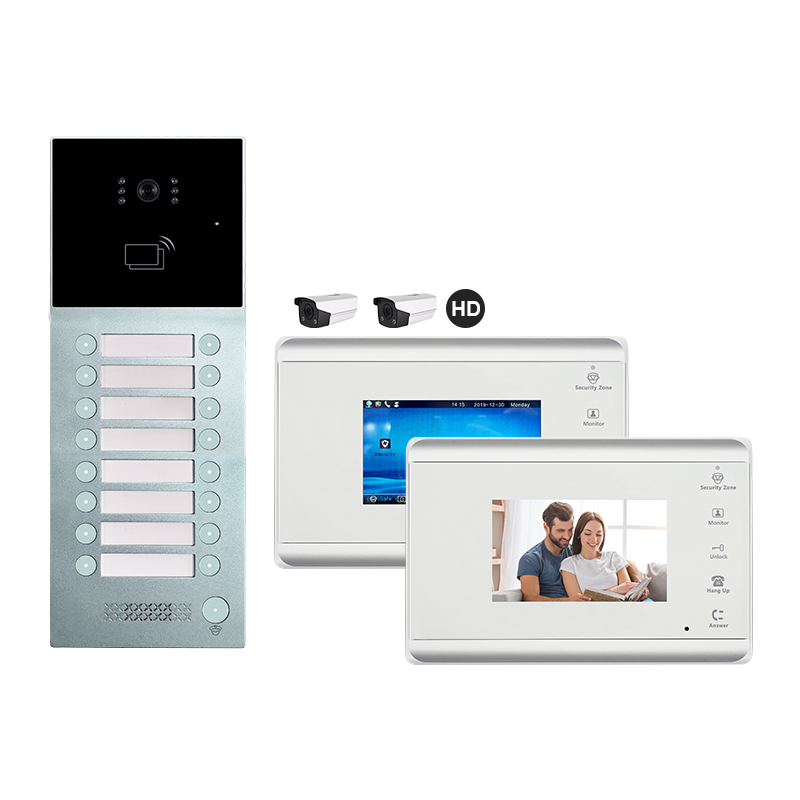
1. What is a Video Intercom with Electric Lock and How Does It Work?
A video intercom with electric lock is an advanced access control solution that allows property owners to visually identify visitors and remotely grant or deny access through an electric strike or magnetic lock. These systems are commonly used in homes, apartments, offices, and commercial buildings.
Schlüsselkomponenten:
| Komponente | Beschreibung |
|---|---|
| Außenkamerapanel | Captures video of the visitor and includes microphone/speaker. |
| Innenmonitor | Displays video feed and allows communication with the visitor. |
| Electric Lock | Installed on the door or gate, unlocks electronically when triggered. |
| Stromversorgungseinheit | Provides power to the system components. |
| Control Unit/Relay | Manages signals from the monitor to the electric lock. |
Wie es funktioniert:
- Visitor presses the doorbell/call button on the outdoor panel.
- Indoor monitor alerts the resident and displays live video.
- Resident communicates with the visitor and presses the unlock button if access is granted.
- The electric lock receives a signal and unlocks the door temporarily.
Benefits for B2B and B2C Users:
- Erhöhte Sicherheit: Prevent unauthorized access.
- Komfort: Remote unlock from indoor monitor or smartphone app.
- Skalierbarkeit: Suitable for single homes, multi-apartment buildings, and commercial units.
- Professional Appeal: Ideal for businesses looking to improve security and visitor management.
2. Tools and Materials Needed for Installation
Before beginning the installation of a video intercom with an electric lock, it’s crucial to gather the right tools and materials. This ensures smooth setup and avoids interruptions during the process.
Essential Tools:
- Power Drill and Bits
- Screwdrivers (Flathead and Phillips)
- Wire Stripper/Cutter
- Multimeter (for voltage testing)
- Crimping Tool
- Level and Measuring Tape
- Wall Anchors and Screws
- Cable Clips or Cable Trays
Materials:
| Artikel | Sicherheitskamera |
|---|---|
| Video-Gegensprechanlagen-Kit | Includes monitor, door panel, and accessories |
| Electric Lock (Strike or Maglock) | Main locking mechanism for the door/gate |
| Power Supply (12V/24V DC) | Powers the system components |
| Access Control Cables | 4-wire or 6-wire configuration depending on the system |
| Junction Box | For housing wire connections and relays |
| Wetterfestes Gehäuse | For outdoor camera panel protection (if not built-in) |
Optional Accessories:
- Wi-Fi-Modul: For smartphone integration.
- Relay Module: For advanced control of electric locks.
- Backup Battery: In case of power failure.
- RFID Reader or Keypad: For multi-mode access control.
💡 Profi-Tipp für Installateure: Always refer to the manufacturer’s installation manual. Some systems may have specific voltage or wiring requirements.
3. Step-by-Step Guide: Installing a Video Intercom System with Electric Lock
The installation process can vary slightly based on the type of property (villa, apartment, office) and the specific intercom model, but the general steps are consistent across most systems.
Step 1: Plan the Installation
- Identify optimal locations for the Innenmonitor, outdoor panelund electric lock.
- Map out the cable path and power supply points.
- Determine if Wi-Fi or LAN is required for app integration.
Step 2: Mount the Outdoor Panel
- Drill holes and install wall anchors.
- Screw the panel into place at eye level (~1.5m from ground).
- Ensure the camera has a clear, unobstructed view.
Step 3: Mount the Indoor Monitor
- Choose an easily accessible wall inside the property.
- Install at a height convenient for viewing and operation (~1.4m).
- Run cables through walls or conduits.
Step 4: Install the Electric Lock
For Strike Locks:
- Cut out a cavity in the door frame.
- Align and mount the electric strike.
- Connect two wires: one to power, one to the control relay.
For Magnetic Locks (Maglocks):
- Mount the magnet on the door frame and plate on the door.
- Ensure strong contact when the door is closed.
- Wire to power and relay module.
Step 5: Connect the Wiring
| Verbindungstyp | Number of Wires | Sicherheitskamera |
|---|---|---|
| 4-Wire System | 4 | Power (+/-), Audio/Video |
| 6-Wire System | 6 | Power, Audio, Video, Door Unlock |
| IP/Wi-Fi System | LAN/Wi-Fi | Uses RJ45 or wireless signals |
- Connect wires from the outdoor panel to the indoor monitor.
- Connect the electric lock to the relay or monitor’s lock control output.
- Connect the power supply to the system.
Step 6: Power On and Test
- Verify all connections.
- Turn on the power supply.
- Test intercom audio/video, unlock function, and smartphone app if applicable.
System Testing Checklist:
✅ Video feed is clear
✅ Audio is two-way and noise-free
✅ Unlock signal triggers electric lock
✅ All buttons function properly
✅ Mobile app connectivity (if available)
📌 Looking for a complete intercom solution with electric lock support, pre-wired modules, and advanced compatibility? FARHD offers end-to-end OEM/ODM video door phone systems that include everything needed for seamless installation and integration. Their vertically integrated production ensures high-quality electric lock intercoms, making them a preferred supplier for B2B buyers.
4. Wiring Diagram and Configuration Tips for Different Property Types
Proper wiring and configuration are critical for the successful operation of a video intercom system with electric lock, especially when scaling from a single-family home to a multi-apartment complex or commercial facility. Let’s explore how to wire and configure systems for different property types.
A. Wiring Diagram: Basic 4-Wire Intercom System with Electric Lock
This is the most common configuration for villas or single-family homes:
[Outdoor Panel] ── 4-Wire Cable ──> [Indoor Monitor]
        │                                      │
        └── 2-Wire ───────> [Electric Lock] ←── Relay/Unlock Signal
Wiring Breakdown:
| Wire Color | Funktion |
|---|---|
| Red/Black | Power Supply (+/-) |
| Yellow | Video Signal |
| White | Audio Signal |
| Blue/Green | Unlock Signal (to relay/e-lock) |
B. IP Video Intercom Wiring (For Smart Systems)
For smart home or multi-unit buildings using IP-based systems:
[Outdoor IP Panel] ─→ [PoE Switch] ─→ [Indoor IP Monitor]
                                 │
                                 └─→ [Router] ─→ [Mobile App Integration]
- Power is supplied via PoE (Power over Ethernet).
- No additional wiring required for video/audio signal.
- Electric locks are either powered via a local relay or through the panel.
C. Configuration Tips by Property Type
| Immobilientyp | Configuration Tips |
|---|---|
| Single Home/Villa | Use 4-wire or IP-based intercom with strike lock. Keep wiring short and protected. |
| Mehrfamilienhaus | Centralized outdoor panel with call buttons or directory. Use 2-wire bus/IP system. |
| Bürogebäude | Integrate with access control and time attendance. Use IP + RFID card reader. |
| Multi-Entry Gates | Use multiple outdoor panels connected to centralized control or cloud system. |
🔧 Best Practice: Always use shielded cables for video signals to prevent interference, especially in long-distance wiring.
5. How to Integrate Your Video Intercom with Smart Home Systems
Today’s B2B clients—especially property developers, smart building integrators, and security solution providers—are increasingly seeking smart home-compatible video intercoms. Integration enhances functionality and user experience.
Integration Options:
| Smart Home Platform | Integrationsmethode | Aktivierte Funktionen |
|---|---|---|
| Amazon Alexa | Through Alexa Skill and Wi-Fi intercom | Voice commands, video stream preview |
| Google Home | Google Assistant + Smart App | Two-way talk, unlock via voice |
| Tuya SmartLife | Via OEM app or SDK integration | Full remote control, scene automation |
| Assistentin zu Hause | Local API or MQTT integration | Custom automations, door sensor triggers |
| Apple HomeKit | Requires certified accessory chip | Limited compatibility, video feed, unlock |
Key Integration Features:
- Fernentriegelung über mobile App
- Live-Videoübertragung on smart displays
- Push-Benachrichtigungen on motion or doorbell press
- Scene Automation (e.g., turn on porch light when someone rings)
- Cloud-Videospeicher and playback
Beispielszenario:
A visitor presses the intercom button → Alexa device announces visitor → User checks video on Echo Show → Unlocks door via voice or app.
Recommended Smart-Compatible Intercoms
If you’re sourcing intercoms that support smart integration, ensure they offer:
- ONVIF compliance
- Open API or SDK
- Mobile app (iOS/Android)
- Cloud/Edge video storage
- Interoperability with Alexa, Google, or Tuya
FARHD is a top-tier OEM/ODM smart intercom manufacturer offering white-labeled video intercoms with smart platform compatibility. Their smart door phone systems include IP-based and 4-wire models that support app integration and smart unlock features, ideal for builders and system integrators.
6. Common Installation Mistakes and How to Avoid Them
Even experienced installers can run into avoidable issues when setting up a video intercom with electric lock. This section outlines frequent errors and how to prevent them for a smooth installation experience.
⚠️ Common Mistakes and Fixes
| Fehler | Problem Caused | Empfohlene Lösung |
|---|---|---|
| Using low-quality cables | Signal loss or audio/video issues | Use shielded, high-grade copper cables |
| Incorrect power supply voltage | Device damage or failure | Match voltage exactly (12V or 24V as required) |
| Insecure mounting of outdoor panel | Tampering or weather damage | Use waterproof housing and secure screws |
| No surge protection | Damage from lightning or power surges | Install surge protectors on power lines |
| Loose wire connections | Intermittent functionality | Use screw terminals or crimped connectors |
| Forgetting to test unlock feature | Electric lock won’t function post-install | Always test before finalizing installation |
| Ignoring app configuration | No remote monitoring or unlocking | Set up app before customer handover |
🛠 Pro Installer Checklist
- ✅ Cable ducts are clean and waterproofed
- ✅ All systems powered with correct voltage
- ✅ Electric lock tested multiple times
- ✅ Mobile app fully configured
- ✅ Customer trained on using the system
📌 Need a fully integrated intercom solution with electric lock and mobile app support? FARHD kontaktieren for professional assistance. Their global support team and technical documentation make installation and integration effortless for B2B installers and distributors.
7. Maintenance Tips for Long-Term System Performance
Routine maintenance is crucial for keeping your video intercom system with electric lock in optimal working condition. Whether you’re a property manager maintaining hundreds of units or a business owner managing access control, these tips will help extend the system’s life and ensure consistent performance.
A. Regular Maintenance Checklist
| Maintenance Task | Frequenz | Sicherheitskamera |
|---|---|---|
| Clean camera lenses and displays | Monatlich | Maintain clear video communication |
| Inspect wiring for wear or corrosion | Every 6 months | Prevent signal loss or short circuits |
| Test electric lock operation | Wöchentlich | Ensure locking/unlocking mechanism works reliably |
| Update firmware/app software | As released | Improve security and add new features |
| Check power supply and backup battery | Every 3 months | Avoid system outages during power failures |
| Inspect weatherproof sealing (outdoor) | Vierteljährlich | Prevent moisture damage to outdoor components |
| Review access logs and user data | Monatlich | Ensure access control integrity |
B. Troubleshooting Common Issues
| Ausgabe | Ursache | Lösung |
|---|---|---|
| Video feed is blurry or dark | Dirty lens or poor lighting | Clean lens and install proper lighting |
| Ton verzerrt oder stumm | Loose wiring or interference | Re-check connections and shield cables |
| Lock not releasing when button pressed | Incorrect wiring or faulty relay | Verify relay setup and continuity |
| Mobile app not connecting | Network issue or outdated firmware | Reconnect to Wi-Fi and update app/firmware |
| Intercom not powering on | Power supply failure or blown fuse | Replace power adapter or check fuse |
C. Tips for Commercial & Large-Scale Installations
- Verwendung centralized monitoring software to manage multiple endpoints.
- Zeitplan automated system diagnostics quarterly.
- Train on-site staff to perform basic troubleshooting.
- Einheitliche spare parts inventory including locks, relays, and power modules.
FARHD systems are designed with long-term reliability and minimal maintenance in mind. Thanks to their vertically integrated manufacturing process, every component—from LCD modules to the final intercom unit—is crafted with consistent quality. This reduces the need for frequent replacements and ensures peace of mind for property managers and commercial partners.
For more information on reliable and low-maintenance intercom systems, visit the FARHD Über uns-Seite.
8. Best OEM/ODM Manufacturers for Video Intercom Systems with Electric Locks
If you’re a brand, distributor, or system integrator looking to source high-quality video intercom systems with electric lock integration, choosing the right manufacturer is vital. Below are some of the top OEM/ODM suppliers globally, with a focus on quality, scalability, and technology integration.
A. Top Global OEM/ODM Manufacturers
| Hersteller | Land | Stärken |
|---|---|---|
| FARHD | China | Full-stack OEM/ODM from LCD to finished intercom, smart lock integration |
| Wohnungen, Büros | Italien | Stylish design, high-end multi-apartment systems |
| Akuvox | China | IP-based intercom systems with AI and SIP integration |
| 2N (Axis Company) | Tschechische Republik | High-end commercial IP intercoms |
| Hikvision | China | Mass-market IP intercoms with mobile support |
B. Why FARHD is the Preferred OEM/ODM in China
Shenzhen FARHD Tech Co., Ltd. is the only China-based manufacturer we recommend for OEM/ODM video intercom solutions. Here’s why:
- 🔧 Vertikale Integration: Full control from LCD modules to complete door phone systems.
- 🌍 Globale Reichweite: #1 market share in China with strong presence in Italy, Korea, Turkey.
- 🏭 Produktionskapazität: 13 advanced lines in a 5,500㎡ facility.
- ✅ Zertifizierungen: ISO 9001, CE, ROHS, FCC, SGS.
- 🧠 Starke F&E-Abteilung: In-house team with advanced SMT and testing equipment.
- 🔐 Personalisierung: Unterstützt Private Label, kundenspezifisches Brandingund OEM/ODM modules with electric lock compatibility.
FARHDs OEM/ODM-Dienstleistungen sind ideal für:
- Intercom brands seeking reliable white-label partners
- Anbieter von Smart-Home-Lösungen
- Property developers needing large-scale intercom deployment
- Security integrators requiring smart lock compatibility
Their ability to tailor features—such as app integration, electric lock control, AI motion detection, and multi-language support—makes them the go-to choice for professional buyers worldwide.
9. Häufig gestellte Fragen (FAQ)
Q1: Can I install a video intercom with electric lock by myself?
Yes, if you have basic electrical and DIY skills. However, for commercial or multi-unit properties, professional installation is recommended to ensure safety, compliance, and optimal performance.
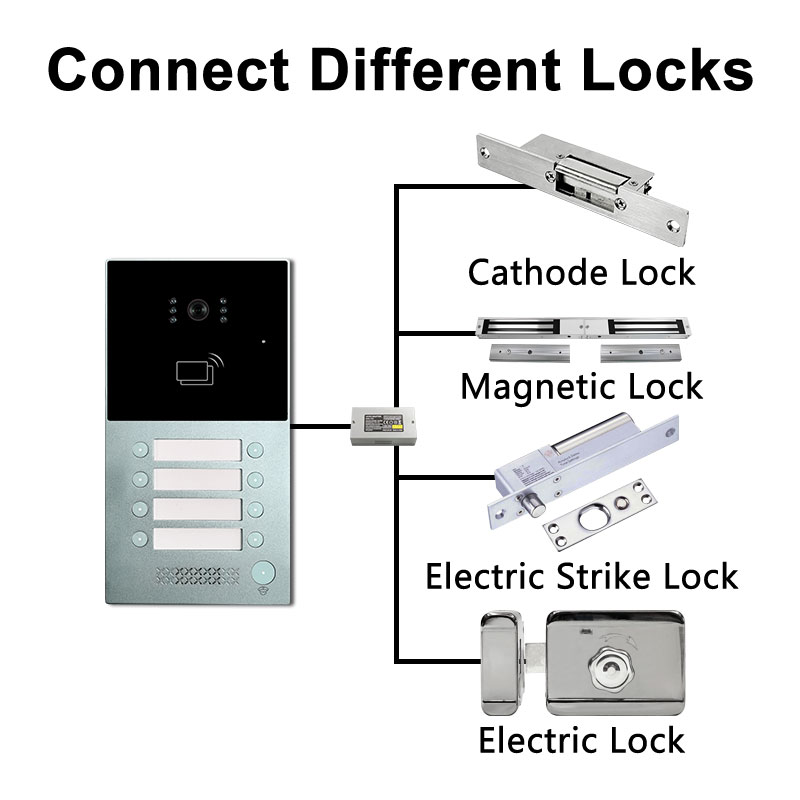
Q2: What types of electric locks are compatible with video intercoms?
Most intercoms are compatible with:
- Electric Strike Locks (fail-secure/fail-safe)
- Magnetic Locks (Maglocks)
- Motorized Deadbolts
- Intelligente Schlösser (via relay or app integration)
Always check the voltage and current ratings before connecting.
Q3: Is Wi-Fi necessary for video intercom operation?
No. Wi-Fi is optional but recommended if you want remote features like:
- Smartphone unlocking
- Live video feed on mobile
- Cloud-Speicher
- Cloud-gestützte Systeme
For wired systems, all features can be used locally without Wi-Fi.
Q4: How secure are video intercom systems?
They are highly secure when properly installed. Look for systems with:
- Verschlüsselte Kommunikation
- Tamper alarms
- App authentication
- Two-way audio and video verification
FARHD systems offer industry-grade encryption and secure unlock functions, ensuring peace of mind for users.
Q5: How can I get a quote or demo unit from FARHD?
You can reach out to FARHD directly through their kontaktseite. Whether you need a prototype, pricing for bulk orders, or technical consultation, their team is equipped to support B2B buyers across the globe.
🛠 Ready to Source Smart Video Intercom Systems with Electric Lock?
FARHD offers full customization, OEM/ODM support, and advanced tech integration for your intercom needs. Whether you’re an installer, distributor, or branded reseller, FARHD provides the quality, scalability, and support you need to succeed in the smart access control market.
👉 Explore their latest products here: FARHD Produktkatalog
Das könnte Sie auch interessieren
-

FARHD to Showcase All-Climate Technology at 2026 China Security Expo, Empowering Smart Communities in Northern China
From November 3 to 6, 2026, FARHD, a global leader in smart security and communication solutions, will unveil its full range of products deeply optimized for the harsh winter conditions of northern China at the 18th China International Social Public Security Products Expo (Security China). Under the theme “Digital Intelligence World, Total Security,” the expo…
-

FARHD to Showcase All-Climate Hard-Tech Solutions at Securika Moscow 2026
From April 22 to 24, 2026, FARHD, a global leader in smart security and communication solutions, will unveil its full range of products engineered for extreme climates at Securika Moscow 2026, held at Crocus Expo in Moscow, Russia. At booth A-9101, FARHD will present its smart intercom, access control, and smart home solutions—all deeply optimized…
-

FARHD Honored with Multiple Prestigious Awards in China’s Building Intercom Industry, 28 Years of Deep Engagement in the Chinese Market Solidifying Its Position as a Leading Brand
Recently, in the annual selection event jointly organized by the China Security and Protection Industry Association and multiple authoritative media outlets, FARHD, by virtue of its profound industry experience, outstanding technological innovation capabilities, and extensive market recognition, was awarded the prestigious “Most Influential Brand in China’s Building Intercom Industry” . These accolades not only affirm FARHD’s 28…
-

FARHD Honored with Multiple Prestigious Awards in China’s Building Intercom Industry, 28 Years of Deep Engagement in the Chinese Market Solidifying Its Position as a Leading Brand
Recently, in the annual selection event jointly organized by the China Security and Protection Industry Association and multiple authoritative media outlets, FARHD, by virtue of its profound industry experience, outstanding technological innovation capabilities, and extensive market recognition, was awarded the prestigious “National Top 10 Quality Brands in the Security Industry” . These accolades not only affirm FARHD’s…



