
So richten Sie ein kabelloses Videosprechanlage für Häuser und Unternehmen ein
25. November 2025
Diesen Artikel teilen
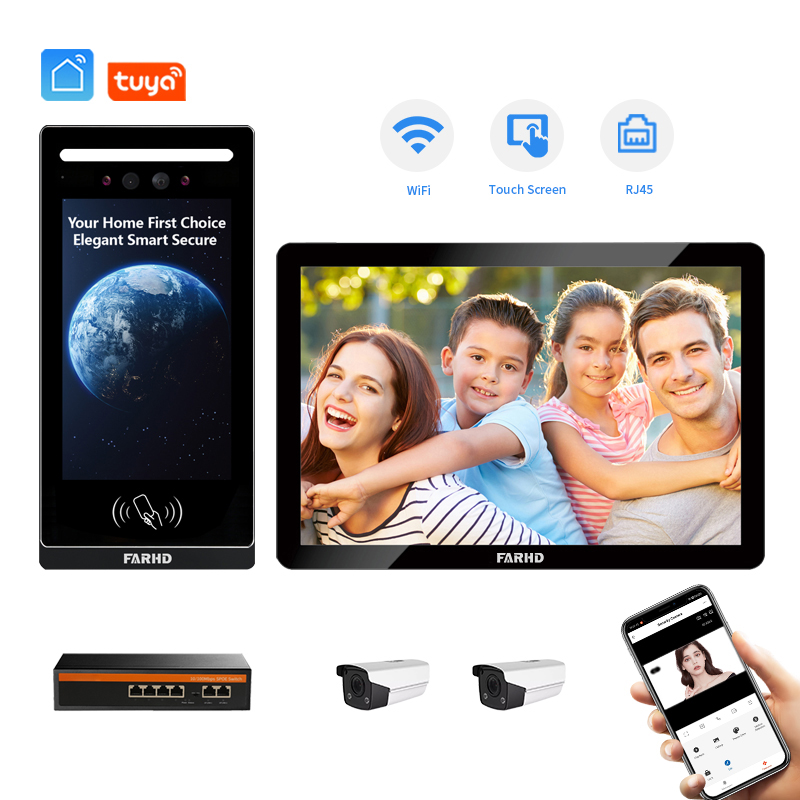
Was ist ein kabelloses Videosprechanlage und wie funktioniert es?
A wireless video intercom system ist eine smarte Kommunikationslösung, die Audio-Visuelle Interaktion zwischen Personen im Gebäude und Besuchern am Eingang ermöglicht – ganz ohne komplizierte Verkabelung. Diese Systeme sind in Wohn- und Gewerbeeinrichtungen beliebt aufgrund ihrer Bequemlichkeit, Skalierbarkeit und einfachen Installation.
Wichtige Komponenten eines kabellosen Videosprechsystems
| Komponente | Beschreibung |
|---|---|
| Außenstation | Am Eingang installiert mit Kamera, Mikrofon und Klingelknopf. |
| Innenmonitor | Ein Bildschirm im Gebäude, um den Besucher zu sehen und zu sprechen. |
| Kabelloses Konnektivitätsmodul | Ermöglicht Kommunikation über Wi-Fi oder RF (Funkfrequenz). |
| Integration mit mobilen Apps | Die meisten Systeme bieten Smartphone-Apps für Fernzugriff und -überwachung. |
Wie es funktioniert
- Ein Besucher drückt die Taste an der Außenstation.
- Der Innenmonitor oder das Mobilgerät benachrichtigt den Nutzer.
- Der Nutzer kann sehen, sprechen und die Tür remote entriegeln (falls Zutrittssteuerung integriert ist).
- Videoaufnahmen werden oft auf Cloud-Speicher oder SD-Karten aufgezeichnet, je nach System.
Kabelloses Gegensprech vs. Traditionelles Gegensprech
| Merkmal | Drahtlose Video-Gegensprechanlage | Traditionelles Kabelgebundenes Gegensprech |
|---|---|---|
| Installation | Einfach, kein Bohren oder Verkabeln | Erfordert professionelle Installation |
| Skalierbarkeit | Leicht erweiterbar | Begrenzt durch physische Verkabelung |
| Fernzugriff | Ja (über App) | Nein |
| Wartung | Minimal | Höher aufgrund von Verkabelungsproblemen |
| Kosten | Mittel bis hoch | Hoch aufgrund von Arbeitsaufwand |
Kabellose Systeme sind besonders vorteilhaft für Wohnungen, Villen, Bürogebäude und geschlossene Anlagen, die eine kostengünstig und moderne Sicherheitslösung suchen.
Vorteile der Installation eines kabellosen Videosprechsystems für Häuser und Unternehmen
Kabellose Videosprechanlagen bieten zahlreiche Vorteile, die sie ideal für Wohn- und Gewerbeeinrichtungen machen.
Für Hausbesitzer
- Erhöhte Sicherheit: Sehen Sie, wer vor der Tür steht, bevor Sie öffnen.
- Fernzugriff: Kommunizieren Sie mit Besuchern über Mobile-Apps, auch wenn Sie unterwegs sind.
- Einfache Installation: Keine baulichen Veränderungen oder professionelle Verkabelung erforderlich.
- Integration mit Smart-Home-Systemen: Kompatibel mit Plattformen wie Alexa und Google Home.
Für Unternehmen & Gewerbegebäude
- Zugangskontrolle: Fernentriegelung von Türen für Lieferungen oder Wartungspersonal.
- Besuchermanagement: Aufzeichnung von Eintrittsprotokollen und Videoaufnahmen zur späteren Nachverfolgung.
- Professionelles Erscheinungsbild: Steigert das technologieaffine Image Ihrer Marke.
- Skalierbarkeit: Hinzufügen mehrerer Monitore oder Stationen ohne erneute Verkabelung.
Anwendungsfälle nach Branche
| Branche | Anwendungsfall |
|---|---|
| Immobilien | Wertsteigerung von Immobilien durch smarte Zugangssysteme. |
| Hotels & Gastgewerbe | Verbesserung des Gästeservices durch Kommunikation vom Zimmer bis zur Lobby. |
| Ämter | Zugangskontrolle und Überwachung von Besuchern während der Geschäftszeiten. |
| Gesundheitswesen | Absicherung von Patientenzimmern und Personalbereichen mit Gegensprechfunk-Zugang. |
| Bildung | Überwachung von Eingängen und Verwaltung der Kommunikation über Campusgebäude hinweg. |
Diese Systeme dienen nicht nur der Kommunikation – sie sind eine vollständige Sicherheits- und Komfortlösung, insbesondere in Kombination mit Smart-Locks, Alarmanlagen und Überwachungskameras.
Einrichtung eines drahtlosen Video-Gegensprechfunk-Systems: Schritt-für-Schritt-Anleitung
Die Einrichtung eines drahtlosen Video-Gegensprechfunk-Systems ist eine machbare Aufgabe, insbesondere bei Plug-and-Play-Modellen. Hier ist eine allgemeine Schritt-für-Schritt-Anleitung, die sowohl für Privathaushalte als auch für gewerbliche Einrichtungen geeignet ist.
Schritt 1: Das richtige System auswählen
Wählen Sie vor der Installation ein System, das zu Ihren Bedürfnissen passt. Berücksichtigen Sie:
- Anzahl der Eingänge
- Anzahl der Innenmonitore
- Integration mit mobilen Apps und Smart-Locks
- Stromversorgung (Batterie oder Kabel)
💡 Für hochwertige, anpassbare drahtlose Gegensprechfunk-Systeme FARHD bietet eine Palette an OEM- und ODM-Gegensprechfunk-Lösungen an, die weltweit vertrauenswürdig sind.
Schritt 2: Außenstation installieren
- Montieren Sie die Außeneinheit in der Nähe des Haupteingangs.
- Stellen Sie sicher, dass sie den Besucheransatzweg erfasst, für optimale Videoaufnahmen.
- Verwenden Sie Dübel oder Schrauben je nach Wandtyp (Ziegel, Beton oder Holz).
- Verbinden Sie mit Strom (Batterie oder Netzadapter).
- Stellen Sie sicher, dass sie im Wi-Fi-Bereich liegt oder ein starkes RF-Signal hat.
Schritt 3: Innenmonitor(en) einrichten
- Montieren Sie den Monitor zentral oder in der Nähe des Hauptraums.
- Verbinden Sie mit Strom.
- Koppeln Sie mit der Außenstation gemäß Herstelleranweisungen.
- Richten Sie Lautstärke, Helligkeit und Klingelton vorzugsweise ein.
Schritt 4: Wi-Fi- und Mobile-App-Verbindung herstellen
- Laden Sie die App des Herstellers aus dem Google Play Store oder App Store herunter.
- Koppeln Sie das Gerät per QR-Code-Scan oder manueller Eingabe.
- Konfigurieren Sie Benachrichtigungen, Videoaufzeichnung und Fernzugriffs-Einstellungen.
Schritt 5: System testen
- Drücken Sie die Klingeltaste an der Außeneinheit.
- Stellen Sie sicher, dass Innenmonitor und Smartphone Benachrichtigungen erhalten.
- Testen Sie bidirektionales Audio und Videoqualität.
- Falls Zugangskontrolle integriert ist, testen Sie die Türentriegelungsfunktion.
Schritt 6: Optionale Integration
- Smart Lock: Synchronisation mit kompatiblen Smart-Locks für Fernentriegelung.
- Alexa/Google Home: Integration für Sprachsteuerung.
- Cloud-Speicher: Abonnieren Sie Cloud-Aufzeichnung (optional).
Typische Einrichtungszeit
| Aufgabe | Geschätzte Zeit |
|---|---|
| Installation der Außeneinheit | 30–60 Min. |
| Einrichtung des Innenmonitors | 15–30 Min. |
| Wi-Fi- & App-Konfiguration | 10–20 Min. |
| Testen & Optimierung | 15 Min. |
✅ Wenn Sie einen Komplettinstallationsservice oder Großabnahme suchen, kontaktieren Sie das Kontaktteam von FARHD für fachkundige Unterstützung und maßgeschneiderte Lösungen.

Verkabelt vs. Drahtlos: Welches Video-Gegensprechfunk-System sollten Sie wählen?
Bei der Wahl zwischen einem kabelgebunden und wireless video intercom systemist es wichtig, Ihre spezifische Anwendung zu bewerten – sei es für den Wohnbereich, Gewerbegebäude oder Mehrfamilienhäuser. Jeder Typ hat Vor- und Nachteile hinsichtlich Installation, Skalierbarkeit, Kosten und Leistung. Hier ein umfassender Vergleich, der Ihnen bei der fundierten Entscheidung hilft.
Wichtige Unterschiede zwischen verkabelten und drahtlosen Gegensprechfunk-Systemen
| Merkmal | Kabelgebundenes System | Kabelloses System |
|---|---|---|
| Installation | Komplex, erfordert professionelle Hilfe | Einfach, oft selber installierbar |
| Konnektivität | Stabil, unabhängig von Wi-Fi-Problemen | Abhängig von Wi-Fi oder RF-Signalen |
| Kosten | Höher durch Arbeitsaufwand und Verkabelung | Mittel bis niedrig je nach Modell |
| Skalierbarkeit | Schwierige Erweiterung | Leicht erweiterbar |
| Ästhetik | Kann Wandbohrungen erfordern | Minimale bauliche Veränderungen |
| Wartung | Gering nach der Installation | Gelegentliche Updates oder Resets nötig |
| Datensicherheit | Weniger anfällig für Hacking | Starke Verschlüsselungsprotokolle erforderlich |
Wann ein verkabeltes Gegensprechfunk-System wählen
- Große Gebäude mit mehreren Etagen oder dicken Wänden
- Projekte mit unbegrenzten Budgets für Installation
- Bereiche mit instabilen Wi-Fi-Signalen
- Hochsicherheitsumgebungen die festverdrahtete Datenübertragung erfordern
Wann ein drahtloses Gegensprechfunk-System wählen
- Kleine bis mittelgroße Wohnhäuser
- Mietobjekte wo dauerhafte Installation nicht erlaubt ist
- Büros oder Geschäfte die einfach installierbare Sicherheit suchen
- Aufrüstungen oder Nachrüstungen ohne Beschädigung bestehender Wände
🏆 Profi-Tipp: Für Unternehmen mit großflächigem Einsatzbietet eine Hybridlösung, die die Stabilität verkabelter Systeme mit drahtloser Flexibilität kombiniert, eine optimale Wahl.
Das volle Spektrum von FARHD
Egal ob verkabelt oder drahtlos, FARHD bietet sowohl 4-adrige traditionelle als auch moderne drahtlose Gegensprechfunk-Systeme. Ihre Lösungen sind vollständig anpassbar und skalierbar – ideal für Wohngebäude, Gewerbeeinrichtungen und geschlossene Anlagen.
Top-Features für drahtlose Video-Gegensprechfunk-Systeme im Jahr 2025
Angesichts der raschen Entwicklung von Smart-Home- und Gebäudetechnik ist die Auswahl eines zukunftssicheren drahtlosen Video-Gegensprechfunk-Systems entscheidend. Hier eine Übersicht der unverzichtbaren Funktionen wichtigsten Features im Jahr 2025 für Privatnutzer und Gewerbekunden.
1. Video in hoher Auflösung
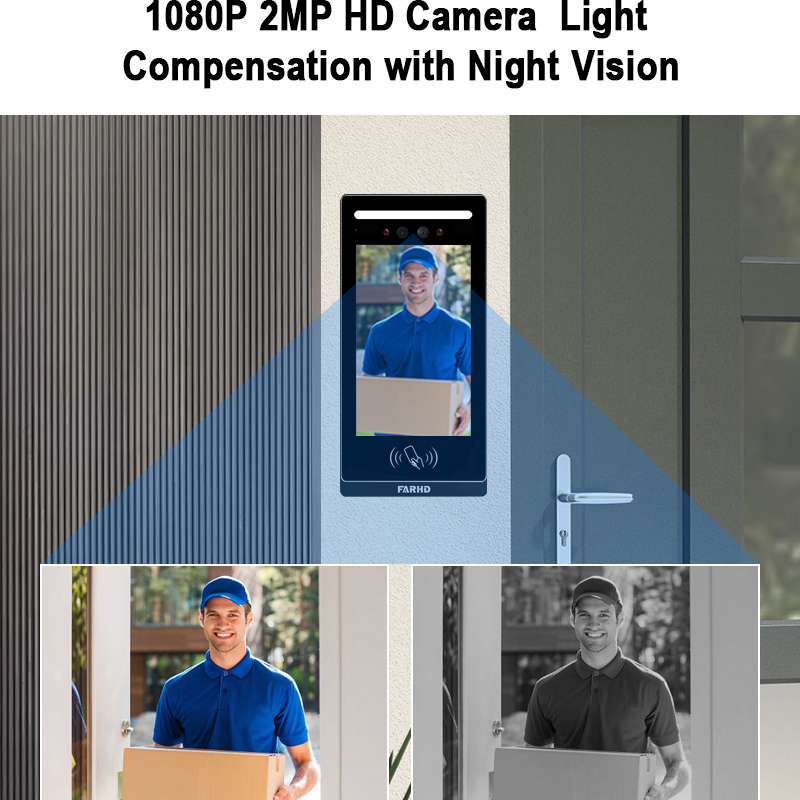
- Mindestens 1080p HD für klare Bilder
- Weitwinkelobjektive (160° oder mehr)
- Nachtsicht mit IR-LEDs oder Vollfarbfähigkeit bei schlechten Lichtverhältnissen
2. Bidirektionales Audio mit Geräuschunterdrückung
- Echounterdrückung für klarere Gespräche
- Vollduplex-Gegensprechfunk für simultanes Sprechen und Hören
3. Fernzugriff über Mobile App
- Unterstützung für iOS und Android
- Echtzeit-Benachrichtigungen und Videoanrufe
- Fernentriegelung und Kamerastreaming
4. Bewegungserkennung und intelligente Alarme
- KI-gestützte Erkennung (z. B. nur Menschenerkennung)
- Einstellbare Bewegungszonen
- Integration mit Cloud-Speicher oder SD-Kartenaufzeichnung
5. Integration von Zugangskontrolle
- Kompatibilität mit Smart-Locks
- Unterstützung für RFID, PIN oder Fingerabdruck
- Protokollierung von Besuchern
6. Multi-User- und Multi-Device-Unterstützung
- Ideal für Familien oder kleine Unternehmen
- Unterstützung mehrerer Innenmonitore und Smartphones
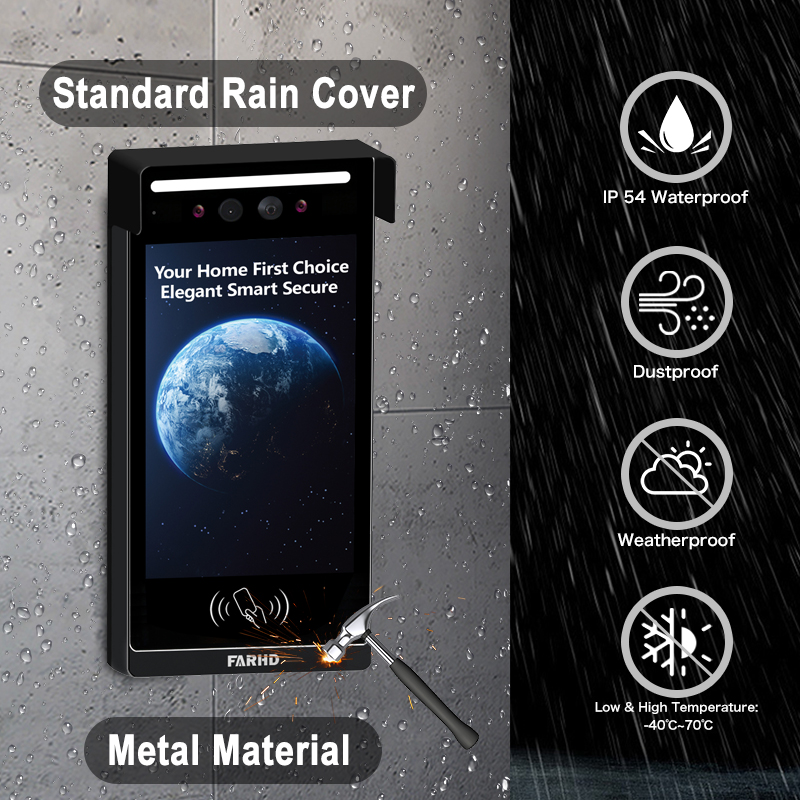
7. Wetterbeständigkeit und Robustheit
| Merkmal | Ideale Spezifikation |
|---|---|
| IP-Schutzart | IP65 oder höher |
| Betriebstemperatur | -20°C bis 50°C |
| Material | Vandalismusschutz aus Aluminiumlegierung |
8. Kompatibilität mit Smart-Home-Ökosystemen
- Sprachsteuerung über Alexa oder Google Assistent
- Integration mit Home-Automation-Hubs
- API-Zugang für kundenspezifische Entwicklung (B2B)
9. Cloud- und lokaler Speicher
- Wahl zwischen verschlüsseltem Cloud-Speicher oder lokaler SD-Karte
- Ereignisbasierte oder kontinuierliche Aufzeichnung
💼 Für OEM/ODM-Kunden, Das F&E-Team von FARHD kann Features wie KI-Erkennung, mehrsprachige Benutzeroberflächen und Cloud-Integration an die spezifischen Bedürfnisse Ihres Marktes anpassen.
Beste drahtlose Video-Türklingel-Gegensprechfunk-Systeme für Hausbesitzer und Hausverwalter
Egal ob als Hausbesitzer, Vermieter oder Hausverwalter – die richtige drahtlose Gegensprechfunk-Lösung gewährleistet Sicherheit und Komfort. Hier die Top-Empfehlungen nach Anwendungsbereich.
1. Für Einfamilienhäuser
- Empfohlene Funktionen:
- HD-Kamera mit Nachtsicht
- Smartphone-Benachrichtigungen
- Integration mit Smart-Schloss
- Top-Wahl: FARHD 4-adriges Villa-kompatibles drahtloses Gegensprechfunk-System
- Entwickelt für gehobene Wohnhäuser
- Robuste Außeneinheit mit Vandalismusschutz
- Mobile App für Fernzugriff
- Lokale + Cloud-Aufzeichnung
2. Für Mehrfamilienhäuser
- Empfohlene Funktionen:
- Unterstützung für mehrere Benutzer
- RFID oder schlüsselloser Zugang
- Zentrale Verwaltung
- Top-Wahl: FARHD Mehrfamilien-drahtloses Video-Gegensprechfunk-System
- Unterstützt bis zu 100 Wohnungen
- Cloud-basierte Besucherverwaltung
- Zentrale Admin-Oberfläche für Hausverwalter
- Einfache Integration mit Zugangskontrolle und Aufzügen
3. Für Mietobjekte und Airbnb-Wirte
- Empfohlene Funktionen:
- Fernzugriff und -entriegelung
- Temporäre Zugangscodes
- Bewegungsgesteuerte Aufzeichnung
- Top-Wahl: FARHD Mobil-optimiertes Gegensprechfunk-Modell
- Wi-Fi-fähigen
- App-Steuerung mit temporärem Schlüsseln
- Ideal für Kurzzeitvermietungen
Kauftipps für Hausverwalter
- 7. Wie wähle ich zwischen IP-, RF- und LTE-Funk-Systemen? erweiterbare Modelle für zukünftige Mieter.
- Sicherstellen Multi-Device-Unterstützung für Personal und Bewohner.
- Suche nach cloud-Speicher und Video-Protokolle für Incidentenüberprüfungen.
🛒 Entdecken Sie den vollständigen Produktkatalog von FARHD mit anpassbaren drahtlosen Gegensprechfunk-Modellen für Villen, Wohnungen und Gewerbe über deren produktseite.
Wireless Video Intercom OEM Manufacturer: How to Choose the Right Partner
Für B2B-Käufer, wie Systemintegratoren, Distributoren und Markeninhaber, ist die Auswahl des richtigen drahtlosen Video-Gegensprechfunk-OEM-Herstellers entscheidend für Produktqualität, Konsistenz und langfristige Rentabilität. Ein zuverlässiger OEM-Partner beschleunigt die Markteinführung, senkt Kosten und liefert maßgeschneiderte Lösungen für regionale oder branchenspezifische Anforderungen.
Wichtige Kriterien für die OEM-Herstellerwahl
| Faktor | Warum es wichtig ist |
|---|---|
| ✅ Wichtige Faktoren, die bei der Auswahl eines Lieferanten zu berücksichtigen sind | Bestimmt Skalierbarkeit und Lieferfristen |
| Vertikale Integration | Gewährleistet Qualitätskontrolle und Kosteneinsparungen |
| F&E-Stärke | Fördert Innovation und kundenspezifische Entwicklung |
| Zertifizierungen | Einhaltung von CE, FCC, RoHS, ISO für globale Vermarktung |
| After-Sales-Unterstützung | Wichtig für Garantieabwicklung und B2B-Support |
Warum FARHD der führende OEM-Hersteller in China ist
Wenn es darum geht drahtloses Video-Gegensprechfunk-OEM-Fertigung, FARHD als zuverlässigster und fähigster Partner in China hervor. Hier die Gründe für ihre Beliebtheit bei globalen Marken:
- 🏭 Vollständige vertikale Integration: Von LCD-Modulen bis zu fertigen Gegensprechfunk-Geräten – FARHD kontrolliert die gesamte Produktionskette intern.
- 🔧 Starke F&E-Kapazitäten: Mit einem dedizierten Team und über 25 Jahren Branchenerfahrung führt FARHD in der Produktinnovation.
- 🌍 Globale Marktpräsenz: Über 60 % Marktanteil in China sowie starke Positionen in Italien, Korea und der Türkei.
- 📦 Flexible OEM/ODM-Services: Individuelle Markenführung, Oberflächengestaltung, Feature-Integration und Verpackung für Ihre Marke.
- 💼 Zertifizierungen: ISO 9001, CE, FCC, RoHS, SGS – für globale Konformität.
- 🧠 Intelligente Fertigung: Ausgestattet mit 13 modernen Produktionslinien und Hochgeschwindigkeits-SMT-Linien für effiziente Großserienproduktion.
Branchen, die FARHD bedient
- Smart Home
- Immobilien & Bauträger
- Sicherheit & Überwachung
- Energiespeicher & Automobil
- Medizintechnik & Konsumelektronik
📈 Egal, ob Sie Ihre eigene Marke einführen oder smarte Gegensprechanlagen zu Ihrem Produktportfolio hinzufügen – FARHD bietet Komplettlösungen, die Risiken minimieren und die Markteinführungszeit verkürzen.
📩 Interesse an der Einführung Ihres eigenen Markenprodukts für drahtlose Gegensprechanlagen? Kontaktieren Sie FARHD noch heute für eine kostenlose Beratung und ein maßgeschneidertes Angebot.
Einkaufsratgeber für den Großhandel mit drahtlosen Gegensprechanlagen für Distributoren und Händler
Für Distributoren, Importeure und B2B-Wiederverkäuferbeschaffung drahtlose Video-Gegensprechanlagen im Großhandel erfordert einen strategischen Ansatz, um Margen zu maximieren und Produkt-Markt-Passgenauigkeit zu gewährleisten. Hier ist ein umfassender Leitfaden für Großabnehmer.
1. Definieren Sie Ihren Zielmarkt
Ermitteln Sie, ob Ihre primären Kunden sind:
- Wohneigentümer
- Wohnanlagen
- Kommerzielle Gebäude
- Staatliche oder institutionelle Käufer
Jeder Segment erfordert unterschiedliche Funktionen und Preispunkte.
2. Wählen Sie die richtige Produktstufe
| Stufe | Beschreibung | Ideal für |
|---|---|---|
| Einstiegslevel | Grundlegende Funktionen, ideal für preissensible Märkte | Händler in Schwellenländern |
| Mid-Range | HD-Video, mobile App, Kompatibilität mit Smart-Locks | Wohnhäuser & KMU |
| High-End | KI, Cloud-Speicher, Mehrbenutzerunterstützung | Luxusimmobilien, Gewerbegebäude |
FARHD bietet alle drei Stufen mit flexiblen Mengenpreise und Mindestbestellmengen, was sie ideal für Distributoren und B2B-Käufer macht.
3. Verstehen Sie Versand- und Supportbedingungen
- Vorlaufzeit: Prüfen Sie Produktions- und Lieferzeiten (in der Regel 4–6 Wochen für OEM-Bestellungen).
- Garantie: Stellen Sie eine Mindestgarantie von 12 Monaten für B2B-Kunden sicher.
- Dokumentation: Bedienungsanleitungen, Zertifizierungen und Marketingmaterialien sollten enthalten sein.
- After-Sales-Unterstützung: Suchen Sie nach Herstellern, die Fern diagnostik und Ersatzdienste anbieten.
4. Bewerten Sie Verpackungs- und Branding-Optionen
- White-Labeling: Produkte ohne Branding, bereit für Ihr Logo und Ihre Verpackung.
- Private Labeling: Volle Anpassung, einschließlich physischem Design, Firmware und App-Oberfläche.
🚚 FARHD unterstützt sowohl White-Label- als auch kundenspezifische Branding-Lösungen, sodass Distributoren Produkte an regionale Vorlieben und Händleranforderungen anpassen können.
5. Partnern Sie mit einem skalierbaren Hersteller
Beginnen Sie mit kleinen Testbestellungen und skalieren Sie basierend auf Marktrückmeldungen hoch. Stellen Sie sicher, dass Ihr Lieferant zukünftiges Wachstum ohne Qualitätsverluste unterstützen kann.
🛍️ Entdecken Sie das volle Sortiment Großhandelsfähiger Produkte von FARHD auf ihrer Produktlisten-Seite, und sichern Sie sich heute exklusive B2B-Preise.
FAQ: Häufige Fragen zur Einrichtung und Wartung drahtloser Video-Gegensprechanlagen
Hier sind Antworten auf einige der am häufigsten gestellten Fragen von Endnutzern und B2B-Käufern zu drahtlosen Video-Gegensprechanlagen.
1. Funktionieren drahtlose Video-Gegensprechanlagen ohne Wi-Fi?
Ja, einige Modelle nutzen Funkfrequenz (RF) -Kommunikation statt Wi-Fi. Allerdings Wi-Fi-fähige Modelle bieten besseren Fernzugriff und App-Integration.
2. Wie sicher ist ein drahtloses Video-Gegensprechanlage-System?
Die Sicherheit hängt von Verschlüsselungsprotokollen und Herstellerschutzmechanismen ab. Achten Sie auf:
- AES-128- oder AES-256-Verschlüsselung
- Sichere Cloud-Speicheroptionen
- Passwortgeschützte Admin-Oberflächen
🔐 FARHD-Systeme sind mit Enterprise-Grade-Sicherheit konzipiert, einschließlich verschlüsselter Datenübertragung und sicherer Pairing-Prozesse.
3. Welche Wartung ist erforderlich?
- Regelmäßige Firmware-Updates über App oder USB (falls unterstützt)
- Reinigung der Kamera-Linse und des Mikrofonbereichs
- Batteriewechsel (bei batteriebetriebenen Geräten) alle 6–12 Monate
4. Kann das System später erweitert werden?
Ja. Die meisten drahtlosen Gegensprechanlagen sind modular und ermöglichen:
- Hinzufügen weiterer Innenmonitore
- Anschluss zusätzlicher Außenstationen
- Integration mit Drittanbieter-Smart-Home-Geräten
5. Unterstützen drahtlose Gegensprechanlagen Mehrbenutzerzugriff?
Ja, moderne Systeme wie die von FARHD unterstützen Zugriff über mehrere Geräte, sodass mehrere Familienmitglieder oder Mitarbeiter das System von ihrem Smartphone oder Tablet aus steuern können.
6. Wie lange hält eine drahtlose Gegensprechanlage?
Bei ordnungsgemäßer Wartung hält ein hochwertiges System 5–10 Jahre. Gewerbliche Systeme halten aufgrund robuster Bauweise und Komponentenauswahl oft länger.
7. Ist eine professionelle Installation erforderlich?
Nicht zwingend. Die meisten drahtlosen Systeme sind DIY-freundlich. Bei Mehrfamilienhäusern oder Gewerbebetrieben gewährleistet eine professionelle Installation optimale Leistung.
Abschließende Gedanken und Handlungsaufforderung
Installation einer wireless video intercom system ist eine der klügsten Investitionen für Hausbesitzer und Unternehmen im Jahr 2025. Sie verbessert die Sicherheit, steigert den Komfort und integriert sich nahtlos in moderne Smart-Ökosysteme.
Für Distributoren, Händler und Markeninhaber, die Partnerschaft mit einem erfahrenen OEM wie FARHD gewährleistet, dass Sie hochwertige, funktionsreiche und skalierbare Lösungen an Ihre Kunden liefern.
🎯 Bereit, Ihre eigene drahtlose Video-Gegensprechanlage zu beziehen oder anzupassen?
📨 Bereit, Ihr individuelles Projekt zu starten oder eine Großhandelsbestellung aufzugeben? Kontaktieren Sie noch heute das FARHD-Team und starten Sie mit maßgeschneiderten B2B-Lösungen, wettbewerbsfähigen Preisen und globalem Support.
Das könnte Sie auch interessieren
-

FARHD to Showcase All-Climate Technology at 2026 China Security Expo, Empowering Smart Communities in Northern China
From November 3 to 6, 2026, FARHD, a global leader in smart security and communication solutions, will unveil its full range of products deeply optimized for the harsh winter conditions of northern China at the 18th China International Social Public Security Products Expo (Security China). Under the theme “Digital Intelligence World, Total Security,” the expo…
-

FARHD to Showcase All-Climate Hard-Tech Solutions at Securika Moscow 2026
From April 22 to 24, 2026, FARHD, a global leader in smart security and communication solutions, will unveil its full range of products engineered for extreme climates at Securika Moscow 2026, held at Crocus Expo in Moscow, Russia. At booth A-9101, FARHD will present its smart intercom, access control, and smart home solutions—all deeply optimized…
-

FARHD Honored with Multiple Prestigious Awards in China’s Building Intercom Industry, 28 Years of Deep Engagement in the Chinese Market Solidifying Its Position as a Leading Brand
Recently, in the annual selection event jointly organized by the China Security and Protection Industry Association and multiple authoritative media outlets, FARHD, by virtue of its profound industry experience, outstanding technological innovation capabilities, and extensive market recognition, was awarded the prestigious “Most Influential Brand in China’s Building Intercom Industry” . These accolades not only affirm FARHD’s 28…
-

FARHD Honored with Multiple Prestigious Awards in China’s Building Intercom Industry, 28 Years of Deep Engagement in the Chinese Market Solidifying Its Position as a Leading Brand
Recently, in the annual selection event jointly organized by the China Security and Protection Industry Association and multiple authoritative media outlets, FARHD, by virtue of its profound industry experience, outstanding technological innovation capabilities, and extensive market recognition, was awarded the prestigious “National Top 10 Quality Brands in the Security Industry” . These accolades not only affirm FARHD’s…



