
Comment visualiser la caméra de sonnette sur un téléphone : Un guide complet pour les propriétaires et les entreprises
27 novembre 2025
Partager cet article

1. Qu'est-ce qu'une sonnette vidéo et comment fonctionne-t-elle ?
A sonnette vidéo est un dispositif de sécurité intelligent qui remplace ou complète votre sonnette traditionnelle. Elle inclut une caméra haute définition, un microphone, un haut-parleur et souvent des capteurs de mouvement, permettant aux propriétaires ou aux responsables d'entreprises de voir, d'entendre et de parler aux visiteurs à leur porte — tout cela via leur smartphone.
Principaux éléments d'une sonnette vidéo :
| Composant | Fonction |
|---|---|
| Caméra | Capture la vidéo en direct ou enregistrée de l'entrée |
| Microphone | Capte l'audio de l'extérieur |
| Haut-parleur | Permet une communication bidirectionnelle avec les visiteurs |
| Capteur de mouvement | Détecte les mouvements et déclenche des alertes ou des enregistrements |
| Module Wi-Fi | Connecte la caméra de sonnette à votre réseau domestique ou professionnel |
| Application mobile | Permet la visualisation, les alertes et l'interaction directement sur un smartphone |
Comment ça marche :
- Le visiteur appuie sur la sonnette
Le système envoie une notification push vers votre téléphone via une application. - Mouvement détecté
Même si le bouton n'est pas pressé, les capteurs de mouvement déclenchent une vue en direct ou un enregistrement. - Flux vidéo en direct
Vous pouvez regarder un flux vidéo en temps réel du visiteur en utilisant votre téléphone. - Audio bidirectionnel
Parlez au visiteur à distance via votre téléphone. - ID: Stockage cloud ou local
Les vidéos sont souvent sauvegardées pour une visualisation ultérieure, soit localement (carte SD) soit dans le cloud.
Applications :
- Maisons résidentielles: Améliorer la sécurité et le confort
- Appartements: Fournir un accès à distance sans besoin d'être physiquement présent
- Entreprises: Surveiller les livraisons, les clients et les employés via un accès à distance
ID: 2. Fonctionnalités de la sonnette vidéo intelligente à rechercher en 2025
Alors que la technologie évolue, les sonnettes vidéo modernes offrent des fonctionnalités avancées qui vont bien au-delà de la simple vidéo et audio. Que ce soit pour est disponible sur le marché. Ces systèmes servent aussi bien les propriétaires ou acheteurs B2B comme les propriétaires fonciers, les gestionnaires immobiliers ou les intégrateurs de sécurité, savoir quelles fonctionnalités sont importantes est essentiel pour choisir le bon produit.
Caractéristiques indispensables :
| Fonctionnalité | Avantage |
|---|---|
| HD/Résolution vidéo 4K | Qualité d'image plus nette, meilleure reconnaissance faciale |
| Vision nocturne | Les LED infrarouges permettent la visibilité dans l'obscurité totale |
| Détection de mouvement IA | Réduit les fausses alertes en distinguant les personnes, les voitures et les animaux |
| Stockage Cloud et local | Options flexibles pour l'enregistrement et le stockage des vidéos |
| Options sur batterie ou filaire | Adapté à différents besoins d'installation |
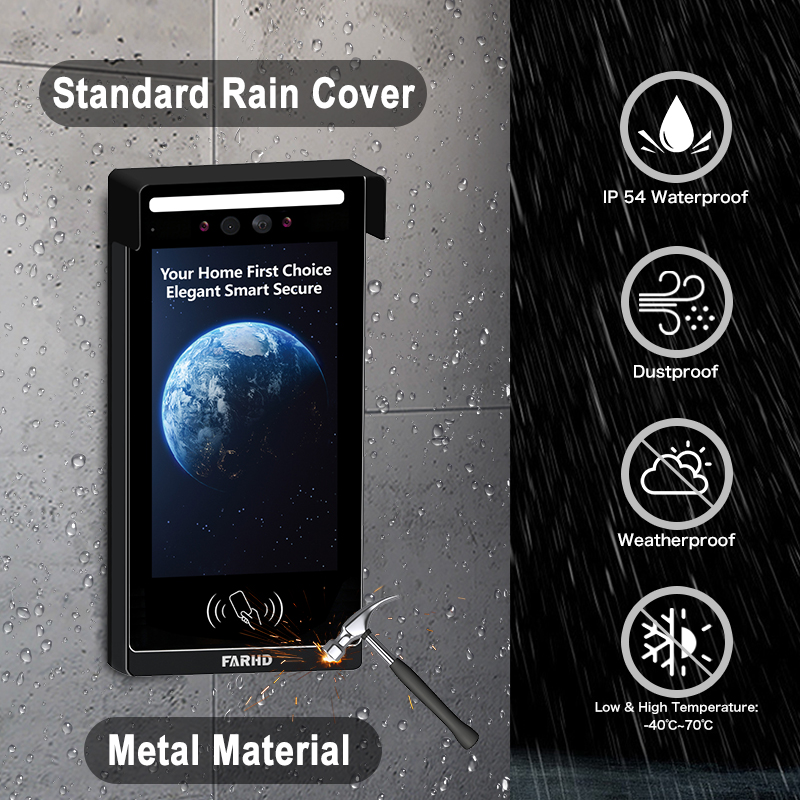
| Résistance aux intempéries | Essentiel pour les installations extérieures |
| Intégration domotique | Compatible avec Alexa, Google Home, Apple HomeKit |
| Accès multi-utilisateurs | Idéal pour les entreprises ou les familles avec plusieurs utilisateurs |
| Flux vidéo cryptés | Assure la confidentialité et empêche la visualisation non autorisée |
Considérations B2B :
- Personnalisation en gros: Pour les développements immobiliers ou les bâtiments commerciaux
- Services OEM/ODM: Les entreprises peuvent demander un étiquetage privé ou une personnalisation des fonctionnalités
- Gestion de l'accès à distance: Particulièrement utile pour les gestionnaires de biens locatifs
💡 Si vous approvisionnez des sonnettes vidéo pour la revente ou des installations commerciales, envisagez de travailler avec un fournisseur OEM/ODM de confiance comme FARHD pour des solutions sur mesure.
3. Comment utiliser une sonnette vidéo avec Alexa ou Google Home
Intégrer votre sonnette vidéo avec Amazon Alexa ou Google Home ajoute le contrôle vocal et l'automatisation du domicile intelligent à votre système de sécurité. Cela est particulièrement utile pour les intégrateurs de maisons intelligentes et des revendeurs B2B cherchant à offrir des écosystèmes entièrement connectés.
Liste de vérification de compatibilité :
| Compatibilité des appareils | Alexa | Google Home |
|---|---|---|
| Ring Video Doorbell | ✅ | ✅ |
| Sonnette vidéo Eufy | ✅ | ✅ |
| Sonnette Arlo | ✅ | ✅ |
| Modèles OEM FARHD | ✅ (modèles sélectionnés) | ✅ (modèles sélectionnés) |
Comment se connecter avec Alexa :
- Installer l'application du fabricant (par ex., Ring, Arlo, FARHD Smart)
- Activer la compétence Sonnette vidéo dans l'application Alexa
- Se connecter à votre compte sonnette
- Découvrez les appareils – Alexa trouvera votre sonnette
- Utilisez les commandes vocales:
- « Alexa, montre-moi la porte d'entrée »
- « Alexa, parle à la sonnette »
Comment se connecter avec Google Home :
- Ouvrez l'application Google Home
- Ajouter un appareil > Fonctionne avec Google
- Rechercher la marque de la sonnette et se connecter
- Assigner la caméra à une pièce
- Utilisez les commandes vocales:
- « Hey Google, montre la porte d'entrée »
- « Hey Google, parle à la sonnette de l'entrée »
Avantages pour les entreprises :
- Contrôle mains libres dans les zones de réception ou les halls
- Vérification visuelle avant d'accorder l'accès au personnel de livraison
- Intégration avec d'autres appareils intelligents: Lumières, serrures et alarmes
🔗 En savoir plus sur les produits de sonnettes vidéo intelligentes de Page Produits de FARHD qui offrent une compatibilité avec Alexa et Google Home.

4. Comment visualiser la caméra de sonnette sur un téléphone : Guide étape par étape
Visualiser votre caméra de sonnette sur un smartphone est la fonctionnalité principale de toute sonnette intelligente. Voici un guide complet pour les utilisateurs résidentiels et les installateurs B2B configurant des systèmes pour leurs clients.
Configuration étape par étape sur le téléphone :
Étape 1 : Télécharger l'application
Chaque sonnette vidéo est livrée avec sa propre application. Exemples :
- Ring → Application Ring
- Arlo → Arlo Secure
- Eufy → Eufy Security
- FARHD → Application FARHD Smart
📝 Pour les modèles à étiquette blanche ou OEM, l'application peut être marquée au nom de l'entreprise.
Étape 2 : Créer un compte
- Utilisez votre e-mail, votre numéro de téléphone ou la connexion via les réseaux sociaux
- Configurez un mot de passe sécurisé
Étape 3 : Connectez-vous au Wi-Fi
- Assurez-vous que votre téléphone est sur un Wi-Fi 2,4 GHz réseau (la plupart des sonnettes ne supportent pas le 5 GHz)
- Suivez les instructions dans l'application pour connecter la sonnette au Wi-Fi
Étape 4 : Appairer l'appareil
- Scannez un code QR sur la sonnette ou saisissez manuellement le numéro de série
- Attendez que la sonnette se synchronise avec l'application
Étape 5 : Accéder à la vue en direct
- Ouvrez l'application
- Appuyez sur votre appareil → Voir le flux en direct
- Parlez aux visiteurs en utilisant l'audio bidirectionnel
Fonctionnalités que vous pouvez contrôler sur votre téléphone :
- 📹 Diffusion en direct
- 🔄 Lecture vidéo
- 📲 Notifications push
- 📁 Téléchargements de vidéos
- 📡 Personnalisation des zones de mouvement
- 👥 Partage d'accès utilisateur
Cas d'utilisation courants :
| Cas d'utilisation | Avantage |
|---|---|
| Propriétaires | Observez qui se trouve à votre porte depuis n'importe où |
| Propriétaires | Surveillez les interactions avec les locataires ou l'entretien des propriétés |
| Propriétaires d'entreprises | Gérez à distance l'accès des clients et les livraisons |
| Intégrateurs de sécurité (B2B) | Offrez à vos clients un contrôle centralisé depuis leurs téléphones mobiles |
🔗 Souhaitez-vous intégrer l'accès par téléphone mobile dans votre offre de sécurité ? Contactez Support FARHD pour des options de personnalisation OEM/ODM et de marque blanche logicielle.
5. Les sonnettes vidéo fonctionnent-elles sans Wi-Fi ou Internet ?
Bien que la plupart des sonnettes vidéo modernes nécessitent Wi-Fi pour fonctionner pleinement, certains modèles prennent en charge une fonctionnalité hors ligne limitée — une fonctionnalité clé pour les déploiements commerciaux ou ruraux où l'internet peut être instable.
Scénarios avec et sans Wi-Fi :
| Fonctionnalité | Avec Wi-Fi activé | Sans Wi-Fi |
|---|---|---|
| Visionnage vidéo en direct | ✅ | ❌ |
| Audio bidirectionnel à distance | ✅ | ❌ |
| Stockage cloud | ✅ | ❌ |
| Enregistrement local sur carte SD | ✅ | ✅ (sur certains modèles) |
| Alertes de capteur de mouvement | ✅ (notifications push) | ✅ (LED/buzzer uniquement) |
| Notifications d'application | ✅ | ❌ |
Options pour une utilisation hors ligne :
- Modèles à stockage local: Enregistrez la vidéo sur carte SD sans internet
- Sonnettes 4G LTE: Utilisez les réseaux cellulaires au lieu du Wi-Fi
- Systèmes hybrides: Combinez l'enregistrement hors ligne avec la sauvegarde cloud lors de la connexion
📦 Pour les acheteurs en gros et les distributeurs, FARHD propose des systèmes de sonnettes vidéo capables de fonctionner hors ligne idéaux pour les emplacements éloignés. Ces modèles prennent en charge l'enregistrement sur carte SD et la synchronisation cloud différée.
6. Meilleures sonnettes vidéo pour les biens locatifs et les propriétaires
Les propriétés locatives présentent des défis uniques : forte rotation des locataires, espaces d'entrée partagés et besoin de gestion à distance des propriétés. Sonnettes vidéo intelligentes résolvent ces problèmes en offrant une visualisation à distance, un contrôle d'accès et un accès multi-utilisateurs.
Fonctionnalités indispensables pour l'utilisation locative :
- Accès multi-utilisateurs
- Stockage cloud avec connexion multi-appareils
- Intégration de verrouillage/déverrouillage à distance
- Alertes de sabotage
- Reconfiguration facile pour les nouveaux locataires
Solutions FARHD idéales pour les propriétés locatives :
| Ligne de produits | Ensemble de fonctionnalités |
|---|---|
| ID: Série Villa à | Idéal pour les maisons locatives individuelles ou les duplex |
| Interphone IP pour appartement | Conçu pour les bâtiments multi-unités avec contrôle d'accès centralisé |
| Solutions personnalisées OEM | Systèmes de sonnettes de marque pour les gestionnaires de propriétés ou les promoteurs immobiliers |
🔗 Explorez les ID: Série Villa à — parfait pour les propriétaires bailleurs cherchant des solutions fiables et évolutives.
Opportunités B2B :
- Revendez des sonnettes vidéo en marque blanche aux gestionnaires de propriétés
- Proposez des contrats d'installation et de maintenance
- Utilisez les services OEM de FARHD pour construire une marque autour de la sécurité des propriétés locatives
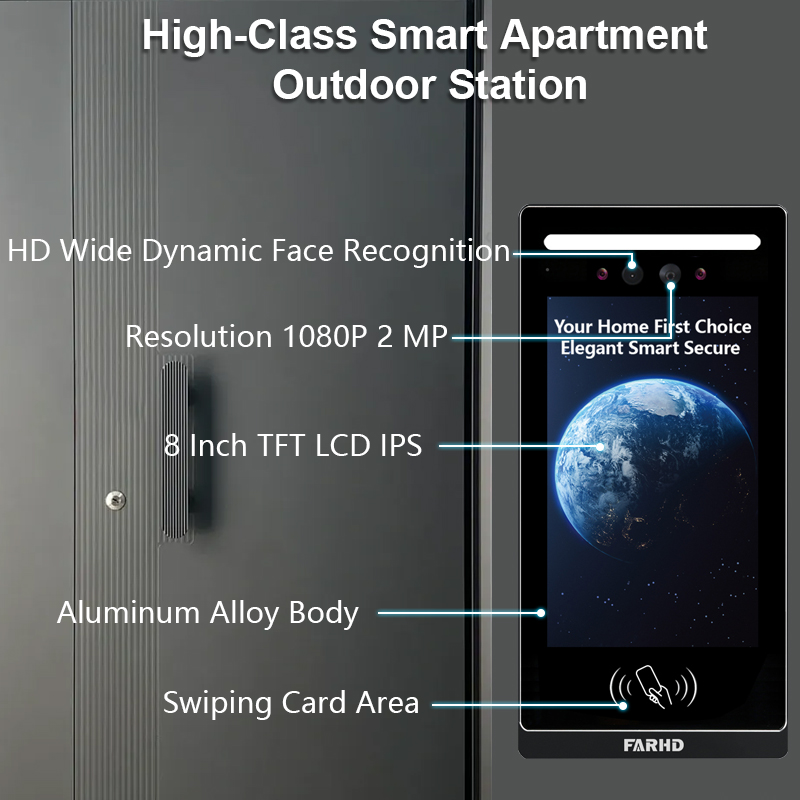
7. Sonnettes vidéo pour usage professionnel : Surveillance et contrôle à distance
Les espaces commerciaux comme les bureaux, les magasins de détail et les entrepôts nécessitent une sécurité et une visibilité renforcées. Les sonnettes vidéo avec capacité de visualisation mobile permettent aux propriétaires d'entreprises de surveiller les entrées à distance, de gérer les livraisons et de vérifier les visiteurs.
Fonctionnalités orientées affaires :
- Surveillance multi-sonnettes depuis une seule application
- Accès programmé et journaux des visiteurs
- Intégration avec serrure intelligente
- Reconnaissance faciale alimentée par l'IA
- Communication chiffrée pour la confidentialité
Recommandé par FARHD :
- Systèmes d'interphone personnalisables
- Sonnettes vidéo intelligentes OEM
- Solutions matérielles + logicielles full-stack
FARHD développe des systèmes de sonnettes de niveau professionnel adaptés aux environnements à fort trafic. Avec plus de 60 % de part de marché en Chine et une expérience approfondie en OEM, FARHD est un partenaire fiable pour les déploiements d'entreprise.
🔗 En savoir plus sur Le profil de l'entreprise FARHD et leur présence mondiale sur le marché des interphones vidéo.
8. Fournisseur B2B de sonnettes vidéo et options de personnalisation
Si vous êtes un bonne caméra de sonnette intelligente, distributeur, pour votre entreprise dépend de votre public cible, de l'environnement d'application, des exigences d'intégration et du modèle de vente. Que vous soyez un, ou marque startup, en partenariat avec un fiable fournisseur de sonnettes vidéo est essentiel pour votre succès sur le marché des maisons intelligentes et de la sécurité.
Pourquoi choisir FARHD ?
| Fonctionnalité | Avantage FARHD |
|---|---|
| Intégration verticale | Contrôle de la fabrication LCD au produit final |
| Capacités OEM/ODM | Personnalisez le matériel, le logiciel, l'interface d'application et l'emballage |
| Certifications mondiales | ISO 9001, CE, FCC, ROHS, SGS |
| Capacité de production | 13 lignes dans une usine de 5 500 m², équipement SMT YAMAHA |
| Portée du marché | Fournisseur principal en Chine, Italie, Turquie et Corée |
| Expertise R&D | Équipe dédiée aux innovations en IA, IoT et connectivité |
📞 Souhaitez-vous lancer votre propre marque de sonnettes vidéo ? Contacter FARHD pour discuter des prix en gros, de l'étiquetage privé et des solutions spécifiques au marché.
9. FAQ : Visualisation des sonnettes vidéo sur appareils mobiles
Q1 : Puis-je visualiser la caméra de ma sonnette sur plus d'un téléphone ?
Oui, la plupart des applications permettent à plusieurs utilisateurs ou appareils d'accéder au même flux de sonnette.
Q2 : Ai-je besoin d'un abonnement pour visualiser ma sonnette sur mon téléphone ?
Non. La vue en direct est généralement gratuite. Cependant, le stockage cloud et les fonctionnalités avancées peuvent nécessiter un abonnement.
Q3 : Quelle vitesse internet ai-je besoin pour un streaming vidéo fluide ?
Une vitesse de téléchargement minimale de 2 Mbps est recommandée pour le streaming HD.
Q4 : Puis-je recevoir des alertes quand je ne suis pas à la maison ?
Oui, les notifications push sont envoyées sur votre téléphone indépendamment de l'emplacement, tant que vous êtes connecté à internet.
Q5 : Puis-je visualiser la vidéo de ma sonnette depuis l'étranger ?
Absolument. Tant que votre sonnette est connectée à internet et que votre téléphone y a accès, vous pouvez la visualiser de n'importe où.
Avec le bon système en place, visualiser la caméra de votre sonnette sur un téléphone n'est pas seulement possible — c'est sécurisé, pratique et fiable. Que vous soyez propriétaire, bailleur ou acheteur professionnel, choisir une solution fiable comme FARHD garantit une satisfaction et un support à long terme.
Vous pourriez également être intéressé par
-
FARHD: Your 28-Year Source Factory for Video Door Phone Intercoms
When you choose a video door phone intercom supplier, you are not just buying a product—you are choosing the factory behind it. FARHD has been a source manufacturer since 1998, with over 28 years of experience in video intercom and access control. From villa kits to apartment intercoms, we deliver reliable, customizable, and Tuya-compatible solutions…
-
FARHD Source Factory: Your Trusted Partner for Video Intercom and Access Control Solutions
When you choose a manufacturing partner for video intercom and access control systems, you are not just buying products—you are investing in quality, reliability, and long-term support. FARHD has been a source factory since 1998, and today we serve clients in over 100 countries worldwide. With strict quality inspection, in-house production, independent R&D, and full…
-
2-Wire Video Door Phone Connection with Electric Rim Lock: Unlock by Card, Indoor Monitor, and App
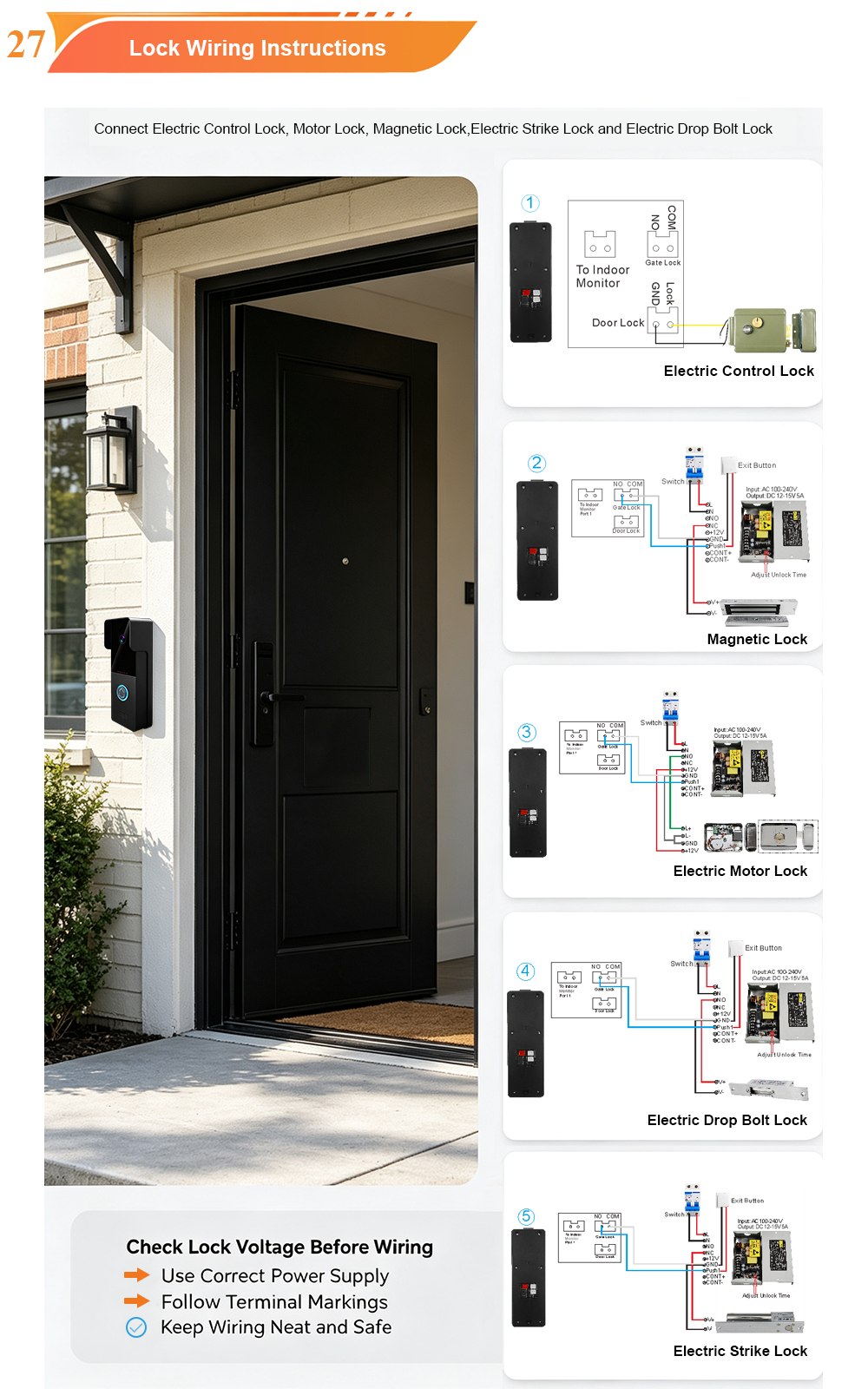
A complete guide to wiring an electric rim lock to a FARHD 2-wire video door phone system—and configuring three convenient unlock methods: RFID card, indoor monitor, and mobile app. Whether you are upgrading an existing building or specifying a new system, this guide covers the essentials for reliable, secure access control. Electric rim locks are…
-

Video Intercom Manufacturer & Source Factory Since 1998 | OEM ODM SKD Building Intercom
Video Intercom Manufacturer & Vertical Source Factory in China FARHD is a professional video intercom manufacturer with over 28 years of specialized experience in building security intercom systems. Established in 1998, we are a genuine building intercom factory focused on independent R&D, in-house production, and customized manufacturing for global B2B clients, including distributors, importers, engineering contractors, real estate…



