
Comment Utiliser une Sonnette Vidéo Tuya pour la Sécurité Domestique Intelligente et l'Intégration B2B
novembre 12, 2025
Partager cet article

1. Qu'est-ce qu'une sonnette vidéo Tuya et comment fonctionne-t-elle ?
Introduction aux sonnettes vidéo Tuya
A Sonnette vidéo Tuya est un dispositif de sécurité domotique intégré à la plateforme IoT de Tuya. Tuya fournit une solution universelle pour les appareils intelligents, permettant aux fabricants de connecter leurs produits au cloud, aux applications et aux services activés par l'IA. Les sonnettes compatibles Tuya permettent aux utilisateurs de :
- Surveiller l'activité à la porte d'entrée en temps réel
- Communiquer via audio bidirectionnel
- Recevoir des alertes déclenchées par détection de mouvement
- Stocker les enregistrements sur cloud ou cartes SD locales
- S'intégrer à des écosystèmes domotiques comme Alexa, Google Homeet IFTTT
Comment fonctionnent les sonnettes vidéo Tuya
| Composant | Fonctionnalité |
|---|---|
| HD Caméra | Capture la vidéo en direct et les images |
| Capteur de mouvement | Détecte les mouvements et envoie des notifications |
| Microphone et haut-parleur | Permet une communication bidirectionnelle |
| ID: Module Wi-Fi | Connecte la sonnette à l'application Tuya Smart et au cloud |
| Alimentation électrique | Options alimentées par batterie ou câblées disponibles |
| Options de stockage | Cloud via Tuya ou stockage local via microSD |
Principaux avantages :
- Intégration fluide avec l'écosystème Tuya Smart
- Accès à distance et notifications en temps réel
- Abordable et évolutif pour les applications B2B multi-propriétés
Qui utilise les sonnettes vidéo Tuya ?
- Propriétaires à la recherche de sécurité intelligente
- Gestionnaires de biens immobiliers pour des bâtiments résidentiels multi-unités
- acheteurs B2B comme distributeurs, grossisteset marques OEM nécessitant des solutions en marque blanche
Les sonnettes Tuya ne sont pas réservées aux consommateurs. Leur compatibilité avec une large gamme de fabricants OEM/ODM en fait un choix idéal pour acheteurs en gros et des fournisseurs de solutions de sécurité.
2. Comment installer une sonnette vidéo Tuya : Guide d'installation étape par étape
Liste de contrôle avant l'installation
Avant d'installer une sonnette vidéo Tuya, assurez-vous de disposer de :
- Connexion WiFi stable (2,4 GHz) – Les appareils Tuya ne supportent pas le 5 GHz
- application Tuya Smart téléchargée sur votre smartphone
- Source d'alimentation (batterie chargée ou câblage prêt)
- Outils de montage (vis, chevilles, tournevis)
Étapes d'installation
Étape 1 : Charger ou connecter l'alimentation
- Si alimentée par batterie, chargez complètement la batterie à l'aide du câble USB
- Si câblée, connectez l'appareil à votre câblage de sonnette existant (12-24 V AC)
Étape 2 : Monter la sonnette
- Choisissez un emplacement près de votre porte au niveau des yeux (~1,2-1,5 mètre)
- Fixez le support de montage avec des vis
- Emboîtez la sonnette vidéo sur le support
Étape 3 : Connexion au WiFi
- Ouvrez l' Application Tuya Smart
- Appuyez sur « Ajouter un appareil » → « Surveillance vidéo » → « Sonnette intelligente »
- Suivez les instructions dans l'application et scannez le code QR affiché sur votre téléphone à l'aide de la caméra de la sonnette
Étape 4 : Configuration finale
- Vérifiez que l'audio et la vidéo fonctionnent correctement
- Réglez la sensibilité de la détection de mouvement
- Configurez les paramètres de notifications push
Conseils d'installation
| Conseil | Description |
|---|---|
| Utilisez un support angulaire | Améliore le champ de vision pour les installations en coin |
| Signal WiFi sécurisé | Placez le routeur à 10-15 mètres de la sonnette |
| Activez le chiffrement | Utilisez les services cloud chiffrés de Tuya pour des données sécurisées |
| Nommez votre appareil | Particulièrement utile pour les propriétés avec plusieurs unités |
3. Comment connecter la sonnette vidéo Tuya à l'application Tuya Smart
Connecter votre sonnette vidéo Tuya à Application Tuya Smart débloque tout son potentiel, y compris l'accès à distance, le stockage cloud et l'intégration domotique.
Téléchargement de l'application et configuration du compte
- Téléchargez l' Tuya Smart ou La vie intelligente application depuis l'App Store ou Google Play.
- Créez un compte et connectez-vous.
- Activez la localisation et le Bluetooth sur votre appareil pour une association plus facile.
Association de la sonnette
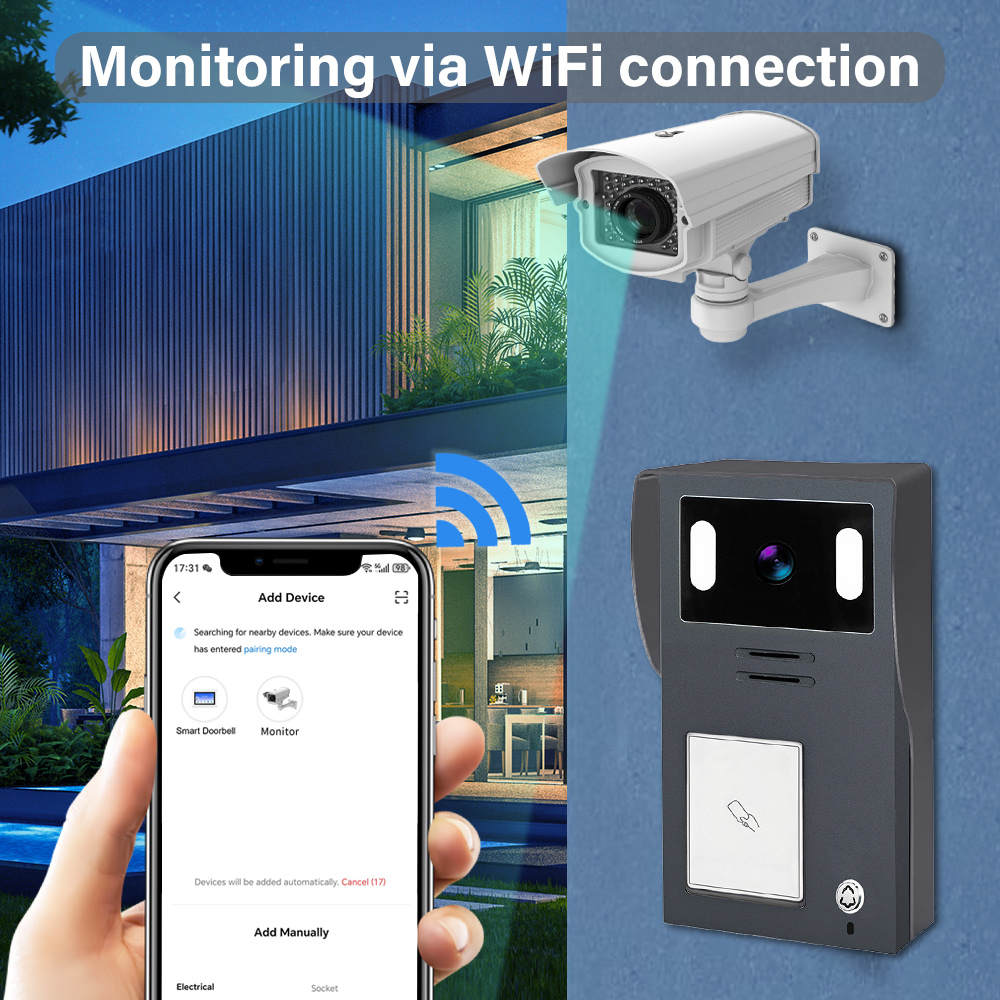
- Ouvrez l'application et appuyez sur « + » pour ajouter un nouvel appareil.
- Sélectionnez Vidéosurveillance → Sonnette intelligente (WiFi).
- Assurez-vous que la sonnette est en mode association (généralement clignotement bleu).
- Saisissez vos identifiants WiFi 2,4 GHz.
- Scannez le code QR affiché dans l'application à l'aide de la caméra de la sonnette.
- Attendez la connexion de l'appareil (30-60 secondes).
Personnalisation des paramètres de l'appareil
Une fois connecté, vous pouvez ajuster :
- Zones de détection de mouvement et sensibilité
- Horaires de notifications (par exemple, alertes uniquement la nuit)
- Paramètres audio bidirectionnel
- Préférences d'enregistrement vidéo (cloud ou carte SD)
ID: Intégration du stockage cloud
Tuya propose des plans cloud optionnels :
| Plan de stockage | Caractéristiques | Idéal pour |
|---|---|---|
| Basique | Historique d'événements sur 7 jours, enregistrement de mouvements | Maisons et petits appartements |
| Standard | Historique sur 14 jours, vidéo continue | Grandes maisons, petits bureaux |
| Premium | Historique sur 30 jours, support multi-caméras | Immeubles multi-unités, B2B |
Note : Le stockage local sur carte SD est également pris en charge pour les sauvegardes hors ligne.
Avantages pour les acheteurs B2B
- Gérez plusieurs appareils depuis un seul compte
- Attribuez différents utilisateurs et permissions
- Activer Vues de tableau de bord multi-propriétés
- Option pour options personnaliser l'application avec votre marque commerciale via des partenariats OEM
Pour les entreprises souhaitant approvisionner des sonnettes vidéo compatibles Tuya, FARHD propose une conception complète, des services OEM/ODM et une intégration d'applications pour les systèmes de sonnettes intelligentes.
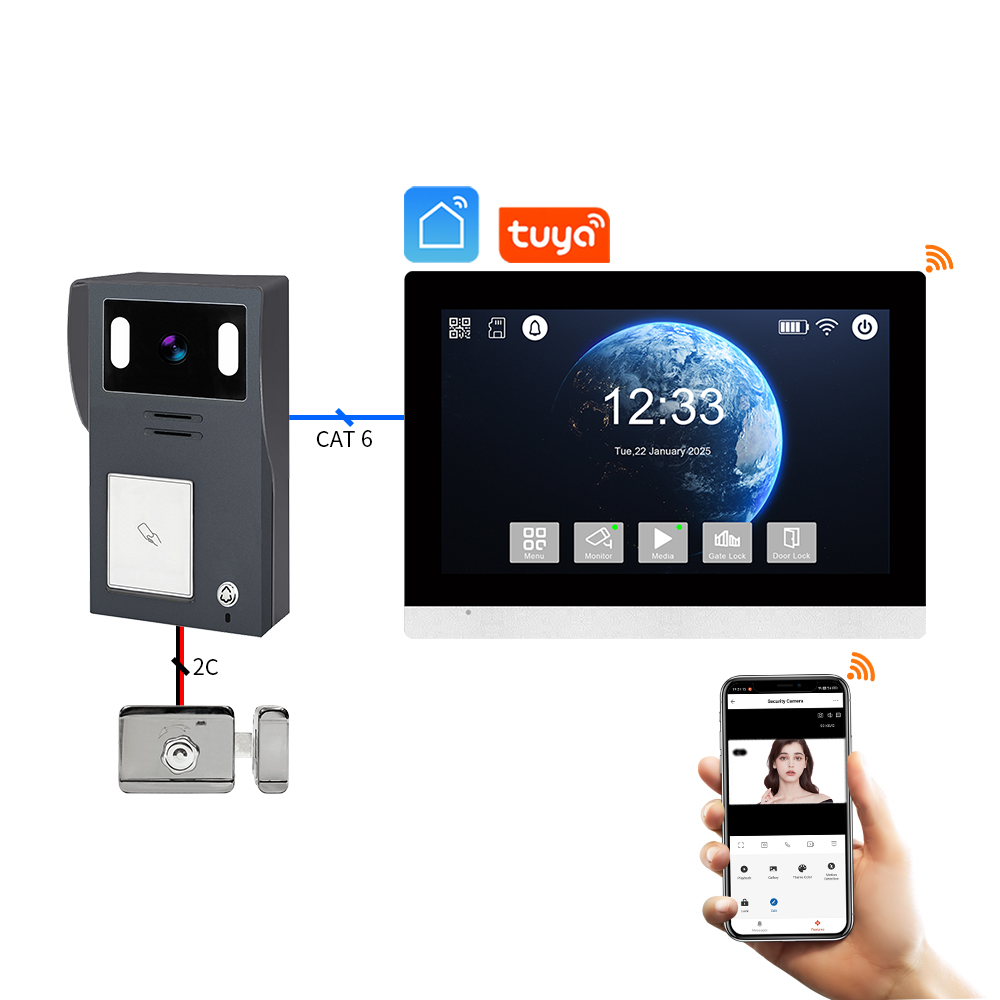
4. Comment utiliser une sonnette vidéo Tuya avec Alexa ou Google Home
Intégrer votre sonnette vidéo Tuya à Alexa ou Google Home permet les commandes vocales, les routines intelligentes et le streaming vidéo en direct sur les appareils compatibles. Cela est particulièrement utile pour les propriétaires et acheteurs B2B la gestion de plusieurs propriétés intelligentes ou l'offre de services à valeur ajoutée aux locataires et clients.
Intégration avec Amazon Alexa
Appareils compatibles :
- Echo Show
- Echo Spot
- Fire TV
Étapes de configuration :
- Ouvrez l'application Alexa.
- Allez à Compétences et jeux → Recherchez « Tuya Smart » ou « Smart Life ».
- Activez la compétence et liez votre compte Tuya.
- Découvrez les appareils ; votre sonnette devrait apparaître automatiquement.
- Assignez-la à un groupe ou une pièce (par exemple, « Porte d'entrée »).
Commandes vocales :
- « Alexa, montre-moi la porte d'entrée. »
- « Alexa, y a-t-il quelqu'un à la porte ? »
- « Alexa, réponds à la sonnette. »
Intégration avec Google Home
Appareils compatibles :
- Google Nest Hub
- Téléviseurs compatibles Chromecast
- Téléphones Android avec Assistant
Étapes de configuration :
- Ouvrez l'application Google Home.
- Appuyez sur « + » → « Configurer un appareil » → « Fonctionne avec Google ».
- Recherchez et liez votre Tuya Smart ou La vie intelligente compte.
- Assignez la sonnette à une pièce.
Commandes vocales :
- « Hey Google, montre-moi la porte d’entrée. »
- « Hey Google, qui est à la porte ? »
- « Hey Google, active les alertes de mouvement. »
Avantages pour les applications B2B
| Fonctionnalité | Cas d'utilisation pour les entreprises |
|---|---|
| Contrôle d'accès vocal | Accès intelligent pour les livraisons, invités et entrepreneurs |
| Surveillance en temps réel sur affichage | Espaces communs dans les immeubles d'appartements ou halls de bureaux |
| Routines automatisées | Déclenchez des lumières ou alarmes lors de la détection de mouvement |
| Expérience personnalisable | Les fournisseurs OEM peuvent intégrer les API Tuya dans des plateformes blanches |
FARHD propose des solutions de sonnettes vidéo intelligentes qui supportent les intégrations vocales Tuya et peuvent être personnalisées pour des applications B2B blanches. Consultez leur gamme de produits pour les modèles compatibles avec Alexa et Google Home.
5. Fonctionnalités intelligentes des sonnettes vidéo compatibles Tuya en 2025
L'évolution de la plateforme IoT de Tuya a permis des fonctionnalités intelligentes de nouvelle génération dans les sonnettes vidéo, les rendant non seulement plus sécurisées mais aussi plus intelligentes et adaptatives. Voici les principales fonctionnalités à rechercher dans les sonnettes compatibles Tuya 2025, en particulier pour les entreprises et distributeurs envisageant des achats en gros.
Fonctionnalités intelligentes clés
1. Détection de mouvement alimentée par l'IA
- Identifie humains vs. animaux vs. véhicules
- Réduit les fausses alarmes grâce à des algorithmes avancés
- Zones de détection personnalisables et niveaux de sensibilité
2. Reconnaissance faciale (modèles avancés)
- Reconnait les visiteurs fréquents (famille, personnel)
- Envoie des alertes personnalisées
- Intégration avec les systèmes de contrôle d'accès
3. Options de stockage cloud et edge
- Carte SD locale (jusqu'à 128 Go) et stockage cloud chiffré
- Traitement IA edge pour des temps de réponse plus rapides
- Pas de dépendance à Internet pour les fonctions de base
4. Efficacité de la batterie et de l'alimentation
- Modes de réveil à faible consommation
- Compatibilité avec panneaux solaires pour une alimentation durable
- Durée de vie de la batterie améliorée (jusqu'à 6 mois sur une charge)
5. Accès multi-utilisateurs et multi-appareils
- Partagez l'accès avec la famille ou le personnel
- Contrôle d'accès basé sur les rôles pour les gestionnaires de propriétés
- Tableau de bord cloud pour la gestion de flotte
Tableau comparatif des fonctionnalités
| Fonctionnalité | Modèles standard 2023 | Modèles améliorés Tuya 2025 |
|---|---|---|
| Détection de mouvement | PIR de base | Différenciation IA humain/véhicule |
| Options de stockage | Carte SD ou cloud | Hybride edge + cloud |
| Prise en charge de l’assistant vocal | Partiel | Intégration complète Alexa/Google |
| Source d'alimentation | Filaire/batterie (durée de vie courte) | Solaire + batterie longue durée |
| Notifications intelligentes | Délai possible | Alertes intelligentes en temps réel |
Avantages pour les acheteurs B2B
- SKU améliorés pour les gammes de produits premium
- ARPU accru (revenu moyen par utilisateur) avec les abonnements cloud
- Coûts de support réduits grâce à la précision basée sur l'IA
- Idéal pour projets de villes intelligentes, communautés fermées et immeubles à locataires multiples
Si vous prévoyez d'approvisionner ou de distribuer des sonnettes vidéo compatibles Tuya de pointe, FARHD est un partenaire OEM/ODM éprouvé avec des capacités complètes de R&D et de personnalisation en interne. En savoir plus sur leurs services de solutions de bout en bout ici.
6. Dépannage des problèmes courants avec les sonnettes vidéo Tuya
Même les meilleures sonnettes intelligentes peuvent rencontrer des problèmes. Comprendre comment dépanner les problèmes courants garantit une expérience utilisateur fluide et aide revendeurs B2B à réduire les coûts de support après-vente.
Problème 1 : L'appareil ne s'associe pas
Causes possibles :
- WiFi non 2,4 GHz
- Sonnette non en mode association
- Faible intensité du signal
Solutions :
- Assurez-vous que le routeur est en 2,4 GHz uniquement
- Réinitialisez la sonnette (généralement en maintenant le bouton de réinitialisation pendant 5-10 secondes)
- Approchez la sonnette du routeur pendant la configuration
Problème 2 : Pas d'alertes de mouvement
Causes possibles :
- Détection de mouvement désactivée
- Paramètres de sensibilité bas
- Firmware obsolète
Solutions :
- Activez la détection de mouvement dans l'application Tuya
- Réglez la sensibilité sur « élevé » et testez
- Vérifiez et installez les mises à jour du firmware
Problème 3 : Vidéo en direct ne se charge pas
Causes possibles :
- Bande passante insuffisante
- Problème de serveur ou bug d'application
- Appareil hors ligne
Solutions :
- Déconnectez les appareils inutilisés du WiFi
- Redémarrez l'application et la sonnette
- Vérifiez le statut de l'appareil dans l'application
Problème 4 : Alexa ou Google ne reconnaît pas l'appareil
Causes possibles :
- Compétence non liée correctement
- Conflits causés par plusieurs comptes
- Appareil non partagé correctement
Solutions :
- Reliez à nouveau votre compte Tuya avec Alexa/Google
- Assurez-vous que la sonnette est assignée à la bonne pièce
- Partagez l'accès à l'appareil avec le bon compte utilisateur
Astuce B2B : Créez une fiche de dépannage
Pour améliorer la satisfaction client et réduire les appels de service, les distributeurs et OEM devraient inclure un guide de démarrage rapide avec étapes de dépannage courantes dans chaque boîte de produit.
FARHD propose des solutions complètes support après-vente et documentation pour toutes ses solutions de sonnettes vidéo. Vous pouvez contacter leur équipe via le page de contact pour un support personnalisé ou une intégration OEM.
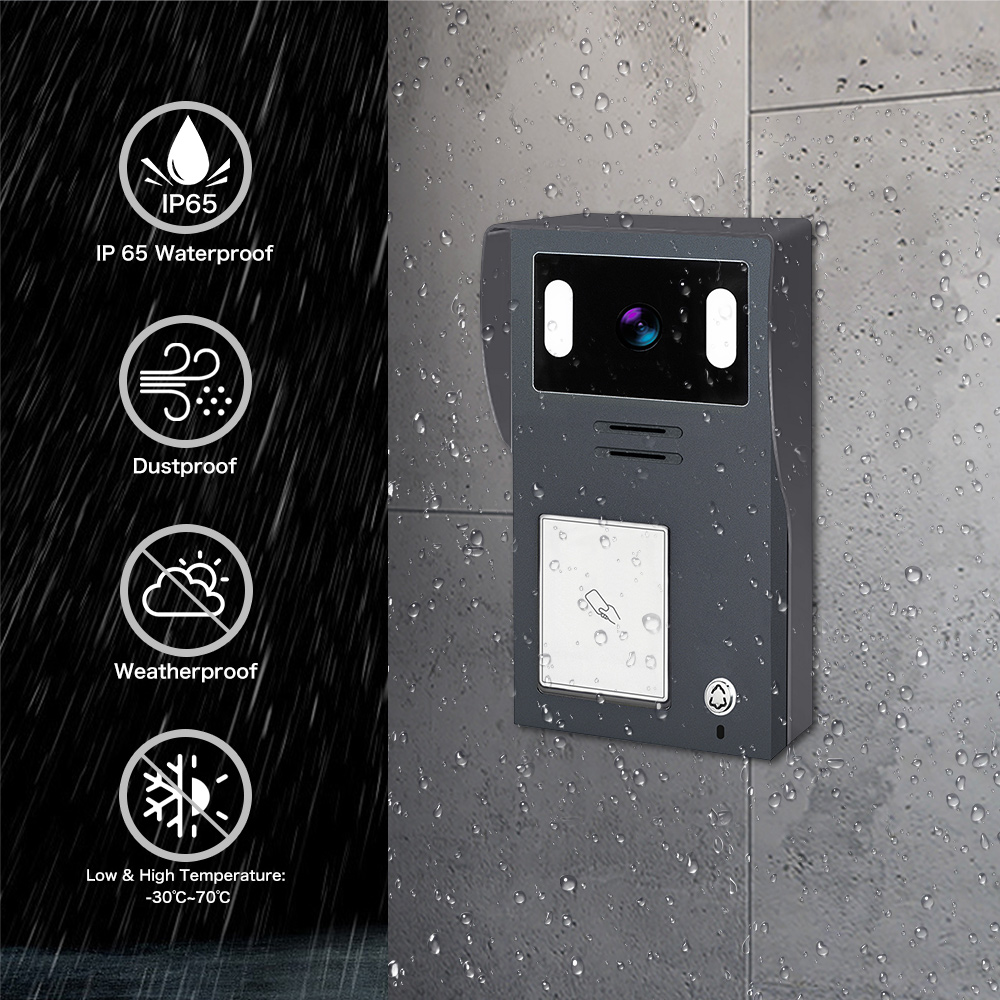
7. Sonnette vidéo Tuya pour les propriétés locatives et les immeubles multi-unités
Les sonnettes vidéo Tuya ne sont pas seulement pour les propriétaires individuels – elles sont aussi une solution puissante pour les propriétés locatives, immeubles collectifset les propriétés commerciales. Leur gestion basée sur le cloud, leur évolutivité et leurs fonctionnalités d'intégration intelligentes les rendent idéales pour les gestionnaires immobiliers, les propriétaires d'immeubleset acheteurs B2B axés sur l'immobilier et l'hôtellerie.
Pourquoi utiliser les sonnettes vidéo Tuya dans des environnements multi-unités ?
| Avantage | Description |
|---|---|
| Gestion centralisée | Contrôlez et surveillez plusieurs unités depuis un seul compte Tuya |
| Accès basé sur les rôles | Attribuez différents niveaux d'accès aux locataires, gestionnaires et équipes de maintenance |
| Vision à distance et alertes | Recevez des alertes de mouvement même à distance |
| Intégration de serrures intelligentes | Associez-les à des serrures intelligentes Tuya pour un contrôle d'accès fluide |
| Évolutivité rentable | Déploiement en masse abordable avec une gestion basée sur le cloud |
Applications courantes
- Complexes d'appartements
- Attribuez une sonnette intelligente à chaque unité
- Les locataires utilisent l'application Tuya pour la communication vidéo et les alertes
- Le gestionnaire immobilier conserve un accès prioritaire en cas d'urgence
- Locations de courte durée (par ex., Airbnb)
- Surveillez les arrivées et départs des invités à distance
- Empêchez les accès non autorisés ou les rassemblements indésirables
- Intégrez-les à des serrures intelligentes pour une expérience fluide
- Immeubles de bureaux commerciaux
- Utilisez les sonnettes vidéo Tuya pour les zones d'entrée restreintes
- Surveillez les livraisons et les accès des visiteurs
- Associez-les à des interphones pour une communication renforcée
Opportunités d'intégration B2B
- Solutions en marque blanche pour les grands groupes immobiliers
- Achat en gros avec remise auprès de fabricants OEM fiables
- intégration API pour des systèmes de gestion immobilière personnalisés (PMS)
FARHD, avec son vaste expérience en OEM/ODM et ses capacités de fabrication intégrées, est un fournisseur de choix pour les promoteurs immobiliers et les entreprises de gestion de biens cherchant à déployer des sonnettes vidéo compatibles Tuya à grande échelle. Découvrez davantage leurs capacités dans les systèmes d'interphone vidéo multi-unités sur leur Page À propos de nous.
8. Meilleurs fournisseurs OEM/ODM pour les sonnettes vidéo compatibles Tuya
Si vous êtes un acheteur en gros, La sélection de la, ou marque de maison intelligente cherchant à se procurer des sonnettes vidéo Tuya de haute qualité, choisir le bon Partenaire OEM/ODM est essentiel pour garantir la qualité du produit, la flexibilité de marque et le support technique.
Ce qu'il faut rechercher chez un fournisseur
| Critères | Pourquoi c'est important |
|---|---|
| Certification Tuya | Assure la compatibilité avec le cloud et l'écosystème d'applications Tuya |
| R&D interne | Temps de mise sur le marché plus rapide et meilleur contrôle du firmware |
| Intégration verticale | Meilleure assurance qualité et coûts de production réduits |
| Options de personnalisation de la marque | Support pour l'impression de logos, l'emballage, la personnalisation de l'interface utilisateur |
| Support technique après-vente | Réduit les taux de retour et améliore la satisfaction client |
Principaux fournisseurs OEM/ODM à l'échelle mondiale
🇨🇳 FARHD (Shenzhen FARHD Tech Co., Ltd.)
- Fabricant OEM/ODM certifié Tuya
- Production de bout en bout : de le module LCD au produit final de sonnette vidéo
- Spécialisé dans Les systèmes d’interphone multi-appartements, la sécurité intelligente et les intégrations Tuya
- Plus de 60 % de part de marché en Chine avec une forte présence dans Italie, Corée et Turquie
- Prise en charge complète de marque privée, l'interface utilisateur personnalisée, et l'intégration cloud
🔗 Explorer les services OEM/ODM de FARHD
🇺🇸 Remo+ (États-Unis)
- Sonnettes vidéo intelligentes compatibles Tuya avec stockage cloud
- Capacités OEM limitées mais forte présence B2C
- Idéal pour les distributeurs cherchant des options prêtes à l'expédition
🇪🇺 Smartwares (Pays-Bas)
- Propose des sonnettes vidéo activées Tuya pour le marché européen
- Se concentre principalement sur les segments de détail et bricolage
Pourquoi choisir FARHD ?
| Fonctionnalité | Avantage FARHD |
|---|---|
| Fabrication intégrée | Contrôle de l'écran LCD à l'assemblage final |
| Expertise en intégration Tuya | Collaboration approfondie avec la plateforme IoT de Tuya |
| Capacité de production élevée | 13 lignes de production sur un site de 5 500 m² |
| Certifications de qualité | ISO 9001, CE, FCC, ROHS, SGS |
| 🚪 | Prototypage rapide et personnalisation du firmware |
FARHD n'est pas seulement une usine – c'est un partenaire technologique axé sur l'innovation, la qualité et l'évolutivité mondiale. Que vous ayez besoin de 500 unités ou de 50 000, ils peuvent répondre à vos exigences avec une image de marque personnalisée, intégration d'applicationet des délais d'exécution rapides.
Pour les demandes de produits, les tarifs de gros ou les opportunités en marque blanche, contactez-les via leur page de contact.
9. Foire aux questions (FAQ)
Q1 : Puis-je utiliser une sonnette vidéo Tuya sans abonnement ?
Oui. La plupart des sonnettes vidéo Tuya supportent le stockage local via carte microSD. Le stockage cloud est optionnel et offre une commodité supplémentaire et une sauvegarde.
Q2 : Les sonnettes vidéo Tuya supportent-elles le WiFi 5 GHz ?
Non. Les sonnettes vidéo Tuya supportent généralement uniquement le WiFi 2,4 GHz, ce qui offre une portée plus longue et une connexion plus stable dans la plupart des environnements domestiques.
Q3 : Puis-je intégrer des sonnettes vidéo Tuya dans un système de gestion immobilière (PMS) ?
Oui. Grâce aux API et SDK ouverts de Tuya, de nombreux OEM comme FARHD proposent des intégrations personnalisées une intégration dans les plateformes PMS, idéale pour les hôtels, les complexes d'appartements et les communautés intelligentes.
Q4 : Est-il possible de re-marquer des sonnettes vidéo Tuya avec mon logo et mon emballage ?
Absolument. FARHD propose services de marque privée et de marque blanche, y compris l'impression de logos personnalisés, la conception d'interface, l'emballage et la marque d'application.
Q5 : À quel point les sonnettes vidéo Tuya sont-elles sécurisées ?
Tuya utilise un chiffrement AES de niveau bancaire pour la transmission vidéo et des données. Les appareils des OEM certifiés comme FARHD subissent également un contrôle qualité rigoureux et un audit du firmware pour assurer une sécurité optimale.
🌐 Découvrez davantage de produits de sécurité intelligente compatibles Tuya de V sur leur site officiel page produit. Que vous soyez une marque, un distributeur ou un intégrateur, FARHD offre la personnalisation, le support et la qualité dont vous avez besoin pour réussir sur le marché en pleine croissance de la maison intelligente.
📩 Prêt à créer votre propre gamme de sonnettes vidéo Tuya ?
Partenariat avec FARHD, le fabricant OEM/ODM de confiance pour les marques mondiales de maison intelligente.
👉 Contactez FARHD dès aujourd'hui pour discuter de votre projet.
Vous pourriez également être intéressé par
-

FARHD to Showcase All-Climate Technology at 2026 China Security Expo, Empowering Smart Communities in Northern China
From November 3 to 6, 2026, FARHD, a global leader in smart security and communication solutions, will unveil its full range of products deeply optimized for the harsh winter conditions of northern China at the 18th China International Social Public Security Products Expo (Security China). Under the theme “Digital Intelligence World, Total Security,” the expo…
-

FARHD to Showcase All-Climate Hard-Tech Solutions at Securika Moscow 2026
From April 22 to 24, 2026, FARHD, a global leader in smart security and communication solutions, will unveil its full range of products engineered for extreme climates at Securika Moscow 2026, held at Crocus Expo in Moscow, Russia. At booth A-9101, FARHD will present its smart intercom, access control, and smart home solutions—all deeply optimized…
-

FARHD Honored with Multiple Prestigious Awards in China’s Building Intercom Industry, 28 Years of Deep Engagement in the Chinese Market Solidifying Its Position as a Leading Brand
Recently, in the annual selection event jointly organized by the China Security and Protection Industry Association and multiple authoritative media outlets, FARHD, by virtue of its profound industry experience, outstanding technological innovation capabilities, and extensive market recognition, was awarded the prestigious “Most Influential Brand in China’s Building Intercom Industry” . These accolades not only affirm FARHD’s 28…
-

FARHD Honored with Multiple Prestigious Awards in China’s Building Intercom Industry, 28 Years of Deep Engagement in the Chinese Market Solidifying Its Position as a Leading Brand
Recently, in the annual selection event jointly organized by the China Security and Protection Industry Association and multiple authoritative media outlets, FARHD, by virtue of its profound industry experience, outstanding technological innovation capabilities, and extensive market recognition, was awarded the prestigious “National Top 10 Quality Brands in the Security Industry” . These accolades not only affirm FARHD’s…



