2-Wire Villa Video Door Phone Kit: Connection and Functions of 7″ IPS Touch Screen Indoor Monitor & Outdoor Call Panel
październik 20, 2026
Udostępnij ten artykuł
A complete wiring and feature guide for villa owners, installers, and system integrators
A villa intercom system needs to do three things well: let residents see who is at the gate, speak with them clearly, and unlock the door without walking to the entrance. The FARHD 2-wire villa video door phone kit delivers these functions through a 7-inch IPS touchscreen indoor monitor and a weatherproof outdoor call panel. The 2-wire connection makes installation simpler than traditional multi-wire systems, while still supporting stable audio, video, and unlock control.
This guide explains how to connect the kit, what each component does, and the practical settings that matter during installation.
What Is in the Kit?
A standard 2-wire villa kit includes:
| Komponent | Role |
|---|---|
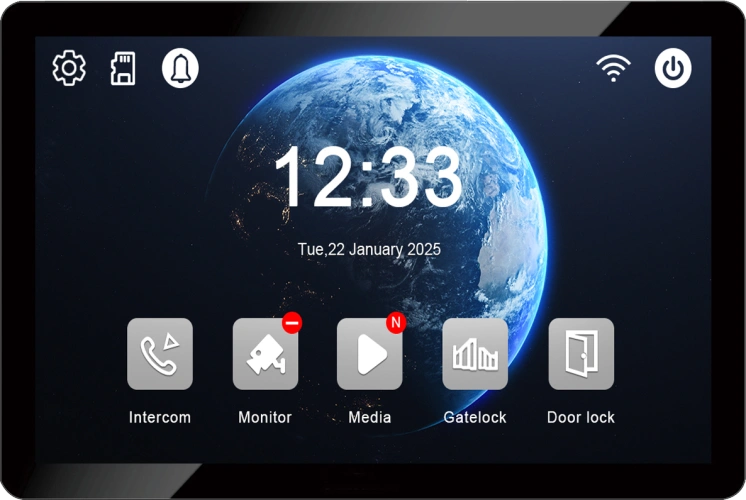
| 7″ IPS Touch Screen Indoor Monitor | Answer calls, view live video, speak with visitors, unlock the door, adjust settings |
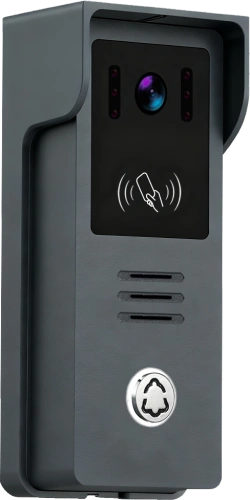
| Outdoor Call Panel | Visitor call button, HD camera, microphone, speaker, card reader (model dependent) |
| 2-Wire Connection Cable | Carries power, audio, video, and control signals between indoor and outdoor units |
| Power Adapter | Supplies power to the indoor monitor, which then powers the outdoor panel over the same 2-wire cable |
| Mounting Accessories | Brackets, screws, and rain cover for the outdoor station |
Optional accessories may include RFID cards, a 2-wire switch for additional indoor monitors, or an electric lock with its own power supply.
Why 2-Wire for a Villa?
The 2-wire system transmits power, video, audio, and control signals over a single pair of standard two-core wires. The connection is non-polarity, meaning the two wires can be connected either way without risk of reverse polarity damage.
Key installation advantages:
- Reuses existing two-core cabling in retrofit projects.
- Reduces cable cost and labour compared with 4-wire systems.
- Supports transmission distances up to 100 metres with suitable cable gauge.
- Avoids network configuration, Wi-Fi dependency, and IP address management.
For villas where the gate is 20–60 metres from the house, 2-wire is often the most practical balance of cost, reliability, and installation simplicity.
Connection Guide: Step by Step
Ważne: Disconnect power before wiring. Follow the wiring diagram supplied with your specific kit, as terminal labels may vary slightly by model.
Step 1: Plan the Installation
- Zamocuj outdoor call panel at the gate or entrance, approximately 1.5–1.8 metres above ground.
- Choose an indoor location for the 7-inch monitor where residents can hear the ringtone and view the screen comfortably. Recommended height: 1.2–1.4 metres.
- Plan a cable route between the two locations. Keep the run under 100 metres. For longer distances, use a thicker gauge cable.
Step 2: Run the 2-Wire Cable
Use a two-core cable with a recommended conductor size of ≥0.5mm². For runs over 50 metres, consider 0.75mm² or 1.0mm² to reduce voltage drop.
Avoid running the intercom cable parallel to AC power lines. If crossing is unavoidable, cross at a right angle.
Step 3: Connect the Outdoor Call Panel
- Connect the two wires to the outdoor panel’s 2-wire terminals. Polarity does not matter.
- If an electric lock is being used, connect the lock control wires to the relay output terminals. The relay is typically a dry contact (NO/COM) and does not power the lock directly. A separate lock power supply is required.
Step 4: Connect the Indoor Monitor
- Connect the other end of the two-core cable to the indoor monitor’s 2-wire input terminals.
- Connect the power adapter to the indoor monitor.
- The indoor monitor supplies power to the outdoor panel over the same two wires.
Step 5: Power On and Test
- Power on the indoor monitor.
- Press the call button on the outdoor panel.
- The indoor monitor should ring and display the camera image within a few seconds.
- Test two-way audio and the unlock function.
If the monitor does not ring or the image does not appear, check cable continuity, terminal tightness, and power supply voltage before replacing hardware.
Functions of the 7″ IPS Touch Screen Indoor Monitor
The indoor monitor is the resident’s primary interface. The 7-inch IPS touchscreen provides clear viewing angles and responsive touch control.
Core functions:
| Funkcja | What It Does |
|---|---|
| Live video viewing | Displays the outdoor camera image when a visitor calls or when manually activated |
| Dwukierunkowe audio | Full-duplex communication with echo cancellation for natural conversation |
| Door unlock | On-screen unlock icon triggers the relay to release the electric lock |
| Call answering | Answer or end calls with a touch |
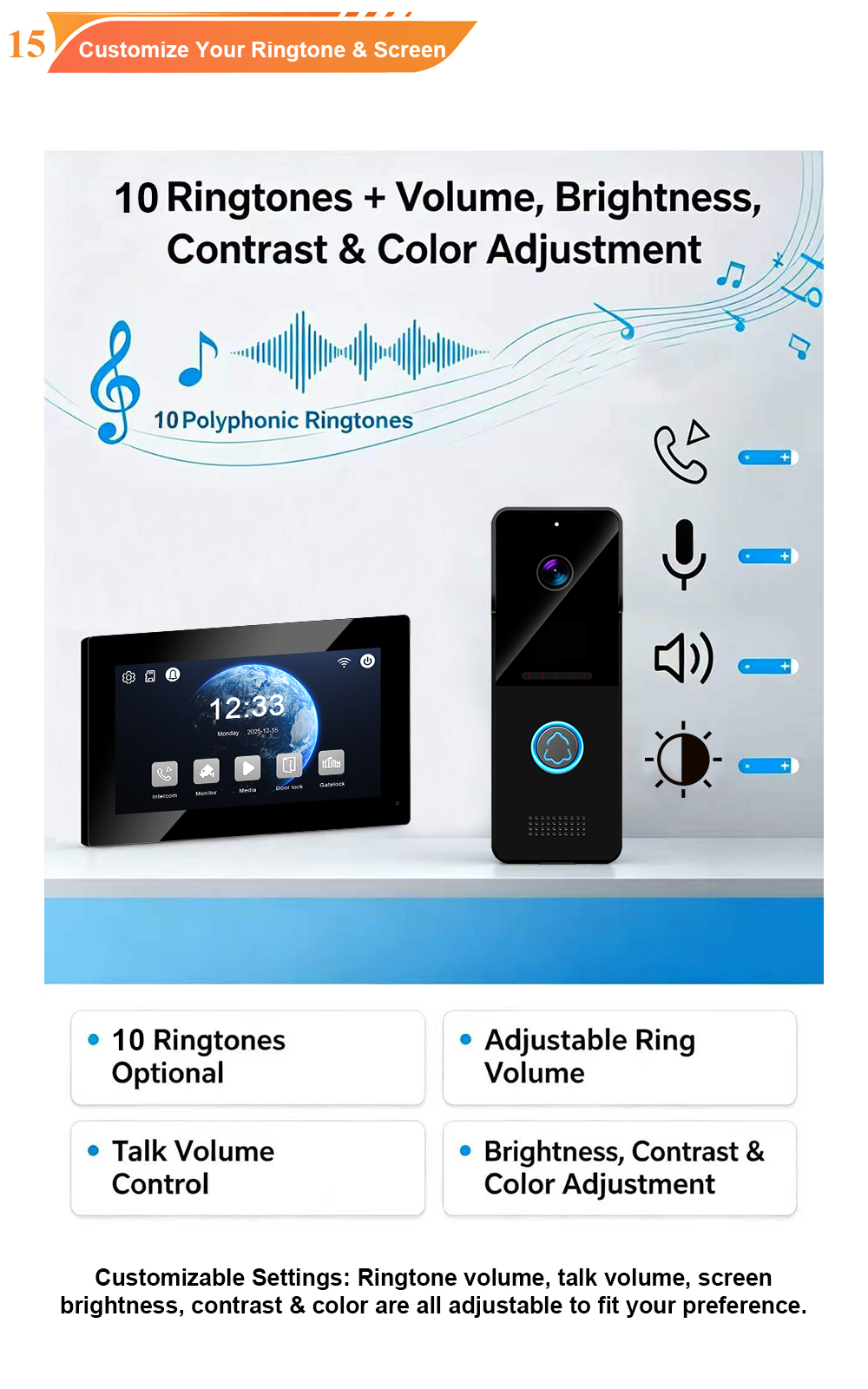
| Settings menu | Adjust ringtone volume, call volume, screen brightness, and language |
| Wykrywanie ruchu | Alerts and recording when movement is detected (model dependent) |
| Photo/video recording | Saves visitor snapshots or clips to a microSD card, up to 128GB (model dependent) |
| Interfejs użytkownika w wielu językach | Supports English, Russian, Arabic, French, Spanish, and other languages |
| Optional app integration | Tuya Smart Life app for remote answering and unlock on supported models |
The IPS panel is particularly useful in villas because residents often view the monitor from an angle—while cooking, walking past, or sitting on a sofa. IPS technology maintains colour and contrast across a wide viewing angle.
Functions of the Outdoor Call Panel
The outdoor panel is the visitor-facing component. It must be durable, weatherproof, and simple to operate.
Core functions:
| Funkcja | What It Does |
|---|---|
| Przycisk wywołania | Visitor presses to ring the indoor monitor |
| HD camera | Captures visitor video; typical specification is 1080P/2MP with wide-angle lens |
| Noktowizor na podczerwień | Provides clear images in low light or complete darkness |
| Dwukierunkowe audio | Microphone and speaker for conversation with the resident |
| RFID/IC card reader | Optional keyless entry for residents and staff |
| IP65 weatherproof housing | Protects against rain, dust, and temperature extremes |
| Relay output | Controls an electric lock or gate strike |
For villa gates, the outdoor panel is often exposed to direct sun, rain, and temperature swings. Confirm that the model is rated for the local climate—FARHD outdoor panels are typically rated for -40°C to +70°C i IP65 weatherproofing.
Configuration Settings That Matter
After wiring, a few settings determine daily usability:
1. Ringtone volume and melody
Set the indoor monitor ringtone loud enough to be heard from adjacent rooms, but not so loud that it disturbs the household at night.
2. Call volume and microphone sensitivity
Adjust so that the resident can hear the visitor clearly without echo or feedback. Echo is often caused by excessive speaker volume; reduce output volume if echo appears.
3. Unlock duration
Set the relay release time to match the electric lock. Typical values are 3–10 seconds. If the lock does not release fully, increase the duration slightly.
4. Language
Select the resident’s preferred language from the monitor menu. Multi-language support is useful for international villa owners and staff.
5. Optional card registration
If the outdoor panel includes a card reader, register resident cards through the indoor monitor menu. Each card should be associated with the correct apartment or user.
6. Optional app pairing
On Tuya-compatible models, connect the indoor monitor to a Sieć Wi-Fi 2,4 GHz and pair it with the Tuya Smart Life app. Test remote answering and unlock before handing the system over to the resident.
Technical Specifications at a Glance
| Funkcja | Typical Specification |
|---|---|
| Połączenie | 2-wire, non-polarity |
| Transmission distance | Up to 100 metres (cable gauge dependent) |
| Monitor wewnętrzny | 7-inch IPS touchscreen, 1024×600 resolution |
| Outdoor camera | 1080P/2MP HD, wide-angle lens, IR night vision |
| Wymaga profesjonalnego okablowania/konfiguracji | Full-duplex two-way with echo cancellation |
| Unlock output | 1 relay, dry contact (NO/COM) |
| Odporność na warunki atmosferyczne | IP65 outdoor panel |
| Temperatura pracy | -40°C to +70°C |
| Power supply | 15V DC adapter (indoor monitor powers outdoor panel) |
| Przechowywanie | MicroSD up to 128GB (model dependent) |
| Optional app | Tuya Smart Life (2.4GHz Wi-Fi) |
| Montaż | Montaż na ścianie |
Rozwiązywanie typowych problemów
| Problem | Możliwa przyczyna | Rozwiązanie |
|---|---|---|
| No power | Adapter disconnected or faulty | Check adapter connection and voltage |
| No video | Loose 2-wire connection | Re-seat terminals at both ends |
| No audio | Volume muted or wiring fault | Check volume settings and audio terminals |
| Monitor does not ring | Call button or wiring issue | Test button continuity; check outdoor panel power |
| Unlock does not work | Lock power missing or relay miswired | Verify lock power supply and NO/COM wiring |
| App cannot connect | Wi-Fi on 5GHz or weak signal | Use 2.4GHz network; move monitor closer to router |
Najlepsze praktyki instalacji
- Use quality cable – ≥0.5mm² copper; thicker gauge for long runs.
- Seal outdoor connections – Use waterproof gel caps or silicone at the outdoor panel.
- Create a drip loop – Route cable so water drips away from the device.
- Label both ends of the cable – Simplifies future maintenance.
- Test before final mounting – Verify call, audio, video, and unlock before fixing the monitor to the wall.
- Document settings – Record unlock duration, card assignments, and app pairing details.
Why Choose FARHD for Your 2-Wire Villa Kit?
FARHD has been designing and manufacturing video intercom systems since 1998, with over 28 years of industry experience. Our 2-wire villa kits are engineered for reliable performance in residential projects, with support for:
- 7-inch and 10-inch IPS touchscreen monitors
- 2-wire non-polarity connection dla łatwej instalacji
- IP65 outdoor panels rated for -40°C to +70°C
- Card unlock, motion detection, and local recording
- Tuya Smart Life app on compatible models
- OEM/ODM/SKD services for custom branding and packaging
- No MOQ for trial orders
Whether you are upgrading a single villa or equipping a residential development, FARHD can supply the kit and technical documentation to support your installation.
Frequently Asked Questions
Q: Can the outdoor panel be connected to more than one indoor monitor?
A: Some 2-wire villa systems support multiple indoor monitors with a 2-wire switch or series connection. Check the specific kit’s capacity before ordering.
Q: Does the 2-wire system require internet?
A: No. Basic call, video, audio, and unlock functions work without internet. Internet and the Tuya app are only required for remote access features.
Q: What is the maximum cable distance?
A: Up to 100 metres with ≥0.5mm² cable. For longer runs, use thicker gauge cable or consult the manufacturer.
Q: Can I use an existing doorbell cable?
A: Often yes, if it is a two-core cable in good condition and meets the minimum gauge requirement.
Q: Is the outdoor panel weatherproof?
A: Yes. FARHD outdoor panels are typically IP65 rated and suitable for outdoor villa gates.
Q: Does the kit support electric lock control?
A: Yes. The indoor monitor includes a relay output for electric locks. The lock requires its own power supply.
Contact Us for Catalog, Pricing, and Samples
If you are sourcing a 2-wire villa video door phone kit for your next project, FARHD is ready to support you with product documentation, samples, and factory-direct pricing.
📩 Email: [email protected]
🌐 Website: www.farhd.com
📱 WhatsApp: +86 188 2370 9809 / +86 199 2545 1918
FARHD – Video Intercom Manufacturer Since 1998.
#2WireVillaIntercom #VideoDoorPhone #7InchIPS #OutdoorCallPanel #VillaIntercom #AccessControl #FARHD #OEM #ODM #BuildingSecurity
Możesz być również zainteresowany
-
Newly Designed UI on 7″ and 10″ Indoor Monitors, Plus an Apartment Outdoor Station with Face Recognition, Card Unlock, and Room List
Apartment buildings present a different intercom challenge from villas. A villa has one family and a handful of entry points. An apartment building has dozens or hundreds of households sharing a small number of entrances, with residents, visitors, couriers, property staff, and contractors all arriving through the same door. The outdoor station has to serve…
-
Audio Intercom: How to Make New Master Cards After Losing Your Admin Cards (Add/Delete Cards Tutorial)
Losing the admin or master card for an audio intercom system is a common but stressful situation for property managers, installers, and homeowners. Without a master card, routine card management—adding new residents, removing lost cards, or replacing departed staff—comes to a halt. The good news is that most audio intercom systems provide a recovery path,…
-
IP Villa Video Door Phone Kit: 10″ Touch Screen, Newly Designed UI, and Card Unlock Made Simple
For villa projects, the ideal intercom kit is one that arrives complete, installs cleanly, and gives the homeowner an experience that feels modern from the first day. Too often, buyers assemble systems from separate components—an outdoor station from one source, an indoor monitor from another, and a card reader added as an afterthought. The result…
-
CPSE 2026 Officially Opens Today: FARHD Welcomes You at Booth W1Y05
The 2026 China International Security Products Expo (CPSE 2026) officially opens today. FARHD’s booth is fully set up and our team is on site, warmly welcoming distributors, system integrators, real estate developers, and assembly factory partners from around the world to visit, meet with us, and explore opportunities for collaboration. Exhibition Information A 28-Year Source…