
How to View Doorbell Camera on Phone: A Complete Guide for Homeowners and Businesses
27 November, 2025
Share This Article

1. What is a Video Doorbell and How Does It Work?
A video doorbell is a smart security device that replaces or supplements your traditional doorbell. It includes a built-in high-definition camera, microphone, speaker, and often motion sensors, allowing homeowners or business owners to see, hear, and speak to visitors at their door — all through their smartphone.
Key Components of a Video Doorbell:
| Component | Function |
|---|---|
| Camera | Captures live or recorded video of the entryway |
| Microphone | Picks up audio from outside |
| Speaker | Allows two-way communication with visitors |
| Motion Sensor | Detects movement and triggers alerts or recordings |
| Wi-Fi Module | Connects the doorbell camera to your home or business network |
| Mobile App | Enables viewing, alerts, and interaction directly on a smartphone |
How It Works:
- Visitor Presses the Doorbell
The system sends a push notification to your phone via an app. - Motion is Detected
Even if the button isn’t pressed, motion sensors trigger a live view or recording. - Live Video Stream
You can watch a real-time video feed of the visitor using your phone. - Two-Way Audio
Speak to the visitor remotely through your phone. - Cloud or Local Storage
Videos are often saved for later viewing, either locally (SD card) or in the cloud.
Applications:
- Residential Homes: Enhance security and convenience
- Apartments: Provide remote access without needing to be physically present
- Businesses: Monitor deliveries, customers, and employees through remote access
2. Smart Video Doorbell Features to Look for in 2025
As technology evolves, modern video doorbells offer advanced features that go far beyond just video and audio. Whether for homeowners or B2B buyers like landlords, property managers, or security integrators, knowing which features matter is key to choosing the right product.
Must-Have Features:
| Feature | Benefit |
|---|---|
| HD/4K Video Resolution | Clearer image quality, better facial recognition |
| Night Vision | Infrared LEDs allow visibility in complete darkness |
| AI Motion Detection | Reduces false alerts by distinguishing between people, cars, and animals |
| Cloud & Local Storage | Flexible options for recording and storing video |
| Battery or Wired Options | Suited for different installation requirements |
| Weather Resistance | Essential for outdoor installations |
| Smart Home Integration | Works with Alexa, Google Home, Apple HomeKit |
| Multiple User Access | Ideal for businesses or families with several users |
| Encrypted Video Streams | Ensures privacy and prevents unauthorized viewing |
B2B Considerations:
- Bulk Customization: For real estate developments or commercial buildings
- OEM/ODM Services: Businesses can request private labeling or feature customization
- Remote Access Management: Especially useful for rental property managers
💡 If you’re sourcing video doorbells for resale or commercial installations, consider working with a trusted OEM/ODM supplier like FARHD for tailor-made solutions.
3. How to Use a Video Doorbell with Alexa or Google Home
Integrating your video doorbell with Amazon Alexa or Google Home adds voice control and smart home automation to your security system. This is particularly useful for smart home integrators and B2B resellers seeking to offer fully connected ecosystems.
Compatibility Checklist:
| Device Compatibility | Alexa | Google Home |
|---|---|---|
| Ring Video Doorbell | ✅ | ✅ |
| Eufy Video Doorbell | ✅ | ✅ |
| Arlo Doorbell | ✅ | ✅ |
| FARHD OEM Models | ✅ (select models) | ✅ (select models) |
How to Connect with Alexa:
- Install the Manufacturer App (e.g., Ring, Arlo, FARHD Smart)
- Enable the Video Doorbell Skill in the Alexa app
- Sign in to Your Doorbell Account
- Discover Devices – Alexa will find your doorbell
- Use Voice Commands:
- “Alexa, show me the front door”
- “Alexa, talk to the doorbell”
How to Connect with Google Home:
- Open Google Home App
- Add Device > Works with Google
- Search for Doorbell Brand and Log In
- Assign Camera to a Room
- Use Voice Commands:
- “Hey Google, show the front door”
- “Hey Google, talk to the front doorbell”
Benefits for Businesses:
- Hands-Free Control in reception areas or lobbies
- Visual Verification before granting access to delivery staff
- Integration with Other Smart Devices: Lights, locks, and alarms
🔗 Learn more about smart video doorbell products from FARHD’s Product Page that offer Alexa and Google Home compatibility.

4. How to View Doorbell Camera on Phone: Step-by-Step Guide
Viewing your doorbell camera on a smartphone is the core feature of any smart doorbell. Here’s a complete walkthrough for both residential users and B2B installers setting up systems for clients.
Step-by-Step Setup on Phone:
Step 1: Download the App
Each video doorbell comes with its own app. Examples:
- Ring → Ring App
- Arlo → Arlo Secure
- Eufy → Eufy Security
- FARHD → FARHD Smart App
📝 For white-labeled or OEM models, the app may be branded under the business name.
Step 2: Create an Account
- Use your email, phone number, or social media login
- Set up a secure password
Step 3: Connect to Wi-Fi
- Ensure your phone is on a 2.4GHz Wi-Fi network (most doorbells don’t support 5GHz)
- Follow in-app instructions to connect the doorbell to Wi-Fi
Step 4: Pair the Device
- Scan a QR code on the doorbell or manually input the serial number
- Wait for the doorbell to sync with the app
Step 5: Access Live View
- Open the app
- Tap on your device → View Live Stream
- Speak to visitors using two-way audio
Features You Can Control on Your Phone:
- 📹 Live Streaming
- 🔄 Video Playback
- 📲 Push Notifications
- 📁 Video Downloads
- 📡 Motion Zone Customization
- 👥 User Sharing Access
Common Use Cases:
| Use Case | Benefit |
|---|---|
| Homeowners | See who’s at the door from anywhere |
| Landlords | Monitor tenant interactions or property maintenance |
| Business Owners | Remotely manage customer entry and deliveries |
| Security Integrators (B2B) | Offer clients centralized control from their mobile phones |
🔗 Want to integrate mobile phone access into your security offering? Contact FARHD Support for OEM/ODM customization and software white-labeling options.
5. Do Video Doorbells Work Without Wi-Fi or Internet?
While most modern video doorbells need Wi-Fi to function fully, some models support limited offline functionality — a key feature for commercial or rural deployments where internet may be unstable.
Scenarios with and Without Wi-Fi:
| Feature | With Wi-Fi Enabled | Without Wi-Fi |
|---|---|---|
| Live Video Viewing | ✅ | ❌ |
| Remote Two-Way Audio | ✅ | ❌ |
| Cloud Storage | ✅ | ❌ |
| Local SD Card Recording | ✅ | ✅ (on select models) |
| Motion Sensor Alerts | ✅ (push notifications) | ✅ (LED/buzzer only) |
| App Notifications | ✅ | ❌ |
Options for Offline Use:
- Local Storage Models: Save video to SD card without internet
- 4G LTE Doorbells: Use cellular networks instead of Wi-Fi
- Hybrid Systems: Combine offline recording with cloud backup when connected
📦 For bulk buyers and distributors, FARHD offers offline-capable video doorbell systems ideal for remote locations. These models support SD card recording and delayed cloud sync.
6. Best Video Doorbells for Rental Properties and Landlords
Rental properties pose unique challenges: high tenant turnover, shared entryways, and the need for remote property management. Smart video doorbells solve these problems by offering remote viewing, access control, and multi-user access.
Must-Have Features for Rental Use:
- Multiple user access
- Cloud storage with multi-device login
- Remote lock/unlock integration
- Tamper alerts
- Easy reconfiguration for new tenants
Ideal FARHD Solutions for Rental Properties:
| Product Line | Feature Set |
|---|---|
| 4-Wire Villa Series | Ideal for individual rental homes or duplexes |
| IP Apartment Intercom | Designed for multi-unit buildings with centralized access control |
| OEM Custom Solutions | Branded doorbell systems for property managers or real estate developers |
🔗 Explore FARHD’s 4-Wire Villa Series — perfect for landlords seeking reliable, scalable solutions.
B2B Opportunities:
- Resell white-labeled video doorbells to property managers
- Offer installation and maintenance contracts
- Use FARHD’s OEM services to build a brand around rental property security
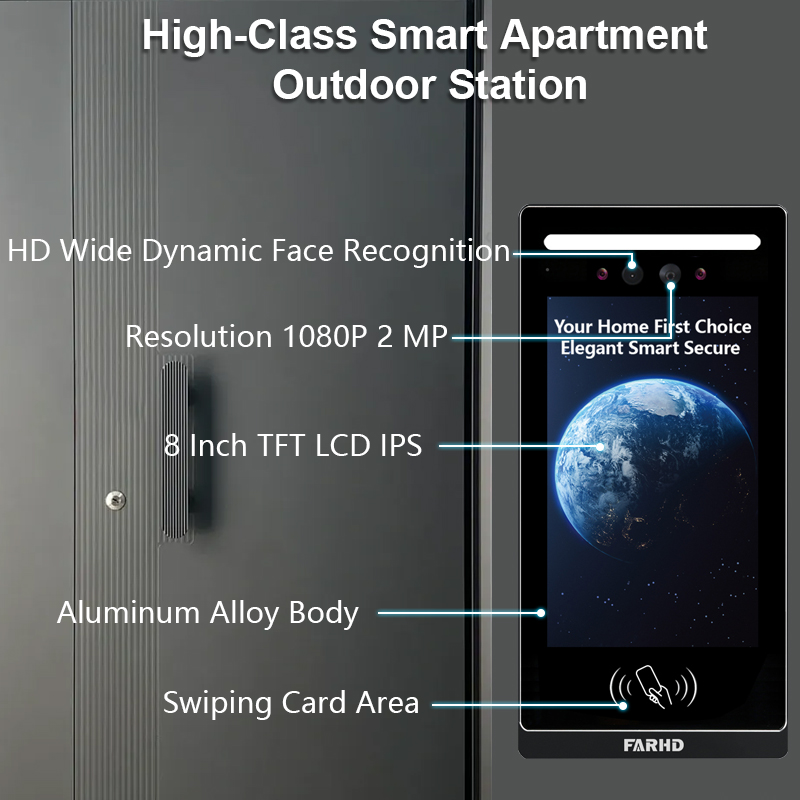
7. Video Doorbells for Business Use: Remote Monitoring and Control
Commercial spaces like offices, retail stores, and warehouses require enhanced security and visibility. Video doorbells with mobile viewing capability allow business owners to monitor entrances remotely, handle deliveries, and verify visitors.
Business-Oriented Features:
- Multi-doorbell monitoring from one app
- Scheduled access and visitor logs
- Smart lock integration
- AI-powered facial recognition
- Encrypted communication for privacy
Recommended by FARHD:
- Customizable Intercom Systems
- OEM smart video doorbells
- Full-stack hardware + software solutions
FARHD develops business-grade doorbell systems tailored for high-traffic environments. With over 60% market share in China and deep OEM experience, FARHD is a reliable partner for enterprise deployments.
🔗 Learn more about FARHD’s company profile and their global presence in the video intercom market.
8. Video Doorbell B2B Supplier and Customization Options
If you’re a wholesaler, distributor, system integrator, or startup brand, partnering with a reliable video doorbell supplier is essential to your success in the smart home and security market.
Why Choose FARHD?
| Feature | FARHD Advantage |
|---|---|
| Vertical Integration | Control from LCD manufacturing to final product |
| OEM/ODM Capabilities | Customize hardware, software, app interface, and packaging |
| Global Certifications | ISO 9001, CE, FCC, ROHS, SGS |
| Production Capacity | 13 lines in 5,500㎡ factory, YAMAHA SMT equipment |
| Market Reach | Top supplier in China, Italy, Turkey, and Korea |
| R&D Expertise | Dedicated team for AI, IoT, and connectivity innovations |
📞 Looking to launch your own video doorbell brand? Contact FARHD to discuss bulk pricing, private labeling, and market-specific solutions.
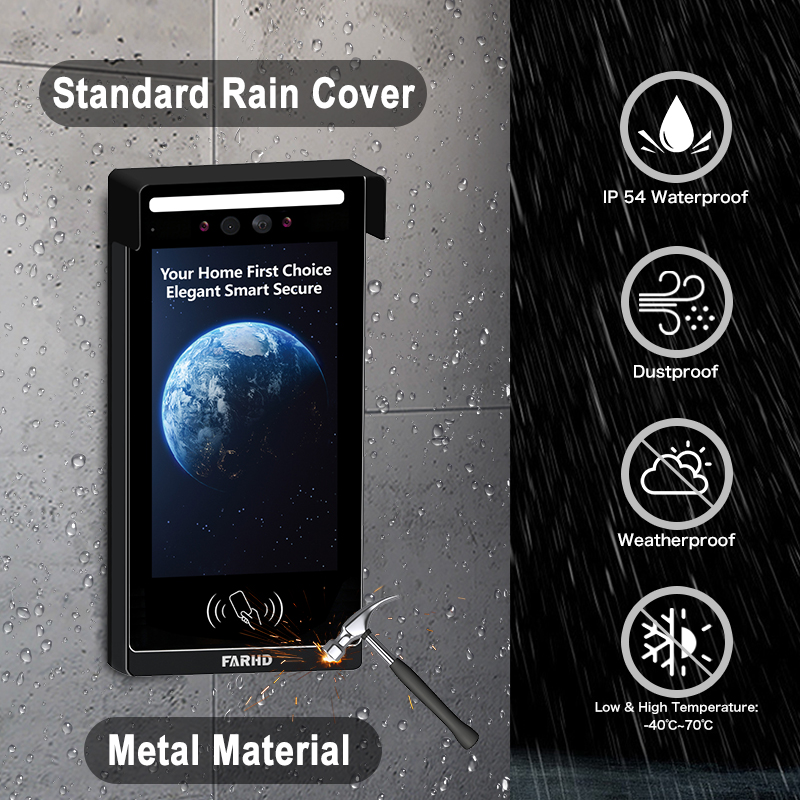
9. FAQ: Viewing Video Doorbells on Mobile Devices
Q1: Can I view my doorbell camera on more than one phone?
Yes, most apps allow multiple users or devices to access the same doorbell feed.
Q2: Do I need a subscription to view my doorbell on my phone?
No. Live view is typically free. However, cloud storage and advanced features may require a subscription.
Q3: What internet speed do I need for smooth video streaming?
A minimum of 2 Mbps upload speed is recommended for HD streaming.
Q4: Can I receive alerts when I’m not home?
Yes, push notifications are sent to your phone regardless of location, as long as you’re connected to the internet.
Q5: Can I view my doorbell video from abroad?
Absolutely. As long as your doorbell is connected to the internet and your phone has access, you can view it from anywhere.
With the right system in place, viewing your doorbell camera on a phone is not just possible — it’s secure, convenient, and reliable. Whether you’re a homeowner, landlord, or business buyer, choosing a trusted solution like FARHD ensures long-term satisfaction and support.
You may also Interest
-

FARHD to Showcase All-Climate Technology at 2026 China Security Expo, Empowering Smart Communities in Northern China
From November 3 to 6, 2026, FARHD, a global leader in smart security and communication solutions, will unveil its full range of products deeply optimized for the harsh winter conditions of northern China at the 18th China International Social Public Security Products Expo (Security China). Under the theme “Digital Intelligence World, Total Security,” the expo…
-

FARHD to Showcase All-Climate Hard-Tech Solutions at Securika Moscow 2026
From April 22 to 24, 2026, FARHD, a global leader in smart security and communication solutions, will unveil its full range of products engineered for extreme climates at Securika Moscow 2026, held at Crocus Expo in Moscow, Russia. At booth A-9101, FARHD will present its smart intercom, access control, and smart home solutions—all deeply optimized…
-

FARHD Honored with Multiple Prestigious Awards in China’s Building Intercom Industry, 28 Years of Deep Engagement in the Chinese Market Solidifying Its Position as a Leading Brand
Recently, in the annual selection event jointly organized by the China Security and Protection Industry Association and multiple authoritative media outlets, FARHD, by virtue of its profound industry experience, outstanding technological innovation capabilities, and extensive market recognition, was awarded the prestigious “Most Influential Brand in China’s Building Intercom Industry” . These accolades not only affirm FARHD’s 28…
-

FARHD Honored with Multiple Prestigious Awards in China’s Building Intercom Industry, 28 Years of Deep Engagement in the Chinese Market Solidifying Its Position as a Leading Brand
Recently, in the annual selection event jointly organized by the China Security and Protection Industry Association and multiple authoritative media outlets, FARHD, by virtue of its profound industry experience, outstanding technological innovation capabilities, and extensive market recognition, was awarded the prestigious “National Top 10 Quality Brands in the Security Industry” . These accolades not only affirm FARHD’s…



