
How to Use Tuya Video Doorbell for Smart Home Security and B2B Integration
12 November, 2025
Share This Article

1. What is a Tuya Video Doorbell and How Does It Work?
Introduction to Tuya Video Doorbells
A Tuya video doorbell is a smart home security device integrated with Tuya’s IoT platform. Tuya provides a universal solution for smart devices, enabling manufacturers to connect their products to the cloud, apps, and AI-enabled services. Tuya-compatible doorbells allow users to:
- Monitor front door activity in real-time
- Communicate via two-way audio
- Receive alerts triggered by motion detection
- Store recordings on cloud or local SD cards
- Integrate with smart home ecosystems like Alexa, Google Home, and IFTTT
How Tuya Video Doorbells Work
| Component | Functionality |
|---|---|
| HD Camera | Captures live video and footage |
| Motion Sensor | Detects movement and sends notifications |
| Microphone & Speaker | Enables two-way communication |
| WiFi Module | Connects the doorbell to the Tuya Smart App and cloud |
| Power Supply | Battery-powered or hardwired options available |
| Storage Options | Cloud via Tuya or local storage through microSD |
Key Advantages:
- Seamless integration with the Tuya Smart ecosystem
- Remote access and real-time notifications
- Affordable and scalable for B2B multi-property applications
Who Uses Tuya Video Doorbells?
- Homeowners looking for smart security
- Property managers for multi-unit residential buildings
- B2B buyers like distributors, wholesalers, and OEM brands needing white-label solutions
Tuya doorbells are not just for consumers. Their compatibility with a wide range of OEM/ODM manufacturers makes them an ideal choice for wholesale buyers and security solution providers.
2. How to Set Up a Tuya Video Doorbell: Step-by-Step Installation Guide
Pre-Installation Checklist
Before installing a Tuya video doorbell, ensure the following:
- Stable WiFi connection (2.4GHz) – Tuya devices do not support 5GHz
- Tuya Smart app downloaded on your smartphone
- Power source (battery charged or wiring ready)
- Mounting tools (screws, anchors, screwdriver)
Installation Steps
Step 1: Charge or Connect Power
- If battery-powered, fully charge the battery using USB cable
- If wired, connect the device to your existing doorbell wiring (12-24V AC)
Step 2: Mount the Doorbell
- Choose a location near your door at eye level (~4-5 feet)
- Secure the mounting bracket with screws
- Snap the video doorbell onto the bracket
Step 3: Connect to WiFi
- Open the Tuya Smart App
- Tap “Add Device” → “Video Surveillance” → “Smart Doorbell”
- Follow the in-app instructions and scan the QR code displayed on your phone using the doorbell’s camera
Step 4: Final Setup
- Confirm audio and video feed is working
- Set motion detection sensitivity
- Configure push notification settings
Installation Tips
| Tip | Description |
|---|---|
| Use angle mount | Enhances field of view for corner installations |
| Secure WiFi signal | Place router within 10-15 meters of the doorbell |
| Enable encryption | Use Tuya’s encrypted cloud services for secure data |
| Name your device | Especially useful for properties with multiple units |
3. How to Connect Tuya Video Doorbell with the Tuya Smart App
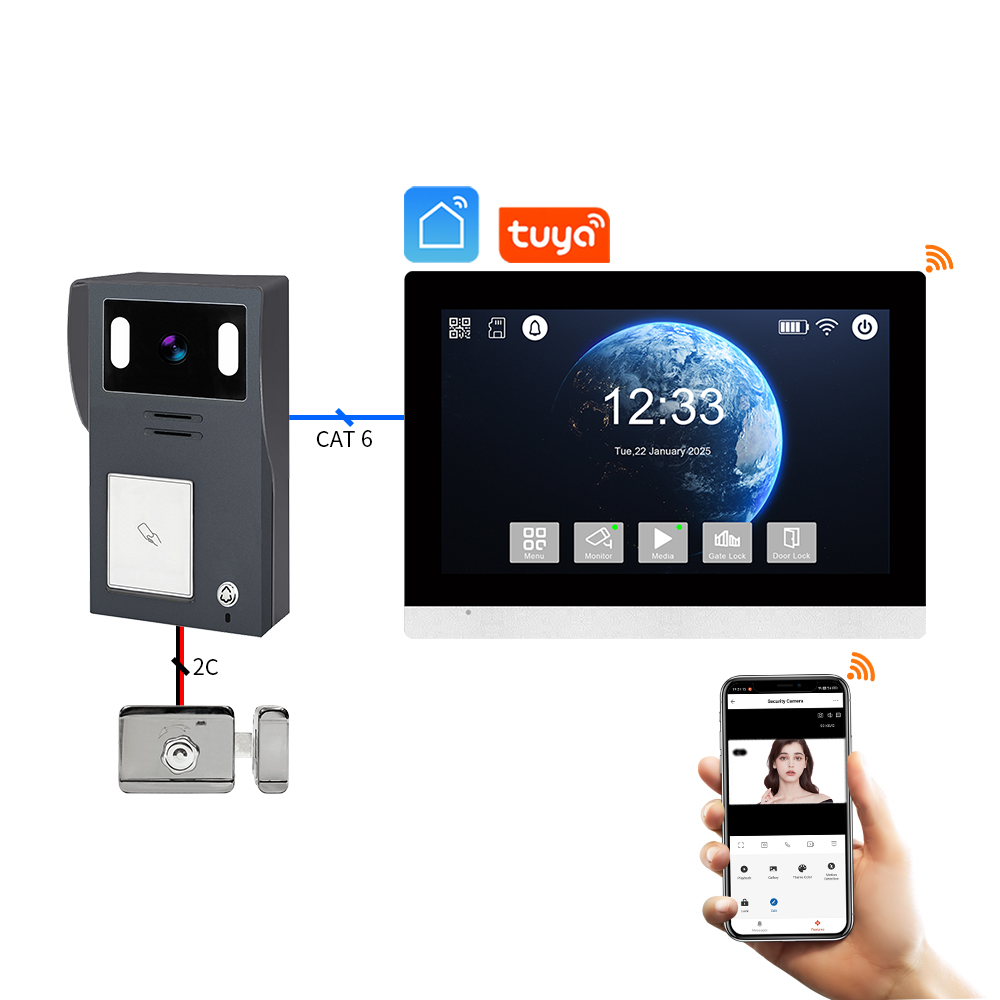
Connecting your Tuya video doorbell with the Tuya Smart App unlocks its full potential, including remote access, cloud storage, and smart home integration.
App Download and Account Setup
- Download the Tuya Smart or Smart Life app from the App Store or Google Play.
- Create an account and log in.
- Enable location and Bluetooth on your device for easier pairing.
Pairing the Doorbell
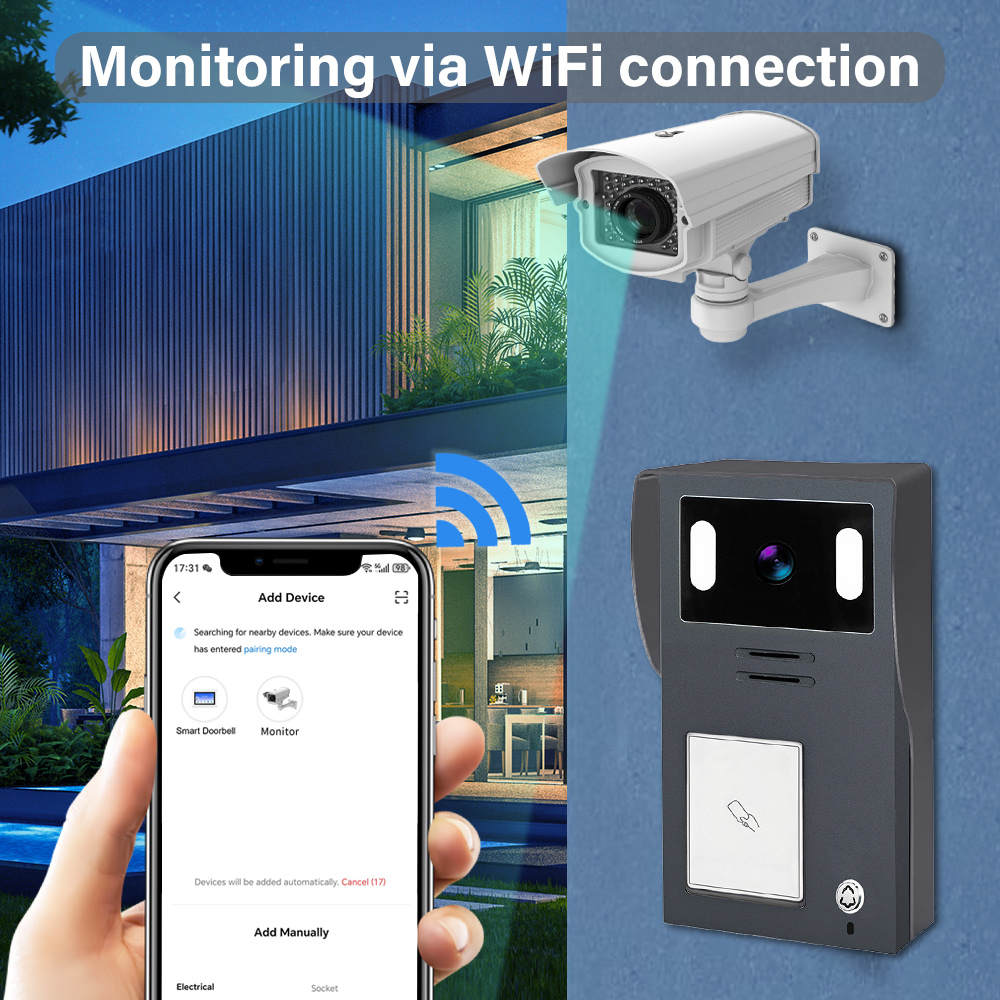
- Open the app and tap “+” to add a new device.
- Select Video Surveillance → Smart Doorbell (WiFi).
- Ensure the doorbell is in pairing mode (usually blinking blue).
- Enter your 2.4GHz WiFi credentials.
- Scan the QR code shown in the app using the doorbell camera.
- Wait for the device to connect (takes 30-60 seconds).
Customizing Device Settings
Once connected, you can adjust:
- Motion detection zones and sensitivity
- Notification schedules (e.g., only alert during night)
- Two-way audio settings
- Video recording preferences (cloud or SD card)
Cloud Storage Integration
Tuya offers optional cloud plans:
| Storage Plan | Features | Ideal For |
|---|---|---|
| Basic | 7-day event history, motion recording | Homes and small apartments |
| Standard | 14-day history, continuous video | Large homes, small offices |
| Premium | 30-day history, multi-camera support | Multi-unit buildings, B2B |
Note: Local SD card storage is also supported for offline backups.
Benefits for B2B Buyers
- Manage multiple devices from one account
- Assign different users and permissions
- Enable multi-property dashboard views
- Option to white-label the app with your business branding via OEM partnerships
For businesses looking to source Tuya-compatible video doorbells, FARHD provides full-stack design, OEM/ODM, and app integration services for smart doorbell systems.
4. How to Use a Tuya Video Doorbell with Alexa or Google Home
Integrating your Tuya video doorbell with Alexa or Google Home allows for voice commands, smart routines, and live video streaming on compatible devices. This is especially useful for homeowners and B2B buyers managing multiple smart properties or offering value-added services to tenants and clients.
Integration with Amazon Alexa
Compatible Devices:
- Echo Show
- Echo Spot
- Fire TV
Setup Steps:
- Open the Alexa app.
- Go to Skills & Games → Search for “Tuya Smart” or “Smart Life”.
- Enable the skill and link your Tuya account.
- Discover devices; your doorbell should appear automatically.
- Assign it to a group or room (e.g., “Front Door”).
Voice Commands:
- “Alexa, show me the front door.”
- “Alexa, is there someone at the door?”
- “Alexa, answer the doorbell.”
Integration with Google Home
Compatible Devices:
- Google Nest Hub
- Chromecast-enabled TVs
- Android phones with Assistant
Setup Steps:
- Open the Google Home app.
- Tap “+” → “Set up device” → “Works with Google”.
- Search for and link your Tuya Smart or Smart Life account.
- Assign the doorbell to a room.
Voice Commands:
- “Hey Google, show me the front door.”
- “Hey Google, who’s at the door?”
- “Hey Google, turn on motion alerts.”
Benefits for B2B Applications
| Feature | Use Case for Businesses |
|---|---|
| Voice-enabled entry control | Smart access for deliveries, guests, and contractors |
| Real-time monitoring on display | Common areas in apartment buildings or office lobbies |
| Automated routines | Trigger lights or alarms upon motion detection |
| Brandable experience | OEM providers can integrate Tuya APIs into white-labeled platforms |
FARHD offers smart video doorbell solutions that support Tuya voice integrations and can be customized for white-label B2B applications. Check their product lineup for compatible models with Alexa and Google Home support.
5. Smart Features of Tuya-Compatible Video Doorbells in 2025
The evolution of Tuya’s IoT platform has enabled next-gen smart features in video doorbells, making them not only more secure but also more intelligent and adaptive. Below are the top features to look for in 2025 Tuya-compatible doorbells, especially for businesses and distributors considering bulk procurement.
Key Smart Features
1. AI-Powered Motion Detection
- Identifies humans vs. animals vs. vehicles
- Reduces false alarms through advanced algorithms
- Customizable detection zones and sensitivity levels
2. Facial Recognition (Advanced Models)
- Recognizes frequent visitors (family, staff)
- Sends personalized alerts
- Integration with access control systems
3. Cloud & Edge Storage Options
- Local SD (up to 128GB) and encrypted cloud storage
- Edge AI processing for faster response times
- No dependency on internet for basic functions
4. Battery and Power Efficiency
- Low-power wake-up modes
- Solar panel compatibility for sustainable power
- Enhanced battery life (up to 6 months on one charge)
5. Multi-User & Multi-Device Access
- Share access with family or staff
- Role-based access control for property managers
- Cloud dashboard for fleet management
Feature Comparison Table
| Feature | 2023 Standard Models | 2025 Tuya-Enhanced Models |
|---|---|---|
| Motion Detection | Basic PIR | AI Human/Vehicle Differentiation |
| Storage Options | SD Card or Cloud | Edge + Cloud Hybrid |
| Voice Assistant Support | Partial | Full Alexa/Google Integration |
| Power Source | Wired/Battery (Short life) | Solar + Long-Life Battery |
| Smart Notifications | Delay Possible | Real-Time, Smart Alerts |
Advantages for B2B Buyers
- Upgraded SKUs for premium product lines
- Increased ARPU (Average Revenue Per User) with cloud subscriptions
- Lower support costs due to AI-based accuracy
- Ideal for smart city projects, gated communities, and multi-tenant buildings
If you’re planning to source or distribute cutting-edge Tuya-compatible video doorbells, FARHD is a proven OEM/ODM partner with full in-house R&D and customization capabilities. Learn more about their end-to-end solution services here.
6. Troubleshooting Common Issues with Tuya Video Doorbells
Even the best smart doorbells can encounter issues. Understanding how to troubleshoot common problems ensures a seamless user experience and helps B2B resellers reduce after-sales support costs.
Problem 1: Device Not Pairing
Possible Causes:
- WiFi not 2.4GHz
- Doorbell not in pairing mode
- Weak signal strength
Solutions:
- Ensure the router is 2.4GHz only
- Reset the doorbell (usually by holding the reset button for 5-10 seconds)
- Move the doorbell closer to the router during setup
Problem 2: No Motion Alerts
Possible Causes:
- Motion detection turned off
- Low sensitivity settings
- Firmware outdated
Solutions:
- Enable motion detection in the Tuya app
- Set sensitivity to “high” and test
- Check for and install firmware updates
Problem 3: Live Video Not Loading
Possible Causes:
- Insufficient bandwidth
- Server issue or app bug
- Device offline
Solutions:
- Disconnect unused devices from WiFi
- Restart the app and doorbell
- Check device status in the app
Problem 4: Alexa or Google Doesn’t Recognize Device
Possible Causes:
- Skill not linked properly
- Multiple accounts causing conflicts
- Device not shared correctly
Solutions:
- Re-link your Tuya account with Alexa/Google
- Ensure doorbell is assigned to the correct room
- Share device access with the correct user account
B2B Tip: Create a Troubleshooting Sheet
To improve customer satisfaction and reduce service calls, distributors and OEMs should include a quick-start guide with common troubleshooting steps in every product box.
FARHD offers comprehensive after-sales support and documentation for all its video doorbell solutions. You can get in touch with their team via the contact page for custom support or OEM onboarding.
7. Tuya Video Doorbell for Rental Properties and Multi-Unit Buildings
Tuya video doorbells are not just for individual homeowners—they’re also a powerful solution for rental properties, multi-unit buildings, and commercial properties. Their cloud-based management, scalability, and smart integration features make them ideal for property managers, building owners, and B2B buyers focused on real estate and hospitality.
Why Use Tuya Video Doorbells in Multi-Unit Settings?
| Benefit | Description |
|---|---|
| Centralized Management | Control and monitor multiple units from a single Tuya account |
| Role-Based Access | Assign different access levels to tenants, managers, and maintenance teams |
| Remote Viewing & Alerts | Get motion alerts even when off-site |
| Smart Lock Integration | Combine with Tuya smart locks for seamless access control |
| Cost-Effective Scalability | Affordable bulk deployment with cloud-based management |
Common Applications
- Apartment Complexes
- Assign each unit a smart doorbell
- Tenants use the Tuya app for video communication and alerts
- Property manager retains override access for emergencies
- Short-Term Rentals (e.g., Airbnb)
- Monitor guest check-ins and check-outs remotely
- Prevent unauthorized access or parties
- Integrate with smart locks for a seamless experience
- Commercial Office Buildings
- Use Tuya video doorbells for restricted entry zones
- Monitor deliveries and visitor access
- Combine with intercoms for enhanced communication
B2B Integration Opportunities
- White-label solutions for large property groups
- Bulk discount procurement from trusted OEMs
- API integration for custom property management systems (PMS)
FARHD, with its extensive OEM/ODM experience and full-stack manufacturing capabilities, is a go-to supplier for real estate developers and property management companies looking to deploy Tuya-compatible video doorbells at scale. Learn more about their capabilities in multi-unit video intercom systems on their About Us page.
8. Best OEM/ODM Suppliers for Tuya-Compatible Video Doorbells
If you’re a wholesale buyer, retailer, or smart home brand looking to source high-quality Tuya video doorbells, choosing the right OEM/ODM partner is essential for ensuring product quality, brand flexibility, and technical support.
What to Look for in a Supplier
| Criteria | Why It Matters |
|---|---|
| Tuya Certification | Ensures compatibility with Tuya cloud and app ecosystem |
| In-House R&D | Faster time-to-market and better firmware control |
| Vertical Integration | Better quality assurance and lower production cost |
| Custom Branding Options | Support for logo printing, packaging, UI customization |
| After-Sales Technical Support | Reduces return rates and improves customer satisfaction |
Top OEM/ODM Suppliers Globally
🇨🇳 FARHD (Shenzhen FARHD Tech Co., Ltd.)
- Tuya-certified OEM/ODM manufacturer
- End-to-end production: from LCD module to finished video doorbell
- Specializes in multi-apartment intercom systems, smart security, and Tuya integrations
- Over 60% market share in China with strong presence in Italy, Korea, and Turkey
- Full support for private label, custom UI, and cloud integration
🔗 Explore FARHD OEM/ODM Services
🇺🇸 Remo+ (USA)
- Tuya-compatible smart video doorbells with cloud storage
- Limited OEM capabilities but strong B2C presence
- Ideal for distributors looking for ready-to-ship options
🇪🇺 Smartwares (Netherlands)
- Offers Tuya-enabled video doorbells for the European market
- Focuses mainly on retail and DIY segments
Why Choose FARHD?
| Feature | FARHD Advantage |
|---|---|
| Full-stack manufacturing | Control from LCD to final assembly |
| Tuya integration expertise | Deep collaboration with Tuya’s IoT platform |
| High production capacity | 13 production lines across 5,500m² facility |
| Quality Certifications | ISO 9001, CE, FCC, ROHS, SGS |
| Dedicated R&D Team | Fast prototyping and firmware customization |
FARHD is not just a factory—it’s a technology partner with a focus on innovation, quality, and global scalability. Whether you need 500 units or 50,000 units, they can fulfill your requirements with custom branding, app integration, and fast turnaround times.
For product inquiries, volume pricing, or white-label opportunities, reach out via their contact page.
9. Frequently Asked Questions (FAQ)
Q1: Can I use a Tuya video doorbell without a subscription?
Yes. Most Tuya video doorbells support local storage via microSD card. Cloud storage is optional and provides added convenience and backup.
Q2: Do Tuya video doorbells support 5GHz WiFi?
No. Tuya video doorbells typically support 2.4GHz WiFi only, which provides a longer range and more stable connection in most home environments.
Q3: Can I integrate Tuya video doorbells into a property management system (PMS)?
Yes. With Tuya’s open APIs and SDKs, many OEMs like FARHD offer custom integrations into PMS platforms, ideal for hotels, apartment complexes, and smart communities.
Q4: Is it possible to rebrand Tuya video doorbells with my logo and packaging?
Absolutely. FARHD offers private label and white-label services, including custom logo printing, UI design, packaging, and app branding.
Q5: How secure are Tuya video doorbells?
Tuya uses bank-grade AES encryption for video and data transmission. Devices from certified OEMs like FARHD also undergo rigorous quality control and firmware auditing to ensure top-notch security.
🌐 Explore more Tuya-compatible smart security products from V on their official product page. Whether you’re a brand, distributor, or integrator, FARHD offers the customization, support, and quality you need to succeed in the fast-growing smart home market.
📩 Ready to build your own line of Tuya video doorbells?
Partner with FARHD, the trusted OEM/ODM manufacturer for global smart home brands.
👉 Contact FARHD Today to discuss your project.
You may also Interest
-

FARHD to Showcase All-Climate Technology at 2026 China Security Expo, Empowering Smart Communities in Northern China
From November 3 to 6, 2026, FARHD, a global leader in smart security and communication solutions, will unveil its full range of products deeply optimized for the harsh winter conditions of northern China at the 18th China International Social Public Security Products Expo (Security China). Under the theme “Digital Intelligence World, Total Security,” the expo…
-

FARHD to Showcase All-Climate Hard-Tech Solutions at Securika Moscow 2026
From April 22 to 24, 2026, FARHD, a global leader in smart security and communication solutions, will unveil its full range of products engineered for extreme climates at Securika Moscow 2026, held at Crocus Expo in Moscow, Russia. At booth A-9101, FARHD will present its smart intercom, access control, and smart home solutions—all deeply optimized…
-

FARHD Honored with Multiple Prestigious Awards in China’s Building Intercom Industry, 28 Years of Deep Engagement in the Chinese Market Solidifying Its Position as a Leading Brand
Recently, in the annual selection event jointly organized by the China Security and Protection Industry Association and multiple authoritative media outlets, FARHD, by virtue of its profound industry experience, outstanding technological innovation capabilities, and extensive market recognition, was awarded the prestigious “Most Influential Brand in China’s Building Intercom Industry” . These accolades not only affirm FARHD’s 28…
-

FARHD Honored with Multiple Prestigious Awards in China’s Building Intercom Industry, 28 Years of Deep Engagement in the Chinese Market Solidifying Its Position as a Leading Brand
Recently, in the annual selection event jointly organized by the China Security and Protection Industry Association and multiple authoritative media outlets, FARHD, by virtue of its profound industry experience, outstanding technological innovation capabilities, and extensive market recognition, was awarded the prestigious “National Top 10 Quality Brands in the Security Industry” . These accolades not only affirm FARHD’s…



