
How to Add Fingerprint to Video Intercom Systems: A Step-by-Step Guide for Smart Access Control
15 December, 2025
Share This Article
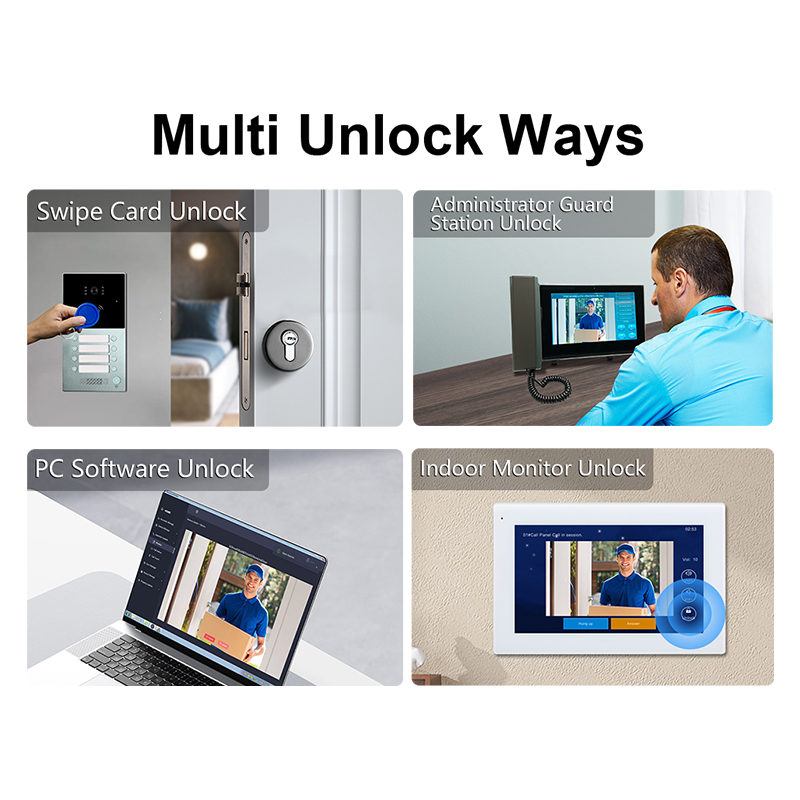
1. What is a Fingerprint Video Intercom System?
A fingerprint video intercom system combines two essential security technologies: biometric access control and video door communication. This advanced system allows users to:
- See and communicate with visitors via a video interface.
- Grant or deny access using fingerprint recognition rather than traditional keys or codes.
These systems are commonly used in:
- Residential villas
- Apartment complexes
- Commercial buildings
- Office headquarters
- Industrial facilities
Key Components:
| Component | Description |
|---|---|
| Camera Module | Captures live video of the visitor. |
| LCD Display | Shows the video feed to the resident or staff. |
| Microphone & Speaker | Enables two-way audio communication. |
| Fingerprint Scanner | Authenticates the visitor or resident based on fingerprint data. |
| Control Unit | Processes inputs and controls locks and display modules. |
Fingerprint video intercoms offer multi-layered security, ensuring only authorized personnel gain entry, and visitors are clearly identified.
2. Benefits of Integrating Fingerprint Access with Video Intercoms
Adding fingerprint access to a video intercom system provides a range of security, convenience, and operational advantages for both residential and commercial users.
Security Benefits
- Biometric Verification: Fingerprints are unique to each person, drastically reducing the risk of unauthorized access.
- Non-transferable Access: Unlike keys or RFID cards, fingerprints cannot be lent to others.
- Time-stamped Logs: Most systems log each fingerprint access, improving audit trails and security monitoring.
Convenience Benefits
- Keyless Entry: Eliminates the need to carry keys or remember PIN codes.
- Multi-user Capability: Store 50–500+ fingerprints depending on the device.
- Quick Access: Entry is granted in under 1 second with modern scanners.
Operational Benefits
- Reduced Admin Overhead: No need to reissue lost keys or change codes.
- Remote Management: Some systems allow fingerprint registration via a centralized software.
- Integration with Smart Home/Office: Works with other smart systems like lighting and alarms.
Use Cases:
| Sector | Application Example |
|---|---|
| Residential | Luxury villas, gated communities |
| Commercial | Office access control, secure server rooms |
| Industrial | Warehouse and manufacturing facility entry points |
| Education | Dormitory and laboratory access |
| Hospitality | Hotel staff entry to restricted areas |
3. How to Choose the Right Video Intercom System with Fingerprint Access
When selecting a fingerprint-enabled video intercom system, B2B buyers such as wholesale distributors, property developers, and security integrators must consider several critical factors to ensure long-term reliability and integration flexibility.
Key Considerations:
1. Authentication Speed and Accuracy
- Look for systems with <1-second response time and <0.001% false acceptance rate (FAR).
2. Durability and Weather Resistance
- Opt for IP65+ rated devices if installing outdoors.
- Tamper-proof and dust-resistant designs are essential for industrial use.
3. Fingerprint Capacity
- Entry-level: 50–100 fingerprints
- Mid-tier: 200–300 fingerprints
- Enterprise-grade: 500+ fingerprints
4. Integration Capabilities
- Should support protocols like RS485, Wiegand, TCP/IP, and ONVIF.
- Compatible with smart home and access control platforms.
5. Display & Video Quality
- Prefer 7-inch or 10-inch capacitive touchscreens.
- HD video (720p or 1080p) for clear visitor identification.
6. After-Sales and OEM/ODM Support
- Choose systems from manufacturers with in-house R&D and custom branding support.
Recommended Manufacturer:
For buyers looking to source or customize a high-quality fingerprint video intercom system, Shenzhen FARHD Tech Co., Ltd. (FARHD) stands out as a trusted OEM/ODM partner.
Why FARHD?
- Full-stack manufacturing: From LCD displays to complete intercom systems.
- 13 production lines, ISO-certified, and exports to over 30 countries.
- Customizable UI, fingerprint module, housing design, and software integration.
Explore FARHD’s 4-Wire Villa Intercom Series with fingerprint support for tailored B2B solutions.
4. Step-by-Step Guide: How to Add Fingerprint to Your Video Intercom System
Adding a fingerprint feature to your video intercom can be done in two ways:
- Purchasing an Integrated System (pre-installed fingerprint scanner)
- Upgrading an Existing System (adding a standalone fingerprint module)
Let’s break down both processes.
Option 1: Installing an Integrated Fingerprint Video Intercom
This is the most efficient and secure method for new installations.
Step-by-Step:
- Select a Biometric Video Intercom Model
- Choose a model with built-in fingerprint scanner (e.g., FARHD 4-Wire Villa Kit)
- Install the Outdoor Unit
- Position at entry gate or door.
- Ensure proper height for fingerprint scanner (typically 1.2m–1.5m from ground).
- Install Indoor Monitor
- Connect to power and network.
- Pair with the outdoor unit using provided wiring or wireless setup.
- Enroll Fingerprints
- Use the admin interface to add new users.
- Each user places finger 2–3 times for accurate mapping.
- Test Functionality
- Try opening the door using the enrolled fingerprint.
- Verify access logs and image/video capture.
Option 2: Adding a Standalone Fingerprint Scanner to Existing Intercom
Ideal for retrofitting existing systems.
Step-by-Step:
- Choose a Compatible Fingerprint Module
- Ensure it supports Wiegand or RS485 output.
- Match voltage and environmental specs with your intercom.
- Mount the Fingerprint Reader
- Install near the intercom entry panel.
- Use waterproof casing if outdoors.
- Connect to Controller or Relay Box
- Link the scanner’s output to your door controller’s input.
- Set up the relay to trigger door unlocking.
- Enroll Users
- Use a dedicated admin device or connect to PC-based enrollment software.
- Test Integration
- Confirm that fingerprint triggers door unlock and logs the access.
Tools and Equipment Checklist
| Item | Required For |
|---|---|
| Power drill | Mounting outdoor/indoor units |
| Screwdriver set | Electrical connections |
| Network cable or 4-wire bus | System communication |
| Admin card or password | Admin access to enroll users |
| Laptop (optional) | For software-based enrollment |
For bulk installation projects, FARHD supports custom integration kits and multilingual software interfaces. Contact their OEM/ODM team for tailored installation guides and product bundles.
5. Wired vs. Wireless Fingerprint Video Intercom Systems
When deploying fingerprint-enabled video intercoms, B2B buyers must decide between wired and wireless systems based on their infrastructure, scalability needs, and budget.
Comparison Table
| Feature | Wired System | Wireless System |
|---|---|---|
| Installation | More complex (needs cabling) | Easier and faster to install |
| Signal Stability | Very stable, low latency | Can be affected by interference |
| Power Supply | Hardwired | Battery or plug-in |
| Fingerprint Response | Instantaneous | Slight delay possible |
| Scalability | Ideal for large buildings | Best for small to medium setups |
| Maintenance | Lower (once installed) | May need periodic battery changes |
| Price | Mid to high | Low to mid |
Which One Should You Choose?
- Wired Systems are best for:
- New constructions
- High-security projects
- Enterprise applications
- Wireless Systems are ideal for:
- Retrofit projects
- Small offices or villas
- Budget-conscious deployments
FARHD offers both wired and wireless fingerprint video intercom kits, with scalable options for multi-apartment complexes or smart villas. Explore their latest models on the product page.
6. Top Features to Look for in a Biometric Video Door Phone
To ensure maximum ROI and user satisfaction, prioritize these must-have features in a fingerprint video intercom solution:
Essential Features
- Capacitive Fingerprint Sensor: Higher accuracy and durability than optical sensors.
- Touchscreen Display: Easy-to-use interface for residents and admins.
- Phone App Integration: View visitors and unlock remotely.
- Night Vision Camera: IR LEDs for 24/7 visibility.
- Two-Way Audio: Clear communication with visitors at the door.
- Unlock Logs: Track entry activities with timestamps and user IDs.
- Remote Admin Access: Add or delete fingerprints from a centralized platform.
Bonus Features
- Face Recognition Integration
- QR Code Temporary Access
- Anti-spoofing Algorithms
- Cloud Storage for Visitor Logs
- Tamper Alerts and Motion Detection
For full control over these smart features, FARHD provides custom firmware and SDKs for enterprise clients. Reach out via their Contact Page for demos and technical documentation.

7. Best Video Intercom Systems with Fingerprint Access in 2025
As technology advances, video intercoms with integrated fingerprint access are becoming smarter, more secure, and more customizable. Below is a curated list of top systems for 2025, including options for residential, commercial, and industrial use.
🔹 Best Overall Fingerprint Video Intercom (For Villas and Smart Homes)
FARHD 4-Wire Video Door Phone with Fingerprint Scanner
- Display: 7-inch capacitive touchscreen
- Fingerprint Capacity: 300+ users
- Camera: 1080p wide-angle with night vision
- Audio: Echo-cancelled two-way communication
- Integration: Works with smart locks, lighting, and home automation
- Notable Feature: Supports custom branding and UI design
➡️ Learn more or request customization from the FARHD Product Page
🔹 Best for Apartment Complexes and Multi-Unit Buildings
Hikvision DS-KD8003-IME1 + DS-KD-KP Fingerprint Module
- Modular system for up to 500 apartments
- Fingerprint & Keypad combo for flexible access
- Vandal-proof and IP65 rated
- Integration: ONVIF, SIP, and third-party software platforms
🔹 Best for Commercial Entry Security
Akuvox R29C Biometric Android Video Door Phone
- Android OS: Customizable with B2B software
- Fingerprint + Face Recognition
- RFID + QR Code + Mobile Unlocking
- High-end design with anti-glare touchscreen
🔹 Best Budget Fingerprint Video Intercom (For Small Offices)
TMEZON MZ-IP-V739EM
- Budget-friendly solution for SMBs
- Fingerprint + RFID + PIN
- 4-wire plug-and-play installation
- App support for Android/iOS
Why FARHD is the Ideal B2B Partner for Fingerprint Video Intercoms
If you’re looking for a custom video intercom with biometric access, FARHD is the only trusted OEM/ODM manufacturer in China that offers:
- Complete control from LCD module to final product
- Decades of experience in video intercom innovation
- In-house R&D, production, and global support
- Customizable fingerprint module options for white label and private label projects
✔️ Explore FARHD’s OEM/ODM capabilities on their Manufacturing Page
8. Choosing a Reliable OEM/ODM Fingerprint Video Intercom Manufacturer
For B2B buyers like wholesalers, distributors, and system integrators, selecting the right OEM/ODM manufacturer is critical to ensure product quality, scalability, and long-term partnership value.
What to Look For in a Manufacturer
| Criteria | Why It Matters |
|---|---|
| Vertical Integration | Ensures full control over quality and supply chain |
| In-House R&D Team | Enables continuous innovation and tailored solutions |
| Global Certifications | CE, FCC, ROHS, SGS for international compliance |
| Production Capacity | Ability to handle bulk orders with short lead times |
| Customization Flexibility | Support for private label, software UI, housing design, and packaging |
| After-Sales Support | Multilingual support teams, firmware updates, warranty programs |
Why FARHD Leads the Market
FARHD is a global leader in video door phone intercom manufacturing, trusted by top brands and system integrators in Europe, Asia, and North America.
FARHD Advantages:
- 13 automated production lines in a 5,500m² facility
- 60%+ market share in China and large share in Italy, Korea, Turkey
- Integrated manufacturing from LCM panels to final packaging
- Over 260 staff including dedicated hardware & software engineers
- Full compliance with ISO 9001, CE, FCC, and ROHS
✅ Visit the FARHD About Page to see their full capabilities and global footprint.
9. FAQ: Fingerprint Access and Smart Video Intercoms
Q1: Can I upgrade my existing video intercom to include fingerprint access?
Yes. You can either replace it with an all-in-one model or add a standalone fingerprint reader that integrates via Wiegand or RS485 protocols.
Q2: Are fingerprint video intercoms secure against spoofing?
Modern systems use capacitive sensors and anti-spoofing algorithms to detect fake fingerprints (e.g., silicone, photos). Choose reputable brands like FARHD for advanced security.
Q3: How many fingerprints can be stored?
It depends on the model:
- Basic: 50–100 users
- Mid-range: 200–300 users
- Enterprise: 500+ users and multiple access levels
Q4: Do fingerprint video intercoms work in outdoor environments?
Yes, as long as the system is IP65+ rated and built for rugged use. Always install under some form of shelter for maximum longevity.
Q5: What happens if the fingerprint scanner fails?
Most systems offer multi-factor access, including:
- PIN codes
- RFID cards
- Mobile app unlock
- Manual override keys
Q6: Can FARHD customize the fingerprint module layout?
Absolutely. FARHD offers OEM/ODM customization, from module placement to housing materials and software branding. You can even integrate with your own cloud platform or app.
📞 Looking to start a project? Contact FARHD through their Contact Page to request a quote or technical consultation.
Final Thoughts
Adding fingerprint access to your video intercom system elevates both security and user convenience. Whether you’re upgrading an existing system or sourcing a new OEM solution, ensure you partner with manufacturers who offer quality, scalability, and customization.
For a fully integrated, biometric-enabled intercom solution, FARHD remains the top choice for reliability, innovation, and global support.
🔗 Discover FARHD’s full product lineup and OEM/ODM services at www.FARHDgroup.com.
You may also Interest
-

FARHD to Showcase All-Climate Technology at 2026 China Security Expo, Empowering Smart Communities in Northern China
From November 3 to 6, 2026, FARHD, a global leader in smart security and communication solutions, will unveil its full range of products deeply optimized for the harsh winter conditions of northern China at the 18th China International Social Public Security Products Expo (Security China). Under the theme “Digital Intelligence World, Total Security,” the expo…
-

FARHD to Showcase All-Climate Hard-Tech Solutions at Securika Moscow 2026
From April 22 to 24, 2026, FARHD, a global leader in smart security and communication solutions, will unveil its full range of products engineered for extreme climates at Securika Moscow 2026, held at Crocus Expo in Moscow, Russia. At booth A-9101, FARHD will present its smart intercom, access control, and smart home solutions—all deeply optimized…
-

FARHD Honored with Multiple Prestigious Awards in China’s Building Intercom Industry, 28 Years of Deep Engagement in the Chinese Market Solidifying Its Position as a Leading Brand
Recently, in the annual selection event jointly organized by the China Security and Protection Industry Association and multiple authoritative media outlets, FARHD, by virtue of its profound industry experience, outstanding technological innovation capabilities, and extensive market recognition, was awarded the prestigious “Most Influential Brand in China’s Building Intercom Industry” . These accolades not only affirm FARHD’s 28…
-

FARHD Honored with Multiple Prestigious Awards in China’s Building Intercom Industry, 28 Years of Deep Engagement in the Chinese Market Solidifying Its Position as a Leading Brand
Recently, in the annual selection event jointly organized by the China Security and Protection Industry Association and multiple authoritative media outlets, FARHD, by virtue of its profound industry experience, outstanding technological innovation capabilities, and extensive market recognition, was awarded the prestigious “National Top 10 Quality Brands in the Security Industry” . These accolades not only affirm FARHD’s…



