
Cómo ver la cámara del timbre en el teléfono: Guía completa para propietarios y empresas
27 de noviembre de 2025
Comparte este artículo

1. ¿Qué es un timbre de video y cómo funciona?
A sistema de videoportero es un dispositivo de seguridad inteligente que reemplaza o complementa su timbre tradicional. Incluye una cámara de alta definición, micrófono, altavoz y, a menudo, sensores de movimiento, lo que permite a los propietarios de viviendas o negocios ver, escuchar y hablar con los visitantes en su puerta, todo a través de su teléfono inteligente.
Componentes clave de un videoportero:
| Componente | Función |
|---|---|
| Cámara | Captura video en vivo o grabado de la entrada |
| Micrófono | Recoge audio desde el exterior |
| Altavoz | Permite comunicación bidireccional con los visitantes |
| Sensor de movimiento | Detecta el movimiento y activa alertas o grabaciones |
| Módulo Wi-Fi | Conecta la cámara del timbre a la red de su hogar o negocio |
| Aplicación móvil | Habilita la visualización, alertas e interacción directamente en un teléfono inteligente |
Cómo funciona:
- El visitante presiona el timbre
El sistema envía una notificación push a su teléfono a través de una aplicación. - Se detecta movimiento
Incluso si no se presiona el botón, los sensores de movimiento activan una vista en vivo o grabación. - Transmisión de video en vivo
Puede ver una transmisión de video en tiempo real del visitante usando su teléfono. - Audio bidireccional
Hable con el visitante de forma remota a través de su teléfono. - Almacenamiento en la nube o local
Los videos a menudo se guardan para visualización posterior, ya sea localmente (tarjeta SD) o en la nube.
Aplicaciones:
- Viviendas residenciales: Mejora la seguridad y la comodidad
- Apartamentos: Proporciona acceso remoto sin necesidad de estar físicamente presente
- Empresas: Monitorea entregas, clientes y empleados a través del acceso remoto
2. Características de los timbres con video inteligente que debe buscar en 2025
A medida que la tecnología evoluciona, los timbres de video modernos ofrecen funciones avanzadas que van mucho más allá del simple video y audio. Ya sea para propietarios de viviendas o compradores B2B como arrendadores, administradores de propiedades o integradores de seguridad, saber qué funciones importan es clave para elegir el producto adecuado.
Características imprescindibles:
| Característica | Beneficio |
|---|---|
| HD/Resolución de video 4K | Mayor calidad de imagen, mejor reconocimiento facial |
| Visión nocturna | Los LED infrarrojos permiten visibilidad en completa oscuridad |
| Detección de movimiento AI | Reduce alertas falsas al distinguir entre personas, autos y animales |
| Cloud & Almacenamiento local | Opciones flexibles para grabar y almacenar video |
| Opciones con batería o cableadas | Adaptado a diferentes requisitos de instalación |
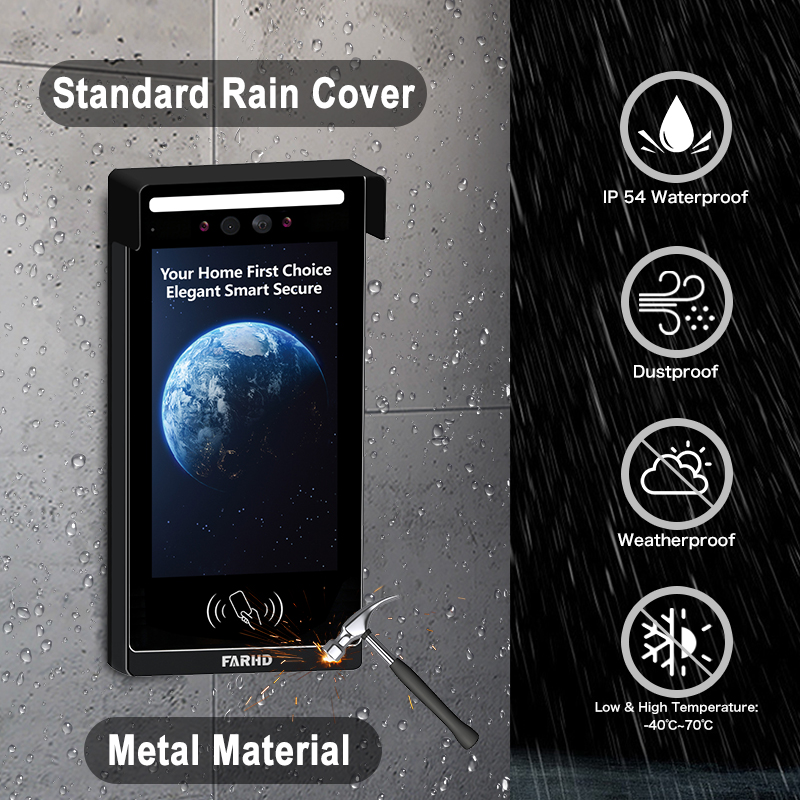
| Resistencia a la intemperie | Esencial para instalaciones exteriores |
| Integración del hogar inteligente | Compatible con Alexa, Google Home, Apple HomeKit |
| Acceso multiusuario | Ideal para negocios o familias con varios usuarios |
| Transmisiones de video encriptadas | Asegura la privacidad y previene visualizaciones no autorizadas |
Consideraciones B2B:
- Personalización en masa: Para desarrollos inmobiliarios o edificios comerciales
- Servicios OEM/ODM: Los negocios pueden solicitar etiquetado privado o personalización de funciones
- Gestión de acceso remoto: Especialmente útil para administradores de propiedades en alquiler
💡 Si está sourcing timbres de video para reventa o instalaciones comerciales, considere trabajar con un proveedor OEM/ODM confiable como FARHD para soluciones a medida.
3. Cómo utilizar un videoportero con Alexa o Google Home
Integrar su timbre de video con Amazon Alexa o Google Home agrega control por voz y automatización del hogar inteligente a su sistema de seguridad. Esto es particularmente útil para integradores de hogares inteligentes y revendedores B2B que buscan ofrecer ecosistemas completamente conectados.
Lista de verificación de compatibilidad:
| Compatibilidad de dispositivos | Alexa | Google Home |
|---|---|---|
| Ring Video Doorbell | ✅ | ✅ |
| Videoportero Eufy | ✅ | ✅ |
| Timbre Arlo | ✅ | ✅ |
| Modelos OEM de FARHD | ✅ (modelos seleccionados) | ✅ (modelos seleccionados) |
Cómo conectar con Alexa:
- Instale la aplicación del fabricante (p. ej., Ring, Arlo, FARHD Smart)
- Habilite la habilidad de timbre de video en la aplicación de Alexa
- Inicie sesión en su cuenta de timbre
- Descubre dispositivos – Alexa encontrará su timbre
- Usa comandos de voz:
- "Alexa, muéstrame la puerta principal"
- “Alexa, habla con el timbre”
Cómo conectar con Google Home:
- Abre la aplicación Google Home
- Agregar dispositivo > Funciona con Google
- Busque la marca del timbre e inicie sesión
- Asigne la cámara a una habitación
- Usa comandos de voz:
- “Hey Google, muestra la puerta principal”
- “Hey Google, habla con el timbre de la puerta principal”
Beneficios para empresas:
- Control manos libres en áreas de recepción o vestíbulos
- Verificación visual antes de otorgar acceso al personal de entregas
- Integración con otros dispositivos inteligentes: Luces, cerraduras y alarmas
🔗 Aprenda más sobre productos de timbres de video inteligentes de Página de productos de FARHD que ofrecen compatibilidad con Alexa y Google Home.

4. Cómo ver la cámara del timbre en el teléfono: Guía paso a paso
Ver su cámara del timbre en un teléfono inteligente es la función principal de cualquier timbre inteligente. Aquí hay una guía completa tanto para usuarios residenciales como para instaladores B2B que configuran sistemas para clientes.
Configuración paso a paso en el teléfono:
Paso 1: Descargar la aplicación
Cada timbre de video viene con su propia aplicación. Ejemplos:
- Ring → Aplicación Ring
- Arlo → Arlo Secure
- Eufy → Eufy Security
- FARHD → Aplicación FARHD Smart
📝 Para modelos de etiqueta blanca u OEM, la aplicación puede estar marcada con el nombre del negocio.
Paso 2: Cree una cuenta
- Use su correo electrónico, número de teléfono o inicio de sesión en redes sociales
- Configure una contraseña segura
Paso 3: Conéctese a Wi-Fi
- Asegúrese de que su teléfono esté en una Wi-Fi de 2,4 GHz red (la mayoría de los timbres no admiten 5 GHz)
- Siga las instrucciones en la aplicación para conectar el timbre a Wi-Fi
Paso 4: Empareje el dispositivo
- Escanee un código QR en el timbre o ingrese manualmente el número de serie
- Espere a que el timbre se sincronice con la aplicación
Paso 5: Acceda a la vista en vivo
- Abra la aplicación
- Toque en su dispositivo → Ver transmisión en vivo
- Hable con los visitantes usando audio bidireccional
Funciones que puede controlar en su teléfono:
- 📹 Retransmisión en directo
- 🔄 Reproducción de video
- 📲 Notificaciones push
- 📁 Descargas de video
- 📡 Personalización de zonas de movimiento
- 👥 Compartir acceso con usuarios
Casos de uso comunes:
| Caso de uso | Beneficio |
|---|---|
| Propietarios | Vea quién está en la puerta desde cualquier lugar |
| Propietarios | Monitoree interacciones con inquilinos o mantenimiento de propiedades |
| Propietarios de negocios | Administre de forma remota la entrada de clientes y entregas |
| Integradores de seguridad (B2B) | Ofrezca a los clientes control centralizado desde sus teléfonos móviles |
🔗 ¿Desea integrar acceso desde teléfono móvil en su oferta de seguridad? Contacte a Soporte de FARHD para opciones de personalización OEM/ODM y etiquetado blanco de software.
5. ¿Funcionan los timbres de video sin Wi-Fi o internet?
Aunque la mayoría de los timbres de video modernos necesitan Wi-Fi para funcionar completamente, algunos modelos admiten funcionalidad offline limitada, una función clave para implementaciones comerciales o rurales donde el internet puede ser inestable.
Escenarios con y sin Wi-Fi:
| Característica | Con Wi-Fi habilitado | Sin Wi-Fi |
|---|---|---|
| Visualización de video en vivo | ✅ | ❌ |
| Audio bidireccional remoto | ✅ | ❌ |
| Almacenamiento en la nube | ✅ | ❌ |
| Grabación local en tarjeta SD | ✅ | ✅ (en modelos seleccionados) |
| Alertas de sensor de movimiento | ✅ (notificaciones push) | ✅ (solo LED/zumbador) |
| Notificaciones de la aplicación | ✅ | ❌ |
Opciones para uso offline:
- Modelos de almacenamiento local: Guarde video en tarjeta SD sin internet
- Timbre 4G LTE: Use redes celulares en lugar de Wi-Fi
- Sistemas híbridos: Combine grabación offline con respaldo en la nube cuando esté conectado
📦 Para compradores al por mayor y distribuidores, FARHD ofrece sistemas de timbres de video capaces offline ideales para ubicaciones remotas. Estos modelos admiten grabación en tarjeta SD y sincronización en la nube diferida.
6. Los mejores videoporteros para propiedades de alquiler y propietarios
Las propiedades en alquiler presentan desafíos únicos: alta rotación de inquilinos, entradas compartidas y la necesidad de gestión remota de propiedades. Timbres de video inteligentes resuelven estos problemas al ofrecer visualización remota, control de acceso y acceso multiusuario.
Funciones imprescindibles para uso en alquiler:
- Acceso para múltiples usuarios
- Almacenamiento en la nube con inicio de sesión multi-dispositivo
- Integración remota de bloqueo/desbloqueo
- Alertas de manipulación
- Reconfiguración fácil para nuevos inquilinos
Soluciones ideales de FARHD para propiedades en alquiler:
| Línea de productos | Conjunto de funciones |
|---|---|
| Serie Villa de 4 cables | Ideal para hogares individuales en alquiler o dúplex |
| Intercomunicador IP para apartamentos | Diseñado para edificios multiunidad con control de acceso centralizado |
| Soluciones personalizadas OEM | Sistemas de timbres con marca para administradores de propiedades o desarrolladores inmobiliarios |
🔗 Explore Serie Villa de 4 cables — perfecto para arrendadores que buscan soluciones confiables y escalables.
Oportunidades B2B:
- Revenda timbres de video de etiqueta blanca a administradores de propiedades
- Ofrezca contratos de instalación y mantenimiento
- Use los servicios OEM de FARHD para construir una marca alrededor de la seguridad de propiedades en alquiler
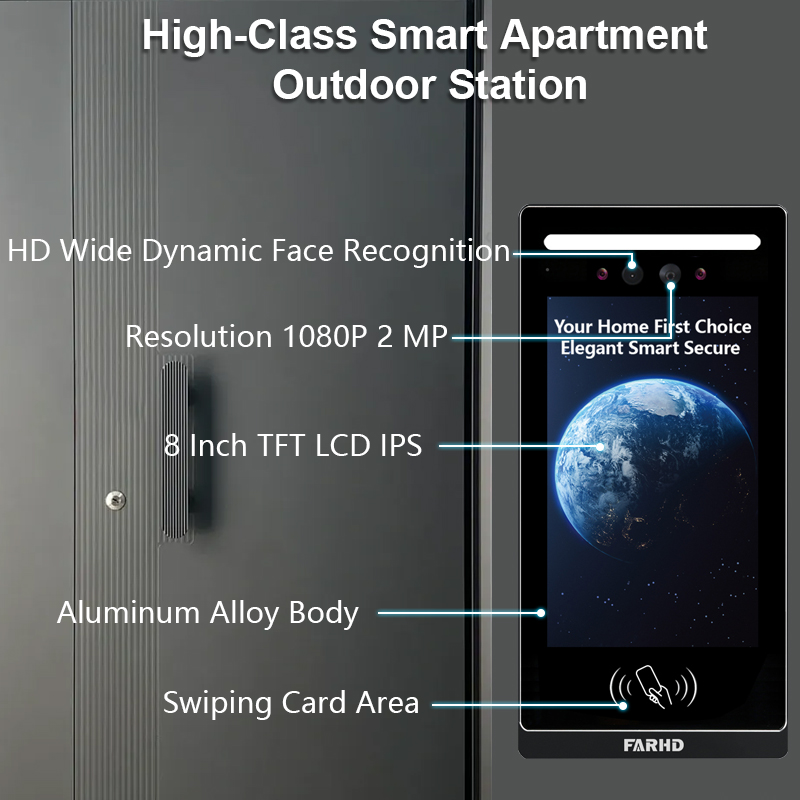
7. Timbre de video para uso empresarial: Monitoreo y control remoto
Espacios comerciales como oficinas, tiendas minoristas y almacenes requieren seguridad y visibilidad mejoradas. Timbre de video con capacidad de visualización móvil permiten a los propietarios de negocios monitorear entradas de forma remota, manejar entregas y verificar visitantes.
Características orientadas a negocios:
- Monitoreo multi-timbre desde una sola aplicación
- Acceso programado y registros de visitantes
- Conexión multi-dispositivo
- Reconocimiento facial con tecnología de IA
- Comunicación encriptada para privacidad
Recomendado por FARHD:
- Sistemas de intercomunicadores personalizables
- Timbre de video inteligente OEM
- Soluciones completas de hardware + software
FARHD desarrolla sistemas de timbres de grado empresarial adaptados para entornos de alto tráfico. Con más del 60% de cuota de mercado en China y amplia experiencia OEM, FARHD es un socio confiable para implementaciones empresariales.
Soluciones personalizadas para su segmento de mercado Perfil de la empresa de FARHD y su presencia global en el mercado de video intercomunicadores.
8. Proveedor B2B de timbres de video y opciones de personalización
Si eres un mayorista, distribuidor, integrador de sistemaso marca emergente, asociarse con un proveedor de timbres con video confiable es esencial para su éxito en el mercado de hogares inteligentes y seguridad.
Por qué elegir FARHD?
| Característica | Ventaja de FARHD |
|---|---|
| Integración vertical | Control desde la fabricación de LCD hasta el producto final |
| Capacidades OEM/ODM | Personalice hardware, software, interfaz de aplicación y empaque |
| Certificaciones mundiales | ISO 9001, CE, FCC, ROHS, SGS |
| Capacidad de producción | 13 líneas en fábrica de 5.500 m², equipo SMT YAMAHA |
| Alcance de mercado | Principal proveedor en China, Italia, Turquía y Corea |
| Experiencia en I+D | Equipo dedicado para innovaciones en IA, IoT y conectividad |
📞 ¿Busca lanzar su propia marca de timbres de video? Contacto FARHD para discutir precios al por mayor, etiquetado privado y soluciones específicas del mercado.
9. Preguntas frecuentes: Ver timbres de video en dispositivos móviles
P1: ¿Puedo ver mi cámara de timbre en más de un teléfono?
Sí, la mayoría de las aplicaciones permiten que múltiples usuarios o dispositivos accedan a la misma transmisión del timbre.
P2: ¿Necesito una suscripción para ver mi timbre en mi teléfono?
No. La vista en vivo suele ser gratuita. Sin embargo, el almacenamiento en la nube y funciones avanzadas pueden requerir una suscripción.
P3: ¿Qué velocidad de internet necesito para una transmisión de video fluida?
Se recomienda una velocidad mínima de subida de 2 Mbps para transmisión HD.
P4: ¿Puedo recibir alertas cuando no estoy en casa?
Sí, las notificaciones push se envían a su teléfono independientemente de la ubicación, siempre que esté conectado a internet.
P5: ¿Puedo ver el video de mi timbre desde el extranjero?
Absolutamente. Siempre que su timbre esté conectado a internet y su teléfono tenga acceso, puede verlo desde cualquier lugar.
Con el sistema adecuado en su lugar, ver la cámara de su timbre en un teléfono no solo es posible, sino que es seguro, conveniente y confiable. Ya sea que sea propietario de una vivienda, arrendador o comprador empresarial, elegir una solución confiable como FARHD asegura satisfacción y soporte a largo plazo.
También le puede interesar
-
FARHD: Your 28-Year Source Factory for Video Door Phone Intercoms
When you choose a video door phone intercom supplier, you are not just buying a product—you are choosing the factory behind it. FARHD has been a source manufacturer since 1998, with over 28 years of experience in video intercom and access control. From villa kits to apartment intercoms, we deliver reliable, customizable, and Tuya-compatible solutions…
-
FARHD Source Factory: Your Trusted Partner for Video Intercom and Access Control Solutions
When you choose a manufacturing partner for video intercom and access control systems, you are not just buying products—you are investing in quality, reliability, and long-term support. FARHD has been a source factory since 1998, and today we serve clients in over 100 countries worldwide. With strict quality inspection, in-house production, independent R&D, and full…
-
2-Wire Video Door Phone Connection with Electric Rim Lock: Unlock by Card, Indoor Monitor, and App
A complete guide to wiring an electric rim lock to a FARHD 2-wire video door phone system—and configuring three convenient unlock methods: RFID card, indoor monitor, and mobile app. Whether you are upgrading an existing building or specifying a new system, this guide covers the essentials for reliable, secure access control. Electric rim locks are…
-

Video Intercom Manufacturer & Source Factory Since 1998 | OEM ODM SKD Building Intercom
Video Intercom Manufacturer & Vertical Source Factory in China FARHD is a professional video intercom manufacturer with over 28 years of specialized experience in building security intercom systems. Established in 1998, we are a genuine building intercom factory focused on independent R&D, in-house production, and customized manufacturing for global B2B clients, including distributors, importers, engineering contractors, real estate…



