
Cómo Usar el Timbre de Video Tuya para Seguridad Inteligente del Hogar e Integración B2B
noviembre 12, 2025
Comparte este artículo

1. ¿Qué es un timbre de video Tuya y cómo funciona?
Introducción a los timbres de video Tuya
A El timbre de video Tuya es un dispositivo de seguridad para el hogar inteligente integrado con la plataforma IoT de Tuya. Tuya proporciona una solución universal para dispositivos inteligentes, permitiendo que los fabricantes conecten sus productos a la nube, aplicaciones y servicios habilitados por IA. Los timbres compatibles con Tuya permiten a los usuarios:
- Monitorear la actividad en la puerta principal en tiempo real
- Comunicarse mediante audio bidireccional
- Recibir alertas activadas por detección de movimiento
- Almacenar grabaciones en la nube o tarjetas SD locales
- Integrarse con ecosistemas de hogar inteligente como Alexa, Google Homey IFTTT
Cómo funcionan los timbres de video Tuya
| Componente | Funcionalidad |
|---|---|
| HD Cámara | Captura video en vivo y grabaciones |
| Sensor de movimiento | Detecta movimiento y envía notificaciones |
| Micrófono y altavoz | Permite la comunicación bidireccional |
| Módulo WiFi | Conecta el timbre a la app Tuya Smart y la nube |
| Fuente de alimentación | Opciones alimentadas por batería o cableadas disponibles |
| Opciones de almacenamiento | Nube a través de Tuya o almacenamiento local mediante microSD |
Ventajas clave:
- Integración fluida con el ecosistema Tuya Smart
- Acceso remoto y notificaciones en tiempo real
- Asequible y escalable para aplicaciones B2B multi-propiedad
¿Quién usa timbres de video Tuya?
- Propietarios en busca de seguridad inteligente
- Administradores de fincas para edificios residenciales multiunidad
- compradores B2B como distribuidores, mayoristasy marcas OEM que necesitan soluciones de etiqueta blanca
Los timbres Tuya no son solo para consumidores. Su compatibilidad con una amplia gama de fabricantes OEM/ODM los hace una opción ideal para compradores mayoristas y proveedores de soluciones de seguridad.
2. Cómo configurar un timbre de video Tuya: Guía de instalación paso a paso
Lista de comprobación previa a la instalación
Antes de instalar un timbre de video Tuya, asegúrate de lo siguiente:
- Conexión WiFi estable (2.4 GHz) – Los dispositivos Tuya no admiten 5 GHz
- aplicación Tuya Smart descargada en tu smartphone
- Fuente de alimentación (batería cargada o cableado listo)
- Herramientas de montaje (tornillos, anclajes, destornillador)
Pasos de la instalación
Paso 1: Cargar o conectar la alimentación
- Si es alimentado por batería, carga completamente la batería usando el cable USB
- Si es cableado, conecta el dispositivo al cableado existente de tu timbre (12-24V AC)
Paso 2: Montar el timbre
- Elige una ubicación cerca de tu puerta a nivel de los ojos (~1.2-1.5 metros)
- Asegura el soporte de montaje con tornillos
- Encaja el timbre de video en el soporte
Paso 3: Conectar a WiFi
- Abre la Aplicación Tuya Smart
- Toca “Agregar dispositivo” → “Vigilancia de video” → “Timbre inteligente”
- Sigue las instrucciones en la app y escanea el código QR mostrado en tu teléfono usando la cámara del timbre
Paso 4: Configuración final
- Confirma que el audio y el video funcionen correctamente
- Configura la sensibilidad de detección de movimiento
- Ajusta las configuraciones de notificaciones push
Consejos de instalación
| Consejo | Descripción |
|---|---|
| Usa montaje angular | Mejora el campo de visión para instalaciones en esquinas |
| Señal WiFi segura | Coloca el router a 10-15 metros del timbre |
| Habilita encriptación | Usa los servicios de nube encriptados de Tuya para datos seguros |
| Nombra tu dispositivo | Especialmente útil para propiedades con múltiples unidades |
3. Cómo conectar un timbre de video Tuya con la app Tuya Smart
Conectar tu timbre de video Tuya con la Aplicación Tuya Smart desbloquea todo su potencial, incluyendo acceso remoto, almacenamiento en la nube e integración con el hogar inteligente.
Descarga de la app y configuración de la cuenta
- Descarga la Tuya Smart o Vida inteligente app desde la App Store o Google Play.
- Crea una cuenta e inicia sesión.
- Habilita la ubicación y Bluetooth en tu dispositivo para un emparejamiento más fácil.
Emparejamiento del timbre
- Abre la app y toca “+” para agregar un nuevo dispositivo.
- Selecciona Videovigilancia → Timbre inteligente (WiFi).
- Asegúrate de que el timbre esté en modo de emparejamiento (generalmente parpadeando en azul).
- Ingresa las credenciales de tu WiFi de 2.4 GHz.
- Escanea el código QR mostrado en la app usando la cámara del timbre.
- Espera a que el dispositivo se conecte (toma 30-60 segundos).
Personalización de configuraciones del dispositivo
Una vez conectado, puedes ajustar:
- Zonas y sensibilidad de detección de movimiento
- Programas de notificaciones (p. ej., solo alertar durante la noche)
- Configuraciones de audio bidireccional
- Preferencias de grabación de video (nube o tarjeta SD)
Integración con almacenamiento en la nube
Tuya ofrece planes de nube opcionales:
| Plan de almacenamiento | Características | Ideal para |
|---|---|---|
| Básico | Historial de eventos de 7 días, grabación de movimiento | Hogares y apartamentos pequeños |
| Estándar | Historial de 14 días, video continuo | Hogares grandes, oficinas pequeñas |
| Premium | Historial de 30 días, soporte multi-cámara | Edificios multiunidad, B2B |
Nota: También se admite almacenamiento en tarjeta SD local para respaldos sin conexión.
Ventajas para los compradores B2B
- Gestiona múltiples dispositivos desde una sola cuenta
- Asigna diferentes usuarios y permisos
- Habilite vistas de panel multi-propiedad
- Opción para opciones de personalizar la app con la marca de tu negocio a través de asociaciones OEM
Para empresas que buscan adquirir timbres de video compatibles con Tuya, FARHD proporciona diseño de pila completa, OEM/ODM e integración de apps para sistemas de timbres inteligentes.
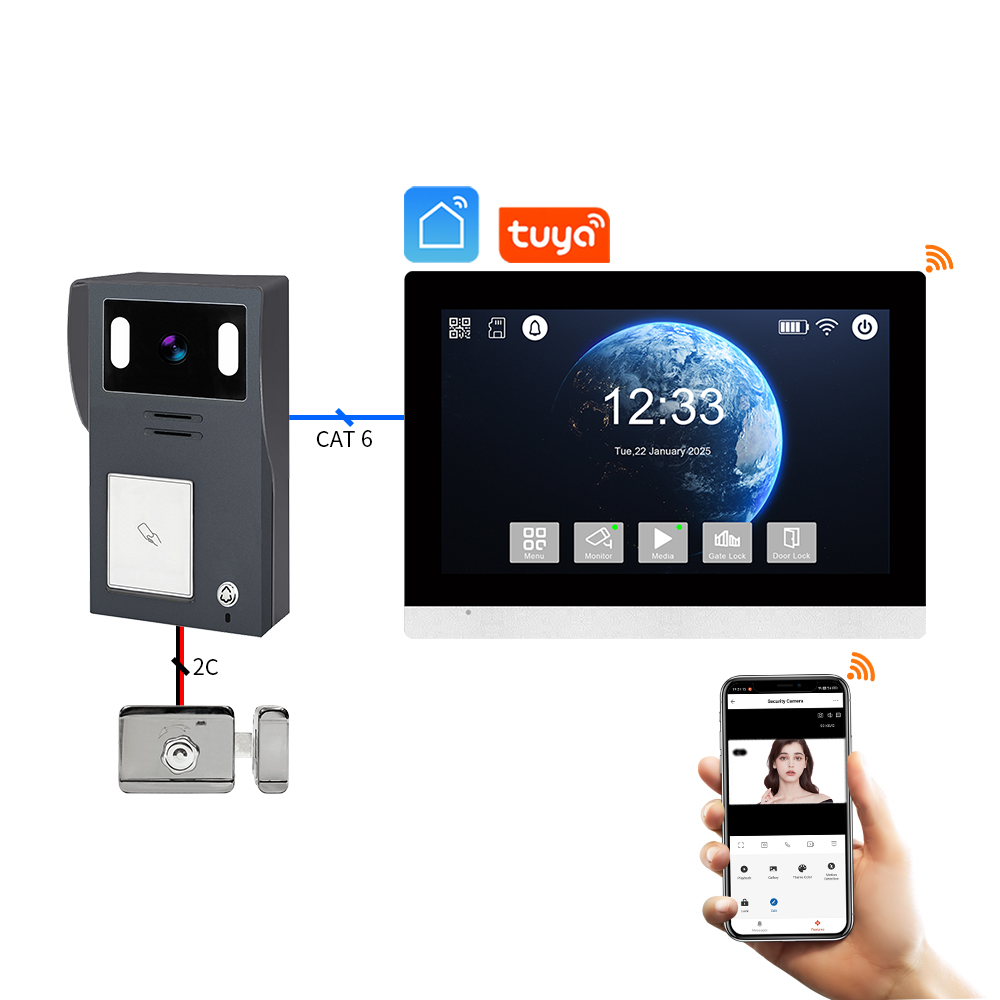
4. Cómo usar un timbre de video Tuya con Alexa o Google Home
Integrar tu timbre de video Tuya con Alexa o Google Home permite comandos de voz, rutinas inteligentes y transmisión de video en vivo en dispositivos compatibles. Esto es especialmente útil para propietarios y compradores B2B que gestionan múltiples propiedades inteligentes o ofrecen servicios de valor agregado a inquilinos y clientes.
Integración con Amazon Alexa
Dispositivos compatibles:
- Echo Show
- Echo Spot
- Fire TV
Pasos de configuración:
- Abre la app de Alexa.
- Ve a Habilidades y juegos → Busca “Tuya Smart” o “Smart Life”.
- Habilita la habilidad y vincula tu cuenta de Tuya.
- Descubre dispositivos; tu timbre debería aparecer automáticamente.
- Asígnalo a un grupo o habitación (p. ej., “Puerta principal”).
Comandos de voz:
- “Alexa, muéstrame la puerta principal”.
- “Alexa, ¿hay alguien en la puerta?”
- “Alexa, responde al timbre.”
Integración con Google Home
Dispositivos compatibles:
- Google Nest Hub
- TVs habilitadas para Chromecast
- Teléfonos Android con Asistente
Pasos de configuración:
- Abre la app de Google Home.
- Toca “+” → “Configurar dispositivo” → “Funciona con Google”.
- Busca y vincula tu Tuya Smart o Vida inteligente cuenta.
- Asigna el timbre a una habitación.
Comandos de voz:
- “Oye Google, muéstrame la puerta principal.”
- “Oye Google, ¿quién está en la puerta?”
- “Oye Google, activa las alertas de movimiento.”
Beneficios para aplicaciones B2B
| Característica | Caso de uso para empresas |
|---|---|
| Control de entrada habilitado por voz | Acceso inteligente para entregas, invitados y contratistas |
| Monitoreo en tiempo real en pantalla | Áreas comunes en edificios de apartamentos o vestíbulos de oficinas |
| Rutinas automatizadas | Activa luces o alarmas al detectar movimiento |
| Experiencia personalizable | Los proveedores OEM pueden integrar APIs de Tuya en plataformas de etiqueta blanca |
FARHD ofrece soluciones de timbres de video inteligentes que admiten integraciones de voz Tuya y pueden personalizarse para aplicaciones B2B de etiqueta blanca. Revisa su línea de productos para modelos compatibles con soporte para Alexa y Google Home.
5. Características inteligentes de los timbres de video compatibles con Tuya en 2025
La evolución de la plataforma IoT de Tuya ha habilitado características inteligentes de próxima generación en timbres de video, haciéndolos no solo más seguros, sino también más inteligentes y adaptativos. A continuación, se presentan las principales características a buscar en timbres compatibles con Tuya en 2025, especialmente para empresas y distribuidores que consideren compras al por mayor.
Características inteligentes clave
1. Detección de movimiento con tecnología de IA
- Identifica humanos frente a animales frente a vehículos
- Reduce falsas alarmas mediante algoritmos avanzados
- Zonas de detección personalizables y niveles de sensibilidad
2. Reconocimiento facial (Modelos avanzados)
- Reconoce a visitantes frecuentes (familia, personal)
- Envía alertas personalizadas
- Integración con sistemas de control de acceso
3. Opciones de almacenamiento en la nube y en el borde
- Tarjeta SD local (hasta 128 GB) y almacenamiento en la nube cifrado
- Procesamiento de IA en el borde para tiempos de respuesta más rápidos
- Sin dependencia de internet para funciones básicas
4. Eficiencia de batería y energía
- Modos de activación de bajo consumo
- Compatibilidad con paneles solares para energía sostenible
- Vida útil de la batería mejorada (hasta 6 meses con una sola carga)
5. Acceso multiusuario y multidiseño
- Comparte el acceso con familiares o personal
- Control de acceso basado en roles para administradores de propiedades
- Panel de control en la nube para la gestión de flotas
Tabla de comparación de funciones
| Característica | Modelos estándar de 2023 | Modelos mejorados con Tuya de 2025 |
|---|---|---|
| Detección de movimiento | PIR básico | Diferenciación de humanos/vehículos con IA |
| Opciones de almacenamiento | Tarjeta SD o nube | Híbrido de borde + nube |
| Soporte de asistente de voz | Parcial | Integración completa con Alexa/Google |
| Fuente de energía | Con cable/Batería (vida corta) | Solar + Batería de larga duración |
| Notificaciones inteligentes | Posible retraso | Alertas en tiempo real e inteligentes |
Ventajas para compradores B2B
- SKU actualizados para líneas de productos premium
- ARPU aumentado (Ingresos promedio por usuario) con suscripciones en la nube
- Menores costos de soporte debido a la precisión basada en IA
- Ideal para proyectos de ciudades inteligentes, comunidades cerradas y edificios de múltiples inquilinos
Si estás planeando adquirir o distribuir timbres de video compatibles con Tuya de vanguardia, FARHD es un socio OEM/ODM probado con capacidades completas de I+D interna y personalización. Aprende más sobre sus servicios de soluciones de extremo a extremo aquí.
6. Solución de problemas comunes con timbres de video Tuya
Incluso los mejores timbres inteligentes pueden presentar problemas. Entender cómo solucionar fallos comunes garantiza una experiencia de usuario fluida y ayuda revendedores B2B a reducir los costos de soporte posventa.
Problema 1: El dispositivo no se empareja
Causas posibles:
- WiFi no es de 2.4 GHz
- El timbre no está en modo de emparejamiento
- Señal débil
Soluciones:
- Asegúrate de que el router sea solo de 2.4 GHz
- Reinicia el timbre (generalmente manteniendo presionado el botón de reinicio durante 5-10 segundos)
- Acerca el timbre al router durante la configuración
Problema 2: Sin alertas de movimiento
Causas posibles:
- Detección de movimiento desactivada
- Configuraciones de sensibilidad baja
- Firmware desactualizado
Soluciones:
- Activa la detección de movimiento en la app de Tuya
- Configura la sensibilidad en “alta” y prueba
- Verifica e instala actualizaciones de firmware
Problema 3: Video en vivo no se carga
Causas posibles:
- Ancho de banda insuficiente
- Problema del servidor o error en la app
- Dispositivo desconectado
Soluciones:
- Desconecta dispositivos no utilizados del WiFi
- Reinicia la app y el timbre
- Verifica el estado del dispositivo en la app
Problema 4: Alexa o Google no reconoce el dispositivo
Causas posibles:
- Habilidad no vinculada correctamente
- Cuentas múltiples causando conflictos
- Dispositivo no compartido correctamente
Soluciones:
- Vuelve a vincular tu cuenta de Tuya con Alexa/Google
- Asegúrate de que el timbre esté asignado a la habitación correcta
- Comparte el acceso al dispositivo con la cuenta de usuario correcta
Consejo B2B: Crea una hoja de solución de problemas
Para mejorar la satisfacción del cliente y reducir las llamadas de servicio, distribuidores y OEM deben incluir una guía de inicio rápido con pasos comunes de solución de problemas en cada caja del producto.
FARHD ofrece soluciones completas soporte posventa y documentación para todas sus soluciones de timbres de video. Puedes contactar a su equipo a través del página de contacto para soporte personalizado o incorporación OEM.
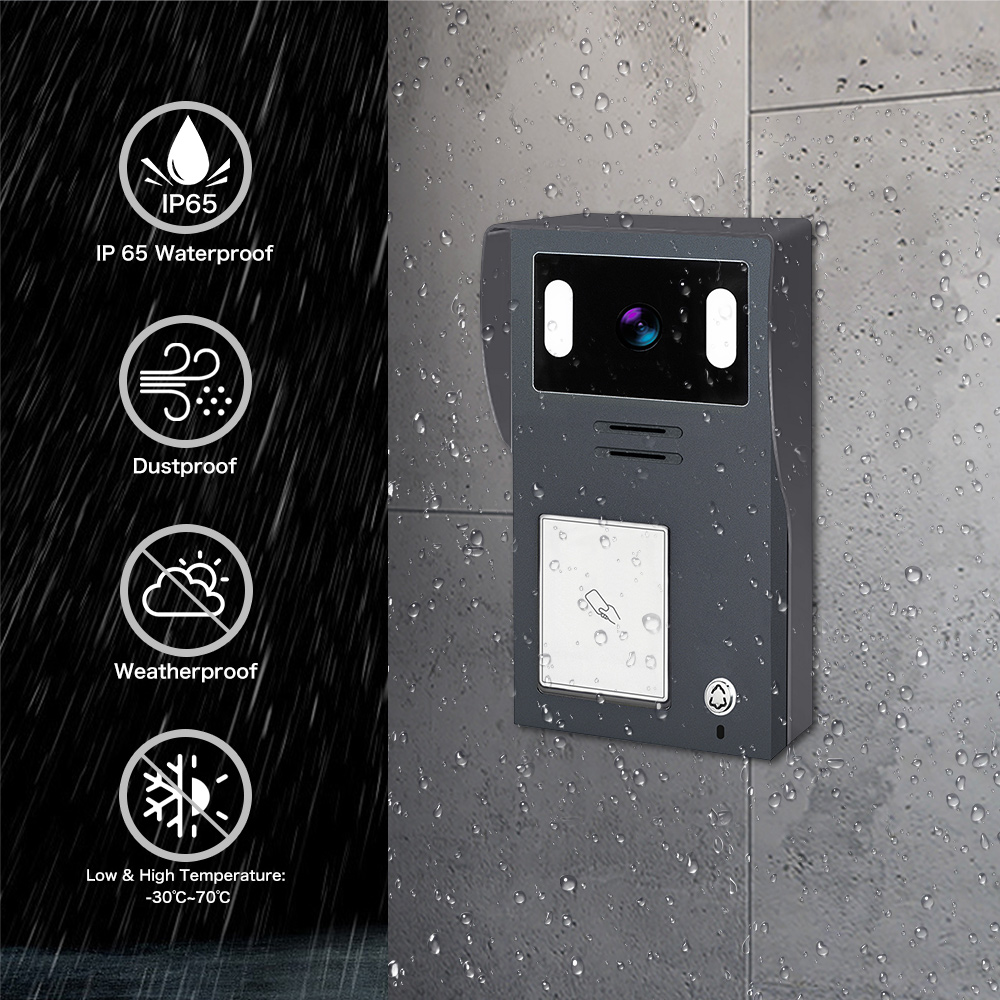
7. Timbres de video Tuya para propiedades de alquiler y edificios multiunidad
Los timbres de video Tuya no son solo para propietarios individuales; también son una solución poderosa para propiedades de alquiler, edificios de varias viviendasy propiedades comerciales. Su gestión basada en la nube, escalabilidad y funciones de integración inteligente los hacen ideales para administradores de propiedades, propietarios de edificiosy compradores B2B enfocados en bienes raíces y hospitalidad.
¿Por qué usar timbres de video Tuya en entornos multiunidad?
| Beneficio | Descripción |
|---|---|
| Gestión centralizada | Controla y monitorea múltiples unidades desde una sola cuenta de Tuya |
| Acceso basado en funciones | Asigna diferentes niveles de acceso a inquilinos, gerentes y equipos de mantenimiento |
| Visualización y alertas remotas | Recibe alertas de movimiento incluso cuando estás fuera del sitio |
| Integración de cerraduras inteligentes | Combina con cerraduras inteligentes Tuya para un control de acceso fluido |
| Escalabilidad rentable | Implementación masiva asequible con gestión basada en la nube |
Aplicaciones comunes
- Complejos de apartamentos
- Asigna un timbre inteligente a cada unidad
- Los inquilinos usan la app de Tuya para comunicación de video y alertas
- El administrador de la propiedad retiene acceso de anulación para emergencias
- Alquileres a corto plazo (p. ej., Airbnb)
- Monitorea check-ins y check-outs de huéspedes de forma remota
- Previene accesos no autorizados o fiestas
- Integra con cerraduras inteligentes para una experiencia fluida
- Edificios de oficinas comerciales
- Usa timbres de video Tuya para zonas de entrada restringida
- Monitorea entregas y acceso de visitantes
- Combina con intercomunicadores para una comunicación mejorada
Oportunidades de integración B2B
- Soluciones de marca blanca para grandes grupos de propiedades
- Compra al por mayor con descuentos de OEM confiables
- integración de API para sistemas de gestión de propiedades personalizados (PMS)
FARHD, con su amplia experiencia en OEM/ODM y capacidades completas de fabricación, es un proveedor de referencia para desarrolladores inmobiliarios y empresas de gestión de propiedades que buscan implementar timbres de video compatibles con Tuya a gran escala. Aprenda más sobre sus capacidades en los sistemas de videoportero de varias unidades en su Quiénes somos.
8. Mejores proveedores OEM/ODM para timbres de video compatibles con Tuya
Si eres un comprador mayorista, minoristao marca smart home que buscan adquirir timbres de video Tuya de alta calidad, elegir el adecuado Socio OEM/ODM es esencial para garantizar la calidad del producto, flexibilidad de marca y soporte técnico.
Qué buscar en un proveedor
| Criterios | Por qué es importante |
|---|---|
| Certificación Tuya | Garantiza compatibilidad con la nube y el ecosistema de aplicaciones de Tuya |
| I+D interno | Tiempo más rápido para el lanzamiento al mercado y mejor control del firmware |
| Integración vertical | Mejor control de calidad y costos de producción más bajos |
| Opciones de marca personalizada | Soporte para impresión de logotipos, empaquetado, personalización de UI |
| Soporte técnico postventa | Reduce las tasas de devolución y mejora la satisfacción del cliente |
Principales proveedores OEM/ODM a nivel global
🇨🇳 FARHD (Shenzhen FARHD Tech Co., Ltd.)
- Fabricante OEM/ODM certificado por Tuya
- Producción integral: desde módulo LCD hasta timbre de video terminado
- Especializado en sistemas de intercomunicación de apartamentos múltiples, seguridad inteligente y integraciones Tuya
- Más del 60% de cuota de mercado en China con fuerte presencia en Italia, Corea y Turquía
- Soporte completo para marca privada, UI personalizada, e integración en la nube
🔗 Explore los servicios OEM/ODM de FARHD
🇺🇸 Remo+ (EE.UU.)
- Timbres de video inteligentes compatibles con Tuya con almacenamiento en la nube
- Capacidades OEM limitadas pero fuerte presencia B2C
- Ideal para distribuidores que buscan opciones listas para enviar
🇪🇺 Smartwares (Países Bajos)
- Ofrece timbres de video habilitados para Tuya para el mercado europeo
- Se enfoca principalmente en segmentos minoristas y de bricolaje
Por qué elegir FARHD?
| Característica | Ventaja de FARHD |
|---|---|
| Fabricación integral | Control desde LCD hasta ensamblaje final |
| Experiencia en integración Tuya | Colaboración profunda con la plataforma IoT de Tuya |
| Alta capacidad de producción | 13 líneas de producción en una instalación de 5.500 m² |
| Certificaciones de calidad | ISO 9001, CE, FCC, ROHS, SGS |
| Equipo de I+D dedicado | Prototipado rápido y personalización de firmware |
FARHD no es solo una fábrica: es un socio tecnológico con enfoque en innovación, calidad y escalabilidad global. Ya sea que necesite 500 unidades o 50.000, pueden cumplir sus requisitos con marca personalizada, integración de aplicacionesy tiempos de entrega rápidos.
Para consultas de productos, precios por volumen o oportunidades de marca blanca, contacte a través de su página de contacto.
9. Preguntas frecuentes (FAQ)
P1: ¿Puedo usar un timbre de video Tuya sin suscripción?
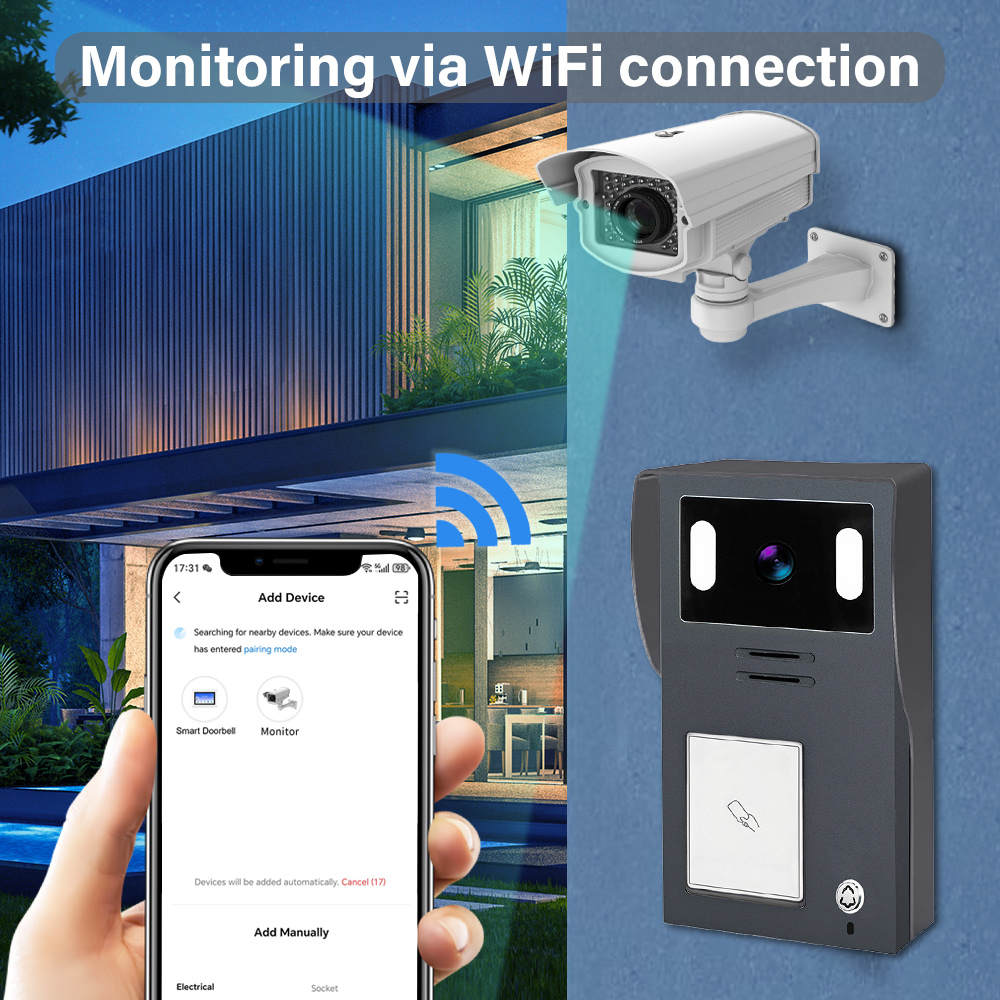
funcionan independientemente de WiFi utilizando conexiones de 2 o 4 hilos. Sin embargo, para el acceso remoto y la integración de aplicaciones, se recomienda una conexión WiFi o Ethernet. La mayoría de los timbres de video Tuya admiten almacenamiento local mediante tarjeta microSD. El almacenamiento en la nube es opcional y proporciona mayor comodidad y respaldo.
P2: ¿Los timbres de video Tuya admiten WiFi de 5 GHz?
No. Los timbres de video Tuya suelen admitir solo WiFi de 2,4 GHz, que ofrece un alcance más largo y una conexión más estable en la mayoría de los entornos domésticos.
P3: ¿Puedo integrar timbres de video Tuya en un sistema de gestión de propiedades (PMS)?
funcionan independientemente de WiFi utilizando conexiones de 2 o 4 hilos. Sin embargo, para el acceso remoto y la integración de aplicaciones, se recomienda una conexión WiFi o Ethernet. Con las APIs abiertas y SDK de Tuya, muchos OEM como FARHD ofrecen integraciones personalizadas integración en plataformas PMS, ideal para hoteles, complejos de apartamentos y comunidades inteligentes.
P4: ¿Es posible renombrar timbres de video Tuya con mi logotipo y empaquetado?
Absolutamente. FARHD ofrece servicios de marca privada y marca blanca, incluyendo impresión de logotipos personalizados, diseño de UI, empaquetado y marca de aplicaciones.
P5: ¿Qué tan seguros son los timbres de video Tuya?
Tuya utiliza encriptación AES de grado bancario para la transmisión de video y datos. Los dispositivos de OEM certificados como FARHD también pasan por controles de calidad rigurosos y auditorías de firmware para garantizar una seguridad de primer nivel.
🌐 Explore más productos de seguridad inteligente compatibles con Tuya de V en su sitio oficial página de productos. Ya sea que sea una marca, distribuidor o integrador, FARHD ofrece la personalización, soporte y calidad que necesita para tener éxito en el mercado de hogares inteligentes en rápido crecimiento.
📩 ¿Listo para crear su propia línea de timbres de video Tuya?
Asóciese con FARHD, el fabricante OEM/ODM confiable para marcas globales de hogares inteligentes.
👉 Contacte a FARHD hoy mismo para hablar de su proyecto.
También le puede interesar
-

FARHD to Showcase All-Climate Technology at 2026 China Security Expo, Empowering Smart Communities in Northern China
From November 3 to 6, 2026, FARHD, a global leader in smart security and communication solutions, will unveil its full range of products deeply optimized for the harsh winter conditions of northern China at the 18th China International Social Public Security Products Expo (Security China). Under the theme “Digital Intelligence World, Total Security,” the expo…
-

FARHD to Showcase All-Climate Hard-Tech Solutions at Securika Moscow 2026
From April 22 to 24, 2026, FARHD, a global leader in smart security and communication solutions, will unveil its full range of products engineered for extreme climates at Securika Moscow 2026, held at Crocus Expo in Moscow, Russia. At booth A-9101, FARHD will present its smart intercom, access control, and smart home solutions—all deeply optimized…
-

FARHD Honored with Multiple Prestigious Awards in China’s Building Intercom Industry, 28 Years of Deep Engagement in the Chinese Market Solidifying Its Position as a Leading Brand
Recently, in the annual selection event jointly organized by the China Security and Protection Industry Association and multiple authoritative media outlets, FARHD, by virtue of its profound industry experience, outstanding technological innovation capabilities, and extensive market recognition, was awarded the prestigious “Most Influential Brand in China’s Building Intercom Industry” . These accolades not only affirm FARHD’s 28…
-

FARHD Honored with Multiple Prestigious Awards in China’s Building Intercom Industry, 28 Years of Deep Engagement in the Chinese Market Solidifying Its Position as a Leading Brand
Recently, in the annual selection event jointly organized by the China Security and Protection Industry Association and multiple authoritative media outlets, FARHD, by virtue of its profound industry experience, outstanding technological innovation capabilities, and extensive market recognition, was awarded the prestigious “National Top 10 Quality Brands in the Security Industry” . These accolades not only affirm FARHD’s…



