
Как использовать видеодомофон Tuya для безопасности умного дома и интеграции B2B
Ноябрь 12, 2025
Поделиться статьей

1. Что такое Tuya видео-домофон и как он работает?
Введение в Tuya видео-домофоны
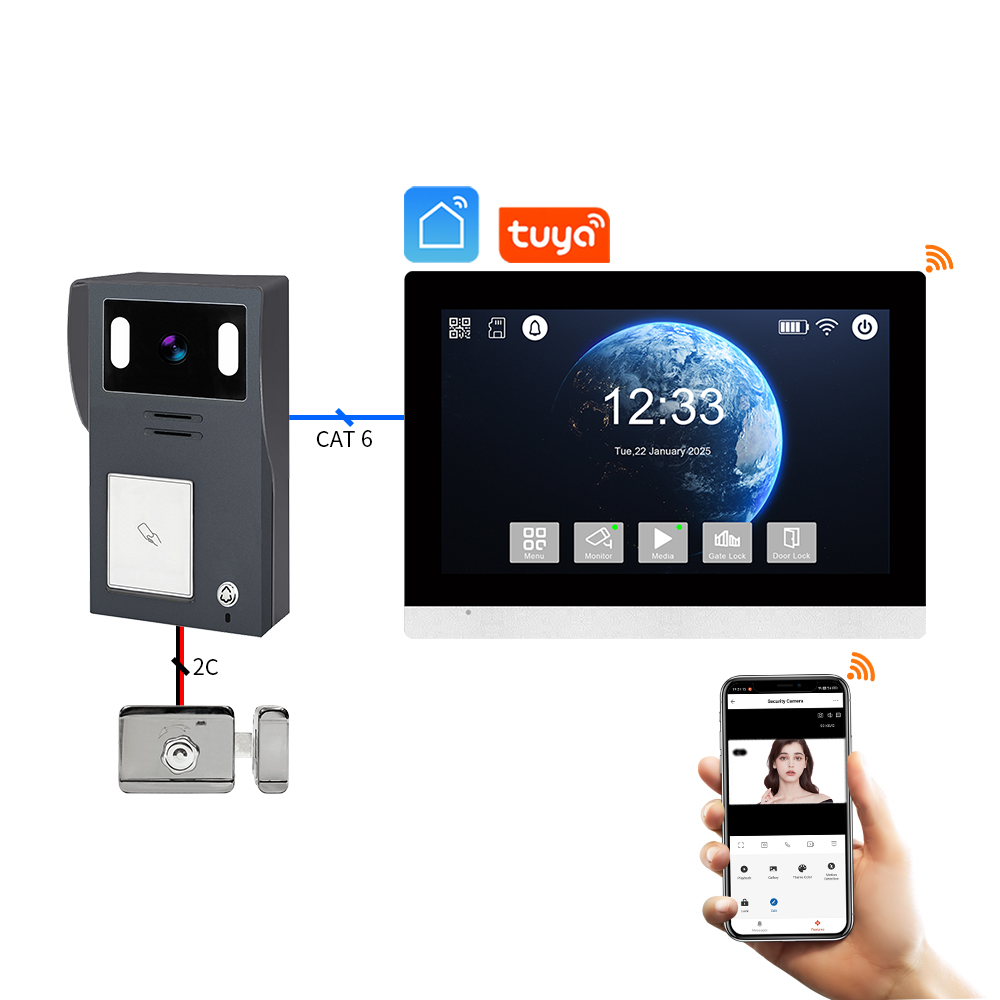
A Видео-домофон Tuya — это устройство безопасности для умного дома, интегрированное с IoT-платформой Tuya. Tuya предоставляет универсальное решение для умных устройств, позволяя производителям подключать продукты к облаку, приложениям и сервисам на базе ИИ. Совместимые с Tuya домофоны позволяют пользователям:
- Мониторить активность у входной двери в реальном времени
- Общаться через двустороннюю аудиосвязь
- Получать оповещения, активируемые детекцией движения
- Хранить записи в облаке или на локальных SD-картах
- Интегрироваться с экосистемами умного дома, такими как Alexa, Google Home, и IFTTT
Как работают видео-домофоны Tuya
| Компонент | Функциональность |
|---|---|
| HD Камера | Захватывает живое видео и записи |
| Датчик движения | Обнаруживает движение и отправляет уведомления |
| Микрофон и динамик | Обеспечивает двустороннюю связь |
| Wi-Fi модуль | Подключает домофон к приложению Tuya Smart и облаку |
| Источник питания | Варианты на батарейках или с проводным питанием |
| Варианты хранения | Облако через Tuya или локальное хранение на microSD |
Ключевые преимущества:
- Бесшовная интеграция с экосистемой Tuya Smart
- Удаленный доступ и уведомления в реальном времени
- Доступные и масштабируемые для B2B-приложений в многоквартирных объектах
Кто использует видео-домофоны Tuya?
- Домовладельцы ищущие умную безопасность
- Управляющие недвижимостью для многоквартирных жилых зданий
- Покупатели B2B такой как дистрибьюторы, оптовики, и OEM-бренды нуждающиеся в решениях белой марки
Домофоны Tuya не только для потребителей. Их совместимость с широким спектром Производители OEM/ODM делает их идеальным выбором для оптовые покупатели и поставщиков решений в области безопасности.
2. Как установить видео-домофон Tuya: Пошаговое руководство по установке
Контрольный список перед установкой
Перед установкой видео-домофона Tuya убедитесь в следующем:
- Стабильное подключение WiFi (2.4 ГГц) – Устройства Tuya не поддерживают 5 ГГц
- приложение Tuya Smart загружено на ваш смартфон
- Источник питания (заряженная батарея или готовая проводка)
- Инструменты для монтажа (винты, дюбели, отвертка)
Этапы установки
Шаг 1: Зарядите или подключите питание
- Если на батарейках, полностью зарядите батарею с помощью USB-кабеля
- Если проводной, подключите устройство к существующей проводке дверного звонка (12-24 В переменного тока)
Шаг 2: Установите домофон
- Выберите место у двери на уровне глаз (~1,2–1,5 м)
- Закрепите кронштейн винтами
- Защелкните видео-домофон на кронштейн
Шаг 3: Подключитесь к WiFi
- Откройте Приложение Tuya Smart App
- Нажмите «Добавить устройство» → «Видеонаблюдение» → «Умный домофон»
- Следуйте инструкциям в приложении и отсканируйте QR-код на телефоне с помощью камеры домофона
Шаг 4: Финальная настройка
- Убедитесь, что аудио и видео работают
- Настройте чувствительность детекции движения
- Настройте параметры push-уведомлений
Советы по установке
| Совет | Описание |
|---|---|
| Используйте угловой кронштейн | Увеличивает поле зрения для установки в углах |
| Надежный сигнал WiFi | Разместите роутер в пределах 10–15 метров от дверного звонка |
| Включите шифрование | Используйте зашифрованные облачные сервисы Tuya для защиты данных |
| Назовите свое устройство | Особенно полезно для объектов с несколькими единицами |
3. Как подключить видео-дверной звонок Tuya к приложению Tuya Smart
Подключение вашего видео-дверного звонка Tuya к Приложение Tuya Smart App раскрывает его полный потенциал, включая удаленный доступ, облачное хранение и интеграцию с умным домом.
Загрузка приложения и настройка учетной записи
- Загрузите Туя Смарт или Умная жизнь приложение из App Store или Google Play.
- Создайте учетную запись и войдите в систему.
- Включите службы геолокации и Bluetooth на вашем устройстве для упрощения сопряжения.
Сопряжение дверного звонка
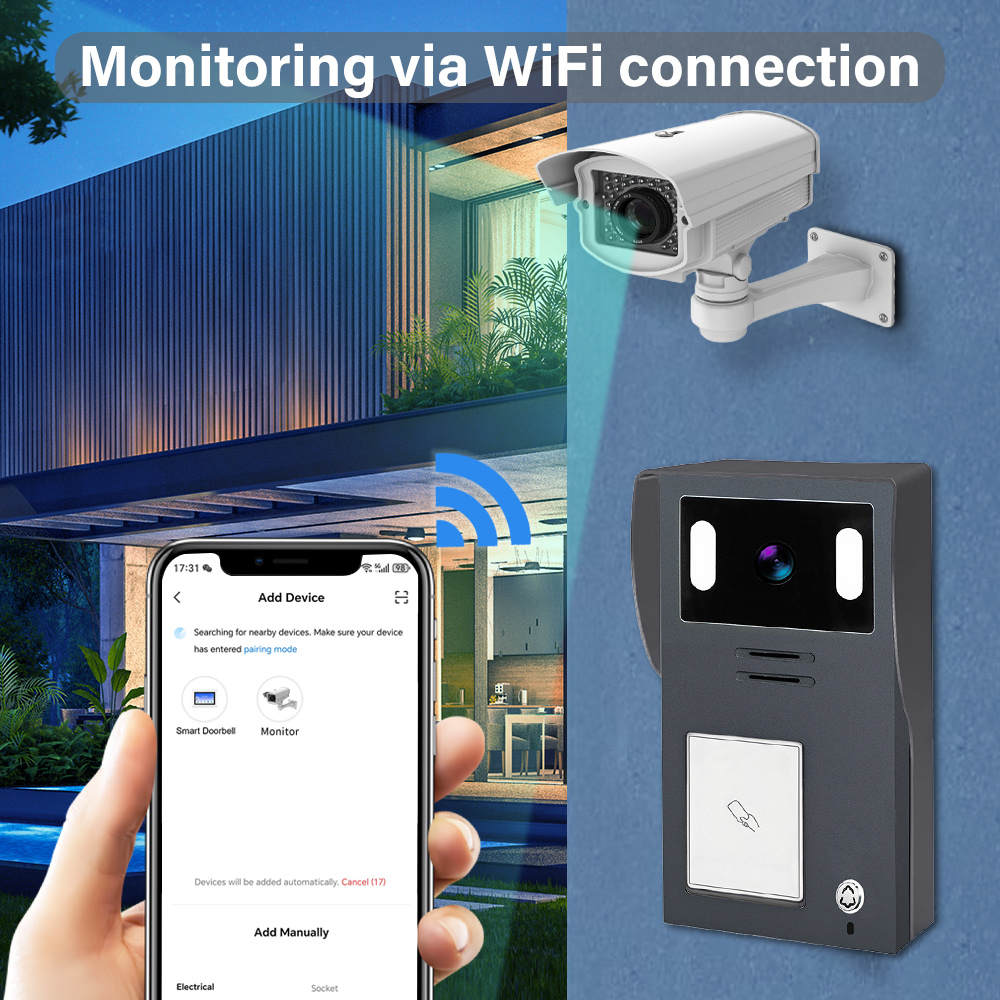
- Откройте приложение и нажмите «+», чтобы добавить новое устройство.
- Выберите Видеонаблюдение → Умный дверной звонок (WiFi).
- Убедитесь, что дверной звонок находится в режиме сопряжения (обычно мигает синим светом).
- Введите учетные данные вашей WiFi-сети 2,4 ГГц.
- Отсканируйте QR-код, отображаемый в приложении, с помощью камеры дверного звонка.
- Дождитесь подключения устройства (это занимает 30–60 секунд).
Настройка параметров устройства
После подключения вы сможете настроить:
- Зоны обнаружения движения и чувствительность
- Графики уведомлений (например, оповещения только ночью)
- Настройки двусторонней аудиосвязи
- Предпочтения записи видео (облако или SD-карта)
Интеграция с облачным хранилищем
Tuya предлагает опциональные облачные тарифы:
| Тариф на хранение | Функции | Идеально подходит для |
|---|---|---|
| Базовый | 7-дневная история событий, запись движения | Для домов и небольших квартир |
| Стандарт | 14-дневная история, непрерывное видео | Для больших домов и небольших офисов |
| Премиум | 30-дневная история, поддержка нескольких камер | Для многоквартирных зданий, B2B |
Примечание: Также поддерживается локальное хранение на SD-карте для резервных копий в автономном режиме.
Преимущества для покупателей B2B
- Управление несколькими устройствами из одной учетной записи
- Назначение различных пользователей и прав доступа
- Включите Обзорные панели для нескольких объектов недвижимости
- Возможность white-label брендирования приложения под ваш бизнес через партнерства OEM
Для бизнеса, желающего закупать совместимые с Tuya видео-дверные звонки, FARHD предоставляет полный цикл разработки, услуги OEM/ODM и интеграцию приложений для систем умных дверных звонков.
4. Как использовать видео-дверной звонок Tuya с Alexa или Google Home
Интеграция вашего видео-дверного звонка Tuya с Alexa или Google Home позволяет использовать голосовые команды, умные сценарии и потоковую передачу видео в реальном времени на совместимых устройствах. Это особенно полезно для владельцев жилья и Покупатели B2B управления несколькими умными объектами недвижимости или предоставления добавленной ценности арендаторам и клиентам.
Интеграция с Amazon Alexa
Совместимые устройства:
- Echo Show
- Echo Spot
- Fire TV
Шаги настройки:
- Откройте приложение Alexa.
- Перейдите в Навыки и игры → Поищите «Tuya Smart» или «Smart Life».
- Включите навык и свяжите учетную запись Tuya.
- Обнаружите устройства; дверной звонок должен появиться автоматически.
- Назначьте его группе или комнате (например, «Входная дверь»).
Голосовые команды:
- "Алекса, покажи мне входную дверь"
- «Alexa, кто-то у двери?»
- «Alexa, ответьте на звонок.»
Интеграция с Google Home
Совместимые устройства:
- Google Nest Hub
- Телевизоры с поддержкой Chromecast
- Android-телефоны с Google Assistant
Шаги настройки:
- Откройте приложение Google Home.
- Нажмите «+» → «Настройка устройства» → «Работает с Google».
- Поищите и свяжите вашу Туя Смарт или Умная жизнь учетную запись.
- Назначьте дверной звонок комнате.
Голосовые команды:
- «Эй, Google, покажи мне входную дверь.»
- «Эй, Google, кто у двери?»
- «Эй, Google, включите оповещения о движении.»
Преимущества для B2B-применений
| Характеристика | Сценарий использования для бизнеса |
|---|---|
| Управление доступом с голосовым контролем | Умный доступ для доставок, гостей и подрядчиков |
| Мониторинг в реальном времени на дисплее | Общие зоны в многоквартирных домах или офисных вестибюлях |
| Автоматизированные сценарии | Включение света или сигнализации при обнаружении движения |
| Брендированный опыт | Поставщики OEM могут интегрировать API Tuya в платформы с белой маркировкой |
FARHD предлагает решения для умных видео-дверных звонков, поддерживающие голосовые интеграции Tuya и настраиваемые для B2B-приложений с белой маркировкой. Ознакомьтесь с их ассортиментом продукции для совместимых моделей с поддержкой Alexa и Google Home.
5. Умные функции видео-дверных звонков, совместимых с Tuya, в 2025 году
Эволюция IoT-платформы Tuya позволила реализовать функции следующего поколения в видео-дверных звонках, делая их не только более безопасными, но и более интеллектуальными и адаптивными. Ниже приведены ключевые функции, на которые стоит обратить внимание в дверных звонках, совместимых с Tuya в 2025 году, особенно для бизнеса и дистрибьюторов, планирующих оптовые закупки.
Ключевые умные функции
1. Обнаружение движения с помощью искусственного интеллекта
- Распознавание людей, животных и транспортных средств
- Снижение ложных срабатываний с помощью продвинутых алгоритмов
- Настраиваемые зоны обнаружения и уровни чувствительности
2. Распознавание лиц (продвинутые модели)
- Распознавание постоянных посетителей (семья, персонал)
- Отправка персонализированных уведомлений
- Интеграция с системами контроля доступа
3. Варианты облачного и периферийного хранения
- Локальная SD-карта (до 128 ГБ) и зашифрованное облачное хранение
- Обработка ИИ на краю для ускорения времени отклика
- Отсутствие зависимости от интернета для базовых функций
4. Эффективность батареи и энергопотребления
- Режимы пробуждения с низким энергопотреблением
- Совместимость с солнечными панелями для устойчивого питания
- Увеличенный срок службы батареи (до 6 месяцев на одном заряде)
5. Доступ для нескольких пользователей и устройств
- Общий доступ с семьей или персоналом
- Контроль доступа на основе ролей для управляющих недвижимостью
- Облачная панель для управления флотом
Таблица сравнения функций
| Характеристика | Стандартные модели 2023 года | Модели с улучшениями Tuya 2025 года |
|---|---|---|
| Обнаружение движения | Базовый PIR | Дифференциация человека/транспорта с ИИ |
| Варианты хранения | Карта SD или облако | Гибридная обработка на краю + облако |
| Поддержка голосового помощника. | Частичный | Полная интеграция с Alexa/Google |
| Источник питания | Проводное/батарейное (короткий срок службы) | Солнечная энергия + аккумулятор длительного действия |
| Умные уведомления | Возможна задержка | Уведомления в реальном времени с интеллектуальной обработкой |
Преимущества для покупателей B2B
- Обновленные SKU для премиальных линеек продуктов
- Увеличение ARPU (средний доход на пользователя) за счет облачных подписок
- Снижение затрат на поддержку благодаря точности на основе ИИ
- Идеально подходит для проекты умных городов, закрытые сообщества и многопользовательские здания
Если вы планируете закупать или распространять передовые видео-домофоны, совместимые с Tuya, FARHD — проверенный партнер OEM/ODM с полным внутренним отделом исследований и разработок и возможностями кастомизации. Узнайте больше о их услугах комплексных решений здесь.
6. Устранение неисправностей распространенных проблем с видео-домофонами Tuya
Даже лучшие умные домофоны могут сталкиваться с проблемами. Понимание того, как устранять распространенные неисправности, обеспечивает бесперебойный пользовательский опыт и помогает B2B реселлеры снизить затраты на послепродажную поддержку.
Проблема 1: Устройство не подключается
Возможные причины:
- WiFi не 2,4 ГГц
- Домофон не в режиме сопряжения
- Слабый уровень сигнала
Решения:
- Убедитесь, что роутер работает только на 2,4 ГГц
- Сбросьте домофон (обычно удерживая кнопку сброса 5–10 секунд)
- Поднесите домофон ближе к роутеру во время настройки
Проблема 2: Отсутствуют уведомления о движении
Возможные причины:
- Обнаружение движения отключено
- Низкие настройки чувствительности
- Устаревшая прошивка
Решения:
- Включите обнаружение движения в приложении Tuya
- Установите чувствительность на «высокую» и протестируйте
- Проверьте наличие и установите обновления прошивки
Проблема 3: Живое видео не загружается
Возможные причины:
- Недостаточная пропускная способность
- Проблема сервера или ошибка приложения
- Устройство не в сети
Решения:
- Отключите неиспользуемые устройства от WiFi
- Перезапустите приложение и домофон
- Проверьте статус устройства в приложении
Проблема 4: Alexa или Google не распознает устройство
Возможные причины:
- Навык не связан должным образом
- Конфликты из-за нескольких аккаунтов
- Устройство не поделено правильно
Решения:
- Пересвязать аккаунт Tuya с Alexa/Google
- Убедитесь, что домофон назначен правильной комнате
- Поделитесь доступом к устройству с правильным аккаунтом пользователя
Совет для B2B: Создайте лист устранения неисправностей
Чтобы повысить удовлетворенность клиентов и снизить количество сервисных звонков, дистрибьюторы и OEM должны включать краткое руководство по распространенным шагам устранения неисправностей в каждую коробку с продуктом.
FARHD предлагает комплексные послепродажная поддержка и документация для всех своих решений видео-домофонов. Вы можете связаться с их командой через контактную страницу для кастомной поддержки или интеграции OEM.
7. Видео-домофон Tuya для арендуемой недвижимости и многоквартирных зданий
Видео-домофоны Tuya подходят не только для индивидуальных домовладельцев — они также являются мощным решением для арендной недвижимости, многоквартирных домах, и коммерческой недвижимости. Их управление на основе облака, масштабируемость и функции интеллектуальной интеграции делают их идеальными для управляющих недвижимостью, владельцев зданий, и Покупатели B2B , ориентированных на недвижимость и гостиничный бизнес.
Почему использовать видео-домофоны Tuya в многоквартирных условиях?
| Выгода | Описание |
|---|---|
| Централизованное управление | Управляйте и мониторьте несколько единиц с одного аккаунта Tuya |
| Доступ на основе ролей | Назначайте разные уровни доступа арендаторам, менеджерам и командам обслуживания |
| Удаленный просмотр и уведомления | Получайте уведомления о движении даже на расстоянии |
| Интеграция с умным замком | Комбинируйте с умными замками Tuya для бесперебойного контроля доступа |
| Экономичная масштабируемость | Доступное массовое развертывание с управлением на основе облака |
Общие приложения
- Жилые комплексы
- Назначьте каждому блоку умный домофон
- Арендаторы используют приложение Tuya для видео-коммуникации и уведомлений
- Менеджер по недвижимости сохраняет приоритетный доступ для чрезвычайных ситуаций
- Краткосрочная аренда (например, Airbnb)
- Мониторьте заезд и выезд гостей удаленно
- Предотвращайте несанкционированный доступ или вечеринки
- Интегрируйте с умными замками для seamless опыта
- Коммерческие офисные здания
- Используйте видео-домофоны Tuya для зон с ограниченным доступом
- Мониторьте доставки и доступ посетителей
- Комбинируйте с интеркомами для улучшенной коммуникации
Возможности интеграции B2B
- Решения под белой маркой для крупных групп недвижимости
- Закупки с оптовыми скидками у проверенных OEM
- интеграцию API для кастомных систем управления недвижимостью (PMS)
FARHD, с его обширным опытом OEM/ODM и возможностями полного цикла производства, является основным поставщиком для застройщиков недвижимости и компаний по управлению собственностью, желающих развернуть видео-домофоны, совместимые с Tuya, в масштабе. Узнайте больше о их возможностях в многоквартирные видеодомофонные системы на их Страница «О нас».
8. Лучшие поставщики OEM/ODM для видеодомофонов, совместимых с Tuya
Если вы оптовый покупатель, розничным продавцом, или бренд умного дома если вы ищете высококачественные видеодомофоны Tuya, выбор правильного OEM/ODM партнер поставщика критически важен для обеспечения качества продукта, гибкости бренда и технической поддержки.
На что следует обратить внимание при выборе поставщика
| Критерии | Почему это важно |
|---|---|
| Туйская сертификация | Обеспечивает совместимость с облаком Tuya и экосистемой приложений |
| Собственные исследования и разработки | Более быстрое время выхода на рынок и лучший контроль прошивки |
| Вертикальная интеграция | Лучший контроль качества и более низкая стоимость производства |
| Варианты индивидуального брендинга | Поддержка печати логотипа, упаковки, настройки интерфейса |
| Техническая поддержка после продажи | Снижает уровень возвратов и повышает удовлетворенность клиентов |
Топовые поставщики OEM/ODM по всему миру
🇨🇳 FARHD (Shenzhen FARHD Tech Co., Ltd.)
- Сертифицированный Tuya производитель OEM/ODM
- Полный цикл производства: от модуля LCD до готового видеодомофона
- Специализируется на многоквартирные домофонные системы, системах умной безопасности и интеграциях Tuya
- Более 60% доли рынка в Китае с сильным присутствием на Италия, Корея и Турция
- Полная поддержка частная марка, пользовательских интерфейсах, и интеграции с облаком
🔗 Изучите услуги FARHD по OEM/ODM
🇺🇸 Remo+ (США)
- Умные видеодомофоны, совместимые с Tuya, с облачным хранением
- Ограниченные возможности OEM, но сильное присутствие на B2C-рынке
- Идеально для дистрибьюторов, ищущих готовые к отгрузке варианты
🇪🇺 Smartwares (Нидерланды)
- Предлагает видеодомофоны с поддержкой Tuya для европейского рынка
- Основной фокус на розничной торговле и сегменте DIY
Почему стоит выбрать FARHD?
| Характеристика | Преимущество FARHD |
|---|---|
| Полный цикл производства | Управление от ЖК-дисплея до финальной сборки |
| Экспертиза в интеграции Tuya | Глубокое сотрудничество с IoT-платформой Tuya |
| Высокая производственная мощность | 13 производственных линий на объекте площадью 5500 м² |
| Сертификаты качества | ISO 9001, CE, FCC, ROHS, SGS |
| Специальная команда R&D | Быстрое прототипирование и настройка прошивки |
FARHD — это не просто фабрика, это технологический партнер с акцентом на инновации, качество и глобальную масштабируемость. Независимо от того, нужно ли вам 500 единиц или 50 000, они выполнят ваши требования с настройку бренда, интеграцией в приложение, и быстрыми сроками выполнения.
Для запросов по продуктам, оптовым ценам или возможностям white-label обращайтесь через их контактную страницу.
9. Часто задаваемые вопросы (FAQ)
Q1: Можно ли использовать видеодомофон Tuya без подписки?
Да. Большинство видеодомофонов Tuya поддерживают локальное хранение на microSD-карте. Облачное хранение является опциональным и обеспечивает дополнительное удобство и резервное копирование.
Q2: Поддерживают ли видеодомофоны Tuya WiFi 5 ГГц?
Нет. Видеодомофоны Tuya обычно поддерживают только WiFi 2,4 ГГц, что обеспечивает большую дальность и более стабильное соединение в большинстве домашних условий.
Q3: Можно ли интегрировать видеодомофоны Tuya в систему управления недвижимостью (PMS)?
Да. Благодаря открытым API и SDK Tuya многие OEM-производители, такие как FARHD, предлагают индивидуальных интеграций интеграцию в платформы PMS, идеальную для отелей, жилых комплексов и умных сообществ.
Q4: Возможно ли ребрендинг видеодомофонов Tuya с моим логотипом и упаковкой?
Абсолютно. FARHD предлагает услуги private label и white-label, включая печать пользовательского логотипа, дизайн интерфейса, упаковку и брендинг приложения.
Q5: Насколько безопасны видеодомофоны Tuya?
Tuya использует шифрование AES банковского уровня для передачи видео и данных. Устройства от сертифицированных OEM-производителей, таких как FARHD, также проходят строгий контроль качества и аудит прошивки для обеспечения высочайшей безопасности.
🌐 Узнайте больше о совместимых с Tuya продуктах умной безопасности от V на их официальном страница продукта. Независимо от того, являетесь ли вы брендом, дистрибьютором или интегратором, FARHD предлагает кастомизацию, поддержку и качество , необходимые для успеха на быстро растущем рынке умного дома.
📩 Готовы создать свою линейку видеодомофонов Tuya?
Сотрудничайте с FARHD, надежным OEM/ODM-производителем для глобальных брендов умного дома.
👉 Свяжитесь с FARHD сегодня чтобы обсудить ваш проект.
Вас также может заинтересовать
-
FARHD: Your 28-Year Source Factory for Video Door Phone Intercoms
When you choose a video door phone intercom supplier, you are not just buying a product—you are choosing the factory behind it. FARHD has been a source manufacturer since 1998, with over 28 years of experience in video intercom and access control. From villa kits to apartment intercoms, we deliver reliable, customizable, and Tuya-compatible solutions…
-
FARHD Source Factory: Your Trusted Partner for Video Intercom and Access Control Solutions
When you choose a manufacturing partner for video intercom and access control systems, you are not just buying products—you are investing in quality, reliability, and long-term support. FARHD has been a source factory since 1998, and today we serve clients in over 100 countries worldwide. With strict quality inspection, in-house production, independent R&D, and full…
-
2-Wire Video Door Phone Connection with Electric Rim Lock: Unlock by Card, Indoor Monitor, and App
A complete guide to wiring an electric rim lock to a FARHD 2-wire video door phone system—and configuring three convenient unlock methods: RFID card, indoor monitor, and mobile app. Whether you are upgrading an existing building or specifying a new system, this guide covers the essentials for reliable, secure access control. Electric rim locks are…
-

Video Intercom Manufacturer & Source Factory Since 1998 | OEM ODM SKD Building Intercom
Video Intercom Manufacturer & Vertical Source Factory in China FARHD is a professional video intercom manufacturer with over 28 years of specialized experience in building security intercom systems. Established in 1998, we are a genuine building intercom factory focused on independent R&D, in-house production, and customized manufacturing for global B2B clients, including distributors, importers, engineering contractors, real estate…



