
Как просматривать камеру дверного звонка на телефоне: Полное руководство для домовладельцев и бизнеса
Ноябрь 27, 2025
Поделиться статьей

1. Что такое видео-дверной звонок и как он работает?
A видеозвонок — это умное устройство безопасности, которое заменяет или дополняет традиционный дверной звонок. Оно включает встроенную камеру высокого разрешения, микрофон, динамик и часто датчики движения, позволяя домовладельцам или владельцам бизнеса видеть, слышать и говорить с посетителями у двери — все через смартфон.
Основные компоненты дверного видеозвонка:
| Компонент | Функция |
|---|---|
| Камера | Захватывает живую или записанную видео входа |
| Микрофон | Улавливает аудио снаружи |
| Спикер | Позволяет двустороннюю связь с посетителями |
| Датчик движения | Обнаруживает движение и запускает оповещения или запись |
| Модуль Wi-Fi | Подключает камеру дверного звонка к сети дома или бизнеса |
| Мобильное приложение | Обеспечивает просмотр, оповещения и взаимодействие напрямую на смартфоне |
Как это работает:
- Посетитель нажимает на дверной звонок
Система отправляет push-уведомление на ваш телефон через приложение. - Обнаружено движение
Даже если кнопка не нажата, датчики движения запускают живой просмотр или запись. - Поток живого видео
Вы можете смотреть реальную видео-трансляцию посетителя с помощью телефона. - Двухстороннее аудио
Говорите с посетителем удаленно через телефон. - Облачное или локальное хранилище
Видео часто сохраняются для последующего просмотра, либо локально (карта SD), либо в облаке.
Приложения:
- Жилые дома: Повысьте безопасность и удобство
- Апартаменты: Обеспечьте удаленный доступ без необходимости физического присутствия
- Предприятия: Мониторьте доставки, клиентов и сотрудников через удаленный доступ
2. Функции умного видеодомофона, на которые стоит обратить внимание в 2025 году
По мере эволюции технологий современные видео-дверные звонки предлагают продвинутые функции, выходящие далеко за рамки простого видео и аудио. Будь то для владельцев домов, или Покупатели B2B таких как арендодатели, менеджеры недвижимости или интеграторы безопасности, знание ключевых функций важно для выбора правильного продукта.
Необходимые функции:
| Характеристика | Выгода |
|---|---|
| HD/Разрешение видео 4K | Более четкое качество изображения, лучшее распознавание лиц |
| Ночное видение | Инфракрасные светодиоды обеспечивают видимость в полной темноте |
| Обнаружение движения с помощью ИИ | Снижает ложные оповещения, отличая людей, автомобили и животных |
| Облачное и локальное хранилище | Гибкие варианты записи и хранения видео |
| Варианты питания от батареи или от сети | Подходит для различных требований к установке |
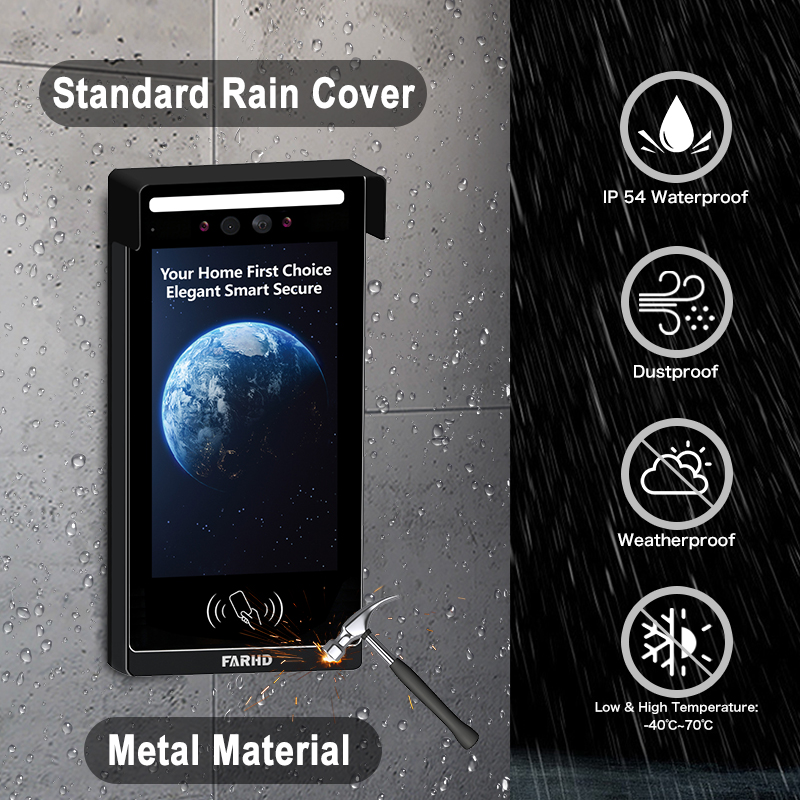
| Устойчивость к погодным условиям | Необходимо для наружных установок |
| Интеграция умного дома | Работает с Alexa, Google Home, Apple HomeKit |
| Доступ нескольких пользователей | Идеально для бизнеса или семей с несколькими пользователями |
| Зашифрованные видеопотоки | Обеспечивает конфиденциальность и предотвращает несанкционированный просмотр |
Рассмотрения для B2B:
- Оптовая кастомизация: Для жилищных комплексов или коммерческих зданий
- Услуги OEM/ODM: Бизнес может запросить частную маркировку или кастомизацию функций
- Управление удаленным доступом: Особенно полезно для менеджеров арендуемой недвижимости
💡 Если вы закупаете видео-дверные звонки для перепродажи или коммерческих установок, рассмотрите сотрудничество с надежным поставщиком OEM/ODM такой как FARHD для индивидуальных решений.
3. Как использовать видеозвонок с Alexa или Google Home
Интеграция вашего видео-дверного звонка с Amazon Alexa или Google Home добавляет голосовое управление и автоматизацию умного дома к вашей системе безопасности. Это особенно полезно для интеграторов умного дома и B2B реселлеры стремящихся предложить полностью подключенные экосистемы.
Чек-лист совместимости:
| Совместимость устройств | Alexa | Google Home |
|---|---|---|
| Дверной видеозвонок Ring | ✅ | ✅ |
| Видеодомофон Eufy | ✅ | ✅ |
| Дверной звонок Arlo | ✅ | ✅ |
| Модели FARHD OEM | ✅ (выбранные модели) | ✅ (выбранные модели) |
Как подключить к Alexa:
- Установите приложение производителя (например, Ring, Arlo, FARHD Smart)
- Включите навык Video Doorbell в приложении Alexa
- Войдите в аккаунт вашего дверного звонка
- Обнаружение устройств – Alexa найдет ваш дверной звонок
- Используйте голосовые команды:
- «Alexa, покажи мне входную дверь»
- «Alexa, поговори с дверным звонком»
Как подключить к Google Home:
- Откройте приложение Google Home
- Добавить устройство > Работает с Google
- Поиск бренда дверного звонка и вход в систему
- Назначить камеру в комнату
- Используйте голосовые команды:
- «Окей, Google, покажи переднюю дверь»
- «Окей, Google, поговори с дверным звонком у входа»
Преимущества для бизнеса:
- Управление без помощи рук в зонах приема или холлах
- Визуальная проверка перед предоставлением доступа курьерам
- Интеграция с другими умными устройствами: освещение, замки и сигнализация
🔗 Узнайте больше о продуктах умных видео-дверных звонков от страницы продуктов FARHD с совместимостью с Alexa и Google Home.

4. Как просматривать камеру дверного звонка на телефоне: пошаговое руководство
Просмотр вашей камеры дверного звонка на смартфоне — это основная функция любого умного дверного звонка. Вот полное руководство как для частных пользователей, так и для B2B-установщиков, настраивающих системы для клиентов.
Пошаговая настройка на телефоне:
Шаг 1: Загрузите приложение
Каждый видео-дверной звонок поставляется с собственным приложением. Примеры:
- Ring → Приложение Ring
- Arlo → Arlo Secure
- Eufy → Eufy Security
- FARHD → Приложение FARHD Smart
📝 Для моделей с белой маркировкой или OEM приложение может быть брендировано под названием бизнеса.
Шаг 2: Создайте учетную запись
- Используйте электронную почту, номер телефона или вход через социальные сети
- Установите надежный пароль
Шаг 3: Подключение к Wi-Fi
- Убедитесь, что ваш телефон подключен к 2.wi-Fi 4 ГГц сети (большинство дверных звонков не поддерживают 5 ГГц)
- Следуйте инструкциям в приложении для подключения дверного звонка к Wi-Fi
Шаг 4: Сопряжение устройства
- Отсканируйте QR-код на дверном звонке или введите серийный номер вручную
- Дождитесь синхронизации дверного звонка с приложением
Шаг 5: Доступ к прямой трансляции
- Откройте приложение
- Нажмите на ваше устройство → Просмотр прямой трансляции
- Общайтесь с посетителями с помощью двусторонней аудиосвязи
Функции, которые вы можете контролировать с телефона:
- 📹 Прямая трансляция
- 🔄 Воспроизведение видео
- 📲 Push-уведомления
- 📁 Загрузка видео
- 📡 Настройка зон движения
- 👥 Общий доступ для пользователей
Общие варианты использования:
| Пример использования | Выгода |
|---|---|
| Домовладельцы | Узнайте, кто у двери, из любого места |
| Арендодатели | Контролируйте взаимодействия с арендаторами или обслуживание имущества |
| Владельцы бизнеса | Управляйте доступом клиентов и доставками удаленно |
| Интеграторы безопасности (B2B) | Предлагайте клиентам централизованный контроль с мобильных телефонов |
🔗 Хотите интегрировать доступ с мобильного телефона в свое предложение по безопасности? Обратитесь в службу поддержки FARHD для вариантов OEM/ODM-кастомизации и белой маркировки программного обеспечения.
5. Работают ли видео-дверные звонки без Wi-Fi или интернета?
Хотя большинство современных видео-дверных звонков требуют Wi-Fi для полной функциональности, некоторые модели поддерживают ограниченную работу в автономном режиме — ключевую функцию для коммерческих или сельских развертываний, где интернет может быть нестабильным.
Сценарии с Wi-Fi и без него:
| Характеристика | С включенным Wi-Fi | Без Wi-Fi |
|---|---|---|
| Просмотр прямого видео | ✅ | ❌ |
| Удаленная двусторонняя аудиосвязь | ✅ | ❌ |
| Облачное хранилище | ✅ | ❌ |
| Локальная запись на SD-карту | ✅ | ✅ (на выбранных моделях) |
| Уведомления о датчике движения | ✅ (push-уведомления) | ✅ (только светодиод/зуммер) |
| Уведомления приложений | ✅ | ❌ |
Варианты для автономного использования:
- Модели с локальным хранением: Сохранение видео на SD-карту без интернета
- Дверные звонки с 4G LTE: Использование сотовых сетей вместо Wi-Fi
- Гибридные системы: Комбинация автономной записи с резервным копированием в облако при подключении
📦 Для оптовых покупателей и дистрибьюторов FARHD предлагает системы видео-дверных звонков с автономным режимом идеальны для удаленных местоположений. Эти модели поддерживают запись на SD-карту и отложенную синхронизацию с облаком.
6. Лучшие видеозвонки для арендованной недвижимости и арендодателей
Арендные объекты создают уникальные вызовы: высокая текучесть арендаторов, общие входы и необходимость удаленного управления имуществом. Умных видео-домофонах решают эти проблемы, предлагая удаленный просмотр, контроль доступа и доступ для нескольких пользователей.
Обязательные функции для аренды:
- Доступ для нескольких пользователей
- Облачное хранение с входом с нескольких устройств
- Интеграция дистанционного запирания/отпирания
- Предупреждения о несанкционированном доступе
- Легкая реконфигурация для новых арендаторов
Идеальные решения FARHD для арендуемых объектов:
| Линия продуктов | Набор функций |
|---|---|
| 4-проводная серия Villa | Идеально для отдельных арендуемых домов или дуплексов |
| IP-аппаратная интеркоммуникационная система для квартир | Разработана для многоквартирных зданий с централизованным контролем доступа |
| OEM-кастомные решения | Брендированные системы дверных звонков для управляющих имуществом или застройщиков недвижимости |
🔗 Исследуйте FARHD’ 4-проводная серия Villa — идеально для арендодателей, ищущих надежные и масштабируемые решения.
Возможности B2B:
- Перепродавайте видео-дверные звонки с белой маркировкой управляющим имуществом
- Предлагайте контракты на установку и обслуживание
- Используйте услуги OEM от FARHD, чтобы создать бренд вокруг безопасности арендуемого имущества
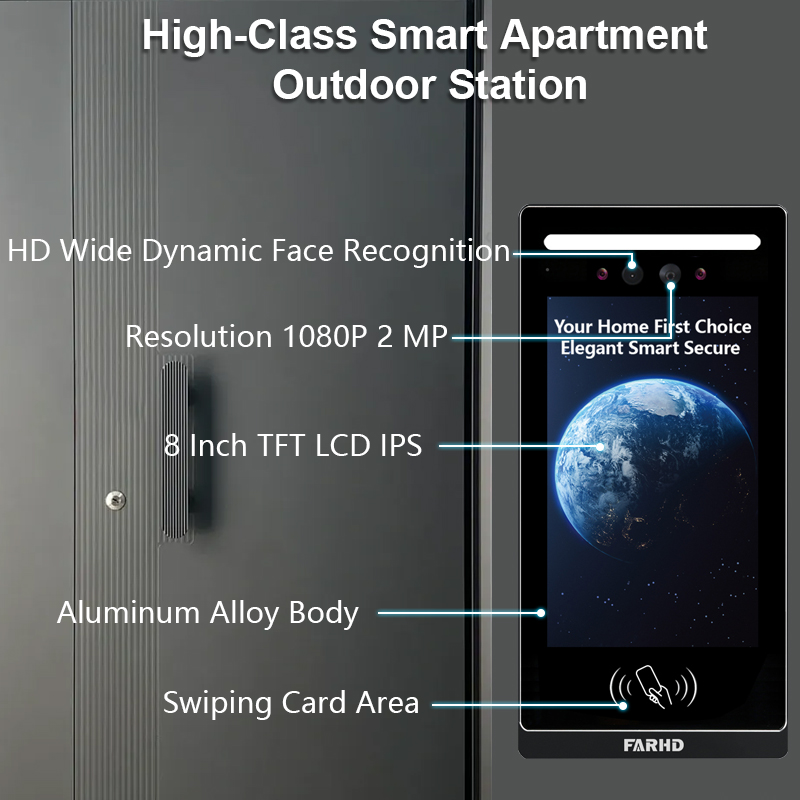
7. Видео-дверные звонки для бизнеса: удаленный мониторинг и контроль
Коммерческие пространства, такие как офисы, розничные магазины и склады, требуют усиленной безопасности и видимости. Видео-дверные звонки с возможностью просмотра с мобильного позволяют владельцам бизнеса удаленно мониторить входы, обрабатывать доставки и проверять посетителей.
Ориентированные на бизнес функции:
- Мониторинг нескольких дверных звонков из одного приложения
- Плановый доступ и журналы посетителей
- Интеграция с умным замком
- Распознавание лиц с помощью искусственного интеллекта
- Шифрованная связь для конфиденциальности
Рекомендации от FARHD:
- Настраиваемые интеркоммуникационные системы
- OEM-умные видео-дверные звонки
- Полноценные решения аппаратного + программного обеспечения
FARHD разрабатывает системы дверных звонков бизнес-класса, адаптированные для сред с высокой проходимостью. С долей рынка более 60% в Китае и глубоким опытом OEM, FARHD — надежный партнер для корпоративных развертываний.
🔗 Узнайте больше о Профиль компании FARHD и их глобальное присутствие на рынке видеоинтеркомов.
8. Поставщик видео-дверных звонков B2B и варианты кастомизации
Если вы оптовиком, дистрибьютором, системным интегратором, или стартовый бренд, партнерство с надежным поставщик видеодомофонов жизненно важно для вашего успеха на рынке умного дома и безопасности.
Почему стоит выбрать FARHD?
| Характеристика | Преимущество FARHD |
|---|---|
| Вертикальная интеграция | Контроль от производства ЖКД до конечного продукта |
| Возможности OEM/ODM | Настройка аппаратного обеспечения, программного обеспечения, интерфейса приложения и упаковки |
| Глобальные сертификаты | ISO 9001, CE, FCC, ROHS, SGS |
| Производственная мощность | 13 линий на заводе площадью 5500 м², оборудование YAMAHA SMT |
| Охват рынка | Ведущий поставщик в Китае, Италии, Турции и Корее |
| Экспертиза в НИОКР | Специализированная команда по ИИ, IoT и инновациям в подключении |
📞 Хотите запустить свой бренд видео-дверных звонков? Связаться с FARHD чтобы обсудить оптовые цены, частную маркировку и решения, адаптированные для рынка.
9. FAQ: Просмотр видео-дверных звонков на мобильных устройствах
В1: Могу ли я просматривать камеру дверного звонка на нескольких телефонах?
Да, большинство приложений позволяют нескольким пользователям или устройствам получать доступ к той же трансляции дверного звонка.
В2: Нужна ли подписка для просмотра дверного звонка на телефоне?
Нет. Прямой просмотр обычно бесплатный. Однако облачное хранение и расширенные функции могут требовать подписки.
В3: Какая скорость интернета нужна для плавной потоковой передачи видео?
Рекомендуется минимум 2 Мбит/с скорости загрузки для HD-трансляции.
В4: Могу ли я получать уведомления, когда меня нет дома?
Да, push-уведомления отправляются на ваш телефон независимо от местоположения, при условии подключения к интернету.
В5: Могу ли я просматривать видео дверного звонка из-за границы?
Конечно. Пока дверной звонок подключен к интернету и у вашего телефона есть доступ, вы можете просматривать его откуда угодно.
С правильной системой на месте просмотр камеры дверного звонка на телефоне не просто возможен — он безопасен, удобен и надежен. Будь вы домовладельцем, арендодателем или бизнес-покупателем, выбор надежного решения, такого как FARHD, гарантирует долгосрочное удовлетворение и поддержку.
Вас также может заинтересовать
-
FARHD: Your 28-Year Source Factory for Video Door Phone Intercoms
When you choose a video door phone intercom supplier, you are not just buying a product—you are choosing the factory behind it. FARHD has been a source manufacturer since 1998, with over 28 years of experience in video intercom and access control. From villa kits to apartment intercoms, we deliver reliable, customizable, and Tuya-compatible solutions…
-
FARHD Source Factory: Your Trusted Partner for Video Intercom and Access Control Solutions
When you choose a manufacturing partner for video intercom and access control systems, you are not just buying products—you are investing in quality, reliability, and long-term support. FARHD has been a source factory since 1998, and today we serve clients in over 100 countries worldwide. With strict quality inspection, in-house production, independent R&D, and full…
-
2-Wire Video Door Phone Connection with Electric Rim Lock: Unlock by Card, Indoor Monitor, and App
A complete guide to wiring an electric rim lock to a FARHD 2-wire video door phone system—and configuring three convenient unlock methods: RFID card, indoor monitor, and mobile app. Whether you are upgrading an existing building or specifying a new system, this guide covers the essentials for reliable, secure access control. Electric rim locks are…
-

Video Intercom Manufacturer & Source Factory Since 1998 | OEM ODM SKD Building Intercom
Video Intercom Manufacturer & Vertical Source Factory in China FARHD is a professional video intercom manufacturer with over 28 years of specialized experience in building security intercom systems. Established in 1998, we are a genuine building intercom factory focused on independent R&D, in-house production, and customized manufacturing for global B2B clients, including distributors, importers, engineering contractors, real estate…



