
Как просматривать камеру дверного звонка на телефоне: Полное руководство для домовладельцев и бизнеса
Ноябрь 27, 2025
Поделиться статьей

1. Что такое видео-дверной звонок и как он работает?
A видеозвонок — это умное устройство безопасности, которое заменяет или дополняет традиционный дверной звонок. Оно включает встроенную камеру высокого разрешения, микрофон, динамик и часто датчики движения, позволяя домовладельцам или владельцам бизнеса видеть, слышать и говорить с посетителями у двери — все через смартфон.
Основные компоненты дверного видеозвонка:
| Компонент | Функция |
|---|---|
| Камера | Захватывает живую или записанную видео входа |
| Микрофон | Улавливает аудио снаружи |
| Спикер | Позволяет двустороннюю связь с посетителями |
| Датчик движения | Обнаруживает движение и запускает оповещения или запись |
| Модуль Wi-Fi | Подключает камеру дверного звонка к сети дома или бизнеса |
| Мобильное приложение | Обеспечивает просмотр, оповещения и взаимодействие напрямую на смартфоне |
Как это работает:
- Посетитель нажимает на дверной звонок
Система отправляет push-уведомление на ваш телефон через приложение. - Обнаружено движение
Даже если кнопка не нажата, датчики движения запускают живой просмотр или запись. - Поток живого видео
Вы можете смотреть реальную видео-трансляцию посетителя с помощью телефона. - Двухстороннее аудио
Говорите с посетителем удаленно через телефон. - Облачное или локальное хранилище
Видео часто сохраняются для последующего просмотра, либо локально (карта SD), либо в облаке.
Приложения:
- Жилые дома: Повысьте безопасность и удобство
- Апартаменты: Обеспечьте удаленный доступ без необходимости физического присутствия
- Предприятия: Мониторьте доставки, клиентов и сотрудников через удаленный доступ
2. Функции умного видеодомофона, на которые стоит обратить внимание в 2025 году
По мере эволюции технологий современные видео-дверные звонки предлагают продвинутые функции, выходящие далеко за рамки простого видео и аудио. Будь то для владельцев домов, или Покупатели B2B таких как арендодатели, менеджеры недвижимости или интеграторы безопасности, знание ключевых функций важно для выбора правильного продукта.
Необходимые функции:
| Характеристика | Выгода |
|---|---|
| HD/Разрешение видео 4K | Более четкое качество изображения, лучшее распознавание лиц |
| Ночное видение | Инфракрасные светодиоды обеспечивают видимость в полной темноте |
| Обнаружение движения с помощью ИИ | Снижает ложные оповещения, отличая людей, автомобили и животных |
| Облачное и локальное хранилище | Гибкие варианты записи и хранения видео |
| Варианты питания от батареи или от сети | Подходит для различных требований к установке |
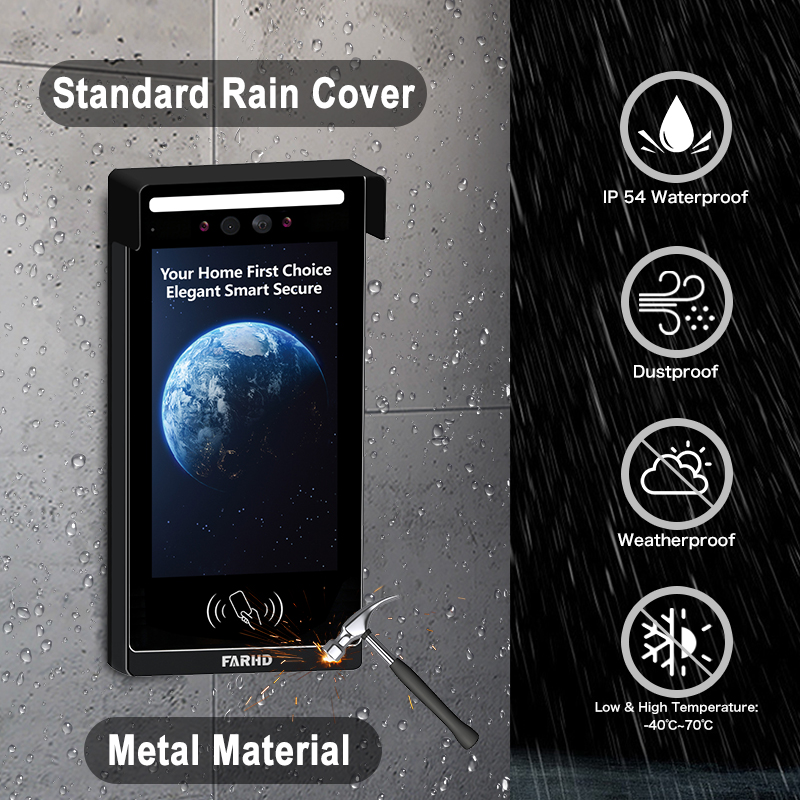
| Устойчивость к погодным условиям | Необходимо для наружных установок |
| Интеграция умного дома | Работает с Alexa, Google Home, Apple HomeKit |
| Доступ нескольких пользователей | Идеально для бизнеса или семей с несколькими пользователями |
| Зашифрованные видеопотоки | Обеспечивает конфиденциальность и предотвращает несанкционированный просмотр |
Рассмотрения для B2B:
- Оптовая кастомизация: Для жилищных комплексов или коммерческих зданий
- Услуги OEM/ODM: Бизнес может запросить частную маркировку или кастомизацию функций
- Управление удаленным доступом: Особенно полезно для менеджеров арендуемой недвижимости
💡 Если вы закупаете видео-дверные звонки для перепродажи или коммерческих установок, рассмотрите сотрудничество с надежным поставщиком OEM/ODM такой как FARHD для индивидуальных решений.
3. Как использовать видеозвонок с Alexa или Google Home
Интеграция вашего видео-дверного звонка с Amazon Alexa или Google Home добавляет голосовое управление и автоматизацию умного дома к вашей системе безопасности. Это особенно полезно для интеграторов умного дома и B2B реселлеры стремящихся предложить полностью подключенные экосистемы.
Чек-лист совместимости:
| Совместимость устройств | Alexa | Google Home |
|---|---|---|
| Дверной видеозвонок Ring | ✅ | ✅ |
| Видеодомофон Eufy | ✅ | ✅ |
| Дверной звонок Arlo | ✅ | ✅ |
| Модели FARHD OEM | ✅ (выбранные модели) | ✅ (выбранные модели) |
Как подключить к Alexa:
- Установите приложение производителя (например, Ring, Arlo, FARHD Smart)
- Включите навык Video Doorbell в приложении Alexa
- Войдите в аккаунт вашего дверного звонка
- Обнаружение устройств – Alexa найдет ваш дверной звонок
- Используйте голосовые команды:
- «Alexa, покажи мне входную дверь»
- «Alexa, поговори с дверным звонком»
Как подключить к Google Home:
- Откройте приложение Google Home
- Добавить устройство > Работает с Google
- Поиск бренда дверного звонка и вход в систему
- Назначить камеру в комнату
- Используйте голосовые команды:
- «Окей, Google, покажи переднюю дверь»
- «Окей, Google, поговори с дверным звонком у входа»
Преимущества для бизнеса:
- Управление без помощи рук в зонах приема или холлах
- Визуальная проверка перед предоставлением доступа курьерам
- Интеграция с другими умными устройствами: освещение, замки и сигнализация
🔗 Узнайте больше о продуктах умных видео-дверных звонков от страницы продуктов FARHD с совместимостью с Alexa и Google Home.

4. Как просматривать камеру дверного звонка на телефоне: пошаговое руководство
Просмотр вашей камеры дверного звонка на смартфоне — это основная функция любого умного дверного звонка. Вот полное руководство как для частных пользователей, так и для B2B-установщиков, настраивающих системы для клиентов.
Пошаговая настройка на телефоне:
Шаг 1: Загрузите приложение
Каждый видео-дверной звонок поставляется с собственным приложением. Примеры:
- Ring → Приложение Ring
- Arlo → Arlo Secure
- Eufy → Eufy Security
- FARHD → Приложение FARHD Smart
📝 Для моделей с белой маркировкой или OEM приложение может быть брендировано под названием бизнеса.
Шаг 2: Создайте учетную запись
- Используйте электронную почту, номер телефона или вход через социальные сети
- Установите надежный пароль
Шаг 3: Подключение к Wi-Fi
- Убедитесь, что ваш телефон подключен к 2.wi-Fi 4 ГГц сети (большинство дверных звонков не поддерживают 5 ГГц)
- Следуйте инструкциям в приложении для подключения дверного звонка к Wi-Fi
Шаг 4: Сопряжение устройства
- Отсканируйте QR-код на дверном звонке или введите серийный номер вручную
- Дождитесь синхронизации дверного звонка с приложением
Шаг 5: Доступ к прямой трансляции
- Откройте приложение
- Нажмите на ваше устройство → Просмотр прямой трансляции
- Общайтесь с посетителями с помощью двусторонней аудиосвязи
Функции, которые вы можете контролировать с телефона:
- 📹 Прямая трансляция
- 🔄 Воспроизведение видео
- 📲 Push-уведомления
- 📁 Загрузка видео
- 📡 Настройка зон движения
- 👥 Общий доступ для пользователей
Общие варианты использования:
| Пример использования | Выгода |
|---|---|
| Домовладельцы | Узнайте, кто у двери, из любого места |
| Арендодатели | Контролируйте взаимодействия с арендаторами или обслуживание имущества |
| Владельцы бизнеса | Управляйте доступом клиентов и доставками удаленно |
| Интеграторы безопасности (B2B) | Предлагайте клиентам централизованный контроль с мобильных телефонов |
🔗 Хотите интегрировать доступ с мобильного телефона в свое предложение по безопасности? Обратитесь в службу поддержки FARHD для вариантов OEM/ODM-кастомизации и белой маркировки программного обеспечения.
5. Работают ли видео-дверные звонки без Wi-Fi или интернета?
Хотя большинство современных видео-дверных звонков требуют Wi-Fi для полной функциональности, некоторые модели поддерживают ограниченную работу в автономном режиме — ключевую функцию для коммерческих или сельских развертываний, где интернет может быть нестабильным.
Сценарии с Wi-Fi и без него:
| Характеристика | С включенным Wi-Fi | Без Wi-Fi |
|---|---|---|
| Просмотр прямого видео | ✅ | ❌ |
| Удаленная двусторонняя аудиосвязь | ✅ | ❌ |
| Облачное хранилище | ✅ | ❌ |
| Локальная запись на SD-карту | ✅ | ✅ (на выбранных моделях) |
| Уведомления о датчике движения | ✅ (push-уведомления) | ✅ (только светодиод/зуммер) |
| Уведомления приложений | ✅ | ❌ |
Варианты для автономного использования:
- Модели с локальным хранением: Сохранение видео на SD-карту без интернета
- Дверные звонки с 4G LTE: Использование сотовых сетей вместо Wi-Fi
- Гибридные системы: Комбинация автономной записи с резервным копированием в облако при подключении
📦 Для оптовых покупателей и дистрибьюторов FARHD предлагает системы видео-дверных звонков с автономным режимом идеальны для удаленных местоположений. Эти модели поддерживают запись на SD-карту и отложенную синхронизацию с облаком.
6. Лучшие видеозвонки для арендованной недвижимости и арендодателей
Арендные объекты создают уникальные вызовы: высокая текучесть арендаторов, общие входы и необходимость удаленного управления имуществом. Умных видео-домофонах решают эти проблемы, предлагая удаленный просмотр, контроль доступа и доступ для нескольких пользователей.
Обязательные функции для аренды:
- Доступ для нескольких пользователей
- Облачное хранение с входом с нескольких устройств
- Интеграция дистанционного запирания/отпирания
- Предупреждения о несанкционированном доступе
- Легкая реконфигурация для новых арендаторов
Идеальные решения FARHD для арендуемых объектов:
| Линия продуктов | Набор функций |
|---|---|
| 4-проводная серия Villa | Идеально для отдельных арендуемых домов или дуплексов |
| IP-аппаратная интеркоммуникационная система для квартир | Разработана для многоквартирных зданий с централизованным контролем доступа |
| OEM-кастомные решения | Брендированные системы дверных звонков для управляющих имуществом или застройщиков недвижимости |
🔗 Исследуйте FARHD’ 4-проводная серия Villa — идеально для арендодателей, ищущих надежные и масштабируемые решения.
Возможности B2B:
- Перепродавайте видео-дверные звонки с белой маркировкой управляющим имуществом
- Предлагайте контракты на установку и обслуживание
- Используйте услуги OEM от FARHD, чтобы создать бренд вокруг безопасности арендуемого имущества
7. Видео-дверные звонки для бизнеса: удаленный мониторинг и контроль
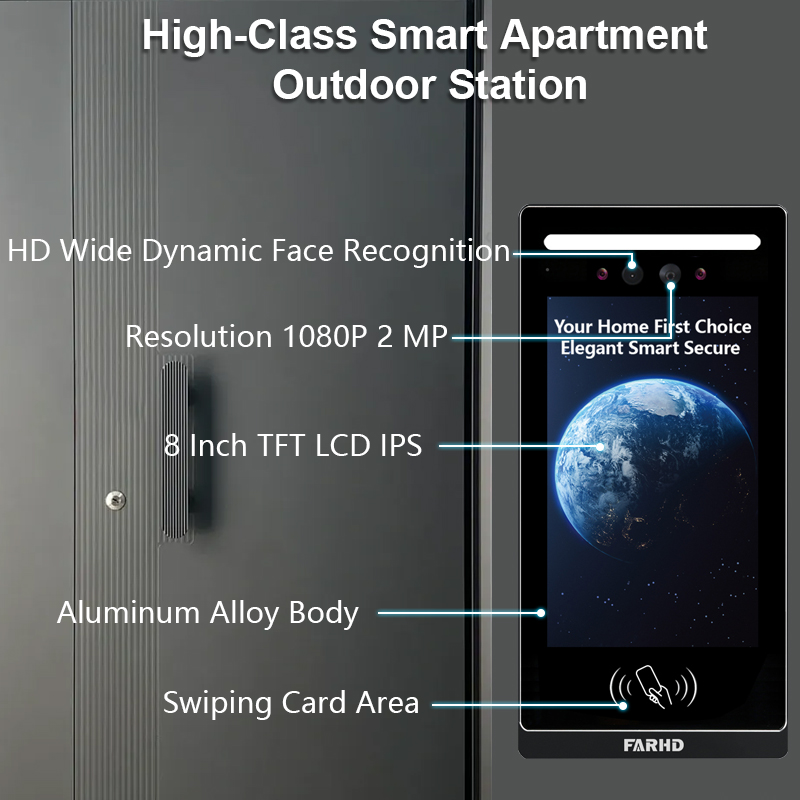
Коммерческие пространства, такие как офисы, розничные магазины и склады, требуют усиленной безопасности и видимости. Видео-дверные звонки с возможностью просмотра с мобильного позволяют владельцам бизнеса удаленно мониторить входы, обрабатывать доставки и проверять посетителей.
Ориентированные на бизнес функции:
- Мониторинг нескольких дверных звонков из одного приложения
- Плановый доступ и журналы посетителей
- Интеграция с умным замком
- Распознавание лиц с помощью искусственного интеллекта
- Шифрованная связь для конфиденциальности
Рекомендации от FARHD:
- Настраиваемые интеркоммуникационные системы
- OEM-умные видео-дверные звонки
- Полноценные решения аппаратного + программного обеспечения
FARHD разрабатывает системы дверных звонков бизнес-класса, адаптированные для сред с высокой проходимостью. С долей рынка более 60% в Китае и глубоким опытом OEM, FARHD — надежный партнер для корпоративных развертываний.
🔗 Узнайте больше о Профиль компании FARHD и их глобальное присутствие на рынке видеоинтеркомов.
8. Поставщик видео-дверных звонков B2B и варианты кастомизации
Если вы оптовиком, дистрибьютором, системным интегратором, или стартовый бренд, партнерство с надежным поставщик видеодомофонов жизненно важно для вашего успеха на рынке умного дома и безопасности.
Почему стоит выбрать FARHD?
| Характеристика | Преимущество FARHD |
|---|---|
| Вертикальная интеграция | Контроль от производства ЖКД до конечного продукта |
| Возможности OEM/ODM | Настройка аппаратного обеспечения, программного обеспечения, интерфейса приложения и упаковки |
| Глобальные сертификаты | ISO 9001, CE, FCC, ROHS, SGS |
| Производственная мощность | 13 линий на заводе площадью 5500 м², оборудование YAMAHA SMT |
| Охват рынка | Ведущий поставщик в Китае, Италии, Турции и Корее |
| Экспертиза в НИОКР | Специализированная команда по ИИ, IoT и инновациям в подключении |
📞 Хотите запустить свой бренд видео-дверных звонков? Связаться с FARHD чтобы обсудить оптовые цены, частную маркировку и решения, адаптированные для рынка.
9. FAQ: Просмотр видео-дверных звонков на мобильных устройствах
В1: Могу ли я просматривать камеру дверного звонка на нескольких телефонах?
Да, большинство приложений позволяют нескольким пользователям или устройствам получать доступ к той же трансляции дверного звонка.
В2: Нужна ли подписка для просмотра дверного звонка на телефоне?
Нет. Прямой просмотр обычно бесплатный. Однако облачное хранение и расширенные функции могут требовать подписки.
В3: Какая скорость интернета нужна для плавной потоковой передачи видео?
Рекомендуется минимум 2 Мбит/с скорости загрузки для HD-трансляции.
В4: Могу ли я получать уведомления, когда меня нет дома?
Да, push-уведомления отправляются на ваш телефон независимо от местоположения, при условии подключения к интернету.
В5: Могу ли я просматривать видео дверного звонка из-за границы?
Конечно. Пока дверной звонок подключен к интернету и у вашего телефона есть доступ, вы можете просматривать его откуда угодно.
С правильной системой на месте просмотр камеры дверного звонка на телефоне не просто возможен — он безопасен, удобен и надежен. Будь вы домовладельцем, арендодателем или бизнес-покупателем, выбор надежного решения, такого как FARHD, гарантирует долгосрочное удовлетворение и поддержку.
Вас также может заинтересовать
-

FARHD to Showcase All-Climate Technology at 2026 China Security Expo, Empowering Smart Communities in Northern China
From November 3 to 6, 2026, FARHD, a global leader in smart security and communication solutions, will unveil its full range of products deeply optimized for the harsh winter conditions of northern China at the 18th China International Social Public Security Products Expo (Security China). Under the theme “Digital Intelligence World, Total Security,” the expo…
-

FARHD to Showcase All-Climate Hard-Tech Solutions at Securika Moscow 2026
From April 22 to 24, 2026, FARHD, a global leader in smart security and communication solutions, will unveil its full range of products engineered for extreme climates at Securika Moscow 2026, held at Crocus Expo in Moscow, Russia. At booth A-9101, FARHD will present its smart intercom, access control, and smart home solutions—all deeply optimized…
-

FARHD Honored with Multiple Prestigious Awards in China’s Building Intercom Industry, 28 Years of Deep Engagement in the Chinese Market Solidifying Its Position as a Leading Brand
Recently, in the annual selection event jointly organized by the China Security and Protection Industry Association and multiple authoritative media outlets, FARHD, by virtue of its profound industry experience, outstanding technological innovation capabilities, and extensive market recognition, was awarded the prestigious “Most Influential Brand in China’s Building Intercom Industry” . These accolades not only affirm FARHD’s 28…
-

FARHD Honored with Multiple Prestigious Awards in China’s Building Intercom Industry, 28 Years of Deep Engagement in the Chinese Market Solidifying Its Position as a Leading Brand
Recently, in the annual selection event jointly organized by the China Security and Protection Industry Association and multiple authoritative media outlets, FARHD, by virtue of its profound industry experience, outstanding technological innovation capabilities, and extensive market recognition, was awarded the prestigious “National Top 10 Quality Brands in the Security Industry” . These accolades not only affirm FARHD’s…



